1. Bubuka
This manual provides detailed instructions for the installation, operation, and maintenance of the Goobay 95739 RJ45 CAT 5e UTP Keystone Module. This module is designed for reliable network connections in modular distribution panels and junction boxes, featuring tool-free LSA mounting and TIA 568A/B color coding for easy installation.
2. Émbaran Kasalametan
Please read and understand all safety instructions before installing or using this product. Failure to follow these instructions may result in damage to the product, property, or personal injury.
- Ensure all power is disconnected from network equipment before installation.
- Ulah kakeunaan modul kana kalembaban atanapi suhu anu ekstrim.
- Handle with care to avoid damaging the internal components.
- produk ieu dimaksudkeun pikeun pamakéan indoor wungkul.
3. Eusi Paket
Pastikeun yén sadaya komponén aya sareng henteu ruksak:
- 1x Goobay 95739 RJ45 CAT 5e UTP Keystone Module
4. Setup jeung Instalasi
The Goobay 95739 Keystone Module features a tool-free LSA mounting design, simplifying the termination of network cables. It is designed for installation in standard modular distribution panels and junction boxes.
4.1 Modul Leuwihview
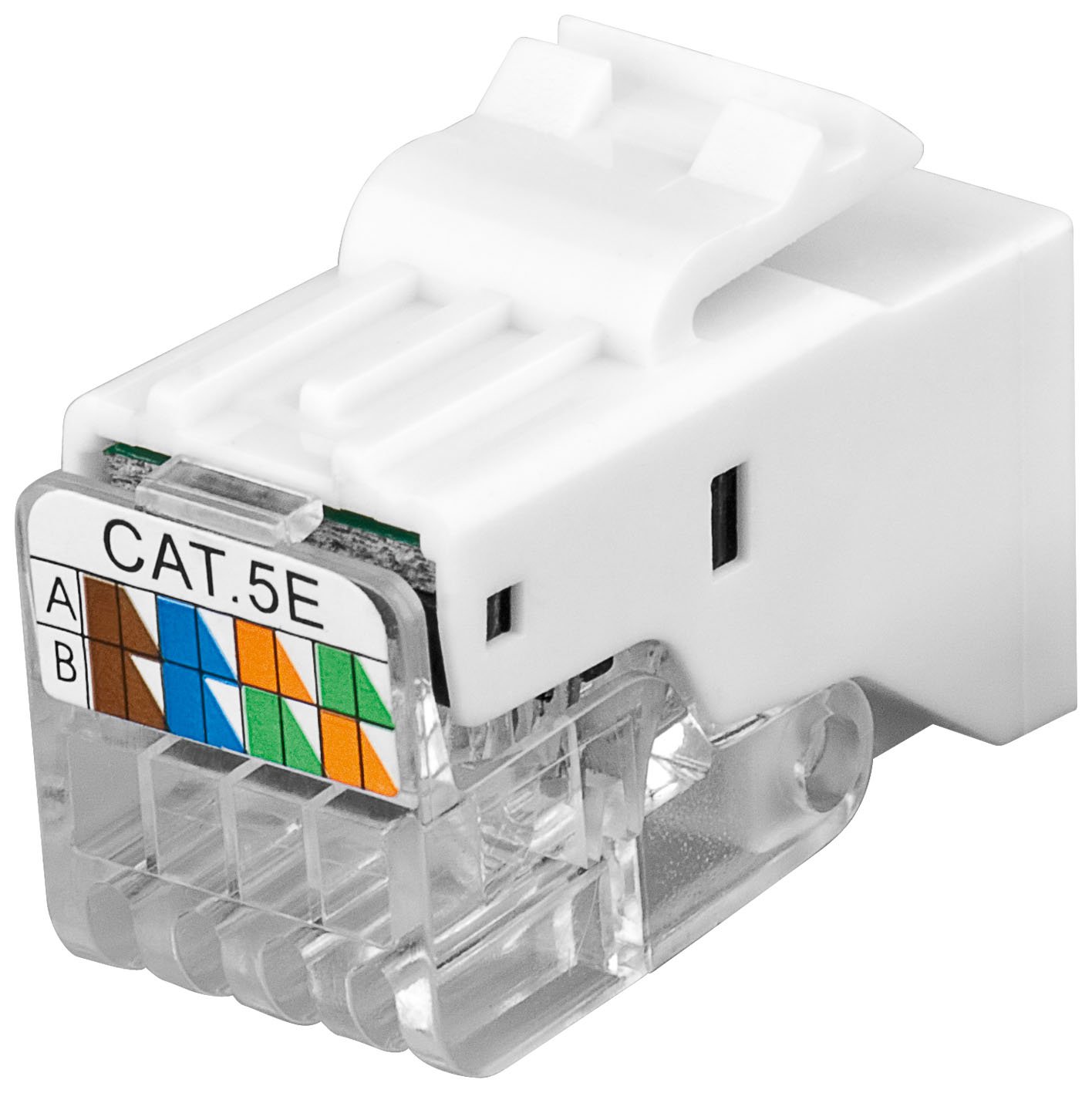
Gambar 1: Hareupeun view of the Goobay 95739 RJ45 Keystone Module, showing the RJ45 port.

Gambar 2: Samping view of the Goobay 95739 RJ45 Keystone Module, illustrating its compact design.
4.2 Wiring the Module (Tool-Free LSA)
The module features TIA 568A/B color-coded connections for easy and accurate wiring. No special punch-down tool is required for termination.
- Carefully remove approximately 2-3 cm of the outer jacket from your CAT 5e UTP network cable.
- Untwist the wire pairs and straighten the individual wires.
- Refer to the color coding diagram on the module (TIA 568A or TIA 568B, typically B is used for most installations).
- Place each individual wire into its corresponding slot on the LSA terminal block. Ensure the wire is fully seated.
- Close the cover or press down on the terminal block mechanism to secure the wires. The tool-free design will automatically cut off excess wire and make the connection.
- Verify all wires are correctly terminated and secured.

Gambar 3: Diwincik view of the LSA terminal block with TIA 568A/B color coding for wire termination.
4.3 Mounting the Module (SNAP-IN)
Once wired, the keystone module can be easily snapped into compatible modular distribution panels or wall plates.
- Align the keystone module with an empty port in your distribution panel or wall plate.
- Gently push the module into the port until it clicks securely into place. The SNAP-IN mechanism ensures a firm fit.
- Ensure the module is flush with the panel surface.
5. Parentah Operasi
After successful installation and wiring, the Goobay 95739 Keystone Module functions as a standard RJ45 network port.
- Connect a standard RJ45 patch cable from your network device (e.g., computer, printer, network switch) to the RJ45 port on the keystone module.
- Ensure the patch cable clicks securely into the module's port.
- Verify network connectivity through your operating system or network device indicators.
6. Pangropéa
The Goobay 95739 Keystone Module requires minimal maintenance.
- Keep the RJ45 port free from dust and debris. Use a can of compressed air if necessary.
- Do not use liquid cleaners directly on the module. If cleaning is required, use a dry, lint-free cloth.
- Periodically check cable connections to ensure they remain secure.
7. Cara ngungkulan
Upami anjeun ngalaman masalah sareng sambungan jaringan anjeun, pertimbangkeun léngkah-léngkah ngungkulan masalah ieu:
| Masalah | Mungkin Cukang lantaranana | Solusi |
|---|---|---|
| Taya sambungan jaringan | Incorrect wiring; loose connection; faulty patch cable; faulty network device. |
|
| sambungan intermittent | Loose wire connection; damaged cable. |
|
8. Spésifikasi
| Fitur | Rincian |
|---|---|
| merek | Goobay |
| Nomer modél | 95739 |
| Tipe Panyambung | RJ45 |
| Kategori | CAT 5e UTP |
| Frékuénsi | 100 MHz |
| Tipe Pamasangan | Panel Mount (SNAP-IN) |
| Terminasi | Tool-Free LSA Terminal Block |
| Wiring Standard | TIA 568A/B Color Coded |
| Warna | Bodas/Hideung |
| Bahan | palastik |
| Design Width | 14.7 mm |
| Item Lebar | 2 séntiméter |
| Item Jangkungna | 18 séntiméter |
| Dimensi produk | 18 x 2 x 18 cm; 6 g |
| Produsén | Wentronic DE GmbH |
9. Émbaran jaminan
Goobay products are manufactured to high quality standards. For specific warranty terms and conditions, please refer to the documentation provided with your purchase or visit the official Goobay websitus. Simpen bukti pameseran anjeun pikeun klaim garansi.
10. Rojongan
For technical assistance, product inquiries, or further support, please contact your retailer or visit the official Goobay support website. Ensure you have your product model number (95739) available when seeking support.
Resmi Websitus: www.goobay.de


