1. Bubuka
This manual provides essential instructions for the safe and efficient use of your Epson L110 Colour Inkjet Printer. The Epson L110 is designed for personal and work projects, offering efficient performance with low running costs. It features a compact design and an integrated ink tank system.
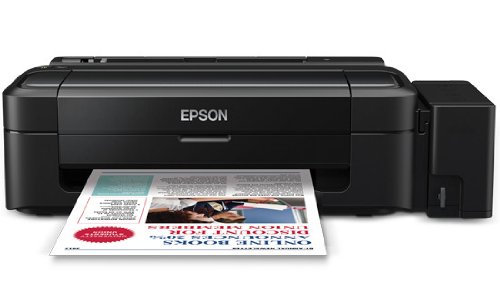
Gambar 1: Hareupeun view of the Epson L110 Colour Inkjet Printer.
2. Setélan
2.1 Ngabongkar bungkusan
Carefully remove the printer from its packaging. Ensure all protective tapes and packing materials are removed from the printer's exterior and interior. Retain the packaging for future transport or storage.
2.2 Sambungan Daya
- Sambungkeun kabel daya kana input daya printer.
- Colokkeun tungtung kabel listrik anu sanés kana stop kontak listrik anu dibumikeun.
- Do not power on the printer until ink tanks are filled.
2.3 Ngeusian Ink Tank
The Epson L110 features an integrated ink tank system. Use only genuine Epson ink bottles for optimal performance and to prevent damage.
- Buka panutup unit tanki tinta di sisi printer.
- Uncap the ink bottle for the corresponding color (Cyan, Magenta, Yellow, Black).
- Carefully pour the ink into the correct tank, aligning the bottle nozzle with the tank's filling port. The "Fast Ink Top-Up Technology" is designed for mess-free refills.
- Fill each tank to the upper line.
- Close the ink tank unit cover securely.
Figure 2: Illustration of filling the ink tanks. Ensure correct color matching.
2.4 Pamasangan Supir
After filling the ink tanks, connect the printer to your computer using a USB cable. Install the printer drivers from the provided CD-ROM or download the latest drivers from the official Epson support websitus. Turutan pitunjuk dina layar pikeun ngarengsekeun pamasangan.
3. Ngoperasikeun Printer
3.1 Loading Paper
- Buka kertas pangrojong teras tarik kaluar ekstensi na.
- Fan the edges of the paper stack to separate the sheets.
- Load paper into the sheet feeder with the print side facing up.
- Adjust the edge guide to the width of your paper. The maximum input sheet capacity is 50 sheets.
Figure 3: Proper paper loading into the input tray.
3.2 Nyitak Dasar
- Pastikeun printer parantos dihurungkeun sareng nyambung ka komputer anjeun.
- Buka dokumén atanapi gambar anu anjeun hoyong nyitak dina komputer anjeun.
- Pilih "Cetak" tina ménu aplikasi (contona, File > Citak).
- In the print dialog box, select "Epson L110" as your printer.
- Saluyukeun setélan citak sapertos ukuran kertas, kualitas citak, sareng jumlah salinan.
- Klik "Citak" pikeun ngamimitian prosés percetakan.
The Epson L110 offers a print speed of up to 27 pages per minute (ppm) for black prints and 15 ppm for color prints. It produces high-resolution prints of 5760 x 1440 dpi.
4. Pangropéa
4.1 ngeusian Tinta
Monitor ink levels regularly. When an ink tank is low, refill it promptly using genuine Epson ink bottles. A single ink bottle provides a high page yield of up to 4000 prints (black) and 6500 prints (color).
penting: When transporting the printer, ensure the choke valve is locked to prevent messy leaks and ink wastage.
4.2 Print Kepala beberesih
If print quality declines (e.g., missing lines, faded colors), perform a print head cleaning. This can typically be done through the printer utility software on your computer. Refer to the software's help section for detailed steps.
4.3 beberesih umum
Ngusap bagian luar printer ku lemes, damp cloth. Do not use abrasive cleaners or solvents. Keep the paper path clear of dust and debris.
5. Cara ngungkulan
- Printer teu ngabales:
- Pariksa sambungan daya sareng pastikeun printer parantos dihurungkeun.
- Verify the USB cable connection between the printer and computer.
- Restart both the printer and computer.
- Pastikeun driver printer parantos dipasang kalayan leres.
- Kualitas cetak goréng:
- Pariksa tingkat tinta jeung eusian deui lamun perlu.
- Ngabersihkeun sirah cetak.
- Jalankeun pamariksaan nozzle pikeun ngaidentipikasi nozzle anu tersumbat.
- Pastikeun anjeun nganggo kertas anu cocog pikeun setélan citak anjeun.
- Kertas macét:
- Pareuman printer jeung cabut colokan.
- Kaluarkeun kertas anu macét sacara ati-ati tina baki input, baki output, atanapi di jero printer.
- Pastikeun kertas dimuat leres tur teu kusut atawa curled.
Kanggo bantosan salajengna, mangga tingal dukungan Epson websitus atanapi ngahubungan layanan palanggan.
6. Spésifikasi
| Fitur | Spésifikasi |
|---|---|
| Ngaran modél | L110 |
| Téhnologi percetakan | Inkjet |
| Kaluaran printer | Warna |
| Resolusi Cetak Warna Maksimum | 5760 x 1440 dpi |
| Maksimum Hideung Bodas Resolusi Print | 5760 x 1440 dpi |
| Max Print Speed Monokrom | 27 ppm |
| Kagancangan Citak Maksimum (Warna) | 15 ppm |
| Warna Tinta | Cyan, Black, Magenta, Yellow |
| Ngahasilkeun Kaca (Hideung) | Nepi ka 4000 kaca |
| Ngahasilkeun Halaman (Warna) | Nepi ka 6500 kaca |
| Téhnologi konektipitas | USB |
| Max Input Lambaran Kamampuh | 50 |
| Ukuran Media Dirojong | A4, A5, A6, A7, A8, A9, B5, B6, B7, B8, B9, C5, C6, C7 |
| Ukuran produk (L x W x H) | 47.2 x 22.2 x 13 cm |
| Item Beurat | 2.7 kg |
| Konsumsi Daya | Maksimum 10 Watts |
7. Garansi jeung Rojongan
The Epson L110 Colour Inkjet Printer comes with an Epson Warranty, providing peace of mind. For specific warranty terms and conditions, please refer to the warranty card included with your product or visit the official Epson support websitus.
Kanggo dukungan téknis, unduhan driver, FAQ, sareng lokasi pusat layanan, mangga buka dukungan resmi Epson. website or contact Epson customer service directly.


