Bubuka
This manual provides essential instructions for the safe and efficient operation of your VisionTek Pitbull RockDoc Power Portable MP3 Speaker. Please read this manual thoroughly before using the device and retain it for future reference.
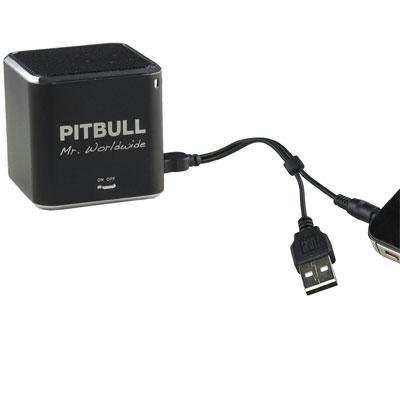
This image displays the compact, black cube-shaped Pitbull RockDoc Power Portable MP3 Speaker. The front face features the 'PITBULL Mr. Worldwide' logo and an 'ON OFF' switch. An integrated cable with a USB connector and a 3.5mm audio jack is shown connected to the speaker, ready for charging or audio input.
Fitur produk
- Desain portabel: Kompak sareng hampang pikeun gampang diangkut.
- Integrated MP3 Player: Features 4GB of internal memory for direct music playback.
- Konéktipitas nirkabel: Supports Bluetooth for audio streaming from compatible devices.
- Wired Audio Input: Includes a 3.5 mm audio jack for connecting non-Bluetooth devices.
- Batré Powered: Operates on an internal battery for cordless use.
- 1-Way Speaker System: Delivers clear audio output.
Disetél
Ngecas Speaker
- Locate the integrated USB cable attached to the speaker.
- Connect the USB-A end of the cable to a powered USB port (e.g., computer, USB wall adapter).
- The speaker's indicator light will illuminate to show charging status. Refer to the device for specific light indications.
- Saatos dicas pinuh, pegatkeun sambungan kabel USB.
Ngahurungkeun/Pareuman
- To power on, slide the 'ON OFF' switch to the 'ON' position.
- To power off, slide the 'ON OFF' switch to the 'OFF' position.
Nyambungkeun Sumber Audio
Your speaker supports three primary methods for audio input:
1. Using Internal 4GB Memory (MP3 Playback)
- To load music onto the internal 4GB memory, connect the speaker to a computer using the USB cable. The speaker should appear as a removable storage device.
- Sered jeung leupaskeun audio MP3 anjeun files into the speaker's storage.
- sakali files are transferred, safely eject the speaker from your computer.
- The speaker will automatically play files from its internal memory when powered on and no other audio source is connected.
2. Sambungan Bluetooth
- Pastikeun spiker diaktipkeun.
- Aktipkeun Bluetooth dina smartphone, tablet, atanapi alat anu cocog sareng anjeun.
- Milarian pikeun available Bluetooth devices. The speaker should appear as "Pitbull RockDoc" or similar.
- Select the speaker from the list to pair. A confirmation sound or light indication may occur upon successful pairing.
3. 3.5 mm Audio Jack Connection
- Locate the integrated 3.5 mm audio jack on the speaker's cable.
- Connect this jack to the headphone output or audio-out port of your external audio device (e.g., MP3 player, phone, laptop).
- Ensure the speaker is powered on. Audio will be routed through this connection.
Parentah Operasi
Kadali Puterkeun Dasar
The speaker features basic controls for media playback. These controls typically include:
- Puter / Reureuh: Press to start or pause audio playback.
- Lagu salajengna: Press to skip to the next audio file.
- Lagu Sateuacanna: Press to go back to the beginning of the current track or to the previous track.
- Kontrol volume: Adjust the volume level. (Specific button layout not provided, assume standard controls).
Note: When connected via Bluetooth or 3.5mm audio jack, playback controls on the speaker may control the connected device, or you may need to control playback directly from the source device.
Pangropéa
beberesih
- Wipe the exterior of the speaker with a soft, dry, lint-free cloth.
- Ulah make cleaners abrasive, pangleyur, atawa bahan kimia kuat.
- Ulah meunang Uap kana sagala bukaan.
Panyimpenan
- Simpen spéker dina tempat anu tiis sareng garing jauh tina sinar panonpoé langsung sareng suhu anu ekstrim.
- Upami nyimpen kanggo waktos anu panjang, pastikeun batréna dieusi sawaréh (sakitar 50%) pikeun manjangkeun umurna.
Pamérésan masalah
| Masalah | Mungkin Cukang lantaranana | Solusi |
|---|---|---|
| Taya kakuatan | Batréna béak | Cas speaker nganggo kabel USB. |
| Taya sora tina speaker | Volume too low; Incorrect input source; Device not paired (Bluetooth); Cable not connected (3.5mm) | Increase speaker volume; Ensure correct mode (internal MP3, Bluetooth, or AUX); Re-pair Bluetooth device; Check 3.5mm cable connection. |
| Nyapasangkeun Bluetooth gagal | Speaker henteu dina mode papasangan; Alat jauh teuing; gangguan | Ensure speaker is discoverable; Move device closer to speaker; Turn off other Bluetooth devices. |
| Teu bisa mindahkeun files to 4GB memory | Incorrect USB connection; Driver issue; Memory full | Ensure speaker is connected to computer via USB; Try a different USB port/cable; Check available memory space. |
spésifikasi
| Fitur | Rincian |
|---|---|
| Nomer modél | 900584 |
| Tipe Speaker | 1-Way Portable Speaker |
| Mémori internal | 4GB (kanggo muter MP3) |
| Konektipitas | Bluetooth, 3.5 mm Audio Jack |
| Sumber Daya | Batré Powered |
| Speaker Maksimum Kaluaran Power | 3 Watt |
| Item Beurat | 159 g |
| Ukuran produk (L x W x H) | 5 x 5 x 4.9 cm |
| Produsén | VISIONTEK MASS STORAGE |
Émbaran jaminan
For detailed warranty information regarding your VisionTek Pitbull RockDoc Power Portable MP3 Speaker, please refer to the warranty card included with your purchase or contact the manufacturer directly. Amazon's buying options mention a 'Warranty Policy', indicating manufacturer coverage.
Ngarojong
If you require technical assistance or have questions not covered in this manual, please contact VisionTek Mass Storage, the manufacturer of this product. Contact details can typically be found on their official websitus atanapi bungkusan produk.


