1. Produk Langkungview
The Red Lion CUB5R000 is a versatile multi-function counter designed for industrial applications. This device offers comprehensive user programming capabilities and can be configured as a single or dual counter with integrated rate indication. Its flexible design allows for various input types and display options.
The CUB5R000 processes incoming pulses, applying a user-defined count scale factor to accurately determine the displayed count. It supports two primary inputs: Input A for the main count signal, and Input B for advanced functions such as quadrature sensing, dual counter operations, anticoincidence counting, or up/down control.
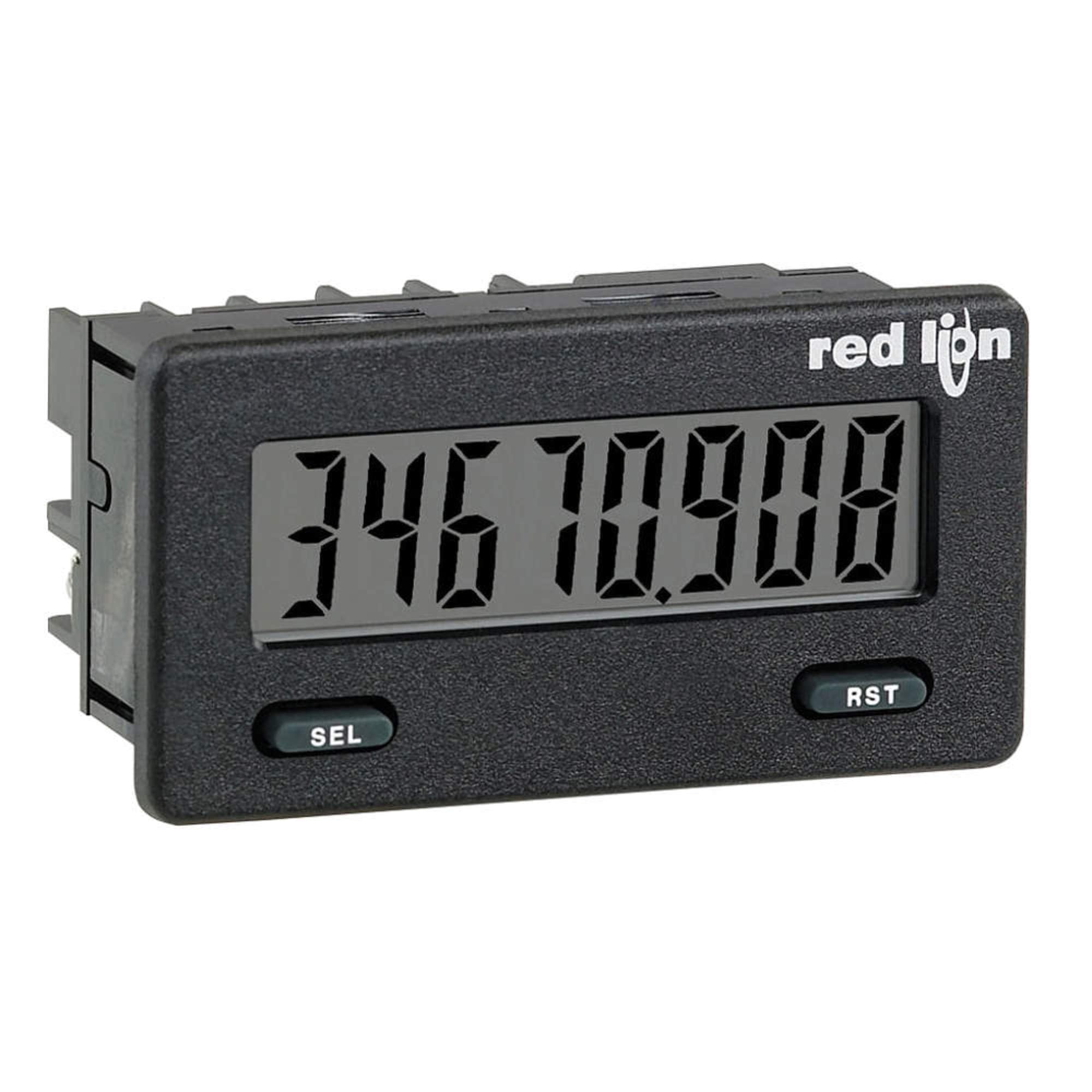
Gambar 1: Hareupeun view of the Red Lion CUB5R000 Multi-function Counter. The digital display shows a value of '346 789.00'. Below the display, there are two control buttons labeled 'SEL' (Select) on the left and 'RST' (Reset) on the right. The Red Lion logo is visible in the upper right corner of the device's faceplate.
2. Fitur konci
- Multi-function Capability: Operates as a single or dual counter with rate indication.
- User Programmable: Offers complete user programming for various operational modes.
- tampilan fléksibel: Display can be toggled manually or automatically between selected readings.
- High Count Speed: Supports count speeds up to 20 kHz.
- Programmable Scaling: Allows for programmable scaling factors for both count and rate measurements.
- Advanced Input Options: Input B supports quadrature, dual counter, anticoincidence, or up/down control counting.
- Display Color Change: Capability for display color change at preset output conditions.
- Optional Relay Output: Supports optional relay output functionality.
3. Setup jeung Instalasi
Proper installation is crucial for the reliable operation of the CUB5R000. This section provides general guidelines. For detailed wiring diagrams and specific installation instructions, refer to the comprehensive technical manual provided with the product or available from the manufacturer's websitus.
3.1 Pamasangan
The CUB5R000 is designed for panel mounting. Ensure adequate space for ventilation and access to wiring terminals. Secure the unit firmly using the provided mounting hardware.
3.2 Sambungan Listrik
All electrical connections should be performed by qualified personnel in accordance with local and national electrical codes. Ensure power is disconnected before making any connections.
- Sasayogian tanaga: Connect the appropriate power supply as specified in the technical manual.
- Sinyal Input: Connect pulse inputs (Input A and Input B) according to your application's requirements (e.g., count, rate, quadrature).
- Konéksi Kaluaran: If using optional relay outputs, connect them to the controlled devices as per the wiring diagram.
Warning: Incorrect wiring can damage the unit and pose safety hazards. Always consult the full technical manual.
4. Parentah Operasi
The CUB5R000 features user-friendly controls for configuration and operation. The primary interface consists of the digital display and two buttons: 'SEL' (Select) and 'RST' (Reset).
4.1 Operasi Dasar
- Daya Hurung: Once correctly wired and powered, the unit will display the current count or rate value.
- Display Toggle: Pencét éta SEL button to manually cycle through different display modes (e.g., Count 1, Count 2, Rate). The unit can also be configured for automatic display cycling.
- Resetting Values: Pencét éta RST button to reset the active counter value. This function may be configurable to require a longer press or external input for safety.
4.2 Modeu Pamrograman
Accessing programming modes allows for configuration of parameters such as count scale factors, input types, output behavior, and display settings. Refer to the detailed programming section in the technical manual for specific sequences and parameter definitions.
- Typically, programming mode is entered by holding down the SEL button for a specified duration.
- Ngagunakeun éta SEL button to navigate through parameters and the RST tombol pikeun ngarobah nilai.
- Save changes before exiting programming mode.
5. Pangropéa
The Red Lion CUB5R000 is designed for minimal maintenance. Regular inspection and cleaning are recommended to ensure optimal performance and longevity.
- beberesih: Periodically clean the display and housing with a soft, damp cloth. Avoid abrasive cleaners or solvents that could damage the unit.
- Pamariksaan: Routinely check all wiring connections for tightness and signs of wear or damage. Ensure the unit is free from dust and debris, especially around ventilation areas.
- Kaayaan Lingkungan: Pastikeun lingkungan operasi tetep dina kisaran suhu sareng kalembaban anu ditangtukeun pikeun nyegah gagalna prématur.
Caution: Do not attempt to open the unit for internal cleaning or repairs. Refer all servicing to qualified personnel.
6. Cara ngungkulan
This section provides basic troubleshooting steps for common issues. For more complex problems, consult the full technical manual or contact Red Lion technical support.
| Masalah | Mungkin Cukang lantaranana | Solusi |
|---|---|---|
| Paparanana kosong | No power supply; Incorrect wiring; Unit failure. | Check power connections and supply voltage. Verify wiring against the manual. If problem persists, contact support. |
| Panghitung henteu nambahan | No input signal; Incorrect input wiring; Input signal too weak/fast; Incorrect scaling. | Verify input signal presence and strength. Check input wiring. Adjust input sensitivity or scaling in programming mode. |
| Incorrect count/rate value | Incorrect scaling factor; Wrong input type selected; Sensor issue. | Review and adjust scaling factors in programming. Confirm correct input type (e.g., quadrature). Check sensor operation. |
| Tombol teu ngaréspon | Unit frozen; Hardware issue. | Cycle power to the unit. If unresponsive, contact technical support. |
7. Spésifikasi Téknis
| Spésifikasi | Nilai |
|---|---|
| Nomer modél | CUB5R000 |
| merek | Red Lion |
| Produsén | COLE-PARMER |
| Count Speed | Nepi ka 20 kHz |
| Jenis Input | Count (Input A), Quadrature, Dual Counter, Anticoincidence, Up/Down Control (Input B) |
| Sumber Daya | Batré Powered |
| Item Beurat | 0.01 ons (kira-kira 0.28 gram) |
| Ukuran Paket | 4 x 3.2 x 2.75 inci |
| Tanggal Kahiji Sadia | Pébruari 7, 2013 |
8. Garansi jeung Rojongan
For warranty information, technical support, or service inquiries regarding your Red Lion CUB5R000, please contact Red Lion Controls directly or refer to their official website. Ensure you have your product model number (CUB5R000) and date of purchase available when contacting support.
Manufacturer: COLE-PARMER
Pikeun sumber tambahan, mangga buka Red Lion Store on Amazon.


