Panamax MD2-ZB BlueBOLT Controlled Outlets User Manual
Model: MD2-ZB
Bubuka
The Panamax MD2-ZB is a compact, two-outlet surge protector designed for wireless control and energy management through the BlueBOLT platform. It provides advanced surge protection and noise filtering for connected equipment, while allowing users to remotely control power to each outlet and schedule energy-saving commands. This manual provides essential information for the proper installation, operation, and maintenance of your MD2-ZB unit.
Émbaran Kasalametan penting
PERHATOSAN: Produk ieu tiasa ngalaan anjeun zat kimia kalebet timah, anu dipikaterang ku Nagara California anu nyababkeun kanker sareng cacat lahir atanapi cilaka réproduktif sanés. Kanggo inpormasi salengkepna buka www.P65Warnings.ca.gov.
- Pamakéan jero rohangan wungkul: This device is intended for indoor use in dry locations only. Do not expose to rain, moisture, or extreme temperatures.
- Grounding anu leres: Ensure the wall outlet used is properly grounded. Do not remove the grounding prong.
- Hindarkeun Overloading: Do not exceed the electrical ratings of the unit or the wall outlet.
- Henteu aya Bagian anu Bisa Dilayanan Pamaké: Ulah nyobian muka, ngarobih, atanapi ngalereskeun unitna. Serahkan sadaya perawatan ka petugas layanan anu mumpuni.
- Kontak cair: Do not immerse the unit in water or expose it to any liquids.
- Ventilasi: Pastikeun ventilasi nyukupan di sabudeureun unit. Ulah meungpeuk bukaan ventilasi.
Eusi pakét
- Panamax MD2-ZB BlueBOLT Controlled Outlets Unit
Produk Leuwihview
The MD2-ZB features two independently controllable outlets, status indicators, and manual override buttons for convenient power management.

Gambar 1: Hareupeun view of the MD2-ZB unit. This image highlights the two controlled outlets, labeled 'Outlet 1' and 'Outlet 2', along with their respective status indicators. The 'Network Connect' and 'Wiring Fault' indicators are also visible, providing quick status checks for connectivity and electrical safety.

Gambar 2: MD2-ZB plugged into a wall outlet. This view demonstrates the compact form factor of the device when installed, showing how it sits flush against the wall while providing two accessible outlets for connected devices.
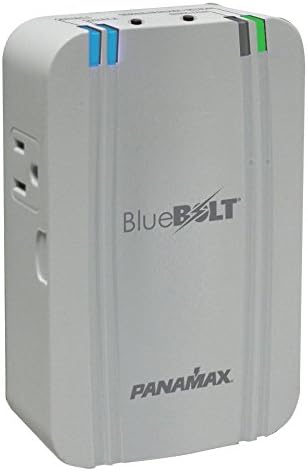
Gambar 3: Pahareup-hareup view of the MD2-ZB. This perspective provides a clear look at the overall shape and branding of the unit, including the 'BlueBOLT' and 'PANAMAX' logos.
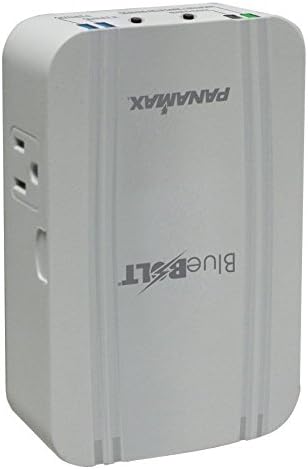
Gambar 4: Balik deui view of the MD2-ZB. This image displays the male plug designed to connect directly into a standard wall receptacle, along with any regulatory markings or serial number information typically found on the rear of the device.
Komponén konci:
- Controlled Outlets (1 & 2): Two standard AC outlets that can be independently controlled wirelessly via BlueBOLT.
- Network Connect Indicator: Illuminates when the unit is successfully connected to the BlueBOLT network via a BB-ZB1 Gateway.
- Wiring Fault Indicator: Illuminates if there is a wiring fault in the wall outlet (e.g., missing ground, reversed polarity).
- Tombol-tombol Panggantian Manual: Push buttons located near each outlet allow for local power on/off control, overriding wireless commands.
Parentah Setup
Follow these steps to set up your Panamax MD2-ZB unit:
- Ngabongkar Unit: Carefully remove the MD2-ZB from its packaging.
- Manggihan hiji outlet témbok: Choose a standard, properly grounded 3-prong wall outlet where you intend to use the MD2-ZB.
- Plug In the MD2-ZB: Insert the MD2-ZB directly into the chosen wall outlet. Ensure it is firmly seated.
- Pariksa Indikator:
- The Kasalahan Wiring indicator should be off. If it illuminates, there is a wiring issue with your wall outlet. Consult a qualified electrician.
- The Jaringan Sambungkeun indicator will blink initially as it attempts to connect to a BlueBOLT BB-ZB1 Gateway. Once connected, it will illuminate steadily.
- Connect to BlueBOLT Gateway: The MD2-ZB requires a BlueBOLT BB-ZB1 Gateway (sold separately) for wireless control. Refer to your BB-ZB1 Gateway's manual for instructions on adding new devices to your BlueBOLT network.
- Plug in Devices: Once the MD2-ZB is connected to your BlueBOLT network, plug your desired electronic devices into the controlled outlets.
Operating Your MD2-ZB
The Panamax MD2-ZB offers both wireless and manual control options for its outlets.
Wireless Control (via BlueBOLT)
Once the MD2-ZB is successfully connected to your BlueBOLT BB-ZB1 Gateway and registered with your BlueBOLT account, you can control its outlets remotely:
- Jauh On/Pareum: Use the BlueBOLT web interface or mobile app to turn Outlet 1 and Outlet 2 on or off independently from anywhere with an internet connection.
- Jadwal: Create custom schedules to automatically power on or off connected devices at specific times, helping to save energy.
- Ngawas énergi: Monitor the energy consumption of devices connected to the MD2-ZB (if supported by your BlueBOLT gateway and service plan).
Manual Override
Each outlet on the MD2-ZB has a dedicated push button for manual control:
- Press the button next to Outlet 1 to toggle its power state (on/off).
- Press the button next to Outlet 2 to toggle its power state (on/off).
Manual overrides will temporarily override any scheduled commands or remote commands until the next scheduled event or remote command is issued.
Perawatan sareng Pangropéa
To ensure the longevity and proper functioning of your Panamax MD2-ZB, follow these simple maintenance guidelines:
- beberesih: Disconnect the unit from the wall outlet before cleaning. Use a soft, dry cloth to wipe the exterior. Do not use liquid cleaners, aerosols, or abrasive cleaning agents.
- Lingkungan: Keep the unit in a cool, dry place, away from direct sunlight, heat sources, and excessive dust.
- Pamariksaan: Periodically inspect the unit and connected cords for any signs of damage. If damage is found, discontinue use and contact support.
Pamérésan masalah
If you encounter issues with your MD2-ZB, refer to the table below for common problems and solutions.
| Masalah | Mungkin Cukang lantaranana | Solusi |
|---|---|---|
| MD2-ZB has no power. | Wall outlet is not live; unit not fully plugged in. | Check the wall outlet with another device. Ensure the MD2-ZB is fully inserted into the outlet. |
| Network Connect indicator is off or blinking. | No BlueBOLT BB-ZB1 Gateway present or connected; unit out of range; network issue. | Ensure your BB-ZB1 Gateway is powered on and connected to the internet. Move the MD2-ZB closer to the Gateway. Refer to your BB-ZB1 Gateway manual for network troubleshooting. |
| Wiring Fault indicator is illuminated. | Problem with the wall outlet's wiring (e.g., missing ground, reversed polarity). | Do not use the outlet. Consult a qualified electrician to inspect and correct the wiring. |
| Outlets do not respond to wireless commands. | No network connection; BlueBOLT service issue; manual override active. | Check Network Connect indicator. Verify your BlueBOLT account status. Try using the manual override buttons. |
| Manual override buttons do not work. | Unit has no power; internal fault. | Check if the unit has power. If power is present and buttons still don't work, contact customer support. |
Spésifikasi teknis
| Fitur | Spésifikasi |
|---|---|
| Nomer modél | MD2-ZB |
| Item Beurat | 15.7 ons |
| Dimensi produk | 1.56 x 3.35 x 5.24 inci |
| Negara asal | Cina |
| Warna | Bodas |
| Jenis Bahan | samsung |
| Tanggal Sadia munggaran | 1 Januari 2013 |
Garansi sareng Rojongan
For information regarding the product warranty, please refer to the warranty card included with your purchase or visit the official Furman website. For technical support, troubleshooting assistance beyond this manual, or service inquiries, please contact Furman customer support through their official channels.


