1. Bubuka
This manual provides instructions for the APEX LD200RM remote control, designed for use with various APEX LCD and LED television models. This remote control offers full functionality for your compatible APEX television, ensuring convenient operation of all features.
Compatible APEX TV Models:
- LD3249
- LD3288, LD3288T, LD3288M
- LD4077, LE4077M
- LD4088
- LD4688
- LE3212, LE3212D
- LE4012
- LE4612
- LE3242
- LE3942
- LE40B12
- LE4243
- LE4643
- LE5043
2. Setélan
2.1 Pamasangan batré
The APEX LD200RM remote control requires two (2) AA batteries for operation. Follow these steps to install the batteries:
- Teangan tempat panutup kompartemen batré dina tonggong kadali jauh.
- Pencét tab sareng geser panutupna kaluar.
- Selapkeun dua batré AA, mastikeun terminal positif (+) jeung négatip (-) align bener jeung markings jero kompartemen nu.
- Geser panutup kompartemen batré deui kana tempatna nepi ka klik aman.
Catetan: Salawasna gentos dua batré dina waktos anu sami. Ulah nyampur batré lami sareng énggal, atanapi jinis batré anu béda.
2.2 Pamakéan awal
The APEX LD200RM remote control is an original replacement and typically does not require any programming or pairing. Once batteries are installed, point the remote control towards your compatible APEX television and begin operation.
3. Parentah Operasi
This section details the functions of the buttons on your APEX LD200RM remote control.
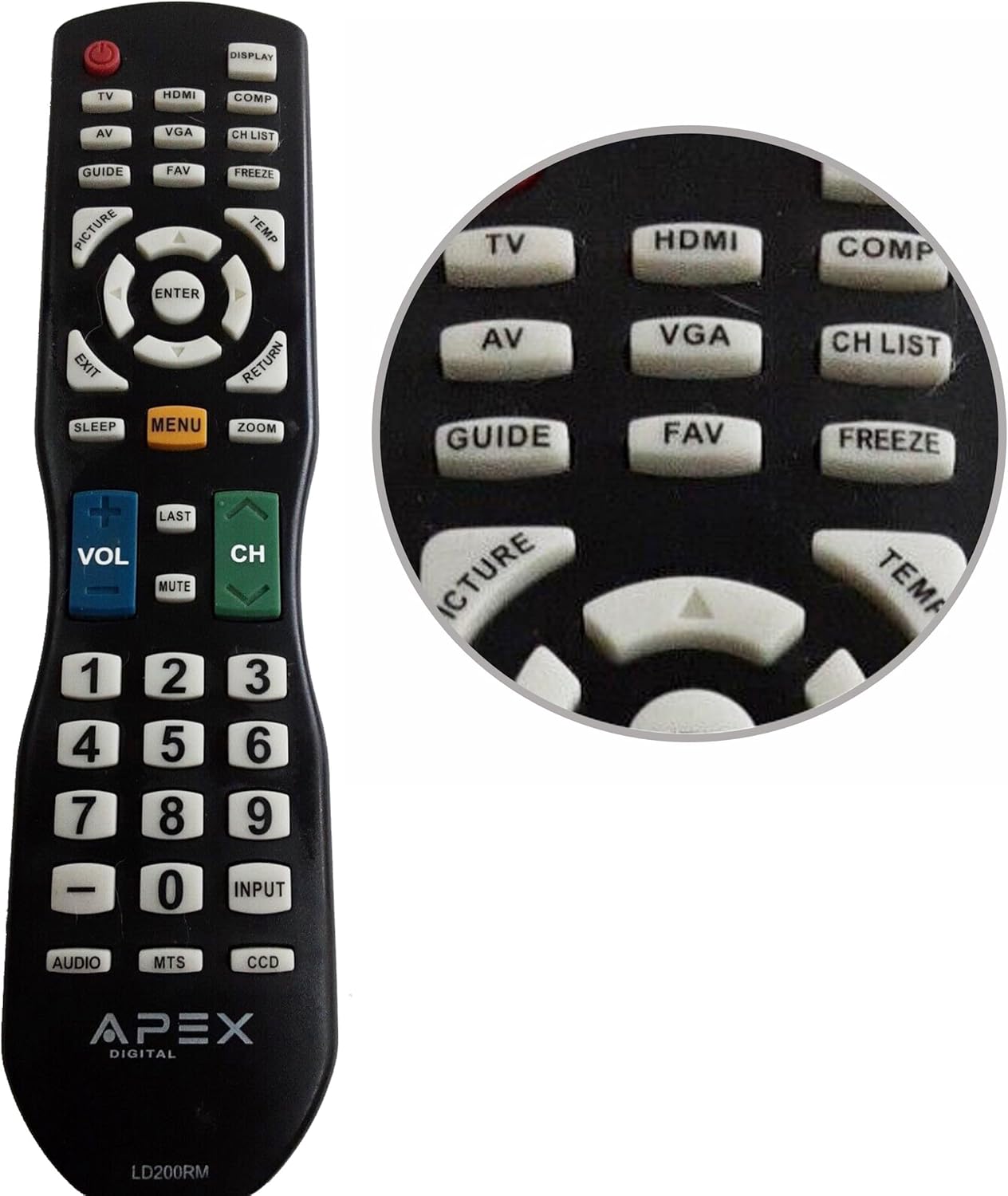
Figure 1: APEX LD200RM Remote Control Layout. This image displays the entire remote control, highlighting the arrangement of its various function buttons, including power, input selection, navigation, volume, channel, and numeric keypad.

Figure 2: Close-up of APEX LD200RM Remote Control Top Buttons. This image provides a detailed view of the upper section of the remote, focusing on buttons such as TV, HDMI, AV, VGA, COMP, CH LIST, DISPLAY, GUIDE, FAV, FREEZE, PICTURE, TEMP, MENU, ENTER, EXIT, RETURN, SLEEP, and ZOOM.
3.1 Power and Input Selection
- POWER (Tombol Beureum): Ngahurungkeun atawa mareuman televisi.
- TV: Selects the TV tuner input.
- HDMI: Selects the HDMI input.
- OF: Selects the Audio/Video input.
- VGA: Selects the VGA input.
- COMP: Selects the Component video input.
- TAMPILAN: Shows on-screen display information.
3.2 Channel and Volume Control
- VOL (+/-): Ngaronjatkeun atanapi ngirangan tingkat polumeu.
- CH (Kaluhur/Turun): Ngarobah saluran televisi kaluhur atanapi kahandap.
- Tukang: Balik deui ka saméméhna viewsaluran ed.
- Bisu: Ngajempékeun atanapi nganonaktipkeun audio televisi.
- DAFTAR CH: Mintonkeun daptar saluran.
3.3 Menu jeung Napigasi
- MENU: Muka menu utama televisi.
- Asupkeun: Confirms a selection within the menu.
- Tombol Panah (Luhur/Ka handap/Kénca/Katuhu): Navigates through menu options and adjusts settings.
- KALUAR: Kaluar tina menu ayeuna atanapi tampilan dina layar.
- PULIH: Mulih ka ménu atawa layar saméméhna.
3.4 Numeric Keypad and Special Functions
- 0-9 (Numeric Buttons): Langsung ngasupkeun nomer saluran.
- input: Siklus ngaliwatan sumber input sadia.
- pituduh: Nampilkeun pituduh program éléktronik (upami sayogi).
- FAV: Ngaksés saluran paporit.
- BEKAS: Freezes the current image on the screen.
- GAMBAR: Nyaluyukeun setélan gambar.
- TEMP: (Function may vary by model, often related to picture temperature or a specific mode).
- SARE: Nyetél waktos bobo.
- ZOOM: Adjusts the screen zoom level.
- AUDIO: Selects audio modes or tracks.
- Mts: Multi-channel Television Sound (stereo/SAP).
- DCC: Closed Captioning Display.
4. Pangropéa
4.1 Ngagantian batré
When the remote control's performance degrades or it stops responding, it is likely time to replace the batteries. Refer to Section 2.1 for detailed battery installation instructions. Always use fresh AA batteries.
4.2 beberesih
Pikeun ngabersihkeun kadali jauh, paké kaén anu lemes sareng garing. Keur kokotor bandel, rada dampBilas lawon ku cai atanapi pembersih anu hampang sareng henteu abrasif. Hindarkeun nganggo bahan kimia anu keras atanapi bahan abrasif, sabab ieu tiasa ngaruksak permukaan remote atanapi komponén internal.
4.3 Panyimpenan
Store the remote control in a cool, dry place away from direct sunlight and extreme temperatures. If the remote will not be used for an extended period, it is advisable to remove the batteries to prevent leakage and potential damage.
5. Cara ngungkulan
- Kadali jauh henteu ngaréspon:
- Ensure the batteries are correctly installed with the correct polarity (+/-).
- Ganti batré anu lami ku batré AA anu énggal.
- Check for any obstructions between the remote control and the television's infrared sensor.
- Ensure you are within the effective range of the television's IR receiver.
- Some buttons are not working:
- Ieu tiasa nunjukkeun daya batré anu lemah. Ganti batréna.
- Ensure the remote is clean and there is no debris lodged under the buttons.
- Verify that the button function is applicable to your specific TV model. Some functions may not be supported by all compatible TVs.
- Television is not turning on/off:
- Confirm the television is plugged into a working power outlet.
- Try using the power button directly on the television to rule out a TV issue.
6. Spésifikasi
| Fitur | Rincian |
|---|---|
| Nomer modél | LD200RM |
| merek | Puncak |
| Alat nu cocog | APEX LCD & LED Televisions |
| Sumber Daya | 2 x Batré AA (teu kalebet) |
| Dimensi produk | 10 x 6 x 2 inci (kira-kira) |
| Item Beurat | 3.2 ons (kira-kira) |
| Warna | Hideung |
| Fitur husus | Desain ergonomis |
7. Émbaran jaminan
This APEX LD200RM remote control typically comes with a 30-day warranty from the date of purchase. This warranty covers manufacturing defects. For specific details regarding warranty claims, returns, or replacements, please refer to your purchase documentation or contact the seller directly.
8. Rojongan
If you encounter issues not covered in this manual or require further assistance, please contact the retailer or the manufacturer's customer support. When contacting support, please have your product model number (LD200RM) and your television model number readily available.


