1. Bubuka jeung Leuwihview
The Extel Loomax Wireless MP3 Chime is a versatile and mobile doorbell system designed for convenience and personalization. This device features a long wireless range of up to 200 meters in open field conditions, operating on a 433.92 MHz frequency. It offers 6 selectable melodies and the unique ability to play personal MP3 music, allowing you to customize your doorbell sound. The chime unit is designed for flexible placement, capable of being used as a desk unit or mounted on a wall. It includes a visual flash indicator for additional alerts and comes with a USB cable for power and MP3 transfer.
2. Eusi Paket
Punten parios yén sadaya barang anu didaptarkeun di handap kalebet kana pakét anjeun:
- Extel Loomax Wireless MP3 Chime Unit
- Wireless Doorbell Push Button (Transmitter)
- Kabel USB
- Adaptor Daya USB
- CR 2032 Lithium Manganese Dioxide Battery (pre-installed in transmitter or separate)
- Pasang Hardware (screws, colokan témbok)
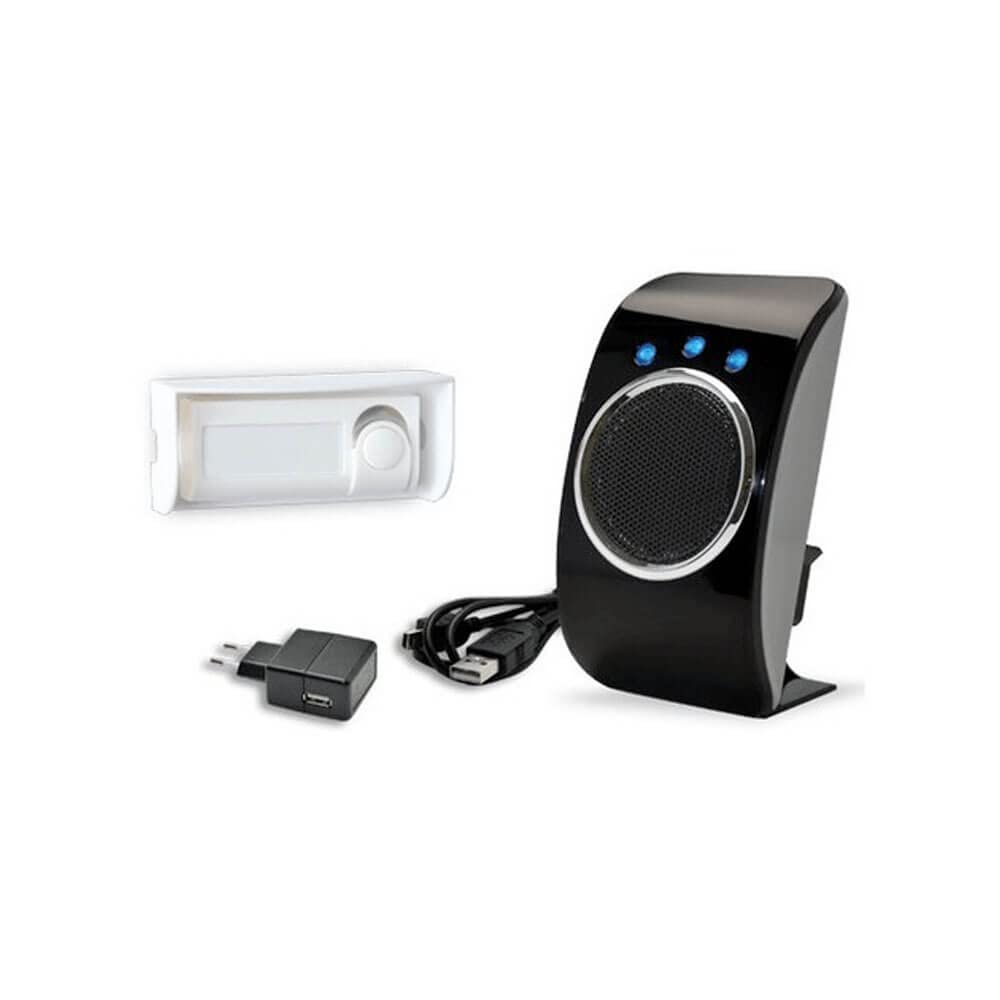
This image displays the complete Extel Loomax Wireless MP3 Chime kit. On the right is the sleek black chime unit with a speaker grille and three blue indicator lights. To its left, a white wireless doorbell push button is shown. Below these main components are the black USB power adapter and the USB cable, essential for powering and customizing the chime unit.
3. Émbaran Kasalametan
Please read and understand all safety instructions before using this product. Failure to follow these instructions may result in injury or damage to the device.
- Ulah ngalaan alat ka cai, beueus, atawa suhu ekstrim.
- Ulah nyobian ngabongkar, ngalereskeun, atawa ngaropéa alat. Ieu bakal ngabatalkeun jaminan.
- Use only the provided USB cable and power adapter, or a compatible certified power source.
- Jauhkeun batré tina jangkauan barudak. Lamun ditelek, neangan perhatian médis saharita.
- Buang batré nurutkeun peraturan lokal. Ulah dibakar.
- Ensure proper ventilation around the chime unit during operation.
4. Setélan
4.1. Ngabongkar bungkusan
Carefully remove all components from the packaging and inspect them for any signs of damage. Retain the packaging for future storage or transport.
4.2. Pamancar Pamasangan Batré
The doorbell push button (transmitter) requires one CR 2032 Lithium Manganese Dioxide battery. This battery is typically included. To install or replace the battery:
- Locate the battery compartment on the back or side of the transmitter.
- Open the compartment cover (you may need a small screwdriver or coin).
- Insert the CR 2032 battery with the positive (+) side facing up, observing the polarity markings.
- Tutup panutup kompartemen batré aman.
4.3. Chime Unit Power Connection
To power the chime unit:
- Connect the small end of the provided USB cable to the USB port on the chime unit.
- Connect the larger end of the USB cable to the USB power adapter.
- Colokkeun adaptor kakuatan USB kana stop kontak listrik standar.
- Alternatively, the chime unit can be powered by connecting the USB cable to a compatible USB port on a computer or other power source.
4.4. panempatan sarta ningkatna
The chime unit offers flexible placement options:
- Penempatan Meja: Simply place the chime unit on any flat, stable surface.
- Pamasangan témbok: For wall mounting, use the provided screws and wall plugs. Choose a location that is within the optimal wireless range of the transmitter and away from major obstructions. Mark the desired drilling points, drill holes, insert wall plugs, and secure the chime unit using the screws.
For the doorbell push button (transmitter), choose a suitable location near your door. Ensure it is protected from direct heavy rain if placed outdoors. Use the provided adhesive or screws for mounting.
5. Parentah Operasi
5.1. Ngapasangkeun (Upami Diperlukeun)
The chime unit and transmitter are typically pre-paired from the factory. If they do not connect automatically, or if you are adding an additional transmitter, follow these steps:
- Ensure the chime unit is powered on.
- Locate the pairing button on the chime unit (refer to the device diagram if available).
- Press and hold the pairing button for a few seconds until an indicator light flashes or a specific sound is heard, indicating it's in pairing mode.
- Within a few seconds, press the doorbell push button (transmitter).
- The chime unit should ring or indicate successful pairing. If not, repeat the process.
5.2. Pilihan Melodi
The chime unit comes with 6 pre-installed melodies. To cycle through and select a melody:
- Locate the melody selection button on the chime unit.
- Press the button repeatedly to hear the available melodies.
- Stop pressing when you hear your desired melody. The chime unit will save this selection.
5.3. Personal MP3 Music Playback
One of the key features of the Extel Loomax is the ability to use your own MP3 files as doorbell chimes:
- Connect the chime unit to your computer using the provided USB cable.
- The chime unit will be recognized as a removable storage device (e.g., a USB drive).
- Open the drive and locate the designated folder for MP3 files (e.g., 'MP3' or 'Ringtones').
- Copy your desired MP3 audio files into this folder. Ensure the files are standard MP3 format.
- Safely eject the chime unit from your computer.
- The chime unit will now play your custom MP3s when the doorbell is pressed. You may need to cycle through melodies to find your custom MP3s.
5.4. Volume adjustment
While specific volume controls are not detailed, the chime unit typically has a fixed volume or a button to cycle through volume levels. Refer to the device for any marked volume buttons.
5.5. Fungsi Lampu Kilat
In addition to the audible chime, the unit features a visual flash indicator. This light will illuminate when the doorbell is pressed, providing an extra alert, which is particularly useful in noisy environments or for individuals with hearing impairments.
6. Pangropéa
6.1. beberesih
To maintain the appearance and functionality of your chime:
- Wipe the chime unit and transmitter with a soft, dry, lint-free cloth.
- Do not use abrasive cleaners, solvents, or strong chemicals, as these can damage the surface.
- Hindarkeun nyemprot cairan langsung kana alat.
6.2. Panggantian Batre pamancar
If the doorbell push button's range decreases significantly or it stops functioning, the CR 2032 battery may need replacement. Follow the steps outlined in Section 4.2 for battery installation.
6.3. Panyimpenan
If you plan to store the device for an extended period, disconnect the chime unit from power and remove the battery from the transmitter. Store the unit in a cool, dry place, away from direct sunlight and extreme temperatures.
7. Cara ngungkulan
If you encounter issues with your Extel Loomax Wireless MP3 Chime, please refer to the following common problems and solutions:
- No Sound/Chime:
- Ensure the chime unit is properly connected to a power source and turned on.
- Check if the transmitter battery is correctly installed and not depleted. Replace if necessary.
- Verify that the chime unit and transmitter are within the effective wireless range.
- If the units are new or have been reset, try re-pairing them as described in Section 5.1.
- Poor Wireless Range:
- Ensure there are no significant obstacles (e.g., thick walls, metal structures, large appliances) between the transmitter and the chime unit that could interfere with the signal.
- Replace the transmitter battery, as a low battery can reduce range.
- Relocate the chime unit to a more central position or closer to the transmitter.
- Personal MP3s Not Playing:
- Pastikeun MP3 Anjeun files are correctly transferred to the designated folder on the chime unit's storage.
- Pariksa yén audio files are in a standard MP3 format. Other formats may not be supported.
- Check if the chime unit is in the correct mode to play custom MP3s (you may need to cycle through melodies).
8. Spésifikasi
| Fitur | Spésifikasi |
|---|---|
| Nomer modél | 060720 |
| merek | EXTEL |
| Produsén | CFIEX |
| Frékuénsi nirkabel | 433.92 MHz |
| Range nirkabel | Nepi ka 200m (sawah terbuka) |
| Chime Unit Power Supply | USB Powered |
| Batré pamancar | 1 x CR 2032 Lithium Manganese Dioxide (included) |
| Melodi | 6 selectable + personal MP3 support |
| Warna | Hideung |
| Item Beurat | 349 g |
| ASIN | B00DCPBIN8 |
| Tanggal Kahiji Sadia | 28 Oktober 2013 |
9. Garansi jeung Rojongan
For specific warranty terms and conditions, please refer to the warranty card or documentation included with your purchase. If you require technical assistance, troubleshooting beyond this manual, or have questions regarding your product, please contact Extel customer service through their official websitus atanapi inpormasi kontak anu disayogikeun dina bungkusan produk anjeun.
Punten tahan bukti pameseran anjeun pikeun klaim garansi.


