1. Bubuka
This manual provides detailed instructions for the Gembird KB-BT-001-W-DE Slimline Bluetooth Keyboard. Please read this manual thoroughly before using the product to ensure proper operation and to maximize its lifespan. This keyboard is designed for seamless wireless connectivity with various Bluetooth-enabled devices.
2. Eusi Paket
- Gembird KB-BT-001-W-DE Bluetooth Keyboard (German QWERTZ Layout, White)
- Kabel USB
- Manual pamaké
3. Fitur konci
- Slimline Bluetooth V 3.0 Wireless Keyboard (German QWERTZ Layout)
- Ultra-flat and ergonomic design
- Supports common Bluetooth-enabled devices: smartphones, tablets, PCs, and laptops
- Soft-touch keys for comfortable typing
- Convenient multimedia keys
- Compact size (28.7 x 2 x 13.7 cm) ideal for travel
- Compatible with Windows (XP, Vista, 7, 8) and Apple (iPad, iPhone, iPod Touch, MAC OS)
- rentang operasi: Nepi ka 10 méter
4. Sarat Sistim
- Device with Bluetooth connectivity (e.g., PC, laptop, tablet, smartphone)
- Supported Operating Systems: Windows XP/Vista/7/8, Apple iOS (iPad, iPhone, iPod Touch), Mac OS
5. Setup jeung papasangan
5.1. Powering On the Keyboard
Locate the power switch on the keyboard, usually on the side or back. Slide it to the "ON" position. The keyboard's indicator light (often blue or green) should illuminate briefly, indicating it is powered on and ready for pairing.
5.2. Nyapasangkeun sareng Alat Anjeun
- Aktipkeun Bluetooth dina Alat Anjeun: Go to your device's settings and ensure Bluetooth is turned on.
- Lebetkeun Mode Papasangan: On the Gembird keyboard, press the Nyambung or Papasangan button (if available, typically a small button on the back or bottom, or a key combination like Fn + C). The indicator light should start blinking rapidly, signifying it is in pairing mode.
- Milarian pikeun Paranti: On your device, search for available Bluetooth devices. The keyboard should appear as "Gembird KB-BT-001-W-DE" or similar.
- Pilih sareng Sambungkeun: Select the keyboard from the list. Your device may prompt you to enter a pairing code displayed on the screen. Type this code using the Gembird keyboard and press Lebetkeun.
- Konfirmasi: Once successfully paired, the indicator light on the keyboard will stop blinking and remain solid or turn off, and your device will show the keyboard as "Connected."
Note: The exact pairing process may vary slightly depending on your device's operating system. Refer to your device's manual for specific Bluetooth pairing instructions.
6. Parentah Operasi
6.1. Pamakéan Dasar
Once paired, the keyboard functions like a standard QWERTZ keyboard. Simply begin typing. Ensure the keyboard is within the 10-meter operating range of your device for optimal performance.
6.2. Multimedia jeung kenop Fungsi
The Gembird KB-BT-001-W-DE keyboard includes dedicated function keys (F1-F12) and multimedia shortcuts. To activate the secondary functions (blue icons) on the F-keys, press and hold the Fn key (located near the left Ctrl key) and then press the desired F-key.
| Kombinasi konci | Fungsi | Katerangan |
|---|---|---|
| Fn + F1 | F11 | Standard F11 key function. |
| Fn + F2 | F12 | Standard F12 key function. |
| Fn + F3 | Surélék | Opens default email client. |
| Fn + F4 | Browser/Home | Opens default web browser or navigates to home page. |
| Fn + F5 | Pamuter média | Launches default media player. |
| Fn + F6 | Lagu saméméhna | Skips to the previous track in media playback. |
| Fn + F7 | Play / Reureuh | Toggles play/pause for media playback. |
| Fn + F8 | Lagu salajengna | Skips to the next track in media playback. |
| Fn + F9 | Ngajempékeun | Ngajempékeun / nganonaktipkeun audio. |
| Fn + F10 | Volume Turun | Decreases system volume. |
| Fn + F11 | Volume Up | Increases system volume. |
| Fn + F12 | Layar konci | Locks the computer screen. |
| Fn + Num Lock | Numeric Keypad Toggle | Activates/deactivates the embedded numeric keypad (U, I, O, J, K, L, M keys). |
6.3. Keyboard Layout (German QWERTZ)
This keyboard features a German QWERTZ layout. Key positions for special characters and symbols may differ from standard QWERTY layouts. Refer to the keycaps for specific character placements.
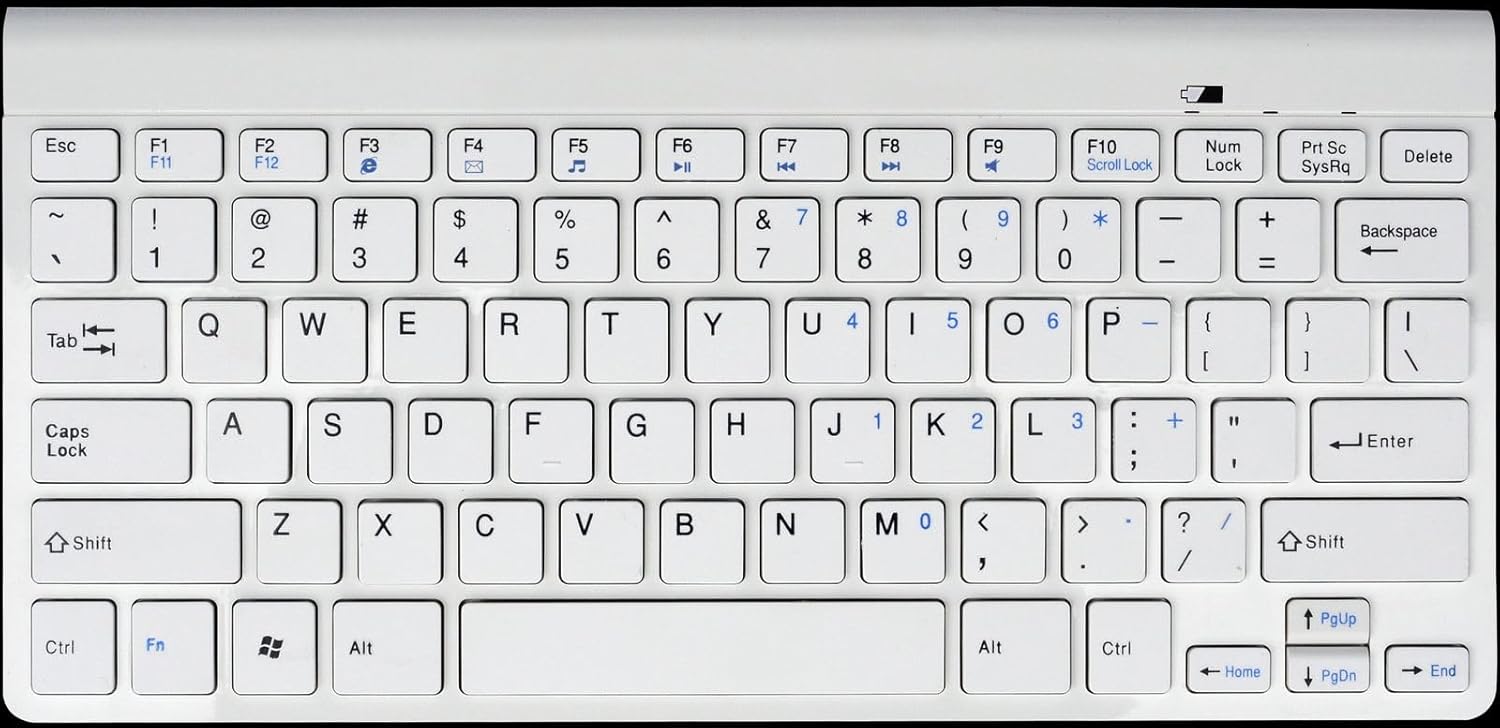
Gambar 1: Gembird KB-BT-001-W-DE Slimline Bluetooth Keyboard. This image displays the full keyboard, highlighting its compact design and German QWERTZ key layout, including function keys with multimedia shortcuts and the embedded numeric keypad on the right side.
7. Pangropéa
7.1. beberesih
- Disconnect the keyboard from power and turn it off before cleaning.
- Make kaen nu lemes, teu aya lint rada dampdikumbah ku cai atawa solusi beberesih hampang.
- Hindarkeun kalembaban anu kaleuleuwihan sareng ulah nyemprot pembersih langsung kana kibor.
- Pikeun lebu sareng lebu antara konci, paké hawa anu dikomprés.
7.2. Kaperawatan batré
- If the keyboard uses rechargeable batteries, charge it regularly using the provided USB cable.
- If it uses disposable batteries, replace them when the low battery indicator (if present) illuminates or performance degrades.
- Turn off the keyboard when not in use for extended periods to conserve battery life.
8. Cara ngungkulan
| Masalah | Mungkin Cukang lantaranana | Solusi |
|---|---|---|
| Kibor teu nyambung/pasangkeun. | Bluetooth is off on device; keyboard not in pairing mode; low battery; too far from device. | Ensure Bluetooth is enabled. Put keyboard in pairing mode. Charge/replace batteries. Move keyboard closer to device (within 10m). Try re-pairing. |
| Kenop teu ngabales atanapi nyangsang input. | Low battery; interference; out of range. | Charge/replace batteries. Move away from other wireless devices. Ensure keyboard is within range. |
| Incorrect characters typed (e.g., Y and Z swapped). | Device's keyboard layout is set to QWERTY instead of QWERTZ. | Change your device's keyboard input language/layout to German (QWERTZ). |
| Tombol multimedia teu tiasa dianggo. | Fn key not pressed; software incompatibility. | Pastikeun anjeun nyekel Fn key while pressing the F-key. Update device drivers if applicable. |
9. Spésifikasi
| Fitur | Rincian |
|---|---|
| merek | Manuk permata |
| Nomer modél | KB-BT-001-W-DE |
| Téhnologi konektipitas | Bluetooth v3.0 |
| Alat nu cocog | PC, Smartphone, Tablet |
| Katerangan kibor | Multimédia |
| Jumlah konci | 78 |
| Tata perenah kibor | QWERTZ (Jerman) |
| Komponén Kaasup | Kabel USB |
| Rentang Operasi | Nepi ka 10 méter |
| Ukuran (approx.) | 28.7 x 13.7 x 2 cm (11.3 x 5.4 x 0.8 inci) |
10. Garansi jeung Rojongan
For warranty information and technical support, please refer to the documentation included with your purchase or visit the official Gembird website. Contact details for support are typically provided in the product packaging or on the manufacturer's websitus.
- Pabrikan: Manuk permata
- Rojongan: Telephone support and email support are mentioned in the product features. Please check the included manual or Gembird's official websitus pikeun inpo kontak ayeuna.


