1. Bubuka
Thank you for choosing the Antec HCG-850M 850W Power Supply. This manual provides essential information for the safe and efficient installation, operation, and maintenance of your power supply unit. Please read this manual thoroughly before installation and retain it for future reference.
2. Émbaran Kasalametan
Salawasna perhatikeun tindakan pencegahan kaamanan ieu pikeun nyegah tatu atanapi karusakan kana sistem anjeun:
- Entong open the power supply casing. Tinggi voltagaya di jero, sanajan unitna teu dicabut tina colokanna.
- Entong insert any objects into the power supply's ventilation openings.
- Pastikeun catu daya dipasang di daérah anu berventilasi saé.
- Use only the modular cables provided with this power supply. Using incompatible cables can cause damage.
- Disconnect the AC power cord from the wall outlet before installing or removing the power supply.
- This product is designed for use in personal computers only.
3. Eusi Paket
Pastikeun yén sadaya item aya dina pakét anjeun:
- Catu Daya Antec HCG-850M 850W
- Modular Cable Set (PCI-E, SATA, Peripheral, CPU)
- Kabel Daya AC
- Pamasangan screws
- Manual pangguna (dokumén ieu)
4. Produk Langkungview
The Antec HCG-850M is an 850-watt, 80 PLUS Bronze certified, semi-modular power supply designed for high-performance personal computers. It features a quiet 135mm fan for efficient cooling and robust protection circuits to ensure stable power delivery.
4.1 Fitur konci
- 850 Watts Continuous Power
- 80 PLUS Bronze Certified Efficiency
- Semi-Modular Cable Management
- Kipas rehe 135mm
- Faktor Bentuk ATX
- Multiple Protection Circuits (OCP, OVP, UVP, SCP, OPP, OTP)
4.2 Unit catu daya
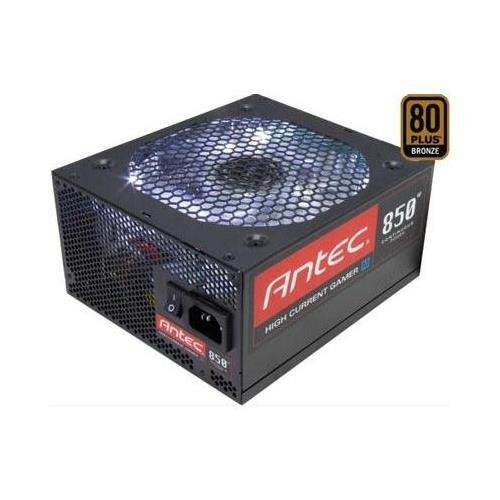
Gambar 1: Hareupeun view of the Antec HCG-850M 850W Power Supply, showing the fan grille and modular cable connectors. This unit provides stable power to your computer components.
5. Setup jeung Instalasi
Follow these steps to install your Antec HCG-850M power supply:
- Nyiapkeun Sistim anjeun: Pastikeun komputer anjeun pareum sapinuhna sareng dicabut tina stop kontak. Buka casing komputer anjeun.
- Cabut PSU Lama (upami aya): Cabut sadaya kabel tina catu daya anjeun anu lami. Cabut sareng cabut PSU anu lami tina wadahna.
- Pasang PSU Anyar: Carefully place the Antec HCG-850M into the power supply bay of your computer case. Secure it with the provided mounting screws. Ensure the fan is oriented correctly for optimal airflow (typically facing down if there's a bottom vent, or up if not).
- Sambungkeun Kabel Penting:
- Connect the 24-pin ATX motherboard power cable.
- Connect the 4+4-pin or 8-pin EPS/CPU power cable to your motherboard.
- Sambungkeun kabel modular: Attach the necessary modular cables for your components (e.g., PCI-E for graphics cards, SATA for hard drives/SSDs, Peripheral for fans/accessories). Connect them securely to both the power supply and the respective components.
- Manajemén Kabel: Jalur kabel rapih pikeun ningkatkeun aliran hawa sareng éstétika.
- Tutup Case sareng Hurungkeun: Close your computer case. Connect the AC power cord to the power supply and then to a wall outlet. Flip the power switch on the PSU to the 'ON' position. Power on your computer.
6. Parentah Operasi
Once installed, the Antec HCG-850M operates automatically. Here are some general operating guidelines:
- Hurungkeun/Pareuman: Use your computer's power button to turn the system on or off. The switch on the power supply itself should generally remain in the 'ON' position during normal operation.
- Stabilitas Sistim: Ensure your system is stable. If you experience unexpected shutdowns or reboots, refer to the troubleshooting section.
- Ventilasi: Maintain good airflow around your computer case to prevent overheating of components, including the power supply.
7. Pangropéa
Pangropéa anu leres tiasa manjangkeun umur catu daya anjeun:
- beberesih lebu: Periodically clean dust from the power supply's fan grille and the interior of your computer case using compressed air. Sok pegatkeun sambungan kabel listrik AC saméméh beberesih.
- Cék kabel: Occasionally check that all power cables are securely connected to the power supply and components.
- Lingkungan: Operate the power supply in a clean, dry environment with stable temperatures.
8. Cara ngungkulan
Upami anjeun ngalaman masalah sareng catu daya anjeun, cobian léngkah-léngkah ieu:
8.1 No Power to System
- Ensure the AC power cord is securely plugged into both the wall outlet and the power supply.
- Check that the power supply's ON/OFF switch is in the 'ON' position.
- Verify all internal power cables (24-pin ATX, CPU, PCI-E) are correctly and firmly connected.
- Nguji stop kontak témbok kalawan alat sejen pikeun mastikeun eta boga kakuatan.
- If possible, test the power supply in another known working system or with a PSU tester.
8.2 System Instability or Random Shutdowns
- Pastikeun syarat kakuatan sistem anjeun henteu ngaleuwihan kapasitas 850W PSU.
- Check for overheating components. Ensure proper case ventilation and clean any dust buildup.
- Verify all power connections are secure. Loose connections can cause intermittent power delivery.
- If the issue persists, it may indicate a fault with the power supply or another component. Consider professional diagnosis.
9. Spésifikasi
| Fitur | Rincian |
|---|---|
| Nomer modél | HCG-850M |
| Kaluaran Wattage | 850 Watt |
| Sertifikasi efisiensi | 80 PLUS Perunggu |
| Faktor Bentuk | ATX |
| Métode Cooling | Air (135mm Fan) |
| Tipe Modular | Semi-Modular |
| Alat nu cocog | Komputer Pribadi |
| Item Beurat | 9 Pon (kira-kira 4.08 kg) |
| ASIN | B00ESAI3M0 |
10. Garansi jeung Rojongan
Produk Antec didukung ku garansi ti produsén. Pikeun syarat sareng katangtuan garansi khusus, mangga tingali kartu garansi anu kalebet dina produk anjeun atanapi kunjungi situs resmi Antec. website. For technical support or customer service, please contact Antec directly through their official support channels.
Antec Resmi Websitus: www.antec.com


