Bubuka
This manual provides essential instructions for the safe and efficient use of your ONKYO RC-1000M Audio Remote Control. Please read this manual thoroughly before using the product and retain it for future reference.
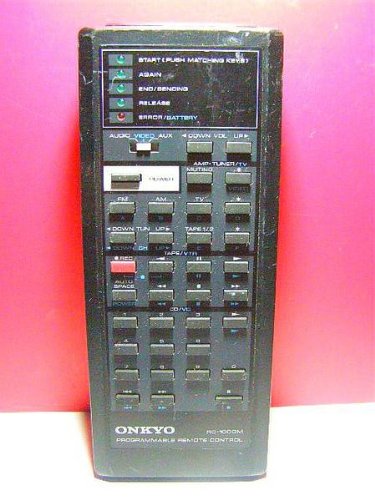
Image: The ONKYO RC-1000M Audio Remote Control, a black rectangular device with various control buttons.
Disetél
1. Pamasangan batré
- Teangan tempat panutup kompartemen batré dina tonggong kadali jauh.
- Geser panutup ka handap atawa pencét kancing pikeun mukakeunana.
- Lebetkeun dua batré AAA (teu kaasup), pastikeun terminal positif (+) sareng négatif (-) sajajar sareng indikator di jero kompartemen.
- Ganti panutup kompartemen batré, mastikeun eta clicks aman kana tempatna.
Catetan: Salawasna anggo batré anyar sareng gentos duanana batré dina waktos anu sami. Ulah nyampur batré lami sareng énggal atanapi jinis batré anu béda.
2. Initial Pairing (If Applicable)
The ONKYO RC-1000M is typically pre-programmed for compatible ONKYO audio devices. No manual pairing is usually required. If the remote does not respond, ensure your audio device is powered on and within range. Refer to your ONKYO audio component's manual for specific remote control compatibility and setup instructions if issues persist.
Parentah Operasi
The RC-1000M remote control provides comprehensive control over your ONKYO audio system. Point the remote control directly at the main unit's remote sensor.
- kakuatan: Press to turn the audio component on or off.
- PEMILIH INPUT: Use dedicated buttons (e.g., CD, TUNER, DVD) to switch between audio input sources.
- VOLUME +/-: Saluyukeun tingkat volume master.
- Bisu: Temporarily silences the audio output. Press again to restore sound.
- PLAY/PAUSE/STOP/SKIP: Control playback functions for compatible media players (e.g., CD player, network player).
- MENU/ENTER/NAVIGATION: Access and navigate on-screen menus of your ONKYO audio component.
For detailed functions of specific buttons, refer to the instruction manual of the ONKYO audio component you are controlling.
Pangropéa
beberesih
Wipe the remote control with a soft, dry cloth. Do not use abrasive cleaners, waxes, or solvents. Avoid spraying liquids directly onto the remote control.
Ngagantian batré
If the remote control's range decreases or it becomes unresponsive, replace the batteries as described in the "Battery Installation" section. Dispose of used batteries according to local regulations.
Panyimpenan
When storing the remote control for extended periods, remove the batteries to prevent leakage and potential damage to the unit.
Pamérésan masalah
| Masalah | Mungkin Cukang lantaranana | Solusi |
|---|---|---|
| Remote control does not operate. |
|
|
| Remote control operates intermittently. |
|
|
spésifikasi
- model: RC-1000M
- merek: ONKYO
- Sasayogian tanaga: DC 3V (AAA batteries x 2)
- Rentang Operasi: Approximately 7 meters (23 feet) under normal conditions.
- Ukuran (Kira-kira.): Not specified in product data.
- Beurat (Kira-kira.): Not specified in product data.
Spésifikasi bisa dirobah tanpa aya bewara pikeun perbaikan.
Garansi sareng Rojongan
For warranty information, technical support, or service inquiries, please refer to the documentation included with your ONKYO audio component or visit the official ONKYO websitus. Simpen resi pameseran anjeun salaku bukti pameseran pikeun klaim garansi.
Official ONKYO Websitus: www.onkyo.com


