Bubuka
The PROSCAN ELITE PKCR2713AMZ is a versatile under-counter audio system designed to provide entertainment and convenience in your kitchen or workspace. Featuring a CD player, FM radio, and Bluetooth connectivity, this unit allows you to enjoy your favorite music from various sources. Its space-saving design and intuitive controls make it a practical addition to any home.
Naon dina Box
Pastikeun sadaya barang tos aya sateuacan ngamimitian pamasangan:
- PROSCAN ELITE PKCR2713AMZ Under Counter CD Player
- Mounting Kit (includes template and hardware)
- Fungsi Jauh Control
- Adaptor Daya AC
Setup sareng Instalasi
Follow these steps to properly install your under-counter CD player:
- Pilih Lokasi: Select a flat, sturdy surface under a kitchen cabinet. Ensure there is adequate space for the unit and access to a power outlet.
- Nyiapkeun pikeun dipasang: Use the provided mounting template to mark the drilling locations under your cabinet. Note: Some users have reported the template may not be perfectly accurate; verify measurements before drilling.
- Bor Pilot liang: Carefully drill pilot holes at the marked locations.
- Ngagantelkeun Plate Pemasangan: Secure the mounting plate to the underside of the cabinet using the provided screws.
- Pasang Unit: Slide the PROSCAN ELITE unit onto the mounting plate until it clicks securely into place.
- Sambungkeun Kakuatan: Plug the AC power adapter into the unit and then into a wall outlet.
- Pasang Batré Cadangan: For clock and preset memory retention during power outages, install 2 x AA batteries (not included) into the battery compartment.
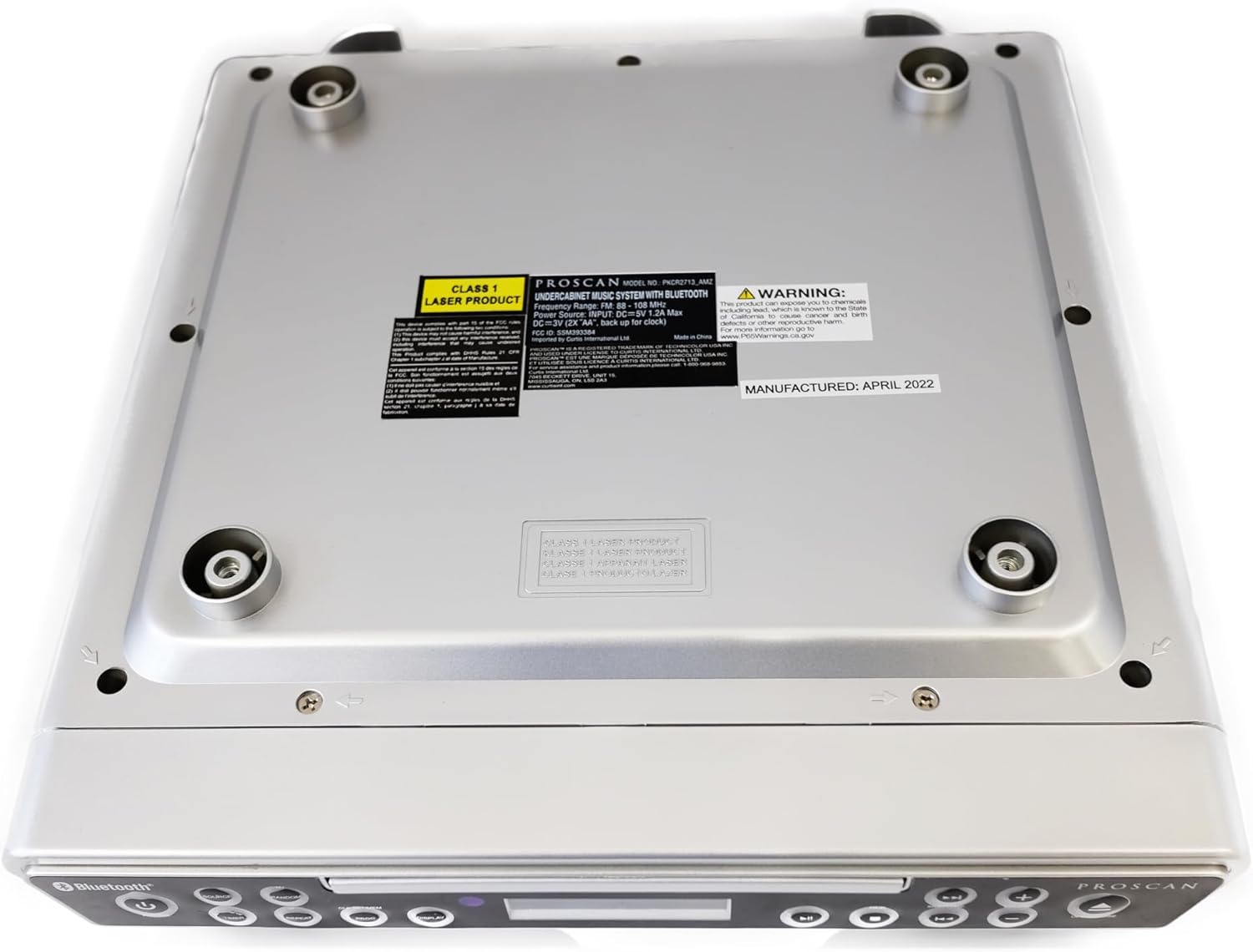
Gambar: handap view of the unit, illustrating the mounting points and product information label.
Parentah Operasi
Kadali Panel hareup

Image: Front panel of the unit, showing the display, CD tray, and various control buttons.
- Tombol DAYA: Pencét pikeun ngaktipkeun atanapi mareuman unit.
- Tombol SUMBER: Cycle through available modes: CD, FM Radio, Bluetooth.
- Tombol VOLUME +/-: Saluyukeun tingkat kaluaran audio.
- Tombol BUKA/TUTUP: Eject or retract the CD tray.
- SKIP/TUNE Buttons:
- In CD mode: Skip to the next/previous track.
- In FM mode: Tune to the next/previous radio station.
- Tombol MAINKAN / PAUSE: Play or pause CD playback.
- Tombol PAIR: Initiate Bluetooth pairing mode.
- Tombol TAMPILAN: Adjust display brightness or cycle through display information.
- CLK SET/MEM Button: Set the clock or save/recall radio presets.
- Tombol TIMER: Set sleep timer or alarm functions.
- Tombol REPEAT: Repeat current track or entire CD.
- Tombol PROG: Program CD playback order.
- RANDOM Button: Play CD tracks in random order.
Operasi Pamuter CD
- Pencét éta BUKA/TUTUP tombol pikeun muka baki CD.
- Simpen CD kana baki kalayan sisi labélna ngadep ka luhur.
- Pencét éta BUKA/TUTUP button again to close the tray. The unit will automatically begin playing the CD.
- Ngagunakeun éta MUTER / Reureuh, SKIP/TUNE, ULANGAN, PROG, jeung Acak tombol pikeun ngadalikeun playback.
Operasi Radio FM
- Pencét éta SUMBER pencét tombol "FM" nepi ka muncul dina layar.
- Ngagunakeun éta SKIP/TUNE buttons to manually tune to a desired frequency or press and hold to auto-scan for the next available station.
- Pikeun nyimpen preset: Setel ka stasiun anu dipikahoyong, teras pencét sareng tahan tombol CLK SET/MEM tombol nepi ka angka prasetél hurung. Ngagunakeun éta SKIP/TUNE pikeun milih nomer prasetél, teras pencét CLK SET/MEM deui pikeun mastikeun.
- Pikeun ngelingan prasetél: Pencét sakeudeung CLK SET/MEM tombol sarta ngagunakeun éta SKIP/TUNE buttons to select the desired preset.
Operasi Bluetooth
- Pencét éta SUMBER button until "BT" or "Bluetooth" appears on the display. The unit will enter pairing mode, indicated by a flashing Bluetooth icon.
- Dina alat Bluetooth-diaktipkeun anjeun (smartphone, tablet, jsb), aktipkeun Bluetooth tur neangan alat nu sadia.
- Select "PROSCAN ELITE" or similar from the list of devices.
- Once paired, the Bluetooth icon on the unit's display will stop flashing, and you can stream audio from your device to the unit.
- To disconnect, either turn off Bluetooth on your device or press and hold the PASANGAN tombol dina unit.

Gambar: Sisi view of the unit, highlighting the 'LINE IN' auxiliary input port.
Pangropéa
- beberesih: Ngusap unit ku kaén anu lembut sareng garing. Ulah make cleaners abrasive atawa pangleyur.
- Perawatan CD: Handle CDs by the edges. Keep them clean and free of scratches to ensure optimal playback.
- Ngagantian batré: Replace backup batteries (AA) annually or when the clock/presets are not retained during power outages.
Pamérésan masalah
| Masalah | Mungkin Cukang lantaranana | Solusi |
|---|---|---|
| Unit teu hurung. | No power, AC adapter not connected. | Ensure AC adapter is securely plugged into the unit and a working wall outlet. |
| Taya sora tina speaker. | Volume too low, incorrect source selected, muted. | Increase volume. Press SOURCE to select correct mode (CD, FM, BT). Check if unit is muted. |
| CDna luncat atawa teu bisa diputer. | Dirty or scratched CD, CD inserted incorrectly. | Clean the CD with a soft cloth. Ensure CD is inserted label-side up. Try a different CD. |
| panarimaan radio FM goréng. | Weak signal, internal antenna position. | Reposition the unit for better reception. Note: This unit does not have an AM feature. |
| Masalah papasangan Bluetooth. | Device too far, Bluetooth not enabled on device, unit not in pairing mode. | Ensure device is within range. Enable Bluetooth on your device. Press PAIR button on unit. |
spésifikasi
- Ukuran produk: Ukuran 14 x 4 x 12.5 inci (L x W x H)
- Beurat barang: 0.035 ons
- merek: PROSCAN
- Jumlah modél: PKCR2713_AMZ
- Téknologi konektipitas: Bluetooth
- warna: pérak
- Tipe Speaker: Stereo
- Kaluaran kakuatan: 2 x1.2 w
- Sumber Daya: AC Adapter with Battery Backup (2 x AA, not included)
- Fitur: Under-cabinet mounting, CD player, FM radio, Bluetooth 3.0, LED display, remote control.
Garansi sareng Rojongan
For warranty information and technical support, please refer to the documentation included with your purchase or visit the official PROSCAN websitus. Simpen bukti pameseran anjeun pikeun klaim garansi.
Sumberdaya Online:
- Official PROSCAN Store: PROSCAN ELITE Store
- Manual Pamaké (PDF): Unduh Manual PDF


