1. Bubuka
The Electro-Voice RE20 is a dynamic cardioid microphone recognized as an industry standard. It is widely favored by broadcasters, podcasters, and sound engineers globally. Its design also makes it a premium-grade instrument microphone for music production. The Variable-D design and heavy-duty internal pop filter are optimized for close-in voice work, while an internal element shock-mount minimizes vibration-induced noise.
2. Fitur konci
- Dynamic Cardioid Design: An industry standard for broadcasting, podcasting, and sound engineering.
- Variable-D Technology: Minimizes proximity effect, ensuring consistent sound quality during close-up vocal use.
- Heavy-Duty Internal Pop Filter: Effectively reduces plosive sounds for clear voice capture.
- Internal Element Shock-Mount: Reduces unwanted vibration-induced noise.
- Large Diaphragm Dynamic Element: Contributes to high-quality audio reproduction.
- Humbucking Coil: Guards against line hum interference.
- Mid-Bass Tone-Shaping Switch: Allows for adjustment of the microphone's tonal characteristics.
3. Setélan
3.1 Unboxing sareng Inspeksi Awal
Carefully remove the microphone and its accessories from the packaging. Inspect all components for any signs of damage. The package includes the RE20 microphone and an 81715 stand clamp.
3.2 Masang Mikropon
Attach the provided 81715 stand clamp to a standard microphone stand or boom arm. Securely fasten the RE20 microphone into the stand clamp. Ensure the microphone is stable and positioned to minimize accidental bumps or falls.

Figure 1: Electro-Voice RE20 microphone mounted on a stand, illustrating typical studio setup.
3.3 Nyambungkeun ka Parabot Audio
The RE20 features an XLR connector. Connect a high-quality XLR cable from the microphone to your audio interface, mixer, or preamplifier. As a dynamic microphone, the RE20 does not require phantom power, but it is compatible with equipment that provides it.
4. Parentah Operasi
4.1 Microphone Placement and Technique
The RE20's Variable-D design effectively controls the proximity effect, allowing for close microphone placement without excessive bass boost. For vocal applications, position the microphone 1 to 6 inches from the sound source. Experiment with distance to achieve the desired tonal balance.

Gambar 2: Hareupeun view of the Electro-Voice RE20 microphone, highlighting its robust construction.
4.2 Using the Mid-Bass Tone-Shaping Switch
The RE20 includes a mid-bass tone-shaping switch located on the microphone body. This switch allows you to tailor the low-frequency response to suit different voices or instruments, or to compensate for room acoustics. Adjust the switch as needed to achieve optimal sound clarity and presence.
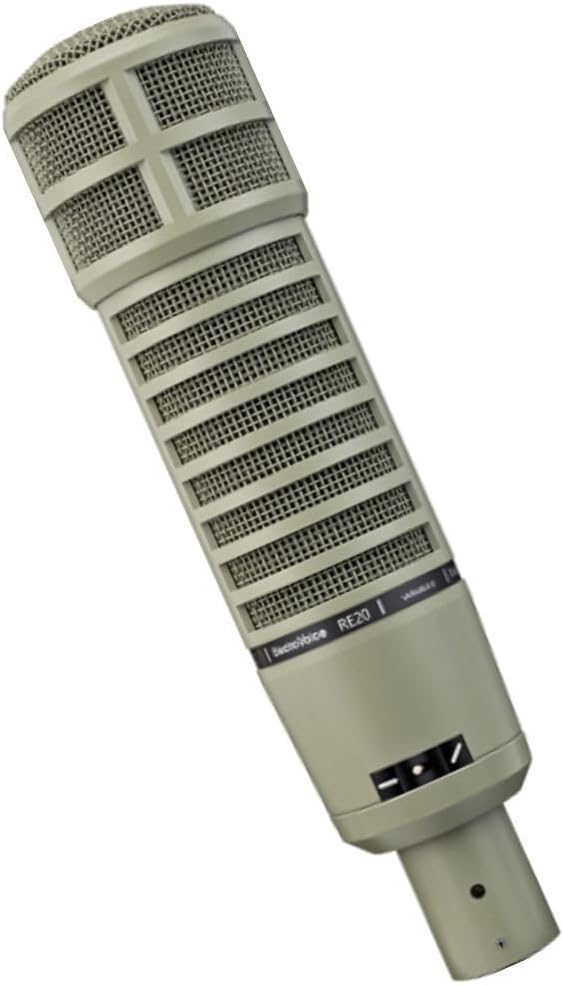
Gambar 3: Angled view of the Electro-Voice RE20, showing the mid-bass tone-shaping switch.
5. Pangropéa
5.1 beberesih
To clean the microphone's exterior, use a soft, dry cloth. For the grille, a soft brush can be used to gently remove dust or debris. Avoid using liquid cleaners or solvents, as these can damage the microphone's components.
5.2 Panyimpenan
When not in use, store the RE20 in a protective case to prevent dust and moisture accumulation. Store in a cool, dry place away from direct sunlight or extreme temperatures.
5.3 Penanganan
Handle the microphone with care. Avoid dropping it or subjecting it to harsh impacts, as this can damage the internal components, including the shock-mount and dynamic element.
6. Cara ngungkulan
6.1 Taya Kaluaran Sora
- Check all XLR cable connections to ensure they are secure.
- Verify that the input gain on your audio interface or mixer is set appropriately.
- Ensure the correct input channel is selected on your audio equipment.
6.2 Unwanted Hum or Noise
- Ensure all audio cables are properly shielded and in good condition.
- Check for proper grounding of your audio equipment.
- The RE20 features a humbucking coil to reduce line hum; ensure it is functioning correctly.
- Move the microphone away from potential sources of electromagnetic interference (e.g., power supplies, monitors).
6.3 Audio Anu Distorsi
- Reduce the input gain on your audio interface or mixer.
- Pastikeun mikropon teu ditempatkeun caket teuing ka sumber sora anu tarik pisan.
- Check the input levels on your recording software to prevent clipping.
7. Spésifikasi
| Fitur | Rincian |
|---|---|
| merek | Éléktro-Sora |
| Ngaran modél | RE20 |
| Nomer Modél Item | RE20 |
| Warna | kulawu |
| Faktor Bentuk Mikropon | Mikropon wungkul |
| Téhnologi konektipitas | Dikabel |
| Tipe Panyambung | XLR |
| Pola Polar | Saarah (Cardioid) |
| Réspon Frékuénsi | 45 Hz - 18,000 Hz |
| Impedansi | 150 ohm |
| Rasio Signal-to-Noise | 78 dB |
| Item Beurat | 16 ons (1 pon) |
| Ukuran produk (L x W x H) | 12.3 x 5 x 3.6 inci |
| Bahan | alumunium |
| Dianjurkeun Mangpaat Pikeun Produk | Singing, Broadcasting, Podcasting |
| Tanggal Kahiji Sadia | 19 Juli 2004 |
8. Naon dina Box
- Electro-Voice RE20 Broadcast Announcer Microphone
- 81715 Stand Clamp
9. Garansi jeung Rojongan
Kanggo inpormasi garansi sareng dukungan téknis, mangga tingal ka Electro-Voice resmi. websitus atanapi ngahubungan layanan palanggan maranéhanana langsung. Simpen bukti pameseran anjeun pikeun klaim garansi.


