1. Bubuka
This manual provides detailed instructions for the installation, operation, and maintenance of your Logisys 4-Port 3.5-inch Bay USB 3.0/2.0 Hub. This device is designed to expand the USB connectivity of your desktop computer by utilizing an available 3.5-inch drive bay, providing convenient access to multiple USB ports directly from the front panel of your PC.
The hub features a combination of USB 3.0 and USB 2.0 ports, including a dedicated i-Charger port for efficient device charging. Please read this manual thoroughly before installation and use to ensure proper functionality and safety.

Gambar 1: Hareupeun view of the Logisys 4-Port 3.5-inch Bay USB 3.0/2.0 Hub, showing the four USB ports and the Logisys branding.
2. Eusi Paket
Punten parios yén sadaya barang aya dina pakét:
- Logisys 4-Port 3.5-inch Bay USB 3.0/2.0 Hub
- Pasang Sekrup (biasana 4)
- USB 3.0 Internal Header Cable (if not integrated)
- USB 2.0 Internal Header Cable (if not integrated)
- SATA Power Cable (if required for additional power)
If any items are missing or damaged, please contact your retailer or Logisys support.
3. Fitur Produk
- 4 port USB: Provides two USB 3.0 ports and two USB 2.0 ports for versatile connectivity.
- 3.5-inch Bay Design: Fits into a standard 3.5-inch drive bay on desktop computers.
- USB 3.0 SuperSpeed: Supports data transfer rates up to 5Gbps (backward compatible with USB 2.0/1.1).
- USB 2.0 High-Speed: Supports data transfer rates up to 480Mbps.
- i-Charger Port: Dedicated port for faster charging of compatible devices.
- Nyolok sareng Puter: Teu aya supir anu diperyogikeun pikeun kalolobaan sistem operasi.
- Konstruksi awét: Designed for reliable long-term use.
4. Setup jeung Instalasi
Before beginning installation, ensure your computer is powered off and unplugged from the wall outlet. It is recommended to wear an anti-static wrist strap to prevent damage to internal components.
- Buka Kasus Komputer: Cabut panel sisi wadah komputer anjeun pikeun ngakses komponén internal.
- Locate 3.5-inch Bay: Identify an available 3.5-inch drive bay on the front of your computer case. You may need to remove a blank panel cover.
- Insert Hub: Slide the Logisys USB Hub into the chosen 3.5-inch bay from the front of the case until its mounting holes align with those on the drive bay.
- Pusat Aman: Use the provided mounting screws to secure the hub firmly in place.
- Sambungkeun kabel USB 3.0: Locate an available 20-pin USB 3.0 header on your motherboard. Connect the hub's internal USB 3.0 cable to this header. Ensure the connection is secure and correctly oriented.
- Sambungkeun kabel USB 2.0: Locate an available 9-pin USB 2.0 header on your motherboard. Connect the hub's internal USB 2.0 cable to this header. Ensure the connection is secure and correctly oriented.
- Connect Power Cable (if applicable): If your hub requires additional power (e.g., for the i-Charger port or high-power devices), connect the SATA power cable from your power supply to the corresponding port on the hub.
- Tutup Kasus: Replace the computer's side panel and secure it.
- Daya Hurung: Plug your computer back into the wall outlet and power it on. The operating system should automatically detect and install the necessary drivers for the hub.
5. Parentah Operasi
Once installed, the Logisys USB Hub operates as a standard USB expansion device. Simply plug your USB devices into the available ports.
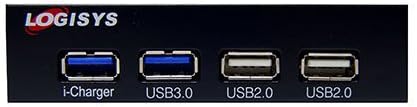
angka 2: Tutup-up view of the hub's front panel, highlighting the 'i-Charger', 'USB3.0', and 'USB2.0' labels for each port.
- Port USB 3.0: Use these ports for devices that require high-speed data transfer, such as external hard drives, SSDs, or high-resolution webcams. These ports are typically blue internally.
- Port USB 2.0: Suitable for devices like keyboards, mice, printers, USB flash drives, and other peripherals where high-speed data transfer is not critical. These ports are typically black or white internally.
- i-Charger Port: This port is optimized for faster charging of compatible mobile devices. While it can also transfer data, its primary function is enhanced power delivery.
The hub is hot-swappable, meaning you can connect and disconnect USB devices without needing to restart your computer.
6. Pangropéa
The Logisys USB Hub requires minimal maintenance.
- beberesih: Use a soft, dry cloth to gently wipe the exterior of the hub. Avoid using liquid cleaners or abrasive materials, as they may damage the finish or internal components.
- Lingkungan: Ensure the computer case has adequate ventilation to prevent overheating. Avoid exposing the hub to extreme temperatures, humidity, or direct sunlight.
- Manajemén Kabel: Ensure internal cables are neatly routed and not obstructing airflow or other components.
7. Cara ngungkulan
If you encounter issues with your Logisys USB Hub, refer to the following troubleshooting steps:
- Alat Teu Dipikawanoh:
- Ensure the hub's internal USB cables are securely connected to the motherboard headers.
- Try connecting the USB device directly to a motherboard USB port to verify the device itself is functional.
- Balikan deui komputer anjeun.
- Check Device Manager in Windows (or System Information in macOS/Linux) to see if the hub is listed without errors.
- Laju Transfer Data Lambat:
- Ensure you are using the USB 3.0 ports for USB 3.0 devices. USB 2.0 devices will operate at USB 2.0 speeds even when connected to a USB 3.0 port.
- Verify that your motherboard's USB 3.0 header is functioning correctly.
- Hindarkeun nyambungkeun seueur teuing alat rubakpita luhur sakaligus ka hub anu sami.
- No Power to Devices / Charging Issues:
- Ensure the optional SATA power cable is connected from your power supply to the hub (if required for your model).
- Test with a different USB device to rule out a faulty device.
- Check your power supply's capacity if you are connecting many power-hungry devices.
- Hub Teu Dideteksi:
- Re-check all internal cable connections to the motherboard.
- Try a different 3.5-inch bay or motherboard header if available.
8. Spésifikasi
| merek | Logisys |
| Total palabuhan USB | 4 (2x USB 3.0, 2x USB 2.0) |
| Panganteur Hardware | USB |
| Fitur husus | Plug and Play, Fast Charging (i-Charger port) |
| Alat nu cocog | Alat USB |
| Faktor Bentuk | 3.5 inci Drive Bay |
| Item Beurat | 3.2 ons (kira-kira 90.7 gram) |
| Ukuran Paket | 7 x 4.9 x 1.5 inci (kira-kira 17.8 x 12.4 x 3.8 cm) |
| Tanggal Kahiji Sadia | 16 Juni 2014 |
9. Garansi jeung Rojongan
Logisys products are designed for reliability and performance. For specific warranty information, please refer to the warranty card included with your product or visit the official Logisys website. If you encounter any issues that cannot be resolved using the troubleshooting guide, please contact Logisys customer support for assistance.
Punten tahan bukti pameseran anjeun pikeun klaim garansi.


