1. Bubuka
This manual provides detailed instructions for the installation, operation, and maintenance of your REXING F9US Dash Camera. Please read this manual thoroughly before using the device to ensure proper functionality and to maximize your user experience.
2. Eusi Paket
Punten parios yén sadaya barang anu didaptarkeun di handap kalebet kana pakét anjeun:
- REXING F9US Dash Camera
- In-car charging cable
- Windshield Suction Cup mount
- kabel USB
- Manual pamaké
Catetan: A Micro SD Card (Class 10 or higher, up to 128GB) is required for operation and is not included in the package.
3. Produk Langkungview
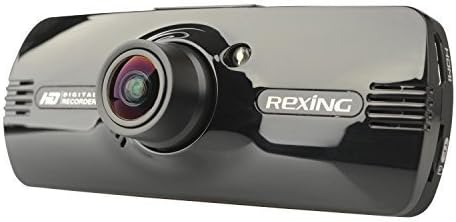
Image: REXING F9US Dash Camera
The REXING F9US Dash Camera is a compact, high-definition car dashboard camera designed to record your driving. It features a 170-degree wide-angle lens, a 2.7-inch 16:9 TFT LCD screen, and supports Full HD 1080p video recording. Key features include G-Sensor for automatic accident detection, Wide Dynamic Range (WDR) technology for optimal video quality in varying light conditions, and motion detection for recording when the vehicle is parked.
4. Setélan
4.1 Masang Kartu Micro SD
- Pastikeun kaméra dasbor pareum.
- Pilari slot kartu Micro SD di sisi kaméra.
- Insert a Class 10 or higher Micro SD card (up to 128GB) into the slot until it clicks into place.
- Pikeun nyabut, dorong kartu ka jero dugi ka kaluar.
4.2 Masang Kaméra Dasbor
- Clean the desired area on your windshield thoroughly.
- Pasangkeun dudukan cangkir sedot kana kaméra.
- Pencét cangkir nyeuseup pageuh kana kipas kaca sareng flip tuas pikeun ngamankeunana.
- Saluyukeun sudut kaméra pikeun mastikeun a jelas view tina jalan.
4.3 Nyambungkeun Daya
- Connect the in-car charging cable to the camera's power input port.
- Plug the other end of the cable into your vehicle's 12V power outlet (cigarette lighter socket).
- Kaméra biasana bakal otomatis hurung nalika konci kontak kendaraan dihurungkeun.
4.4 Setélan awal
Upon first use, or after a reset, you may need to set the date, time, and language. Navigate through the menu using the camera's buttons.
5. Parentah Operasi
5.1 Rekaman Dasar
- Once powered on and connected to power, the camera will automatically begin loop recording. A flashing red record indicator will confirm recording is active.
- To manually start/stop recording, press the REC kancing.
5.2 Navigasi Menu
The camera features several buttons for navigation and control:
- Tombol MENU (bottom left): Press once to enter video settings, press twice to enter tool settings.
- EVENT Button (top right, with a triangle): Functions as an 'Up' button in menus. When held for 3 seconds during recording, it locks the current video file.
- Tombol MIC: Functions as a 'Down' button in menus.
- Tombol REC: Functions as 'Select' or 'OK' in menus.
- Tombol Gambar (bottom right): When held, enters review mode pikeun view dirékam files.
5.3 Playback jeung File Manajemén
- Ka view recordings on the camera, enter review mode using the Picture button.
- Pikeun mindahkeun files to a computer, connect the camera via the USB cable. The camera will appear as a removable disk.
- The camera also supports HDMI output for viewdina tampilan anu langkung ageung.
6. Features Explained
6.1 Ngarekam loop
The camera continuously records video in segments (e.g., 2, 3, or 5 minutes). When the memory card is full, the oldest unlocked video file is automatically overwritten by the newest recording. This ensures continuous recording without manual intervention.
6.2 G-Sensor (Accident Auto Detection Feature)
The built-in G-Sensor detects sudden movements or impacts (e.g., in case of a collision). When triggered, the current video segment is automatically locked and saved to prevent it from being overwritten by loop recording. These files are stored in a protected folder.
6.3 Wide Dynamic Range (WDR) Technology
WDR technology enhances video quality by balancing exposure in scenes with high contrast, such as driving from a dark tunnel into bright sunlight. This ensures clearer images with more detail in both bright and dark areas.
6.4 Deteksi Gerak
When enabled, the camera will automatically start recording if it detects motion in front of the lens while the vehicle is parked. This feature is useful for monitoring your vehicle when it's unattended.
6.5 Visi Peuting
The camera supports night vision capabilities to improve recording quality in low-light conditions. Note that the built-in LED light is primarily for use when the camera is outside the car in battery mode, acting as a flashlight. For in-car recording, it's generally recommended to keep it off to avoid windshield reflections.
7. Pangropéa
- beberesih: Anggo lawon anu lemes sareng garing pikeun ngabersihkeun lénsa kaméra sareng layar. Hindarkeun nganggo pembersih atanapi pangleyur anu abrasif.
- Format kartu SD: It is recommended to format the Micro SD card periodically (e.g., once a month) within the camera's settings to ensure optimal performance and prevent data corruption. Back up any important files saméméh pormat.
- Panyimpenan: Simpen kaméra di tempat anu tiis sareng garing jauh tina sinar panonpoé langsung sareng suhu anu ekstrim nalika henteu dianggo.
8. Cara ngungkulan
| Masalah | Solusi anu mungkin |
|---|---|
| Kaméra teu hurung. | Ensure the power cable is securely connected to both the camera and the vehicle's 12V outlet. Check the vehicle's power outlet for functionality. |
| Camera powers off unexpectedly or stops recording. | Verify the power connection is stable. Ensure the Micro SD card is Class 10 or higher and formatted correctly. Try a different Micro SD card. |
| Kualitas pidéo goréng atanapi buram. | Clean the camera lens. Ensure the protective film (if any) has been removed from the lens. Check if the windshield is clean. |
| Kasalahan kartu Micro SD. | Format the Micro SD card within the camera's settings. Ensure the card is Class 10 or higher. Try a different, reputable brand Micro SD card. |
| Tanggal sareng waktosna lepat. | Adjust the date and time settings in the camera's menu. |
9. Spésifikasi
| Fitur | Rincian |
|---|---|
| Resolusi Video | 1080FHD (1920x1080), 1080P (1440x1080), 720P (1280x720), WVGA (848x480), VGA (640x480), QVGA (320x240) |
| Lensa | 170 degree 6-layers glass lens |
| Ukuran layar | 2.7 inch 16:9 TFT LCD |
| Video File Formatna | MOV |
| Gambar File Formatna | JPG |
| Rojongan Kartu Mémori | Up to 128GB Class10 or upper Micro SD/TF Card (not included) |
| Konektipitas | HDMI, AV-OUT, USB |
| Rékam audio | Dirojong |
| Sistem Basa | Inggris, Perancis, Spanyol, Portugis, Jerman, Italia, Cina Sederhana, Cina Tradisional, Rusia, Jepang |
| Dimensi produk | 7 x 5 x 3 inci |
| Item Beurat | 12.1 ons |
| Batré | Diperlukeun 1 batré Litium Polimer (internal) |
10. Garansi jeung Rojongan
For information regarding product warranty, technical support, or service inquiries, please visit the official REXING website or contact REXING customer service directly. Please have your product model number (F9US) and purchase details available when contacting support.


