1. Bubuka
This manual provides essential instructions for the safe operation and maintenance of your QFX PBX-410204BTD PA Speaker. Please read this manual thoroughly before using the device and retain it for future reference.
1.1. Produk Langkungview
The QFX PBX-410204BTD is a versatile battery-powered PA speaker system featuring dual 10-inch woofers and dual 1-inch tweeters. It includes multiple audio input options such as Bluetooth, USB, SD card, FM radio, and DVD playback. Additional features include a disco light and karaoke functionality, making it suitable for various entertainment and public address applications. The unit operates on a 12V 12AH rechargeable battery and supports AC 100-240V input.
1.2. Parentah Kasalametan
- Sumber Daya: Pastikeun catu daya cocog sareng voltage requirements (AC 100-240V or DC 12V).
- Ventilasi: Ulah ngahalangan liang ventilasi. Jaga rohangan anu cekap di sakitar unit pikeun aliran hawa anu leres.
- Cai sareng Uap: Ulah ngantepkeun unit ieu ka hujan, kalembaban, atanapi cairan.
- Sumber Panas: Jauhkeun unit tina sumber panas sapertos radiator, register panas, kompor, atanapi alat anu ngahasilkeun panas anu sanés.
- beberesih: Disconnect the power before cleaning. Use a dry cloth.
- Palayanan: Entong nyobian ngalayanan produk ieu nyalira. Rujuk sadayana ngalayanan ka tanaga jasa anu mumpuni.
- Batré: The unit contains a rechargeable battery. Follow proper disposal guidelines for batteries. Do not expose to excessive heat.
2. Eusi Paket
Mangga parios pakét kanggo barang-barang ieu:
- QFX PBX-410204BTD PA Speaker Unit
- Adaptor/Kabel Daya
- Remote Control (upami kalebet)
- Mikropon (upami kalebet)
- Manual pangguna (dokumén ieu)
3. Kadali sarta Fitur
Familiarize yourself with the various controls and connection ports on your PA speaker.
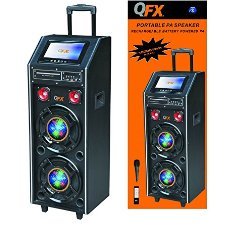
Gambar 1: Hareupeun view of the QFX PBX-410204BTD PA Speaker. This image displays the speaker's front panel, including the dual 10-inch woofers, the central control panel with various buttons and knobs, and the integrated disco light.
3.1. Control Panel Leuwihview
- Saklar kakuatan: Hurungkeun unit HIRUP / OFF.
- Kontrol volume: Nyetél volume master.
- Input mikropon: Connects a wired microphone.
- Echo/Mic Volume: Adjusts microphone volume and echo effect.
- Port USB: Pikeun playback USB flash drive.
- Slot Kartu SD: Pikeun playback kartu SD.
- Tombol Mode: Switches between input modes (Bluetooth, USB, SD, FM, DVD).
- Tombol Puter/Reureuh: Ngadalikeun putereun média.
- Kancing Lagu Saméméhna/Salajengna: Navigates media tracks or FM stations.
- Anteneu FM: Pikeun ningkatkeun panarimaan radio FM.
- Disco Light Switch: Turns the disco light ON/OFF.
- Pamuter DVD: Integrated DVD disc slot and controls.
- Input AC: Connects the power adapter for charging and AC operation.
- DC 12V Input/Output: For external 12V power source or output.
4. Setélan
4.1. Ngecas Awal
Before first use, fully charge the internal battery. Connect the power adapter to the AC input on the speaker and plug it into a standard wall outlet. The charging indicator will illuminate. Charging typically takes several hours. The indicator will change or turn off once fully charged.
4.2. Panempatan
Place the speaker on a stable, flat surface. Ensure there is adequate space around the unit for ventilation. Avoid placing it near direct sunlight, heat sources, or areas with high humidity.
5. Parentah Operasi
5.1. Daya Hurung / Pareum
To power on the unit, toggle the Power Switch to the "ON" position. To power off, toggle it to "OFF".
5.2. Sambungan Bluetooth
- Turn on the speaker and press the "Mode" button until "Bluetooth" mode is selected.
- Enable Bluetooth on your mobile device or audio player.
- Milarian pikeun "QFX PBX-410204BTD" (or similar name) in your device's Bluetooth settings.
- Pilih spiker anu bade dipasangkeun. Nada konfirmasi bakal disada upami sambunganna suksés.
- Anjeun ayeuna bisa muterkeun audio tina alat Anjeun ngaliwatan speaker.
5.3. Putereun Kartu USB/SD
- Selapkeun flash drive USB atanapi kartu SD kana slot anu saluyu.
- Press the "Mode" button to select "USB" or "SD" mode. The unit will automatically begin playing compatible audio files.
- Use the Play/Pause, Previous, and Next buttons to control playback.
5.4. Radio FM
- Press the "Mode" button to select "FM" mode.
- Panjangkeun anteneu FM pikeun panarimaan anu langkung saé.
- Press and hold the Play/Pause button to auto-scan and save available FM stations.
- Use the Previous/Next buttons to navigate through saved stations.
5.5. Playback DVD
- Insert a DVD disc into the DVD slot.
- Press the "Mode" button to select "DVD" mode.
- Use the integrated DVD controls or the remote control to manage playback.
5.6. Fungsi Karaoke
- Connect a microphone to the Microphone Input jack.
- Adjust the Microphone Volume and Echo controls to your preference.
- Play music from any source (Bluetooth, USB, SD, DVD) and sing along.
5.7. Lampu Disko
Toggle the Disco Light Switch to activate or deactivate the integrated disco light feature.
6. Pangropéa
6.1. beberesih
Wipe the exterior of the unit with a soft, dry cloth. Do not use abrasive cleaners, waxes, or solvents. Ensure the unit is powered off and unplugged before cleaning.
6.2. Kaperawatan batré
To prolong battery life, fully charge the unit before storing it for extended periods. Recharge the battery at least once every 3 months if not in regular use. Avoid completely draining the battery frequently.
6.3. Panyimpenan
Simpen speaker di tempat anu tiis sareng garing, jauh tina sinar panonpoé langsung sareng suhu anu ekstrim.
7. Cara ngungkulan
| Masalah | Mungkin Cukang lantaranana | Solusi |
|---|---|---|
| Taya kakuatan | Unit not plugged in; Power switch off; Battery drained. | Check power connection; Turn power switch ON; Charge the battery. |
| Taya sora | Volume teuing leutik; Modeu input salah; Alat teu dipasangkeun (Bluetooth). | Naékkeun volume; Pilih modeu input anu leres; Pasangkeun deui alat Bluetooth. |
| Bluetooth teu nyambung | Spiker teu dina modeu Bluetooth; Alatna jauh teuing; Gangguan. | Ensure speaker is in Bluetooth mode; Move device closer; Avoid obstacles. |
| USB/SD teu tiasa diputer | Lepat file formatna; kartu USB/SD ruksak; Modeu salah. | Mastikeun files are compatible (e.g., MP3); Try another USB/SD card; Select correct mode. |
| Radio FM panarimaan goréng | anteneu teu ngalegaan; Sinyal lemah. | Fully extend the FM antenna; Try repositioning the unit. |
8. Spésifikasi
- model: PBX-410204BTD
- Tipe Speaker: Batré Powered pa Speaker
- Ukuran Woofer: 2 x 10 inci
- Ukuran Tweeter: 2 x 1 inci
- Konektipitas: Bluetooth, USB, SD, FM Radio, DVD
- Fitur husus: Disco Light, Karaoke
- Batré: 12V 12AH Bisa dicas deui
- Input AC: 100-240V
- DC Input/Output: 12V
- Kaluaran Wattage: 346 Watt
- Ukuran parsél: 100.33 x 43.18 x 43.18 cm (39.5 x 17 x 17 inci)
- Beurat barang: 29.94 kg (66 Pon)
9. Garansi jeung Rojongan
For warranty information and technical support, please refer to the warranty card included with your product or contact QFX customer service directly. Keep your purchase receipt as proof of purchase.
Catetan: Sarat jaminan spésifik tiasa béda-béda dumasar daérah sareng pangecér.


