Bubuka
This manual provides comprehensive instructions for the setup, operation, maintenance, and troubleshooting of your Proscan CRK83X PSVR82 TV Remote Control. This remote is designed to work seamlessly with various Proscan TV and VCR models, offering a direct replacement or compatible control solution.
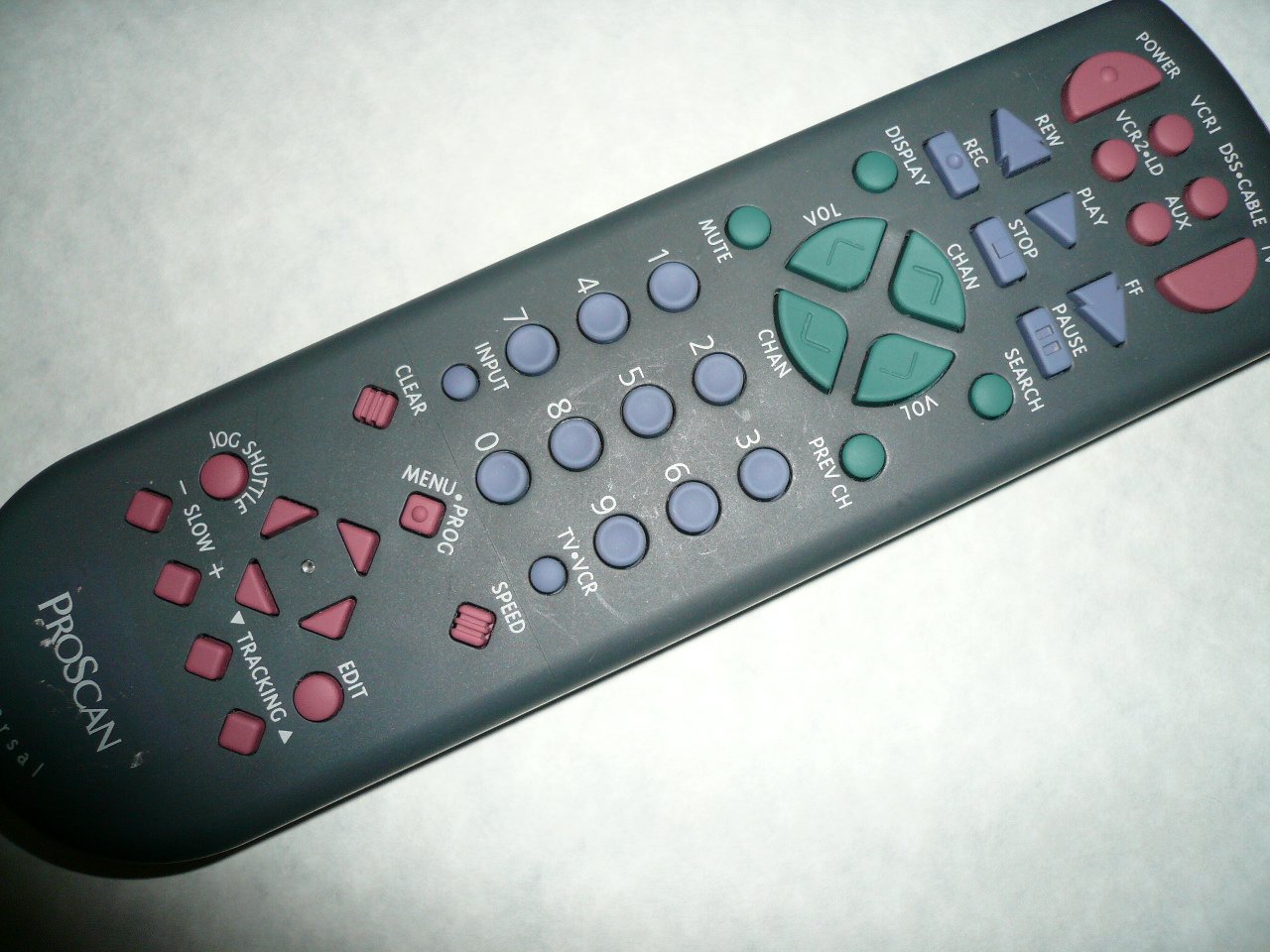
An image showing the Proscan CRK83X PSVR82 TV Remote Control, highlighting its ergonomic design and button layout. The remote is dark gray with purple and teal buttons, clearly labeled for various functions.
Disetél
1. Pamasangan batré
- Teangan tempat panutup kompartemen batré dina tonggong kadali jauh.
- Geser panutup ka handap atawa pencét kancing pikeun mukakeunana.
- Selapkeun dua (2) batré AAA (teu kaasup), mastikeun terminal positif (+) jeung négatip (-) align bener jeung markings jero kompartemen nu.
- Ganti panutup kompartemen batré ku cara ngageser deui kana tempatna nepi ka klik aman.
2. Pamakéan awal
The Proscan CRK83X PSVR82 remote control is typically pre-programmed for compatible Proscan TV and VCR models. No complex programming steps are usually required for initial use with supported devices. Simply point the remote at your device and press the desired function button.
This remote is compatible with a wide range of models, including but not limited to: P5VR74, PAVR57, PCVR72, PRVR71, PSDR72, PSDR73, PSNKVSR72, PSNPSVR57, PSNPSVR65, PSNPSVR70, PSNPSVR71, PSNPSVR72, PSNPSVR73, PSNPSVR74, PSNPSVRR73, PSNR65, PSNVR74, PSRV65, PSRV71, PSRV72, PSRV74, PSRVR65, PSRVR71, PSUR70, PSUR72, PSV174, PSV65, PSV71, PSV72, PSVDR73, PSVER72, PSVH57, PSVP71, PSVR22, PSVR27, PSVR57, PSVR61, PSVR62, PSVR65, PSVR72L, PSVR72VCR, PSVR75, PSVR79, PSVR83, PSVT73, PSVV73, PSZR65, PSZR71, PSZR73, PVSR73, R65, RCU800, RSVR73, SPVR65, SSVR62, VR653HF, VR730, VR730HF.
Parentah Operasi
Familiarize yourself with the buttons and their functions for optimal control of your television and VCR.
| Ngaran Tombol | Fungsi |
|---|---|
| POWER | Turns the connected device (TV/VCR) on or off. |
| VCR1, DSS/CABLE, VCR2/LD, AUX | Selects the input source for the television or VCR. |
| BISA | Ngajempékeun atanapi nganonaktipkeun kaluaran audio. |
| VOL +/- | Nyaluyukeun tingkat volume ka luhur atanapi ka handap. |
| CHAN +/- | Ngarobah saluran kaluhur atanapi kahandap. |
| saméméhna CH | Switches to the previously viewsaluran ed. |
| TAMPILAN | Displays on-screen information such as channel number or time. |
| REC | Initiates recording on the VCR. |
| REW | Rewinds the tape during VCR playback. |
| ulin | Starts playback of a tape or disc. |
| FF | Fast forwards the tape during VCR playback. |
| EUREUN | Ngeureunkeun playback atanapi ngarékam. |
| Reureuh | Ngareureuhkeun playback atawa ngarékam. |
| Pilarian | Activates search function, typically for VCR content. |
| Nomer Pad (0-9) | Directly enters channel numbers or menu selections. |
| INPUT | Siklus ngaliwatan sumber input sadia. |
| JELAS | Clears entered numbers or menu selections. |
| MENU / PROG | Accesses the on-screen menu or programming functions. |
| TV-VCR | Toggles control between TV and VCR modes. |
| JOG SHUTTLE | Provides frame-by-frame or variable speed control for VCR playback. |
| Leuleus +/- | Adjusts slow-motion speed during VCR playback. |
| LAJU | Adjusts playback speed, typically for VCR. |
| TRACKING ▲/▼ | Adjusts the VCR tracking for optimal picture quality. |
| EDIT | Activates editing functions, typically for VCR. |
Pangropéa
Ngabersihkeun Remote
- Ngusap kadali jauh ku lawon lemes, garing.
- Keur kokotor bandel, rada dampen lawon ku cai atawa hampang, cleaner non-abrasive. Ulah menyemprot cleaner langsung kana remote.
- Ulah nganggo bahan kimia, pangleyur, atanapi bantalan beberesih anu kasar, sabab ieu tiasa ngaruksak permukaan atanapi komponén internal remote.
Ngagantian batré
Replace batteries when the remote's response becomes sluggish or it stops functioning. Refer to the "Battery Installation" section under Setup for detailed instructions.
Salawasna miceun batré anu parantos dianggo kalayan tanggung jawab numutkeun peraturan lokal.
Pamérésan masalah
| Masalah | Mungkin Cukang lantaranana / Solusi |
|---|---|
| Remote teu jalan. |
|
| Jauh dianggo intermittently. |
|
| Tombol-tombol tertentu teu ngaréspon. |
|
spésifikasi
- merek: PROSCAN
- model: CRK83X PSVR82
- Pabrikan: Proscan
- Alat anu cocog: Television (and various Proscan VCR models as listed in Setup section)
- Téknologi konektipitas: Infrabeureum
- Jenis Controller: Tombol Control
- Fitur husus: Desain ergonomis
- ASIN: B00P82T2LS
- Titimangsa munggaran sadia: 4 Nopémber 2014
Garansi sareng Rojongan
Specific warranty information for the Proscan CRK83X PSVR82 TV Remote Control is not provided in this manual. Please refer to the product packaging or contact your retailer for details regarding warranty coverage.
For further assistance or technical support, please contact the manufacturer or your point of purchase. No specific support contact details are available in this document.


