1. Bubuka
This manual provides essential instructions for the safe and efficient operation of your COTEK SP-1500-112 Pure Sine Wave Inverter. This device is designed to convert 12V DC battery power into stable 120V AC household power, making it suitable for a wide range of electronic devices, including sensitive equipment.
2. Émbaran Kasalametan
Mangga baca jeung ngarti sagala parentah kaamanan saméméh masang atawa operasi inverter nu. Gagalna nuturkeun parentah ieu bisa ngakibatkeun shock listrik, seuneu, atawa tatu serius.
Precautions Kasalametan Umum
- Ventilasi: Ensure the inverter is installed in a well-ventilated area to prevent overheating. Do not block ventilation openings.
- Uap: Ulah ngalaan inverter kana hujan, kalembaban, atanapi kalembaban anu kaleuleuwihi.
- Bahan anu gampang kaduruk: Keep the inverter away from flammable materials, gases, or liquids.
- Wiring: All wiring must comply with local and national electrical codes. Use appropriate gauge wiring for DC input and AC output connections.
- Grounding: The inverter must be properly grounded. Connect the chassis ground terminal to a reliable earth ground.
- Pegatkeun Daya: Always disconnect all power sources (DC input and AC output) before performing any maintenance or servicing.
- Personil anu mumpuni: Pamasangan sareng ngalayanan kedah dilakukeun ku tanaga anu mumpuni wungkul.

Image: Safety gear including a hard hat, safety glasses, and gloves, emphasizing the importance of personal protection during installation.

Image: A car battery, representing the DC power source for the inverter, highlighting the need for proper battery handling.
3. Fitur Produk
The COTEK SP-1500-112 Inverter offers the following key features:
- Output gelombang sinus murni pikeun éléktronika sénsitip.
- Power ON / OFF kamampuhan kadali jauh (Terminal Héjo).
- Input & output fully isolated for enhanced safety.
- Temperature & load controlled cooling fan for efficient operation.
- panganteur ramah-pamaké.
- Kandang Aluminium Jero Rohangan Tipe 1 pikeun daya tahan.
4. Produk Langkungview

Gambar: Angled view of the COTEK SP-1500-112 Pure Sine Wave Inverter, showcasing its blue and gray casing.
Panel hareup
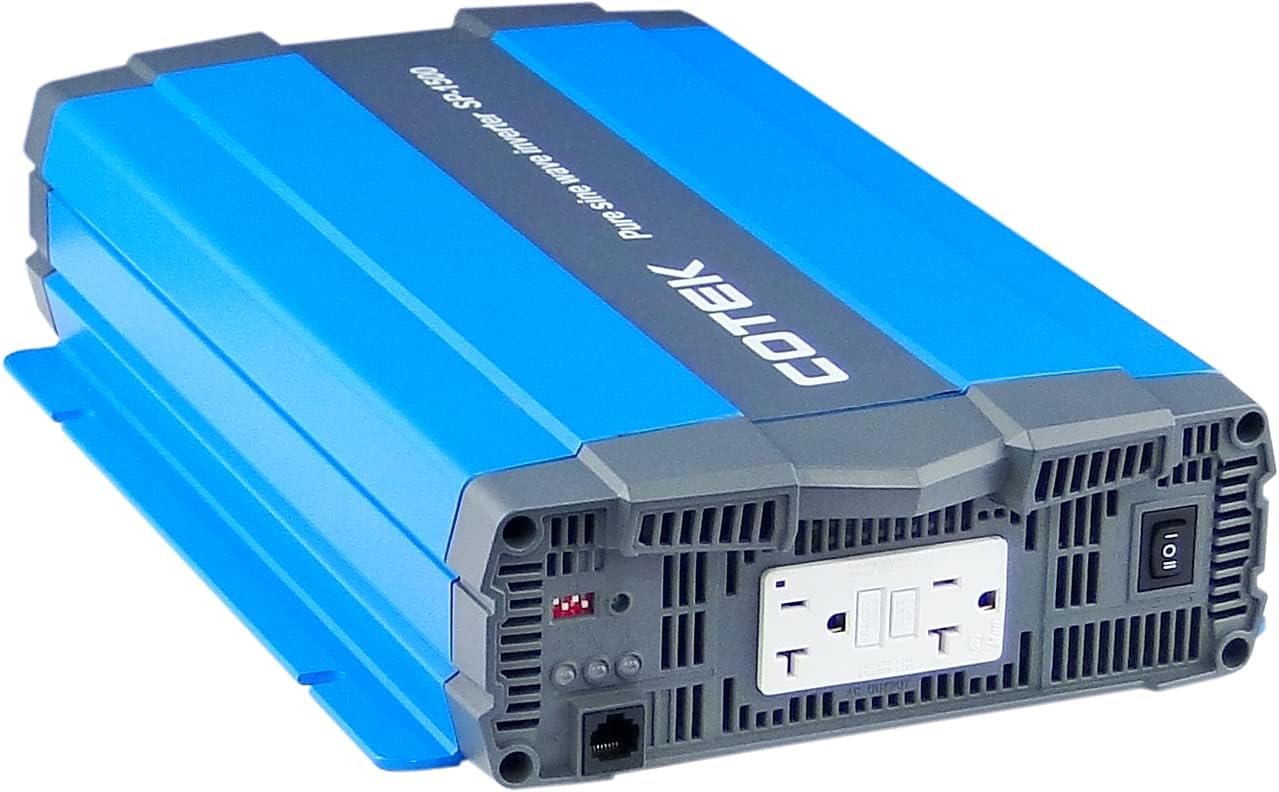
Gambar: Hareupeun view of the COTEK SP-1500-112 Pure Sine Wave Inverter, showing the dual GFCI AC output receptacles, power switch, and indicator lights.
Panel tukang

Gambar: Tukangeun view of the COTEK SP-1500-112 Pure Sine Wave Inverter, displaying the DC input terminals, chassis ground connection, and remote control port.
Samping View

Gambar: Sisi view of the COTEK SP-1500-112 Pure Sine Wave Inverter, highlighting the cooling fins and robust aluminum enclosure.
5. Instalasi jeung Setup
Proper installation is crucial for the safe and reliable operation of your inverter.
Pamasangan
- Choose a dry, cool, and well-ventilated location.
- Pasang inverter kalayan pageuh kana permukaan anu stabil.
- Ensure there is adequate clearance around the inverter for proper airflow and cooling.
Wiring
- Sambungan Input DC: Connect the DC input cables from your 12V battery bank to the inverter's DC input terminals. Ensure correct polarity (positive to positive, negative to negative) and secure connections. Use appropriately sized cables to minimize voltage teundeun.
- Taneuh Chassis: Connect the inverter's chassis ground terminal to a reliable earth ground or vehicle chassis using a suitable ground wire.
- Sambungan Kaluaran AC: Plug your AC loads directly into the inverter's AC output receptacles. Ensure the total wattage of your connected devices does not exceed the inverter's continuous power rating.
Remote Control (Opsional)
If using a remote control, connect it to the designated remote control port on the inverter. Refer to the remote control's specific instructions for setup and operation.
6. Operasi
Follow these steps for basic operation of your COTEK SP-1500-112 Inverter.
Ngahurungkeun/Pareuman
- To turn on the inverter, press the power switch on the front panel to the 'ON' position. The power indicator light should illuminate.
- To turn off the inverter, press the power switch to the 'OFF' position.
- If using a remote control, use its power button to control the inverter.
Nyambungkeun Beban
Once the inverter is powered on, you can connect your AC devices to the output receptacles. Always ensure the total power consumption of your devices does not exceed the inverter's continuous power rating of 1500W.
Lampu Indikator
The inverter features indicator lights to provide status information:
- Indikator kakuatan: Illuminates when the inverter is operating normally.
- Fault/Warning Indicator: Illuminates or flashes to indicate a fault condition (e.g., overload, over-temperature, low battery voltage). Refer to the troubleshooting section for details.
7. Pangropéa
Pangropéa rutin ngabantosan mastikeun umur panjang sareng kinerja optimal inverter anjeun.
- beberesih: Bersihkeun bagian luar inverter sacara berkala nganggo lawon anu garing sareng lemes. Entong nganggo pembersih cair atanapi pelarut.
- Ventilasi: Ensure that all ventilation openings are free from dust, debris, or obstructions. The cooling fan should operate freely.
- Sambungan: Regularly check all DC input and AC output connections for tightness. Loose connections can cause overheating and poor performance.
- Pangropéa batré: Maintain your battery bank according to the battery manufacturer's recommendations.
8. Cara ngungkulan
Bagian ieu nyayogikeun solusi pikeun masalah umum anu anjeun tiasa pendak sareng inverter anjeun.
| Masalah | Mungkin Cukang lantaranana | Solusi |
|---|---|---|
| Inverter henteu hurung | Taya kakuatan input DC; batré low voltage; Loose DC connections; Blown DC fuse. | Pariksa sambungan batré jeung voltage; Ensure battery is charged; Inspect and replace DC fuse if necessary. |
| Taya kaluaran AC | Inverter in fault mode (overload, over-temperature, low voltage); AC output circuit breaker tripped. | Reduce AC load; Allow inverter to cool down; Recharge battery; Reset AC circuit breaker. |
| Overload warning/shutdown | Connected load exceeds inverter's rating. | Ngurangan total wattage of connected AC devices. |
| Over-temperature warning/shutdown | Ventilasi goréng; Suhu lingkungan luhur; Beban kaleuleuwihi. | Improve ventilation; Reduce ambient temperature; Reduce AC load. |
| batré low voltage peringatan / pareum | Batré voltage has dropped below safe operating level. | Recharge or replace the battery bank. |
9. Spésifikasi
Key technical specifications for the COTEK SP-1500-112 Pure Sine Wave Inverter:
| Spésifikasi | Nilai |
|---|---|
| Ngaran modél | SP-1500-112 |
| Wattage (Terus) | 1500 watt |
| Masukan Voltage | 12VDC |
| Kaluaran Voltage | 120VAC |
| Bentuk gelombang kaluaran | Galura murni |
| Item Beurat | 11.76 pon |
| Ukuran Paket | 19.02 x 11.97 x 5.91 inci |
| Sumber Daya | Batré Powered |
| Dianjurkeun Mangpaat | Kandaraan |

Image: Detailed specifications sheet for the COTEK SP-1500 series inverters, showing electrical parameters, environmental ratings, and certifications.

Image: Mechanical drawings and dimensions of the COTEK SP-1500 series inverter, useful for installation planning.
10. Aplikasi
The COTEK SP-1500-112 Pure Sine Wave Inverter is suitable for various applications requiring reliable AC power from a DC source.

Image: Mobile homes or an RV park at dusk, illustrating typical off-grid or mobile power applications for the inverter.

Image: A glowing lightbulb, symbolizing energy and power solutions provided by the inverter for various electrical needs.
11. Émbaran jaminan
The COTEK SP-1500-112 Pure Sine Wave Inverter is covered by a 2-taun jaminan produsén urang. This warranty covers defects in materials and workmanship under normal use. Please retain your proof of purchase. For full terms and conditions, refer to the warranty card included with your product or visit the official COTEK websitus.
12. Rojongan Palanggan
For technical assistance, troubleshooting guidance, or service inquiries regarding your COTEK SP-1500-112 Inverter, please contact COTEK customer support. You can typically find contact information, including phone numbers and email addresses, on the official COTEK websitus atanapi dina bungkusan produk.
When contacting support, please have your product model number (SP-1500-112) and purchase date available.


