Bubuka
This manual provides comprehensive instructions for the setup, operation, maintenance, and troubleshooting of your Midland T10 X-TALKER Two-Way Radios. These radios offer reliable communication with 22 FRS channels and 38 privacy codes, along with NOAA Weather Alert capabilities, making them suitable for various outdoor activities and general use.
Naon dina Box
Your Midland T10 X-TALKER package includes the following items:
- Two (2) Midland T10 X-TALKER Two-Way Radios
- Two (2) Belt Clips
- Hiji (1) Buku Panduan pikeun nu boga

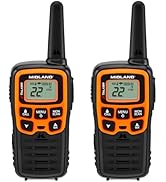
Katerangan Gambar: A luhur-handap view of the package contents, showing two black Midland X-TALKER radios, two black belt clips, and an owner's manual, all neatly arranged.
Fitur Langkungview
The Midland T10 X-TALKER radios are designed for clear and efficient communication with several key features:
- 22 FRS Channels: Provides a wide range of communication options.
- 38 CTCSS Privacy Codes: Enhances communication privacy by filtering out unwanted transmissions.
- Pindai Cuaca NOAA + Siaga: Automatically scans 10 weather band channels and alerts you to severe weather.
- eVOX (Easy Voice and Sound Activated Transmission): Allows for hands-free operation.
- Long Range Communication: Optimized for extended range in open areas.
- Desain kompak sareng ringan: Easy to carry and handle.
- Tampilan LCD Backlit: Nyayogikeun pisibilitas dina kaayaan cahaya anu handap.

Katerangan Gambar: A nutup-up view of the Midland T10 X-TALKER radio, with key features labeled: Push to Talk Button, Channel Display, VOX - Hands-Free Communication, Battery Meter, Menu, Scan, Silent Operation, and WX (Weather) button.
Disetél
Pamasangan batré
The Midland T10 radios are designed to operate with a rechargeable Li-ion battery (Model: BL-10C, 3.7V/1200mAh). To install the battery:
- Remove the belt clip by pinching the release tab and sliding the clip upwards.
- Buka panutup kompartemen batré anu aya di tukang radio.
- Insert the BL-10C Li-ion battery into the compartment, ensuring correct polarity.
- Replace the battery compartment cover and reattach the belt clip.
Ngecas Batré
To charge your Midland T10 radio:
- Locate the USB-C charging port on the side of the radio, protected by a rubber flap.
- Connect the provided USB-C charging cable to the radio's charging port.
- Sambungkeun tungtung kabel USB anu sanésna kana sumber daya USB anu cocog (contona, adaptor témbok, port USB komputer).
- Indikator batré dina tampilan LCD bakal nembongkeun status ngecas.
Katerangan Video: A user demonstrates how to remove the belt clip, open the battery compartment, insert the rechargeable Li-ion battery, and then connect the USB-C charging cable to the radio. The video also shows the battery specifications on the battery itself.
Operasi Dasar
Daya Hurung/Pareuman
To power on or off the radio, press and hold the MENU / POWER button located below the display.
Volume Control
Saluyukeun polumeu nganggo UP jeung TURUN arrow buttons. The current volume level will be displayed on the screen.
Pamilihan Saluran
Pikeun milih saluran:
- Pencét éta MENU tombol sakali. Nomer saluran bakal kedip-kedip.
- Ngagunakeun éta UP or TURUN tombol panah pikeun milih saluran anu dipikahoyong (1-22).
- Pencét éta MENU button again to confirm your selection, or wait a few seconds for the radio to automatically confirm.
Push-to-Talk (PTT)
Pikeun ngirimkeun, pencét jeung tahan tombol PTT button located on the left side of the radio. Speak clearly into the microphone. Release the PTT button to receive transmissions.
Fitur canggih
Kodeu Privasi (CTCSS)
The T10 radios feature 38 CTCSS (Continuous Tone Coded Squelch System) Privacy Codes to minimize interference from other users on the same channel. To set a privacy code:
- Pencét éta MENU tombol dua kali. Nomer kodeu privasi bakal hurung.
- Ngagunakeun éta UP or TURUN tombol panah pikeun milih kode privasi anu dipikahoyong (1-38).
- Pencét éta MENU button again to confirm, or wait for automatic confirmation.
Note: Both radios must be on the same channel and privacy code to communicate.
NOAA Cuaca Scan + Siaga
Stay informed about weather conditions with the NOAA Weather Scan and Alert feature:
- Weather Scan: Pencét jeung tahan tombol WX button to activate NOAA Weather Scan. The radio will automatically scan through 10 available weather (WX) band channels and lock onto the strongest weather channel.
- Waspada Cuaca: When activated, the NOAA Weather Alert will sound an alarm indicating a risk of severe weather in your area. NOAA Weather Radio also broadcasts AMBER alerts.
eVOX (Operasi Bebas Tangan)
The eVOX feature allows you to transmit without pressing the PTT button. The radio detects your voice and automatically transmits. Refer to the owner's manual for detailed eVOX sensitivity settings.
Rentang jeung Performance
The Midland T10 X-TALKER radios offer varying ranges depending on terrain and obstructions:
- No Obstruction: Up to 20 miles in open areas with clear line of sight.
- Partial Obstruction: 2-5 miles in areas with some trees or light buildings.
- Ngahalangan: Less than 1 mile in urban areas with heavy buildings or dense foliage.
Katerangan Gambar: A diagram showing three scenarios for radio range: 'No Obstruction' (up to 20 miles), 'Partial Obstruction' (2-5 miles with trees), and 'Obstructed' (less than 1 mile with city buildings). Actual distance may vary.
Katerangan Video: Hiji pintonan video produk resmicasing the Midland X-TALKER T10 walkie-talkie, highlighting its features and ease of use for various communication needs.
Pangropéa
To ensure optimal performance and longevity of your Midland T10 radios:
- beberesih: Ngagunakeun lemes, damp lawon pikeun ngabersihkeun bagian luar radio. Entong nganggo bahan kimia anu kasar atanapi pembersih anu abrasif.
- Perawatan batré: Fully charge batteries before extended storage. If storing for long periods, remove batteries.
- Panyimpenan: Simpen radio di tempat anu tiis, garing, sareng jauh tina suhu anu ekstrim sareng sinar panonpoé langsung.
- Tahan cai: The radios are water resistant. Avoid submerging them in water. Ensure the USB-C port cover is securely closed when not charging.
Pamérésan masalah
If you experience issues with your Midland T10 radios, try the following:
- Henteu aya kakuatan: Check battery charge level. Ensure batteries are correctly installed.
- Teu tiasa ngirim/nampi: Verify both radios are on the same channel and privacy code. Ensure the PTT button is fully pressed when transmitting. Check for obstructions if range is limited.
- Static/Poor Audio: Move to an area with fewer obstructions. Adjust volume. Try a different channel.
- Keypad Dikonci: If the keypad is locked, press and hold the lock button (usually the MENU button) until the lock icon disappears from the display.
spésifikasi
| Item Beurat | 2.7 ons |
| Dimensi produk | 2 x 1.2 x 5.5 inci |
| Nomer Modél Item | T10 |
| Jenis Batré | Rechargeable Li-ion (BL-10C, 3.7V/1200mAh) |
| Jumlah Saluran | 22 |
| Rentang Frékuénsi | 400-512 MHz |
| Ngawangkong Range Maximum | 20 Miles (in optimal conditions) |
| Tingkat Résistansi Cai | Tahan cai |
| Produsén | Midland |
Garansi sareng Rojongan
The Midland T10 X-TALKER Two-Way Radios come with a Three Year Warranty. For warranty claims, technical support, or additional information, please refer to the contact details provided in your owner's manual or visit the official Midland websitus.


