Bubuka
The Logitech UE Boom is a 360-degree wireless Bluetooth speaker designed for portable audio. It features a durable, go-anywhere shape and is equipped with a water and stain resistant acoustic skin. This speaker allows for wireless music playback, phone calls, and can be paired with another UE Boom for stereo sound.

Gambar: Hareupeun view of the Logitech UE Boom Wireless Bluetooth Speaker in Northern Light color.
Fitur konci
- Sora 360-Gelar: Nyayogikeun audio anu pikaresepeun ka sadaya arah.
- Desain portabel: Versatile, cylindrical shape for easy transport.
- Tahan Cai sareng Noda: Features a colorful acoustic skin with plasma coating for durability against water and stains.
- Konéktipitas nirkabel: Connects via Bluetooth from up to 50 feet away. Easy pairing via NFC for compatible devices.
- Fitur Ganda: Wirelessly connect two UE BOOM speakers in stereo using the UE BOOM app for enhanced sound.
- Hirup batré anu panjang: Rechargeable battery provides up to 15 hours of playback.
- Speakerphone: Integrated crystal-clear speakerphone for calls.
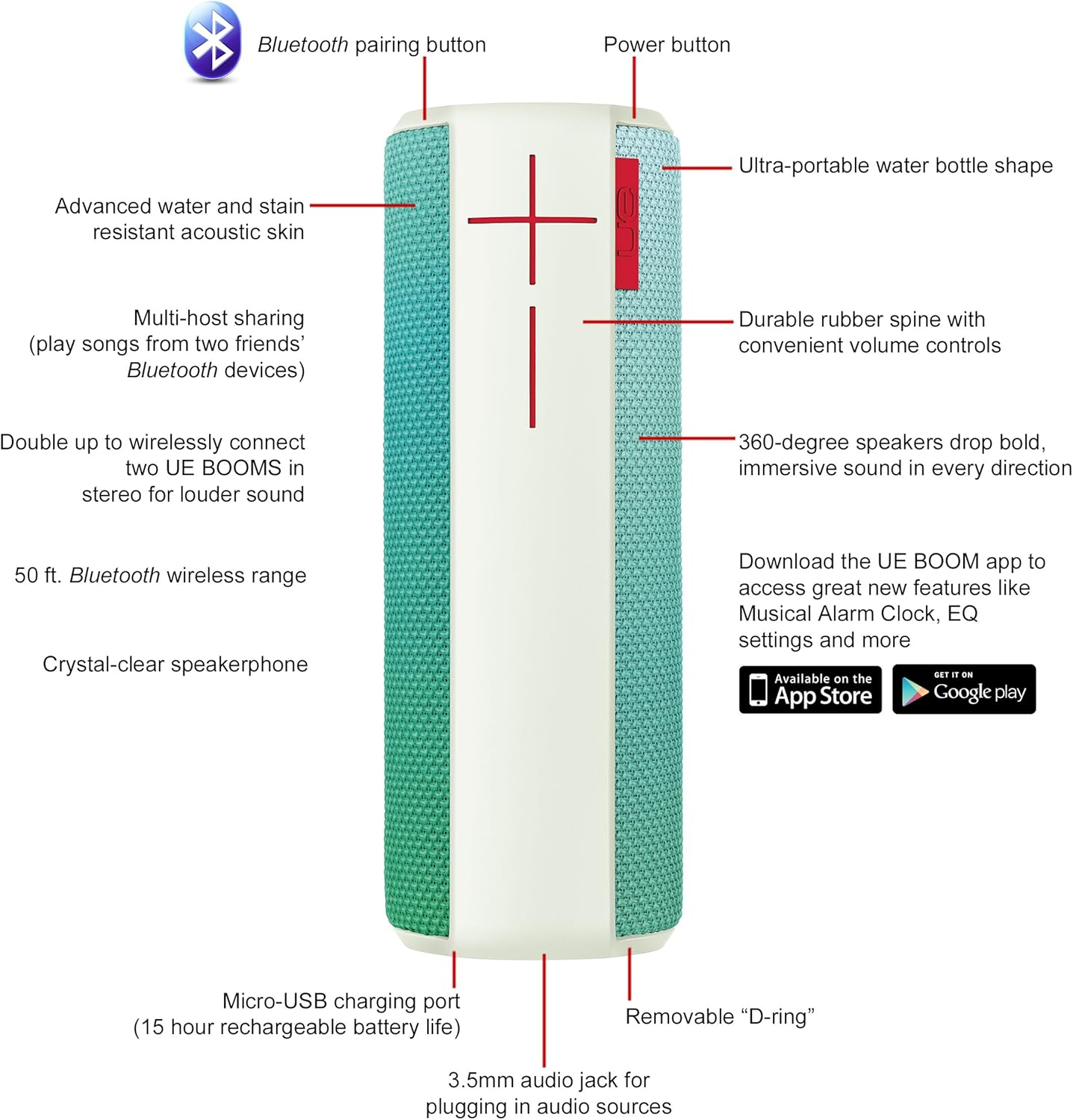
Image: Diagram highlighting key features and controls of the UE Boom speaker, including Bluetooth pairing button, power button, volume controls, micro-USB charging port, and 3.5mm audio jack.
Disetél
Ngecas Speaker
Before initial use, fully charge your UE Boom speaker. Connect the provided micro-USB cable to the charging port located at the bottom of the speaker and plug the other end into a USB power source. The speaker's battery provides approximately 15 hours of playback on a full charge.
Papasangan Bluetooth
- Power on your UE Boom speaker by pressing the power button.
- Press and hold the Bluetooth pairing button (usually indicated by a Bluetooth icon) until you hear an audible tone and the LED indicator flashes rapidly.
- On your mobile device (smartphone or tablet), navigate to the Bluetooth settings.
- Select "UE Boom" from the list of available devices to pair.
- Once paired, you will hear a confirmation tone from the speaker.
For NFC-enabled devices, simply tap your device to the NFC area on the speaker for quick pairing.
Parentah Operasi
Kadali dasar
- Tombol Daya: Located on the top of the speaker to turn it on or off.
- Kontrol Volume: Large '+' and '-' buttons on the side of the speaker adjust the volume.
- Tombol Bluetooth: Mimitian mode papasangan Bluetooth.
Ngagunakeun Aplikasi UE BOOM
Download the official UE BOOM app from your device's app store (available on App Store and Google Play) to unlock additional features:
- Musical Alarm Clock: Wake up to your favorite music.
- Aktipkeun Jauh: Turn your speaker on/off from your device.
- Setélan EQ: Sesuaikeun sora profile kana karesep anjeun.
- Gandakeun: Connect two UE BOOM speakers for a stereo sound experience.
Fungsi Speakerphone
When connected to a smartphone, the UE Boom can be used as a speakerphone. Incoming calls will be routed through the speaker, allowing for hands-free communication.
Pangropéa
The UE Boom speaker features a water and stain resistant acoustic skin. To clean, gently wipe the speaker with a damp cloth. Avoid using harsh chemicals or abrasive cleaners. Ensure all ports are dry before charging or connecting other devices.
Pamérésan masalah
- Henteu aya kakuatan: Ensure the speaker is charged. Connect it to a power source using the micro-USB cable.
- Teu Bisa Masangkeun via Bluetooth:
- Pastikeun spiker aya dina mode papasangan (LED kedip-kedip).
- Pariksa yen Bluetooth diaktipkeun dina alat Anjeun.
- Pindahkeun alat anjeun langkung caket kana spiker (dina jarak 50 kaki).
- Coba cabut pasangan sareng pasangkeun deui alat.
- Volume Lemah atanapi Sora Terdistorsi:
- Saluyukeun polumeu dina speaker sareng alat Anjeun nu disambungkeun.
- Pastikeun spéker dicas pinuh.
- Check for any obstructions around the speaker.
- App Teu Nyambung: Ensure the speaker is powered on and connected via Bluetooth to your device. Update the app to the latest version.
Spésifikasi produk
| Ngaran modél | Logitech UE Boom Wireless Bluetooth Speaker |
| Nomer modél | 980-001023 |
| merek | Logitech |
| Warna | Northern Light |
| Tipe Speaker | Luar |
| Téhnologi konektipitas | Bluetooth, Nirkabel |
| Range nirkabel | Nepi ka 50 suku (15.24 méter) |
| Sumber Daya | Batré Powered (1 batré Litium Ion kaasup) |
| Rata Kahirupan Batré | 15 Jam |
| Tingkat Résistansi Cai | Tahan cai |
| Item Beurat | 2.2 pon |
| Ukuran produk (L x W x H) | 2.6 x 2.6 x 7.1 inci |
| Bahan | palastik |
| UPC | 097855112125 |
Video Produk Resmi
Video: Hiji leuwihview of the Logitech UE Boom speaker's features, including 360-degree sound, water resistance, wireless connectivity, and the ability to pair two speakers for louder sound. This video demonstrates the speaker's durability and portability in various environments.
Garansi sareng Rojongan
The Logitech UE Boom Wireless Bluetooth Speaker comes with a Limited Warranty. For specific warranty details, please refer to the documentation included with your product or visit the official Logitech websitus.
For technical support or customer service, you may contact Logitech at: 646-454-3200.


