1. Bubuka
This manual provides comprehensive instructions for the safe and efficient operation, setup, and maintenance of your Sealey SDH70 Industrial Dehumidifier. Please read this manual thoroughly before operating the unit and retain it for future reference. The Sealey SDH70 is designed for professional use in various industrial and commercial environments to effectively control humidity levels.
2. Parentah Kasalametan
Salawasna perhatikeun pancegahan kaamanan di handap ieu pikeun ngirangan résiko kahuruan, kejutan listrik, atanapi tatu.
- Pastikeun catu daya cocog sareng voltage anu ditangtukeun dina labél rating dehumidifier.
- Do not operate the unit with a damaged power cord or plug. Contact qualified service personnel for repair.
- Place the dehumidifier on a stable, level surface to prevent tipping.
- Maintain adequate clearance around the unit for proper airflow (at least 20 cm from walls or other objects).
- Ulah ngasupkeun barang kana kisi-kisi asupan atanapi kaluarna hawa.
- Cabut colokan unit sateuacan ngabersihkeun, ngalaksanakeun pangropéa, atanapi mindahkeun éta.
- Alat ieu henteu dimaksudkeun pikeun dianggo ku jalma (kalebet murangkalih) anu ngirangan kamampuan fisik, indrawi atanapi mental, atanapi kirang pangalaman sareng pangaweruh, kecuali aranjeunna dipasihan pangawasan atanapi petunjuk ngeunaan panggunaan alat ku jalma anu tanggung jawab kana kasalametanana.
- Do not use the dehumidifier in areas where flammable liquids or gases are stored.
- Unit ieu ngandung refrigeran R290. Perawatan ngan kedah dilakukeun ku tanaga anu mumpuni.
3. Produk Langkungview
Familiarize yourself with the components of your Sealey SDH70 Industrial Dehumidifier.

Gambar 3.1: Pahareup-hareup view of the Sealey SDH70 Industrial Dehumidifier. This image shows the robust red and black casing, the control panel on the side, and the durable wheels for portability.
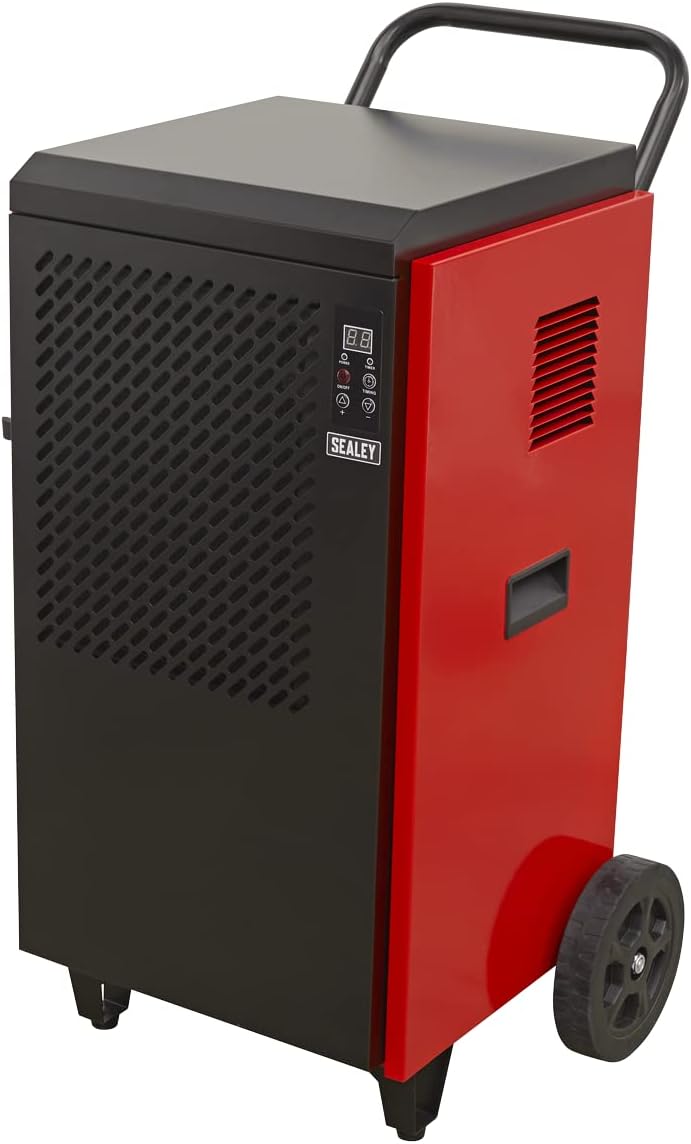
Gambar 3.2: Samping view of the dehumidifier, highlighting the continuous drainage hose connection point at the bottom. The hose allows for direct water removal without manual emptying.

Gambar 3.3: Diwincik view of the digital control panel. It features a digital display for humidity readings, power button, full tank indicator, timer indicator, and up/down buttons for setting desired humidity levels and timer functions.
4. Setélan
- Ngabongkar bungkusan: Carefully remove the dehumidifier from its packaging. Inspect for any shipping damage. Retain packaging for future transport or storage.
- panempatan: Position the unit on a firm, level surface in the area requiring dehumidification. Ensure there is at least 20 cm (8 inches) of clear space around all sides of the unit to allow for proper air circulation. Do not block the air inlet or outlet.
- Setup drainase: The SDH70 is designed for continuous drainage. Connect the provided drainage hose to the drainage outlet at the bottom of the unit. Route the hose to a suitable drain or collection container, ensuring it is sloped downwards to allow gravity flow. Ensure the hose is not kinked or blocked.
- Sambungan Daya: Colokkeun kabel listrik kana stop kontak listrik grounded anu cocog sareng voltage syarat unit.
5. Parentah Operasi
- Hurungkeun/Pareuman: Pencét éta POWER button on the control panel to turn the unit on or off. The digital display will illuminate.
- Setel kalembaban anu dipikahoyong:
- When the unit is running, the display shows the current room humidity.
- Pencét éta UP (▲) atawa TURUN (▼) buttons to adjust the desired humidity level. The setting range is typically between 30% and 90% Relative Humidity (RH).
- The unit will operate until the set humidity level is reached, then cycle off. It will restart automatically if the humidity rises above the set level.
- Fungsi Timer:
- Pencét éta WAKTU button to set the auto-off timer. Each press increases the timer by one hour, up to 24 hours.
- The unit will automatically shut off after the set number of hours.
- Pikeun ngabolaykeun timer, pencét tombol WAKTU button until "00" is displayed.
- Operasi kontinyu: For continuous dehumidification, set the desired humidity level to the lowest possible setting (e.g., 30% RH). The unit will run continuously, provided the drainage hose is properly set up.
6. Pangropéa
Pangropéa rutin ngajamin kinerja optimal sareng manjangkeun umur dehumidifier anjeun.
- Ngabersihan Saringan Udara:

Gambar 6.1: Demonstrates the removal of the washable air filter from the side of the dehumidifier for cleaning.
- The air filter should be cleaned every two weeks or more frequently depending on the operating environment.
- Unplug the unit before attempting to clean the filter.
- Locate the air filter access panel (typically on the side or rear). Remove the filter.
- Kumbah saringan ku cai haneut nu dicampur sabun. Bilas tuntas teras antepkeun nepi ka garing sagemblengna sateuacan dipasang deui. Ulah nganggo mesin cuci piring.
- A clean filter ensures efficient operation and prevents dust buildup inside the unit.
- Ngabersihan Luar: Ngusap bagian luar unit kalayan lemes, damp lawon. Ulah make bahan kimia kasar, abrasives, atawa pangleyur.
- Panyimpenan: If storing the unit for an extended period, ensure it is clean and dry. Coil the power cord neatly. Store in a cool, dry place, preferably in its original packaging.
7. Cara ngungkulan
Sateuacan ngahubungi dukungan palanggan, tingali tabel di handap ieu pikeun masalah umum sareng solusina.
| Masalah | Mungkin Cukang lantaranana | Solusi |
|---|---|---|
| Unit teu hurung. | Teu aya catu daya; Kabel listrik leupas; Pemutus sirkuit pareum. | Pariksa stop kontak; Pastikeun kabel daya dipasang pageuh; Setel deui pemutus sirkuit. |
| Dehumidifier teu ngumpulkeun cai. | Humidity setting too high; Room temperature too low; Air filter clogged; Drainage hose kinked/blocked. | Lower humidity setting; Ensure room temperature is above 5°C (41°F); Clean air filter; Check drainage hose for obstructions. |
| Unit ribut. | Unit not level; Air filter clogged; Internal components loose. | Place on a level surface; Clean air filter; If noise persists, contact service. |
| Aliran hawa lemah. | Air filter clogged; Air inlet/outlet blocked. | Clean air filter; Ensure no obstructions around air vents. |
8. Spésifikasi
Technical specifications for the Sealey SDH70 Industrial Dehumidifier.
| Fitur | Rincian |
|---|---|
| merek | Sealey |
| Nomer modél | SDH70 |
| Warna | Beureum |
| Ukuran produk (L x W x H) | 49 x 60 x 105 cm |
| Item Beurat | 46.7 kg |
| Kapasitas | 70 Litres (dehumidification capacity per day) |
| Refrigerant | R290 (Ramah lingkungan) |

Gambar 8.1: The R290 Eco Friendly logo, indicating the type of refrigerant used in the SDH70 dehumidifier.
9. Garansi jeung Rojongan
Your Sealey SDH70 Industrial Dehumidifier comes with a manufacturer's warranty.

Gambar 9.1: Sealey 1 Year Guarantee logo, indicating the product warranty.
Sealey products are manufactured to a high standard and are guaranteed for 1 year from the date of purchase against manufacturing defects. This guarantee is subject to the terms and conditions available on the official Sealey website or from your retailer.
For technical support, spare parts, or warranty claims, please contact your authorized Sealey dealer or visit the official Sealey website for contact information. When contacting support, please have your model number (SDH70) and purchase details ready.