1. Bubuka
The Hiditec GX12 Gaming Mouse is designed for an optimal gaming experience, featuring a comfortable ergonomic design, vibrant RGB lighting, and a high-precision optical sensor. This manual provides detailed instructions for setting up, operating, maintaining, and troubleshooting your GX12 mouse to ensure peak performance.

Gambar 1: Hareupeun view of the Hiditec GX12 Gaming Mouse showcasing its dynamic RGB lighting.
2. Eusi Paket
- Hiditec GX12 Gaming Mouse
- Manual pangguna (dokumén ieu)

Figure 2: The retail packaging for the Hiditec GX12 Gaming Mouse, highlighting key features.
3. Setélan
3.1 Nyambungkeun Mouse
- Locate an available USB port on your computer or compatible gaming console (e.g., XBOX ONE, PS4).
- Insert the USB connector of the GX12 mouse firmly into the USB port.
- The mouse will automatically be recognized by your operating system (Windows, Mac, etc.) and the RGB lighting will illuminate.
3.2 Pamasangan Parangkat Lunak (Opsional)
To unlock the full customization capabilities of your GX12 mouse, including macro programming and button remapping, it is recommended to install the official Hiditec software.
- Visit the official Hiditec websitus (hiditec.com/en/downloads).
- Navigate to the "Gaming Mice" category and select "GX12".
- Download the "Software GX12 V1.0" (a .zip file).
- Ékstrak eusi .zip file and run the executable (.exe) installer.
- Turutan pitunjuk dina layar pikeun ngarengsekeun pamasangan parangkat lunak.
Catetan: The software is primarily designed for Windows operating systems. Functionality on macOS may be limited to basic plug-and-play.
4. Parentah Operasi
4.1 Fungsi Tombol
The GX12 mouse features 5 programmable buttons and a scroll wheel for versatile control.
| Tombol | Fungsi standar | Katerangan |
|---|---|---|
| Klik Kénca | Primary Click | Pilihan standar sareng aktivasina. |
| Klik katuhu | Secondary Click | Context menu or alternative action. |
| Gulung kabayang | Scroll / Middle Click | Scrolls content vertically. Pressing acts as middle click. |
| Tombol DPI | Daur DPI | Cycles through 4 preset DPI levels (1000/1300/1600/2400). |
| Side Buttons (2) | Maju / mundur | Navigates forward/backward in web browser atawa file explorers. Programmable via software. |

Gambar 3: Sisi view of the GX12 mouse, illustrating the ergonomic design and side button placement.
4.2 Nyaluyukeun DPI (Sensitivitas)
The GX12 mouse allows for on-the-fly DPI adjustment. Press the dedicated DPI button (usually located behind the scroll wheel) to cycle through the available sensitivity settings: 1000, 1300, 1600, and 2400 DPI. Each change will typically be indicated by a subtle shift in the RGB lighting pattern or color.
4.3 Customizing with Software
The Hiditec GX12 software provides advanced customization options:
- Tugas Button: Remap any of the 5 buttons to perform specific actions, keyboard shortcuts, or macros.
- Editor Makro: Create complex sequences of commands (macros) and assign them to buttons for quick execution in games or applications.
- Setélan DPI: Sempurnakeun tingkat DPI sareng jieun pro khususfiles.
- Pangaruh cahaya: While the mouse automatically cycles through six colors, the software may offer additional control over lighting modes or brightness.
5. Fitur Leuwihview
- Beurit Kaulinan Profesional: Designed by Hiditec, a leading Spanish manufacturer of gaming peripherals, offering a configurable experience.
- Sensor Optik Presisi Tinggi: Equipped with a 2400 DPI optical sensor, adjustable across four levels for precise and responsive tracking.
- Omron Technology Buttons: Features Omron switches for superior durability, rated for over 10 million clicks, ensuring long-lasting performance and fast response times.
- Desain ergonomis: The comfortable design perfectly adapts to your hand, allowing for agile movement during extended gaming sessions.
- Lampu RGB Dinamis: Automatically cycles through six vibrant colors, providing an immersive aesthetic without manual configuration.
- Tombol anu tiasa diprogram: Five buttons, including the scroll wheel, can be customized via the dedicated software to suit your gaming and productivity needs.
- Low-Friction Base Pads: Durable base pads ensure smooth gliding and precise mouse movements.
- Kasaluyuan lega: Compatible with PC, laptops, and various digital video devices including XBOX ONE and PS4 via USB connection.

Gambar 4: Lain view of the GX12 mouse, emphasizing its ergonomic contours and integrated lighting.
6. Pangropéa
Proper maintenance will extend the lifespan of your Hiditec GX12 Gaming Mouse.
- beberesih: Anggo lawon anu garing sareng lemes pikeun ngusap permukaan beurit. Keur kokotor bandel, rada dampBilas lawon ku cai atanapi pembersih éléktronik anu hampang. Hindarkeun bahan kimia anu keras atanapi bahan anu abrasif.
- Sensor beberesih: Sakapeung, lebu atawa kokotor bisa ngumpul di sabudeureun sénsor optik di handapeun beurit. Anggo kapas atawa hawa anu dikomprés pikeun ngabersihkeun daérah sénsor sacara saksama.
- Perawatan kabel: Hindarkeun tikungan seukeut atawa tarik kaleuleuwihan dina kabel USB pikeun nyegah karuksakan.
- Panyimpenan: Lamun teu dipaké pikeun période nambahan, nyimpen beurit dina bersih, lingkungan garing jauh ti sinar panonpoé langsung jeung suhu ekstrim.
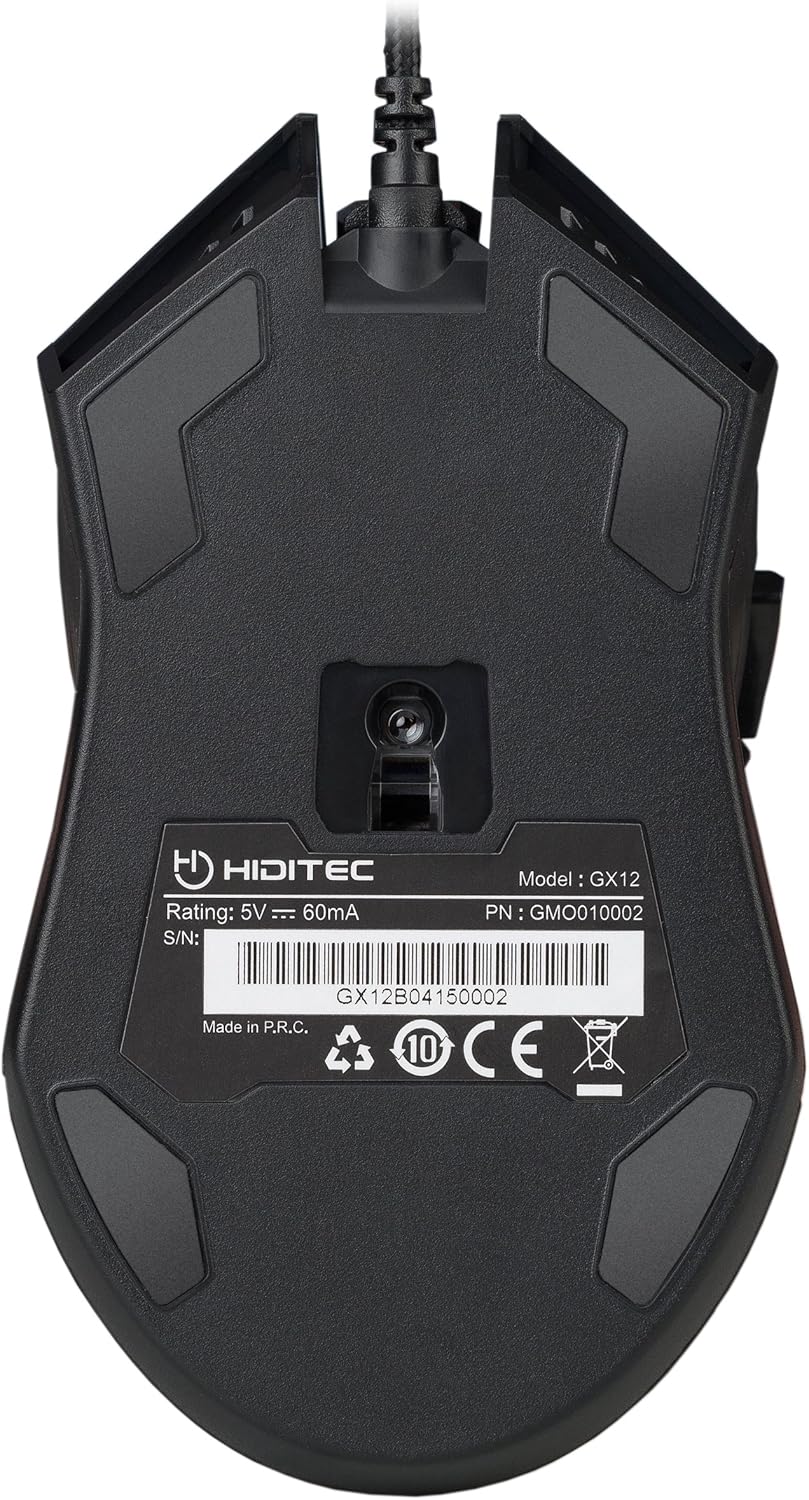
Figure 5: The underside of the GX12 mouse, showing the optical sensor and product information.
7. Cara ngungkulan
If you encounter issues with your GX12 mouse, refer to the following common problems and solutions:
| Masalah | Mungkin Cukang lantaranana | Solusi |
|---|---|---|
| Beurit teu ngabales | Sambungan USB leupas, port USB lepat, masalah supir. |
|
| Inaccurate tracking / Cursor erratic | Dirty optical sensor, unsuitable surface, software settings. |
|
| Lampu RGB teu jalan | Power issue, software conflict. |
|
| Tombol teu ngabales | Konflik parangkat lunak, karusakan fisik. |
|
8. Spésifikasi
| Fitur | Rincian |
|---|---|
| merek | Hiditec |
| Ngaran modél | GX12 |
| Nomer Modél Item | GMO010002 |
| Téhnologi konektipitas | USB (Kabel) |
| Téhnologi Deteksi Gerakan | Optik |
| Tingkat DPI | 1000 / 1300 / 1600 / 2400 DPI |
| Jumlah Kancing | 5 |
| Button Durability | Omron switches, 10 Million Clicks |
| Orientasi leungeun | Right-Handed |
| Dimensi produk | 12.43 x 7.19 x 4.13 cm (approx. 13 cm x 7 cm) |
| Item Beurat | 130 g |
| Sumber Daya | Kabel Listrik (USB) |
| Alat nu cocog | PC, Laptops, XBOX ONE, PS4 |
| Kasaluyuan System Operasi | Windows, Mac (basic functionality) |
9. Garansi jeung Rojongan
9.1 Émbaran jaminan
Hiditec provides a garansi dua taun on the GX12 Gaming Mouse from the date of purchase. This warranty covers manufacturing defects and ensures the product meets its specified performance. Please retain your proof of purchase for warranty claims.
9.2 Rojongan Palanggan
For any questions, technical assistance, or warranty claims, please contact Hiditec customer support. You can reach our specialized team through the Amazon messaging system or by visiting our official website for contact details. Our team is ready to assist you with any product-related inquiries.


