Bubuka
Thank you for choosing the Technoline WT 745 Radio Controlled Alarm Clock. This digital alarm clock features precise timekeeping, dual alarms with snooze, date and weekday display, and indoor temperature monitoring. Please read this manual carefully to ensure proper setup and operation.
Eusi pakét
- Technoline WT 745 Radio Controlled Alarm Clock
- Manual pamaké
Catetan: Diperlukeun batré 2x AAA sareng henteu kalebet.
Produk Leuwihview
Familiarize yourself with the main components of your WT 745 alarm clock.
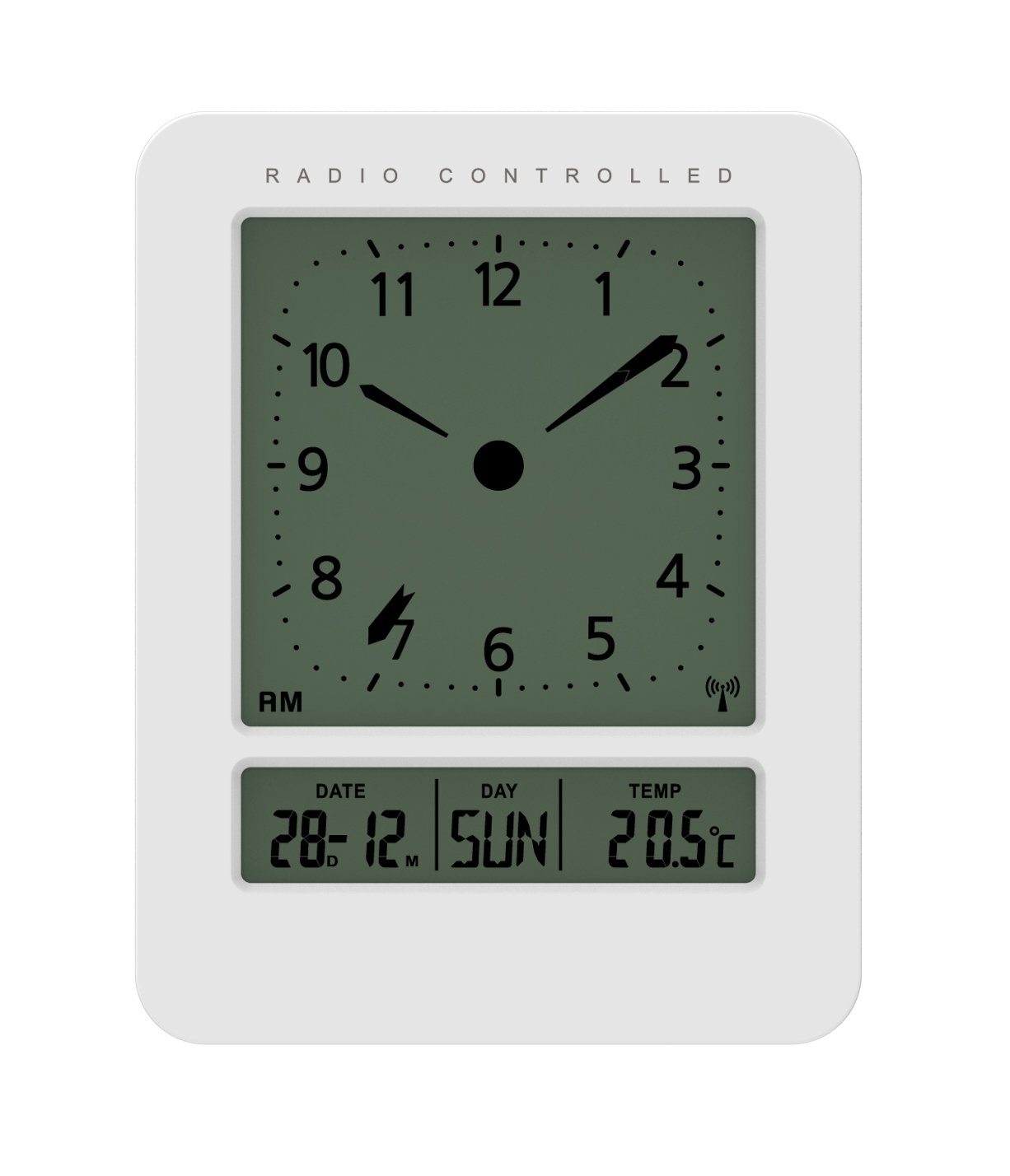
Gambar: Hareup jeung samping view of the Technoline WT 745 Radio Controlled Alarm Clock, showing the digital display with time, date, day, and temperature, and the analog clock face. The clock is white with a light grey display.
- Analog Clock Face: Displays current time with hour, minute, and second hands.
- Digital tampilan: Shows date, day of the week, and indoor temperature.
- Radio Controlled Indicator: Symbol indicating successful radio signal reception.
- Tombol kontrol: Buttons for setting time, alarm, and other functions, typically located on the back or side.
- Kompartemen batré: Located on the back for 2x AAA batteries.
Disetél
1. Nyelapkeun Batré
- Open the battery compartment cover on the back of the alarm clock.
- Insert 2 new AAA batteries, observing the correct polarity (+/-).
- Tutup panutup kompartemen batré aman.
Note: The clock will automatically start searching for the radio time signal after battery insertion. This process may take several minutes.
2. Initial Radio Signal Reception
- Place the clock near a window for optimal signal reception.
- Avoid placing it near electronic devices that may cause interference.
- Once the signal is received, the time, date, and day will be automatically set. The radio controlled indicator will appear on the display.
If the signal is not received within 10 minutes, try repositioning the clock or manually setting the time (see "Manual Time Setting").
Parentah Operasi
Nyetel Alarm
- Pencét éta SET ALARM button (location not specified, assume standard placement). The alarm time will flash.
- Ngagunakeun éta UP or TURUN tombol pikeun nyaluyukeun jam.
- Pencét SET ALARM again to confirm the hour and move to minutes.
- Ngagunakeun éta UP or TURUN tombol pikeun nyaluyukeun menit.
- Pencét SET ALARM pikeun ngahemat waktos alarm.
- Pikeun ngaktipkeun/nganonaktipkeun alarm, pencét tombol ALARM Hurungkeun / Pareum kancing. Ikon alarem bakal muncul / ngaleungit dina tampilan.
The WT 745 supports two independent alarms. Repeat the steps above to set the second alarm.
Fungsi Snooze
- Nalika alarm disada, pencét éta SNOOZE button (usually a large button on top). The alarm will pause for approximately 5 minutes and then sound again.
- To stop the alarm completely, press any other button (e.g., ALARM ON/OFF) or let it ring for its full duration.
Aktivasina Lampu Latar
- Pencét éta CAHAYA or SNOOZE button to temporarily illuminate the display for easy viewing dina kaayaan cahaya handap.
Viewing Date, Day, and Temperature
- The digital display continuously shows the current date, day of the week, and indoor temperature. No specific action is required to view ieu.
Manual Time Setting (if radio signal is unavailable)
- Pencét jeung tahan tombol WAKTU WAKTU button for a few seconds until the hour digits flash.
- Ngagunakeun éta UP or TURUN tombol pikeun nyaluyukeun jam.
- Pencét WAKTU WAKTU again to confirm the hour and move to minutes.
- Ngagunakeun éta UP or TURUN tombol pikeun nyaluyukeun menit.
- Terus pencét WAKTU WAKTU to cycle through and adjust year, month, and day as needed.
- Pencét WAKTU WAKTU one last time to exit manual setting mode.
Pangropéa
- beberesih: Lap jam ku lawon anu lemes sareng garing. Entong nganggo pembersih atanapi pelarut anu abrasif.
- Ngagantian batré: Replace batteries when the display dims or functions become erratic. Always replace both batteries simultaneously with new ones.
- Panyimpenan: Upami nyimpen jam kanggo waktos anu lami, cabut batréna pikeun nyegah bocor.
- Lingkungan: Jauhkeun jam tina sinar panonpoé langsung, suhu anu ekstrim, sareng kalembaban anu luhur.
Pamérésan masalah
| Masalah | Mungkin Cukang lantaranana | Solusi |
|---|---|---|
| Pintonan kosong atanapi taram. | Batré lemah atanapi teu leres diselapkeun. | Ganti batré ku batré AAA anyar, mastikeun polaritasna bener. |
| Clock does not receive radio signal. | Interference, poor location, or signal too weak. | Move the clock closer to a window, away from electronic devices. Try manual time setting. |
| Alarm teu disada. | Alarm henteu diaktipkeun atanapi henteu leres disetel. | Ensure the alarm icon is visible on the display. Recheck alarm time settings. |
| Lepat waktos dipintonkeun. | Radio signal lost or manual time set incorrectly. | Allow the clock to resynchronize with the radio signal. If persistent, manually set the time. |
spésifikasi
- model: WT 745
- merek: Technoline
- ukuran: 7.1 x 4.5 x 9.2 cm (L x W x H)
- beurat: 150 g
- Bahan: palastik
- Jenis tampilan: Digital with Analog Clock Face
- Sumber Daya: 2 x Batré AAA (teu kalebet)
- Fitur husus: Radio Controlled Time, Dual Alarms, Snooze Function, Date Display, Day of Week Display, Indoor Temperature Display, Backlight.
- Pamakéan: jero rohangan
Garansi sareng Rojongan
For warranty information or technical support, please refer to the warranty card included with your product or visit the official Technoline websitus. Simpen resi pameseran anjeun salaku bukti pameseran.
Resmi Websitus: www.technoline.eu


