1. Bubuka
This manual provides comprehensive instructions for the installation, operation, and maintenance of your HC SimpleSmart Motorized Smart Curtain Track System, Model HT100. This system allows for automated control of your curtains via remote control, mobile applications, and smart home devices like Amazon Alexa and Google Home. Please read this manual thoroughly before beginning installation or operation to ensure proper use and to maximize the lifespan of your product.
2. Émbaran Kasalametan
- Baca sadaya pitunjuk kalayan saksama sateuacan dipasang sareng dianggo. Simpen manual ieu kanggo rujukan ka hareup.
- Ensure all electrical connections are made by a qualified professional if you are unsure.
- Entong ngantepkeun murangkalih ngajalankeun sistem tanpa pangawasan.
- Tetep leungeun bersih tina bagian nu pindah salila operasi.
- Do not attempt to repair or modify the system yourself. Contact customer support for assistance.
- Ensure the mounting surface is strong enough to support the weight of the track system and curtains.
3. Eusi Paket
Punten parios yén sadaya komponén anu didaptarkeun di handap kalebet kana pakét anjeun:
- 2-8 pieces of one-meter-long tracks (to form total length)
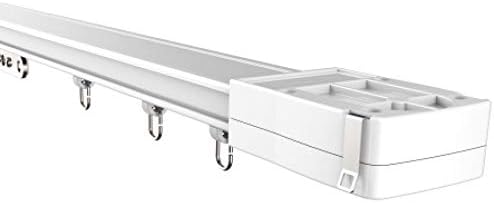
- 1 Motor with smart motor (with remote receiver)
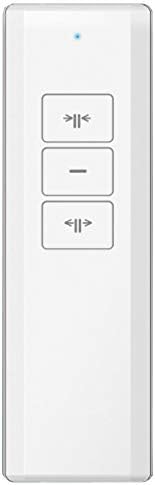
- 1 Kadali jauh
- Ceiling brackets and wall brackets
- Panyambung lagu
- 8 Curtain runners per meter of tracks
- Manual pamaké (dokumén ieu)
- Ngajalankeun Sabuk
- Pamawa


4. Setup & Instalasi
4.1. Lagu Majelis
The track system is modular and can be cut to your desired length using appropriate tools. Connect track pieces securely using the provided track connectors. Ensure all connections are flush and stable for smooth curtain movement.
4.2. Pamasangan
Choose between ceiling or wall mounting based on your preference and room structure. Use the appropriate brackets and secure them firmly to the mounting surface. Ensure the track is level and properly aligned. The mounting surface must be strong enough to support the entire system and curtains.
4.3. Pamasangan Motor
Install the motor unit at either the left or right end of the track. Ensure the drive belt is correctly tensioned and engaged with the motor gear. Refer to the diagram below for motor placement options.

4.4. Curtain Attachment
Attach your curtains to the runners provided. Ensure the curtains are evenly distributed and move freely along the track without snagging.

4.5. Sambungan Daya
Connect the motor to a suitable power source. Ensure the power supply meets the system requirements specified in the specifications section. Use only the provided power adapter or a compatible replacement.
4.6. Initial Setup & Calibration
After power-on, the system may require initial calibration to set the open and close limits. Refer to the remote control section for programming instructions to define the full open and full closed positions of your curtains.
5. Operasi
5.1. Operasi Jauh Jauh
Use the provided RF remote control to operate your curtains. The remote typically features dedicated buttons for:
- Buka: Fully opens the curtains.
- Tutup: Fully closes the curtains.
- Eureun/Reureuh: Stops the curtains at their current position.
Ensure the remote control has fresh batteries and is within range of the motor unit.
5.2. Smart Home Integration (Alexa & Google Home)
The HC SimpleSmart system is designed for integration with Amazon Alexa and Google Home. To enable voice control:
- Download the SimpleSmart mobile application from your device's app store.
- Follow the in-app instructions to connect your curtain system to your home Wi-Fi network.
- Link your SimpleSmart account with your Amazon Alexa or Google Home app.
- Once linked, you can use voice commands such as "Alexa, open the curtains" or "Hey Google, close the living room blinds."
5.3. Mobile App Control
The SimpleSmart mobile application provides comprehensive control over your curtain system, including:
- Opening and closing curtains from anywhere.
- Setting schedules for automatic opening and closing.
- Adjusting curtain position to a specific percentage.
- Managing multiple curtain systems.
5.4. Operasi Manual
Dina acara kakuatan outage or if you prefer manual control, the curtains can be operated by gently pulling them along the track. The motor is designed to allow for manual override.
5.5. Setting Open/Close Limits
The system automatically detects the full open and full closed positions. If adjustments are needed or if you wish to set custom intermediate stop points, refer to the specific programming instructions provided with your remote control or in the SimpleSmart mobile application.
6. Pangropéa
- beberesih: Keep the track clean and free of dust and debris. Use a soft, dry cloth to wipe down the track and motor housing. Do not use abrasive cleaners or solvents.
- Halangan: Periodically check the track for any obstructions that might hinder curtain movement.
- Inspeksi Sabuk: Inspect the drive belt for any signs of wear, fraying, or improper tension. A loose belt may affect performance.
- Lubrication: Do not lubricate the track with oil-based products, as this can attract dust and lead to operational issues. The system is designed for maintenance-free operation in this regard.
7. Cara ngungkulan
| Masalah | Mungkin Cukang lantaranana | Solusi |
|---|---|---|
| Curtains not moving | No power; Remote battery low; Obstruction on track; Motor disengaged. | Check power connection; Replace remote battery; Remove obstructions; Ensure motor is properly engaged with the belt. |
| Curtains not stopping at desired position | Limits not calibrated correctly. | Re-calibrate the open/close limits using the remote control programming instructions or the mobile app. |
| Kadali jauh teu ngabales | Low battery; Remote out of range; Remote not paired. | Replace remote battery; Ensure remote is within operating range; Re-pair the remote with the motor unit as per instructions. |
| Smart home integration issues | Wi-Fi connectivity problems; Incorrect app settings; Device not linked. | Verify Wi-Fi connection; Check SimpleSmart app settings; Ensure the device is correctly linked to your Alexa/Google Home account. |
| Motor nyieun sora anu teu biasa | Belt tension incorrect; Foreign object in track; Motor malfunction. | Check and adjust belt tension; Inspect track for foreign objects; If noise persists, contact customer support. |
8. Spésifikasi
| merek | HC |
| Nomer modél | HT100 |
| Bahan | logam |
| Product Dimensions (2M track) | 1.5"L x 79"W (approx. 200 cm) |
| Item Beurat | 6.44 pon |
| Tipe Pamasangan | Wall Mounted (also supports Ceiling Mounted) |
| Fitur husus | Works with Alexa and Google Home voice devices (no bridge required) |
| UPC | 739810375878 |
9. Jaminan & Dukungan
For warranty information, technical support, or to inquire about replacement parts, please contact HC customer service. Refer to your purchase documentation or the official HC website for specific warranty terms and contact details. Please have your model number (HT100) and purchase date available when contacting support.