1. Bubuka
Hatur nuhun pikeun meuliasing the eKids Li-B17 Millennium Falcon Bluetooth Speaker. This portable wireless speaker allows you to stream audio from your Bluetooth-enabled devices and enjoy hands-free calling. Its unique design, inspired by the iconic Millennium Falcon, includes light effects and plays the Star Wars theme. Please read this manual carefully to ensure proper use and maintenance of your speaker.
2. Émbaran Kasalametan
- Saran umur: Cocog pikeun umur 3 taun ka luhur.
- Ulah kakeunaan unit kana suhu anu ekstrim, sinar panonpoé langsung, atanapi kalembaban.
- Entong nyobian ngabongkar atanapi ngarobih unit. Ieu bakal ngabatalkeun jaminan.
- Anggo ukur kabel ngecas anu disayogikeun atanapi anu sarimbag anu disertipikasi.
- Jauhkeun unit tina médan magnét anu kuat.
3. Eusi Paket
Pastikeun sadaya item aya dina bungkusan:
- eKids Li-B17 Millennium Falcon Bluetooth Speaker
- Kabel Ngecas USB

Gambar 1: eKids Li-B17 Millennium Falcon Bluetooth Speaker on its clear stand, showcasing its detailed design and illuminated blue engine lights.
4. Fitur Produk
- Bluetooth Wireless Audio: Stream music wirelessly from compatible devices.
- Fungsi Hands-Free: Answer and end calls directly from the speaker.
- Pangaruh cahaya: Integrated lights illuminate during operation.
- Batré anu tiasa dicas deui: Built-in lithium battery provides up to 6 hours of playback.
- Star Wars Theme: Plays the iconic Star Wars main theme.
- Input AUX: Connect non-Bluetooth devices via the auxiliary port.

Gambar 2: The eKids Li-B17 Millennium Falcon Bluetooth Speaker with text indicating powerful sound performance and illuminated engine lights, alongside a smartphone displaying music playback.
5. Setélan
5.1 Ngecas Speaker
- Connect the small end of the included USB charging cable to the USB charging port on the speaker.
- Sambungkeun tungtung kabel ngecas USB anu langkung ageung kana port USB anu diaktipkeun (contona, komputer, adaptor témbok USB).
- Lampu indikator ngecas bakal hurung. Saatos dicas pinuh, lampu tiasa robih warna atanapi pareum.
- A muatan pinuh nyadiakeun kira 6 jam waktu playback.
5.2 Powering on / Pareum
Locate the 3-position switch on the side of the speaker (refer to Figure 3).
- Pikeun kakuatan ON in Bluetooth mode, slide the switch to the simbol Bluetooth posisi.
- Pikeun kakuatan ON in AUX mode, slide the switch to the AUX posisi.
- Pikeun kakuatan Pareum, slide the switch to the Pareum posisi (tengah).
5.3 Nyapasangkeun Bluetooth
- Ensure the speaker is charged and powered ON in Bluetooth mode. The speaker will automatically enter pairing mode if no previously paired device is found.
- Dina alat Bluetooth-diaktipkeun anjeun (smartphone, tablet, jsb), aktipkeun Bluetooth tur neangan alat nu sadia.
- Pilih"eKids Li-B17" (atawa ngaran nu sarupa) tina daptar alat.
- Once paired, the speaker will indicate a successful connection (e.g., a tone or voice prompt).
- To pair a new device or re-enter pairing mode, press and hold the Bluetooth button on the top of the speaker.
5.4 Sambungan AUX
For devices without Bluetooth, you can use the AUX input:
- Slide the 3-position switch to the AUX posisi.
- Connect one end of a 3.5mm audio cable (not included) to your audio device's headphone jack.
- Connect the other end of the 3.5mm audio cable to the AUX port on the speaker (refer to Figure 3).
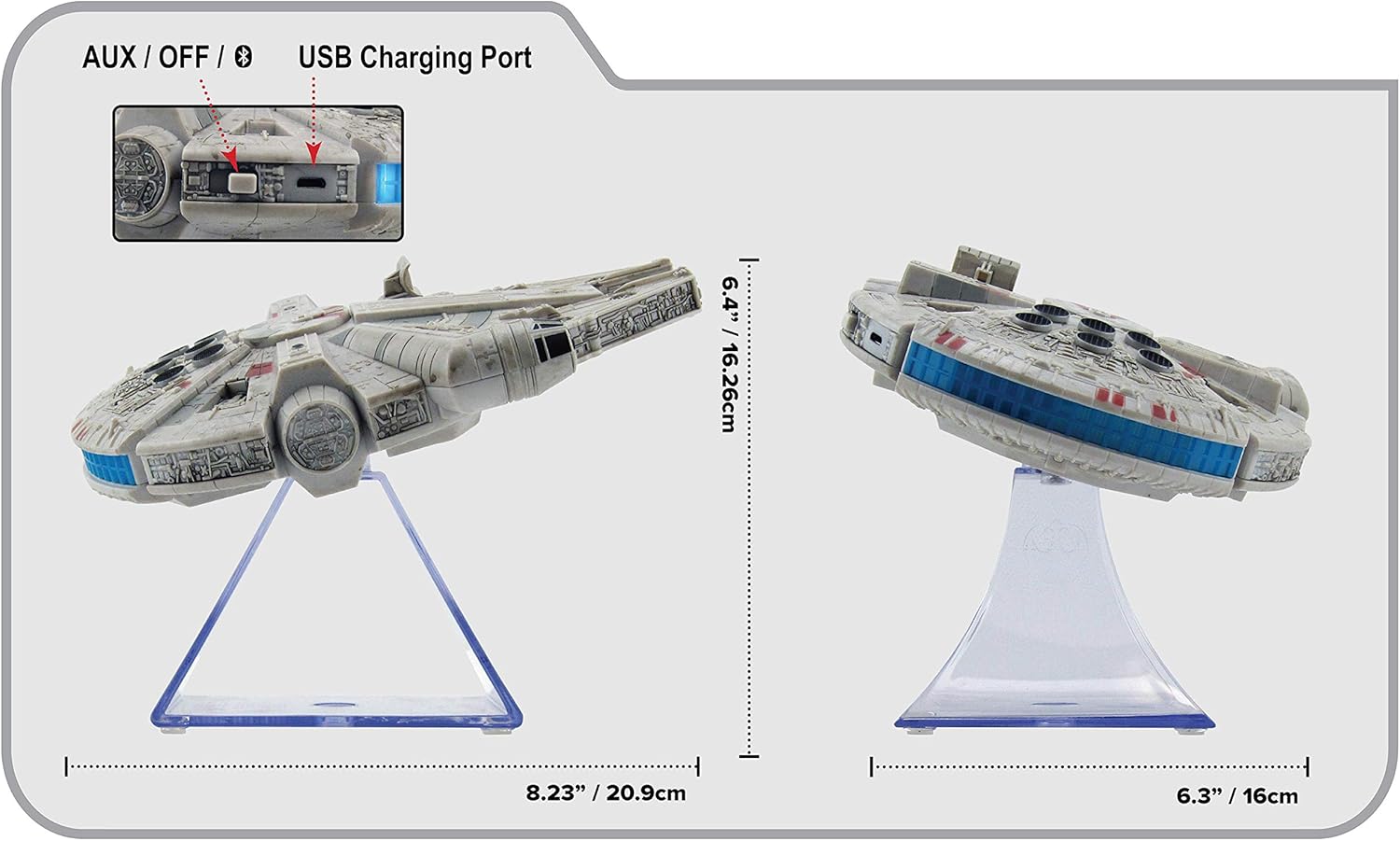
Gambar 3: Samping view of the eKids Li-B17 Millennium Falcon Bluetooth Speaker, highlighting the AUX/OFF/Bluetooth switch, USB charging port, and product dimensions.

Gambar 4: Image illustrating the eKids Li-B17 Millennium Falcon Bluetooth Speaker's compatibility with multiple devices including mobile phones, tablets, notebooks, smartwatches, game devices, and PCs.
6. Parentah Operasi
6.1 Maén Audio
- Once connected via Bluetooth or AUX, start playing audio from your source device.
- Adjust the volume using the controls on your connected device. The speaker itself does not have volume controls.
6.2 Telepon bebas leungeun
Nalika disambungkeun via Bluetooth ka smartphone:
- Ngajawab Telepon: Press the designated call button on the speaker (often integrated with the Bluetooth button or a separate small button near the main blaster area).
- Nutup Telepon: Press the call button again.
- Nelepon: Initiate the call from your smartphone; audio will route through the speaker.
6.3 Pangaruh Cahaya
The speaker features integrated blue engine lights that illuminate when the speaker is powered on and in use, enhancing the visual experience.
6.4 Star Wars Theme Playback
Press the large button located on the top of the speaker (the top blaster area) to play the Star Wars main theme.
7. Pangropéa
- Clean the speaker with a soft, dry cloth. Do not use liquid cleaners or abrasive materials.
- Simpen spéker dina tempat anu tiis sareng garing upami henteu dianggo.
- Hindarkeun miceun spéker atanapi némpélkeun kana tabrakan anu kuat.
8. Cara ngungkulan
| Masalah | Mungkin Cukang lantaranana | Solusi |
|---|---|---|
| Speaker teu hurung. | Batré béak. | Ngecas spéker nganggo kabel USB anu disayogikeun. |
| Teu bisa masangkeun via Bluetooth. | Speaker is not in pairing mode or device's Bluetooth is off. | Ensure speaker is in Bluetooth mode and press the Bluetooth button to enter pairing. Turn Bluetooth on your device and search again. |
| Taya sora tina speaker. | Volume too low, incorrect input mode, or device not playing. | Increase volume on your device. Ensure speaker is in correct mode (Bluetooth/AUX). Check if your device is playing audio. |
| Kualitas audio goréng. | Device too far from speaker, interference, or low battery. | Move device closer to speaker (within 30 feet). Avoid obstacles. Charge the speaker. |
9. Spésifikasi
| Fitur | Spésifikasi |
|---|---|
| Nomer modél | Li-B17 |
| Téhnologi konektipitas | Bluetooth |
| Range nirkabel | Nepi ka 30 suku (kira-kira 9 méter) |
| Sumber Daya | Lithium-Polymer Battery (rechargeable) |
| Kahirupan batré | Nepi ka 6 jam |
| Max Speaker Kaluaran Power | 25 Watt |
| Mode Kaluaran Audio | Stereo |
| Bahan | palastik |
| Tipe Pamasangan | Tabletop |
| Ukuran (L x W x H) | 18.29 x 26.42 x 24.13 cm (7.2 x 10.4 x 9.5 inci) |
| Komponén Kaasup | Millennium Falcon Bluetooth Speaker, USB Charging Cable |
10. Garansi jeung Rojongan
Produk ieu hadir kalawan a Garansi kawates. For specific details regarding warranty coverage, duration, and how to obtain service, please refer to the warranty card included with your purchase or contact eKids customer support.
For technical support or further inquiries, please visit the official eKids websitus atanapi ngahubungan departemén layanan palanggan maranéhna.


