1. Bubuka
This manual provides essential instructions for the proper setup, operation, and maintenance of your SentrySafe Executive Security Safe, Model PLX510487. This safe is designed to protect your valuables with an electronic lock and pry-resistant steel construction. Please read this manual thoroughly before using your safe to ensure optimal performance and security.
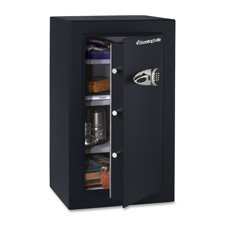
Figure 1: SentrySafe Executive Security Safe (Model PLX510487)
2. Émbaran Kasalametan
- Do not store safe keys inside the safe. Always keep override keys in a secure location away from the safe.
- Pastikeun aman dipasang pikeun nyegah panyabutan anu teu sah.
- Keep the electronic keypad dry and clean.
- This safe is not water resistant. Do not expose it to water or high humidity.
- Keep children away from the safe and do not allow them to operate the electronic lock.
3. Eusi Paket
Pastikeun yén sadaya komponén aya dina bungkusan:
- SentrySafe Executive Security Safe (PLX510487)
- Tombol Override (2)
- Mounting Bolts (for wall mounting)
- Manual pangguna (dokumén ieu)
4. Setélan
4.1 Ngabongkar bungkusan
- Taliti piceun brankas tina bungkusan na.
- Inspect the safe for any signs of damage. If damaged, contact customer support.
- Nyimpen bahan bungkusan pikeun angkutan hareup lamun diperlukeun.
4.2 Pamasangan batré
The electronic lock requires four (4) AA alkaline batteries (not included).
- Panggihan kompartemen batréna di jero panto brankas.
- Buka panutup kompartemen batré.
- Insert four new AA alkaline batteries, ensuring correct polarity (+/-).
- Tutup panutup kompartemen batré aman.
4.3 Pasang Aman
For enhanced security, it is recommended to wall mount the safe.
- Pilih lokasi anu cocog pikeun dipasang, pastikeun éta permukaan anu padet anu sanggup nahan beurat brankas.
- Open the safe door and locate the pre-drilled mounting holes on the back panel.
- Position the safe against the wall and mark the drilling points through the mounting holes.
- Drill pilot holes into the wall at the marked locations.
- Align the safe with the drilled holes and secure it using the provided mounting bolts. Tighten all bolts firmly.
4.4 Initial Code Setup
Upon first use, you will need to set your personal electronic access code.
- With the safe door open, press the red reset button located on the inside of the door, near the hinge. The yellow indicator light on the keypad will illuminate.
- Dina 5 detik, lebetkeun kode 3-8 angka anu dipikahoyong dina keypad.
- Press the 'A' or 'B' button to confirm your new code. The yellow light will turn off, and a beep will confirm the code is set.
- Nguji kodeu anyar kalawan panto muka saméméh nutup éta.
5. Ngoperasikeun Aman
5.1 Opening the Safe with Electronic Code
- Enter your personal 3-8 digit code on the keypad.
- Press the 'A' or 'B' button. The green indicator light will illuminate, and you will hear a beep.
- Dina 5 detik, puter gagangna searah jarum jam pikeun muka panto brankas.
5.2 Opening the Safe with Override Key
In case of forgotten code or battery failure, use the override key.
- Panggihan panutup liang konci dina panel keypad.
- Cabut panutup.
- Insert the override key and turn it counter-clockwise.
- Sambil nyekel konci, puter gagangna searah jarum jam pikeun muka panto brankas.
- Remove the key and replace the keyhole cover after use.
5.3 Nutup sareng Ngonci Brankas
- Tutup panto aman pageuh.
- Turn the handle counter-clockwise until it is fully engaged and the door is secured.
- The safe will automatically lock.
5.4 Ngarobah Kodeu Pamaké
- Open the safe door using your current code or override key.
- Press the red reset button on the inside of the door. The yellow indicator light will illuminate.
- Within 5 seconds, enter your new 3-8 digit code.
- Press the 'A' or 'B' button to confirm. The yellow light will turn off, and a beep will confirm the new code.
- Tés kodeu anyar ku panto muka sateuacan ditutup.
6. Pangropéa
6.1 Ngagantian batré
When the batteries are low, the red indicator light will flash when you enter your code. Replace batteries promptly to avoid lock-out.
- Buka panto aman.
- Replace all four AA alkaline batteries as described in Section 4.2.
- Your electronic code will be retained during battery replacement.
6.2 beberesih
Rapihkan bagian luar brankas dengan lembut, damp cloth. Do not use abrasive cleaners or solvents, as these may damage the finish or electronic components.
7. Cara ngungkulan
- Safe does not open with code:
- Ensure batteries are fresh and installed correctly. Replace if necessary.
- Re-enter the code carefully. Ensure no buttons are stuck.
- Try using the override key to open the safe. - Keypad does not respond:
- Check battery installation and replace batteries.
- Ensure no debris is obstructing the buttons. - Forgotten code:
- Use the override key to open the safe.
- Once open, follow the steps in Section 5.4 to set a new user code. - Door does not close/lock properly:
- Ensure no items are obstructing the door or locking bolts.
- Check that the handle is fully turned counter-clockwise to engage the locking mechanism.
8. Spésifikasi
| merek | SentrySafe |
| Nomer modél | PLX510487 |
| Tipe Konci | Éléktronik, Key |
| Kapasitas | 6 suku kubik |
| Bahan | Alloy Steel |
| Tipe Pamasangan | Tembok Gunung |
| Komponén Kaasup | Bolts, Keys |
| Item Beurat | 241 pon |
| Tingkat Résistansi Cai | Henteu Tahan Cai |
| Dimensi produk | 23.8 x 21.5 x 38.3 inci |
| UPC | 635665104871 |
9. Garansi jeung Rojongan
SentrySafe products are manufactured to high-quality standards. For specific warranty information, please refer to the warranty card included with your purchase or visit the official SentrySafe website. For technical support, replacement parts, or further assistance, please contact SentrySafe customer service directly.
SentrySafe Official Websitus: www.sentrysafe.com


