Bubuka
The myTouchSmart Plug-In Indoor/Outdoor Digital Timer is designed to simplify the automation of your lighting and appliances. This weather-resistant timer features two grounded outlets, offering versatile control for landscape, patio, and seasonal lighting. It provides both customizable "My On/Off Time" settings and convenient daily preset options, along with a 24-hour countdown feature. The large LCD screen and blue LED indicators ensure easy programming and monitoring of active programs. Compatible with various light sources including CFL, LED, incandescent, and halogen, this UL listed product is built for convenience and energy efficiency.
Fitur produk
- Easy-to-set digital timer with two grounded outlets for landscape, patio, and seasonal lights and appliances.
- Features simple daily preset options, fully customizable "My On/Off Time" settings, and a custom, up to 24-hour countdown feature.
- Weather resistant for both outdoor and indoor use. Includes an attached bracket for easy mounting and installation.
- Compatible with CFL, LED, incandescent, and halogen light sources.
- Large LCD screen and blue LED indicators to show active programs.
- Electrical Rating: 125V/60Hz, 15A/1875W General purpose/resistive.
- CSA listed for safety.

Figure 1: Control outdoor or indoor lights with the myTouchSmart timer.

Figure 2: The timer is weather resistant and suitable for outdoor use.
Parentah Setup
- Power-Up mimiti: Plug the timer into a standard 125V AC outlet. The LCD screen will illuminate. If the screen is blank or not reading, plug it in for at least one hour to charge the internal battery.
- Setel Waktos Ayeuna:
- Pencét éta JAM kancing.
- Ngagunakeun éta UP (▲) jeung TURUN (▼) arrows to adjust the hour.
- Pencét JAM again to move to minutes, then use the arrows to adjust.
- Pencét JAM a third time to confirm and exit time setting.
- Pamasangan: Use the integrated mounting bracket to securely attach the timer near your desired outlet. Ensure the timer is positioned to prevent water accumulation.

Figure 3: Simple setup involves setting the current time and custom ON/OFF times.
Video 1: An instructional video demonstrating how to set the current time and program ON/OFF times on the myTouchSmart timer.
Parentah Operasi
Setting Custom ON/OFF Times ("My On/Off Time")
- Setel Waktu ON:
- Pencét éta MY ON TIME button. The display will show the current ON time setting.
- Ngagunakeun éta UP (▲) jeung TURUN (▼) arrows to adjust the desired ON hour.
- Pencét MY ON TIME again to move to minutes, then use the arrows to adjust.
- Pencét MY ON TIME a third time to confirm and save the ON time. The blue LED indicator next to "my on time" will illuminate when active.
- Waktu Pareum:
- Pencét éta MY OFF TIME button. The display will show the current OFF time setting.
- Ngagunakeun éta UP (▲) jeung TURUN (▼) arrows to adjust the desired OFF hour.
- Pencét MY OFF TIME again to move to minutes, then use the arrows to adjust.
- Pencét MY OFF TIME a third time to confirm and save the OFF time. The blue LED indicator next to "my off time" will illuminate when active.
Using Preset Schedules
The timer offers three convenient preset schedules:
- Evening (5pm-12am): Pencét éta PETI kancing.
- Morning (5am-8am): Pencét éta Isuk-isuk kancing.
- All Night (6pm-6am): Pencét éta ALL NIGHT kancing.
To activate a preset, simply press the corresponding button. The blue LED indicator next to the selected preset will light up.
24-Hour Countdown
To use the countdown feature:
- Pencét éta MY COUNTDOWN kancing.
- Ngagunakeun éta UP (▲) jeung TURUN (▼) arrows to set the desired countdown duration (up to 24 hours).
- Pencét MY COUNTDOWN again to start the countdown. The timer will turn ON for the set duration and then turn OFF.

Figure 4: Program custom ON/OFF times or select from convenient preset schedules.
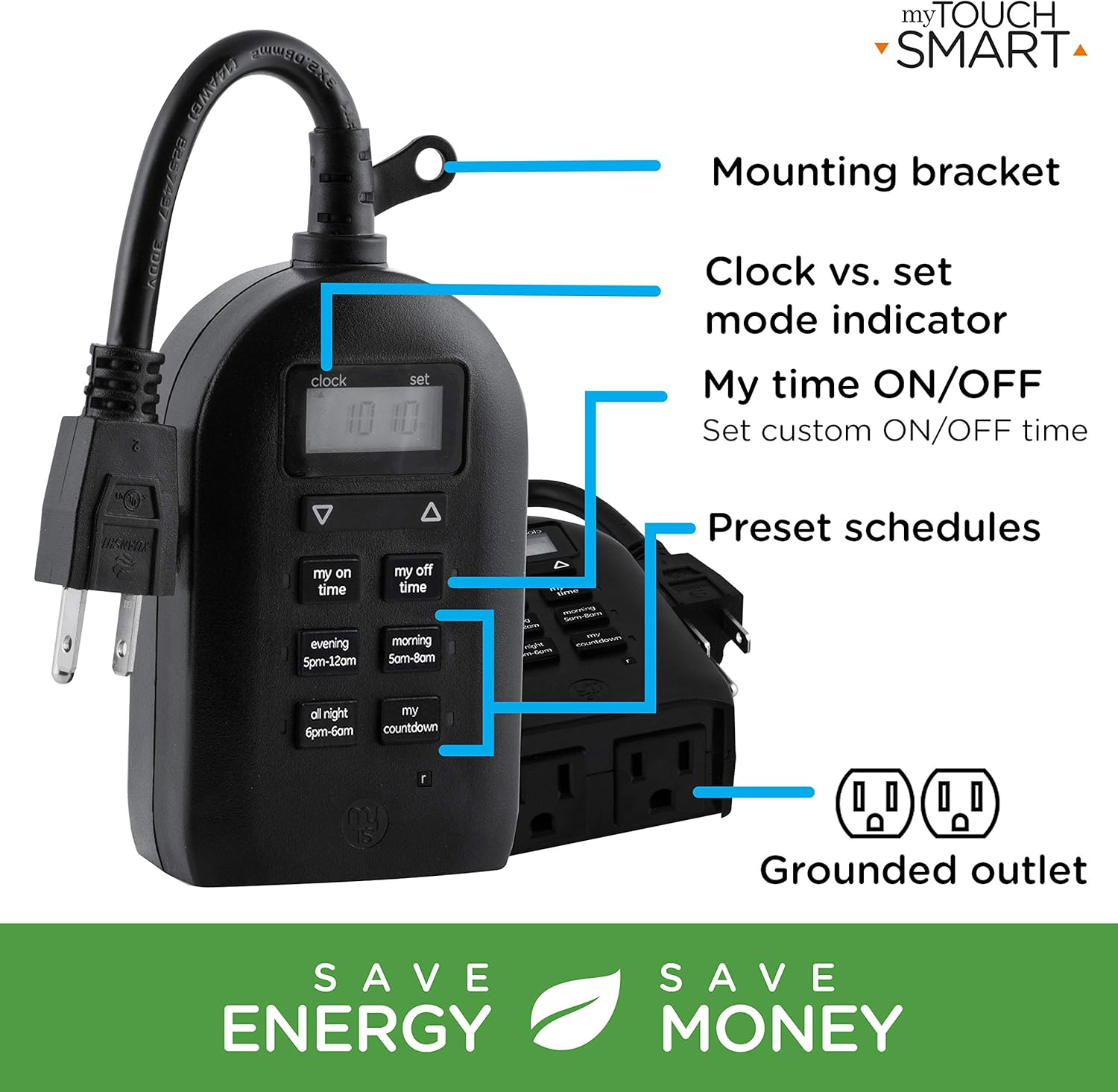
Figure 5: Key features and controls of the myTouchSmart timer.
Pangropéa
- beberesih: Disconnect the timer from the power outlet before cleaning. Wipe the exterior with a soft, damp lawon. Ulah make bahan kimia kasar atawa cleaners abrasive.
- Panyimpenan: Upami henteu dianggo salami lami, simpen timer di tempat anu tiis, garing, sareng jauh tina sinar panonpoé langsung sareng suhu anu ekstrim.
- Batré internal: The timer contains an internal battery to maintain settings during power outages. If the display is dim or blank, plug the timer into an outlet for at least one hour to recharge the battery.
Pamérésan masalah
| Masalah | Mungkin Cukang lantaranana | Solusi |
|---|---|---|
| Tampilan timer kosong atawa redup. | Batré internal lemah atanapi béak. | Plug the timer into a live outlet for at least one hour to charge the internal battery. |
| Connected device does not turn ON/OFF. |
|
|
| Timer is not responding to button presses. | glitch software samentara atawa batré low. | Unplug the timer from the outlet for a few minutes, then plug it back in. Allow the internal battery to charge if the display was dim. |
spésifikasi
| Fitur | Rincian |
|---|---|
| Nomer modél | 26898-P1 |
| Peunteun Listrik | 125V AC, 60Hz, 15A, 1875W (General Purpose/Resistive) |
| Outlet | 2 outlet grounded |
| Diménsi | 3.2 "D x 7" W x 7.5" H (kira-kira) |
| Item Beurat | 9.92 ons |
| Tipe tampilan | LCD |
| Tipe Pamasangan | Pasang-In Gunung |
| Sertifikasi | Didaptarkeun ka UL, Didaptarkeun ka CSA |
| Batré internal | Yes (for settings retention) |

Figure 6: Product dimensions for the myTouchSmart timer.
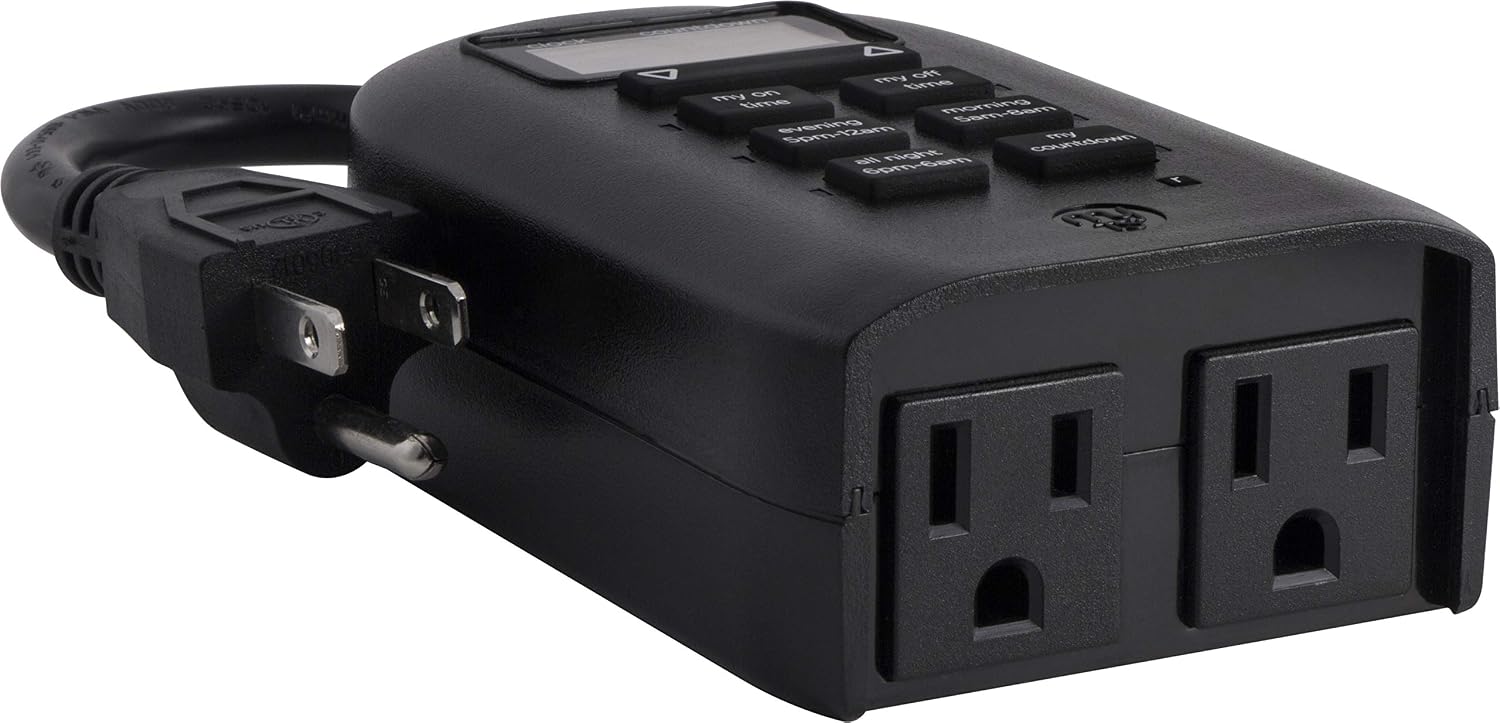
Figure 7: Dual grounded outlets for connecting devices.
Garansi sareng Rojongan
This myTouchSmart timer is backed by a jaminan kawates sataun from the date of purchase. For warranty claims or technical support, please refer to the contact information provided with your product packaging or visit the official myTouchSmart websitus.
Pikeun sumber tambahan, anjeun ogé tiasa ngarujuk ka resmi Manual Pamaké (PDF) or Manual Instalasi (PDF) sadia online.