1. Bubuka
This manual provides comprehensive instructions for the setup, installation, operation, maintenance, and troubleshooting of your Antec VSK2000-U3 Micro-ATX Desktop Case. Please read this manual thoroughly before beginning installation to ensure proper assembly and optimal performance.
Video 1: Computer Case Display. This video provides a visual overview of a computer case, demonstrating its external features and design.
2. Fitur konci
The Antec VSK2000-U3 Micro-ATX Desktop Case is designed for efficient and compact PC builds. Key features include:
- Motherboard Support: Up to Micro-ATX
- Cooling: 1 x 92 mm temperature-controlled fan included
- Power Supply Unit (PSU) Support: TFX form factor
- Drive Bays: Supports up to 1 x 5.25” ODD, 1 x 3.5" HDD & 1 x 2.5" SSD
- Slot ékspansi: 4

Gambar 1: Hareupeun view of the Antec VSK2000-U3 case, highlighting the front panel I/O and optical drive bay.
3. Setup jeung Instalasi
Follow these steps to install your components into the Antec VSK2000-U3 case. Ensure all power is disconnected before handling internal components.
3.1. Nyiapkeun Kasus
- Leupaskeun Panel Sisi: Carefully remove the side panels of the case to access the interior.
- Pasang I/O Shield: Pasangkeun tameng I/O anu disayogikeun sareng motherboard anjeun kana liang tukang casing.

Gambar 2: Sisi view of the Antec VSK2000-U3 case with the side panel removed, showing the internal layout.
3.2. Pamasangan motherboard
- Align Motherboard: Carefully align your Micro-ATX motherboard with the standoffs inside the case.
- Motherboard Aman: Use the provided screws to secure the motherboard to the standoffs.
3.3. Instalasi Power Supply
- Posisi PSU: Install your TFX form factor power supply into its designated bay.
- PSU anu aman: Secure the power supply with screws from the rear of the case.
- Sambungkeun Kabel Daya: Route and connect the necessary power cables to your motherboard and other components.

Gambar 3: Tukangeun view of the Antec VSK2000-U3 case, showing the I/O shield area, expansion slots, and PSU mounting.
3.4. Drive Installation (ODD, HDD, SSD)
- Optical Drive (ODD): Install your 5.25" optical drive into the front bay. The case features a tool-less ODD housing system.
- Hard Disk Drive (HDD): Install your 3.5" HDD into the designated bay. The case features a tool-less HDD housing system.
- Solid State Drive (SSD): Install your 2.5" SSD into the designated bay.
- Connect Drives: Sambungkeun kabel data sareng daya SATA ka sadaya drive anu dipasang.
3.5. Pamasangan Kartu ékspansi
- Leupaskeun panutup slot: Leupaskeun panutup slot ékspansi perlu ti pungkur kasus.
- Kartu Pasang: Insert your expansion card (e.g., graphics card) into the appropriate PCI-E slot on the motherboard.
- Kartu Aman: Secure the expansion card with a screw.
3.6. Sambungan Panel hareup
Connect the front panel cables (USB 3.0, audio, power switch, reset switch, LED indicators) to the corresponding headers on your motherboard. Refer to your motherboard manual for specific header locations.
3.7. Manajemén kabel
Route cables neatly to improve airflow and aesthetics. Use cable ties or the case's cable management features to secure cables away from moving parts and airflow paths.
3.8. Video Tutorials for Installation
Video 2: Detailed Installation Tutorial. This video demonstrates the step-by-step process of installing components into a computer case, including the motherboard, power supply, and drives.
Video 3: Micro ATX PC Case Installation. This video illustrates the assembly process for a Micro ATX PC case, covering component placement and cable routing.
4. Parentah Operasi
Once all components are securely installed and connected, replace the side panels. Connect your monitor, keyboard, mouse, and other peripherals to the appropriate ports on the rear I/O panel and front panel. Connect the power cable to the power supply and a wall outlet, then press the power button on the front of the case to start your system.
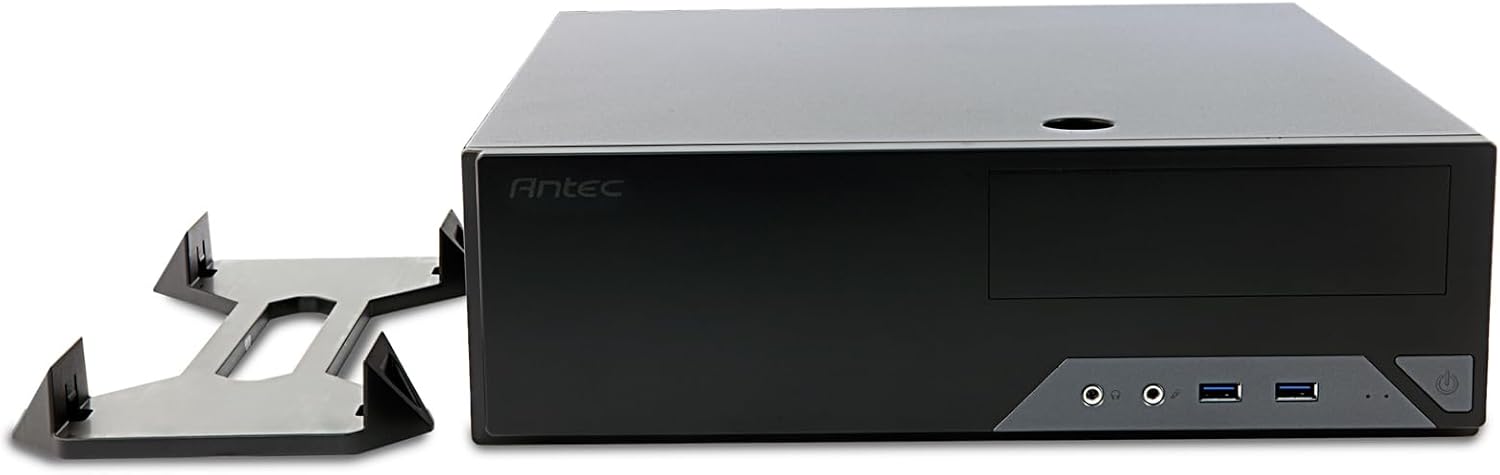
Figure 4: The Antec VSK2000-U3 case shown in a horizontal orientation with its included stand, demonstrating versatile placement options.
5. Pangropéa
Pangropéa rutin ngabantosan mastikeun umur panjang sareng kinerja optimal PC anjeun.
- beberesih lebu: Periodically clean dust from the case interior, fans, and air vents using compressed air or a soft brush. Ensure the system is powered off and unplugged before cleaning.
- Manajemén Kabel: Check cable routing periodically to ensure no cables are obstructing airflow or fan operation.
- Pariksa kipas: Ensure the included 92mm temperature-controlled fan and any other installed fans are operating correctly and free from obstructions.
6. Cara ngungkulan
Upami anjeun ngalaman masalah sareng pangwangunan PC anjeun, pertimbangkeun léngkah-léngkah ngungkulan masalah umum ieu:
- Henteu aya kakuatan:
- Verify the power cable is securely connected to the PSU and wall outlet.
- Pastikeun saklar PSU dina posisi 'ON'.
- Check all internal power connections (24-pin ATX, 8-pin CPU, GPU power, drive power).
- Confirm front panel power switch cable is correctly connected to the motherboard.
- Henteu aya tampilan:
- Ensure the monitor is connected to the correct graphics output (dedicated GPU or motherboard integrated graphics).
- Pasang deui kartu grafik sareng modul RAM.
- Noise kaleuleuwihan:
- Identify the source of the noise (fan, HDD).
- Clean dust from fans.
- Ensure no cables are touching fan blades.
7. Spésifikasi
| Fitur | Rincian |
|---|---|
| merek | Antec |
| Runtuyan | VSK2000-U3 |
| Ngaran modél | VSK2000-U3 |
| Motherboard kasaluyuan | Mikro ATX |
| Jenis Kasus | Mid Tower (Slim Desktop) |
| Ukuran (L x W x H) | 18.6 x 15.9 x 7 inci |
| Item Beurat | 5.28 pon |
| Warna | Hideung |
| Bahan | Painted/Coated Metal (Likely Steel Or Aluminum With Plastic Components) |
| Power Supply ningkatna Tipe | Rear Mount (TFX form factor) |
| Métode Cooling | Air (1 x 92 mm temperature-controlled fan included) |
| Ukuran Fan | 92 milimeter |
| Drive Bays | 1 x 5.25” ODD, 1 x 3.5" HDD, 1 x 2.5" SSD |
| slot ékspansi | 4 |
8. Garansi jeung Rojongan
The Antec VSK2000-U3 Micro-ATX Desktop Case comes with a 2-Taun Garansi. For technical support, warranty claims, or additional product information, please visit the official Antec websitus atanapi ngahubungan departemén layanan palanggan maranéhna. Simpen bukti pameseran anjeun pikeun validasi jaminan.
Pikeun pitulung salajengna, mangga tingal Antec Store.


