1. Produk Langkungview
The Plumeet Kids Alarm Clock is a compact and user-friendly digital alarm clock designed for easy readability and portability. It features a large LCD display, a soft backlight, an ascending alarm sound, and an 8-minute snooze function. Its durable silicone cover provides shock protection, making it suitable for children and travel.

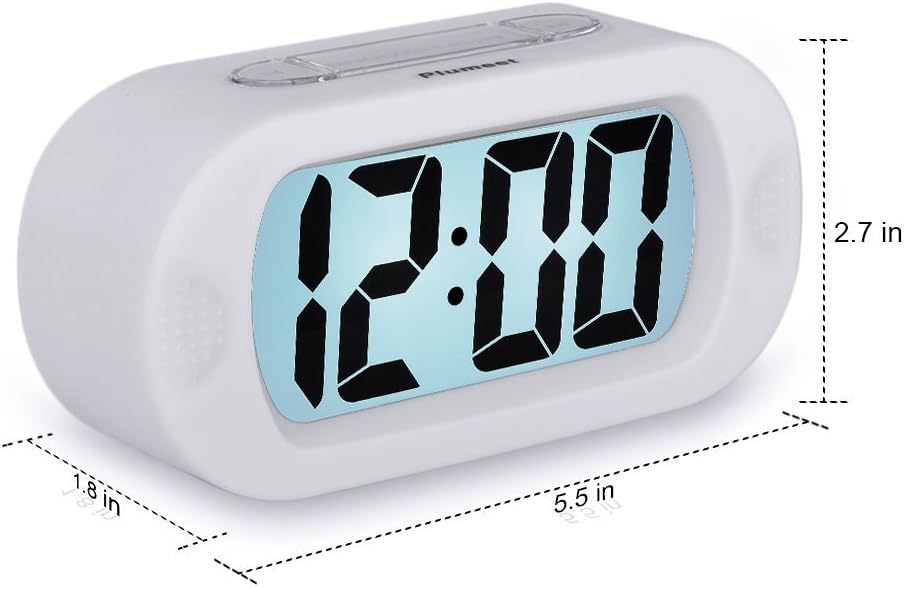
Gambar 1: Hareupeun view of the Plumeet Kids Alarm Clock, showing the large digital LCD display.
Eusi pakét:
- 1 x Plumeet Digital Alarm Clock
- 1 x Manual Pamaké
- 1 x Kartu Hatur nuhun
2. Setélan
2.1 Pamasangan batré
The clock requires 3 AAA 1.5V batteries (not included). Follow these steps to install them:
- Teangan tempat panutup kompartemen batré dina tonggong jam.
- Geser panutup ka handap pikeun muka kompartemen.
- Selapkeun 3 batré AAA, mastikeun polaritasna bener (+/-) sakumaha dituduhkeun di jero kompartemen.
- Ganti panutup kompartemen batré ku cara ngageser ka luhur nepi ka ngaklik kana tempatna.
Gambar 2: Tukangeun view of the clock showing the battery compartment with the cover removed.
2.2 Nyetél Waktos
To set the current time on your Plumeet alarm clock:
- Pencét éta WAKTU WAKTU button located on the back of the clock. The hour digits will begin to flash.
- Pencét éta JAM button to adjust the hour. Note the AM/PM indicator for 12-hour format.
- Pencét éta WAKTU WAKTU tombol deui. Angka menit bakal mimiti kedip-kedip.
- Pencét éta MENIT tombol pikeun ngaluyukeun menit.
- Pencét éta WAKTU WAKTU button one more time to confirm the time setting and exit time setting mode.

Figure 3: Diagram illustrating the location of Hour, Minute, and Time Set buttons.
3. Parentah Operasi
3.1 Nyetél Alarm
To set an alarm time:
- Pencét éta SET ALARM button (often labeled "SET" on the side). The alarm hour digits will flash.
- Pencét éta JAM tombol pikeun ngarobih jam alarm.
- Pencét éta SET ALARM tombol deui. Angka menit alarm bakal kedip-kedip.
- Pencét éta MENIT tombol pikeun nyaluyukeun menit alarm.
- Pencét éta SET ALARM button one more time to confirm the alarm setting.
Figure 4: Location of the Alarm Setting button on the side of the clock.
3.2 Ngaktipkeun/Nonaktipkeun Alarm
To turn the alarm on or off, use the ON/OFF switch/button, typically located on the side or back of the clock. When the alarm is active, an alarm icon (often a bell) will appear on the display.
Figure 5: Location of the Alarm ON/OFF button.
3.3 Snooze Function and Night Light
Lamun alarm disada, pencét badag SNOOZE-LIGHT button on top of the clock to activate the snooze function. The alarm will pause for approximately 8 minutes and then sound again. This button also activates the soft backlight for about 6 seconds, allowing you to view the time in the dark without disturbing sleep.

Gambar 6: Top view highlighting the SNOOZE-LIGHT button.
3.4 Sora Alarm Naék
The alarm features an ascending beep sound. When the alarm is activated, the beeping sound will gradually increase in volume and speed over 60 seconds, ensuring a gentle yet effective wake-up experience.

Figure 7: Visual representation of the ascending alarm sound feature.
4. Pangropéa
4.1 beberesih
To clean your alarm clock, gently wipe the surface with a soft, dry cloth. Do not use abrasive cleaners, solvents, or immerse the clock in water.
4.2 Ngagantian batré
Replace the batteries when the display becomes dim or the alarm sound weakens. Always replace all three AAA batteries at the same time with new ones. Dispose of old batteries responsibly according to local regulations.
5. Cara ngungkulan
- Clock not turning on or display is blank:
Ensure batteries are installed correctly with the right polarity. Replace with fresh AAA batteries.
- Alarm teu disada:
Check if the alarm is set to the correct time. Verify that the alarm ON/OFF switch is in the "ON" position. Ensure batteries are not depleted.
- Backlight is not working:
The backlight only illuminates for 6 seconds when the SNOOZE-LIGHT button is pressed. If it doesn't light up, check battery levels.
- Time or alarm setting is difficult:
Refer to sections 2.2 and 3.1 for detailed instructions. Ensure you are pressing the correct buttons in sequence.
6. Spésifikasi
| merek | Plumeet |
| Nomer modél | EMAU-8002-WH |
| Dimensi produk | 14.22 x 6.86 x 4.06 cm (5.6 x 2.7 x 1.6 inci) |
| Beurat | 150.25 g (0.33 lbs) |
| Sumber Daya | 3 x Batré AAA 1.5V (Teu Kaasup) |
| Tipe tampilan | LCD |
| Fitur husus | Snooze, Ascending Alarm, Night Light |
| Jenis Bahan | Plastic with Silicone Cover |

Figure 8: Product dimensions of the Plumeet Kids Alarm Clock.
7. Garansi jeung Rojongan
7.1 Émbaran jaminan
For detailed warranty information regarding your Plumeet Kids Alarm Clock, please refer to the warranty card included in your product packaging or your purchase documentation. Warranty terms and conditions may vary by region and retailer.
7.2 Rojongan Palanggan
If you encounter any issues or have questions not covered in this manual, please contact Plumeet customer support. Contact details can typically be found on the product packaging, the official Plumeet websitus, atawa ngaliwatan saluran rojongan pangecér anjeun.


