Bubuka
This manual provides essential information for the proper installation, operation, and maintenance of your Lowrance Hook-5 Sonar/GPS Mid/High/Downscan Fishfinder. Please read this manual thoroughly before using the device to ensure optimal performance and longevity.
The Lowrance Hook-5 combines CHIRP sonar and DownScan Imaging technologies to provide a clear view of the underwater environment. It features a highly accurate built-in GPS antenna and detailed mapping capabilities.
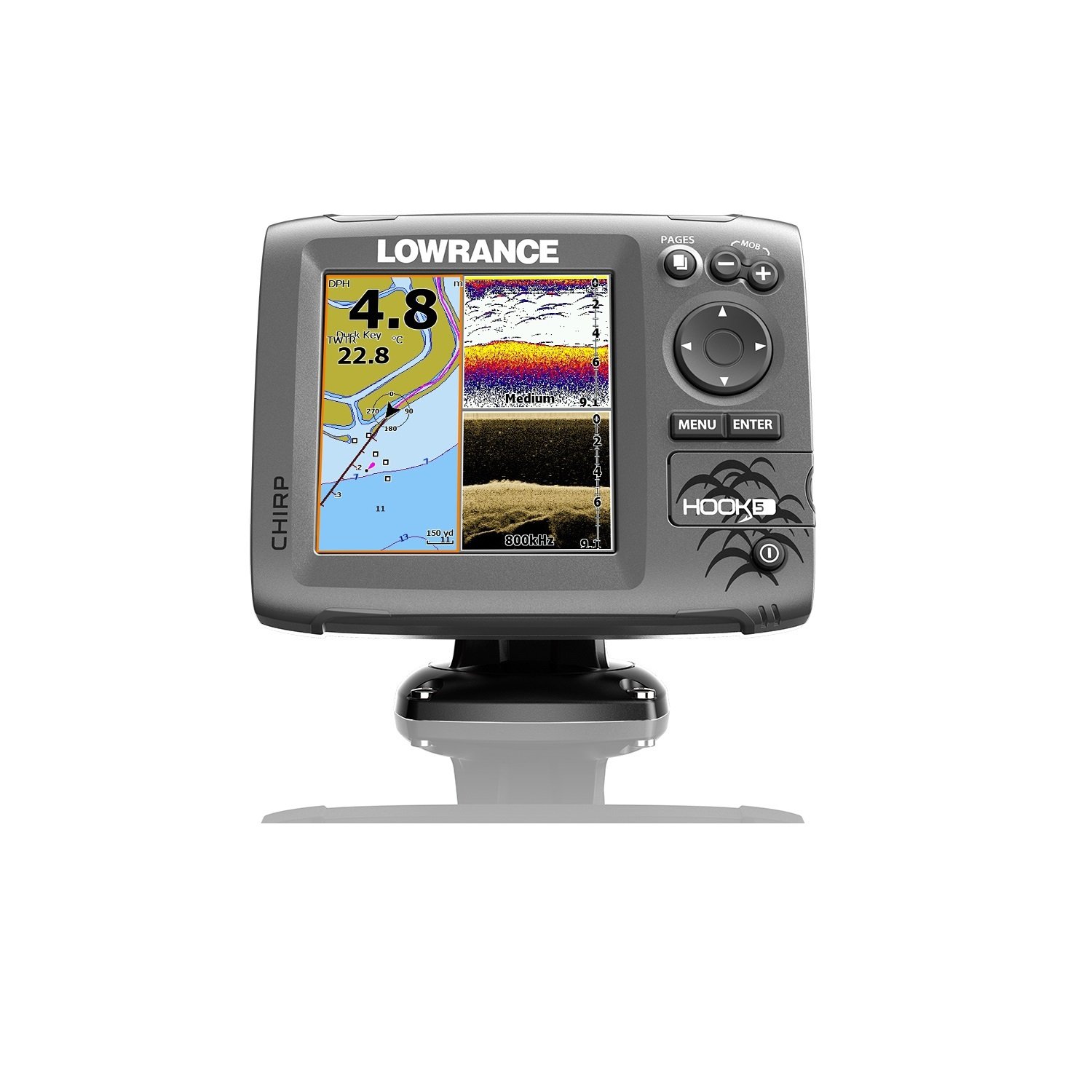
Figure 1: Lowrance Hook-5 Fishfinder unit. The display shows a GPS map on the left with depth (4.8m) and water temperature (22.8°C), and sonar/DownScan imaging on the right, indicating medium frequency sonar and 800kHz DownScan. Control buttons for PAGES, MOB, MENU, ENTER, and directional navigation are visible on the right side.
Setup sareng Instalasi
Proper installation is crucial for the performance of your Hook-5 unit. Ensure all components are securely mounted and connections are watertight.
Pamasangan Unit Tampilan
The display unit should be mounted in a location that provides clear visibility and is protected from excessive moisture and direct sunlight. Use the included bracket and hardware for secure mounting. Ensure adequate ventilation around the unit.
Pamasangan Transduser
The transducer is typically mounted on the transom of the boat. It must be positioned to have an unobstructed view of the water beneath the hull. Avoid mounting near propellers or other sources of turbulence. Refer to the detailed instructions provided with your transducer for specific mounting procedures.
Sambungan Daya
Connect the power cable to a 12V DC power source. Ensure the connection is fused and protected from short circuits. The red wire connects to the positive (+) terminal, and the black wire connects to the negative (-) terminal. Verify correct polarity before powering on the unit.
Parentah Operasi
Familiarize yourself with the controls and menu system to effectively use your Hook-5 fishfinder.
Ngahurungkeun/Pareuman
Pencét jeung tahan tombol POWER button (usually marked with a circle and vertical line) to turn the unit on or off. A short press typically accesses the backlight or system menu.
Napigasi Menus
Use the directional keypad to navigate through menu options. The MENU button accesses the main menu, and the Asupkeun tombol confirms selections. The KACA button cycles through different display views (e.g., Sonar, Chart, DownScan, split screens).
Operasi Sonar
The Hook-5 utilizes CHIRP sonar for excellent target separation and DownScan Imaging for photo-like views of structure and fish. Adjust sensitivity, range, and frequency settings as needed for different water conditions.
- Sonar CHIRP: Provides traditional sonar views with superior clarity.
- Pencitraan DownScan: Offers detailed, high-resolution images of underwater structure and bottom composition.
GPS and Chartplotter Functions
The built-in GPS antenna provides accurate positioning. Use the chartplotter to view your current location, navigate to waypoints, and follow routes. The unit comes with a detailed U.S. map, and optional chart upgrades are available.
- Titik jalan: Mark specific locations of interest.
- Rute: Plan and follow predefined paths.
- Lagu: Record your path for future reference.
Pangropéa
Regular maintenance ensures the longevity and reliability of your Lowrance Hook-5.
- beberesih: Clean the display screen with a soft, damp lawon. Hindarkeun pembersih abrasive atanapi pangleyur.
- Sambungan: Pariksa sacara berkala sadaya sambungan kabel pikeun ayana korosi atanapi karusakan. Pastikeun éta dipasang pageuh.
- Panyimpenan: When not in use for extended periods, store the unit in a dry, temperate environment. Disconnect power if storing for a long time.
- Apdet parangkat lunak: Check the Lowrance websitus pikeun apdet parangkat lunak anu sayogi pikeun mastikeun kinerja anu optimal sareng aksés kana fitur-fitur énggal.
Pamérésan masalah
This section addresses common issues you might encounter with your Hook-5 unit.
| Masalah | Mungkin Cukang lantaranana | Solusi |
|---|---|---|
| Taya Daya | Sambungan listrik kendor, sekering bocor, batréna pareum. | Check power cable connections, inspect fuse, verify battery charge. |
| Teu Aya Pamacaan Sonar | Transducer not connected, air bubbles under transducer, incorrect settings. | Ensure transducer is plugged in, check transducer mounting for obstructions, adjust sensitivity/range. |
| Inaccurate GPS Position | Poor satellite signal, unit obstructed. | Pastikeun jelas view of the sky, move unit if possible, allow time for satellite acquisition. |
| Screen Freezes/Unresponsive | Software glitch, power fluctuation. | Perform a soft reset (refer to manual for specific key combination), check power supply stability. |
If the problem persists, contact Lowrance customer support or refer to the full user manual available online.
spésifikasi
Key technical specifications for the Lowrance Hook-5 Sonar/GPS Mid/High/Downscan Fishfinder.
- Ngaran modél: Lowrance Hook-5 Sonar/GPS Mid/High/Downscan Fishfinder
- Jumlah modél: 000-12656-001
- Ukuran layar: 1 inci
- Jenis tampilan: LCD
- Sumber Daya: Batré Powered (12V DC)
- Beurat barang: 8 ons
- Tipe Pamasangan: Transom Mount (for transducer)
- Ukuran (L x W x H): 9.5 x 7.38 x 7.88 inches (Item)
- Frékuénsi Sonar: Mid/High CHIRP, 83/200 kHz, 455/800 kHz DownScan
- GPS: Built-in high-sensitivity GPS antenna
- Pemetaan: Detailed U.S. Map with over 3,000 lakes, rivers & coastal contours.
Garansi sareng Rojongan
Lowrance products are designed for reliability and performance. For specific warranty details, please refer to the warranty card included with your product or visit the official Lowrance websitus. Sarat jaminan biasana nutupan cacad manufaktur pikeun période anu ditangtukeun ti tanggal pameseran.
For technical support, product registration, or to download the latest software updates and full user manuals, please visit the official Lowrance support portal. You can also find contact information for customer service on their websitus.
Versi PDF tina manual pangguna sayogi kanggo diunduh: Lowrance Hook-5 User Manual (PDF).


