1. Bubuka
This manual provides detailed instructions for the installation, operation, maintenance, and troubleshooting of your Gateway SX2865 SFF Desktop Motherboard H61 (Model DB.U7411.001). This motherboard is designed for Small Form Factor (SFF) desktop systems, featuring the Intel H61 Express chipset and supporting LGA 1155/1156 CPUs and DDR3 RAM. Please read this manual thoroughly before proceeding with any installation or configuration to ensure proper functionality and safety.
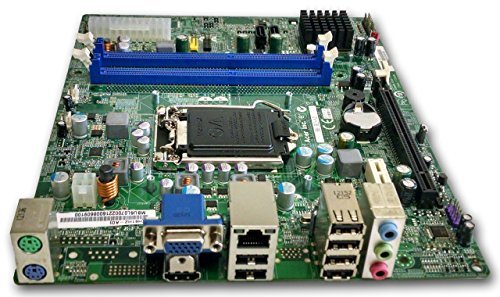
Gambar 1: Leuwihview of the Gateway SX2865 SFF Desktop Motherboard H61. This image displays the main components and layout of the motherboard, including the CPU socket, RAM slots, and various connectors.
2. Émbaran Kasalametan
Always observe the following safety precautions when handling and installing computer components:
- Pegatkeun sambungan kabel listrik ti stop kontak témbok saméméh masang atawa nyoplokkeun komponén nanaon.
- Anggo tali pigeulang anti statik pikeun nyegah karusakan éléktrostatik (ESD) kana komponén sénsitip.
- Pegang motherboard ku sisi-sisina supados henteu némpél komponén atanapi sirkuit anu sénsitip.
- Pastikeun ventilasi anu cekap dina jero casing komputer pikeun nyegah panas teuing.
- Ulah ngalaan motherboard ka Uap atawa hawa ekstrim.
- Upami anjeun teu yakin kana léngkah pamasangan naon waé, konsultasi ka teknisi anu mumpuni.
3. Setup jeung Instalasi
Follow these steps to properly install the Gateway SX2865 SFF Desktop Motherboard into your system:
3.1. Nyiapkeun Chassis
- Open your computer chassis and ensure it is clean and free of dust.
- Install the I/O shield provided with your chassis or motherboard into the rear panel opening.
- Verify that the standoffs in the chassis align with the mounting holes on the motherboard. Adjust if necessary.
3.2. Pamasangan CPU
- Locate the CPU socket (LGA 1155/1156) on the motherboard.
- Gently angkat tuas beban tur buka panutup stop kontak CPU.
- Carefully align the CPU with the socket, matching the golden triangle on the CPU with the triangle mark on the socket. Do not force the CPU into the socket.
- Tutupkeun panutup stop kontak teras pencét tuas beban dugi ka konci dina tempatna.
- Apply a thin layer of thermal paste to the CPU surface (if not pre-applied on the cooler).
- Install the CPU cooler according to its manufacturer's instructions, ensuring it is securely fastened.
3.3. Pamasangan RAM
- Manggihan slot DIMM DDR3 on motherboard nu.
- Buka klip dina kadua tungtung slot DIMM.
- Sejajarkeun takik dina modul RAM sareng konci dina slot DIMM.
- Pencét pageuh dina duanana tungtung modul RAM nepi ka klip snap kana tempat.
3.4. Motherboard Pamasangan
- Carefully place the motherboard into the chassis, aligning the mounting holes with the standoffs.
- Secure the motherboard with screws, ensuring not to overtighten.
3.5. Nyambungkeun Periferal jeung Power
- Sambungkeun konektor kakuatan ATX 24-pin sareng konektor kakuatan CPU 4-pin tina catu daya anjeun ka motherboard.
- Sambungkeun kabel data SATA tina alat panyimpen anjeun (HDD / SSD) ka palabuhan SATA dina motherboard.
- Connect front panel connectors (power button, reset button, USB, audio) to their respective headers on the motherboard. Refer to the motherboard's silkscreen labels for correct orientation.
- Pasang kartu ékspansi naon waé (contona, kartu grafis) kana slot PCIe anu saluyu sareng amankeun.
- Connect all necessary cables to your power supply.
4. Operasi sareng Konfigurasi
4.1. Mimiti Boot-Up
- After all components are installed and connected, close the chassis.
- Sambungkeun monitor anjeun, keyboard, sareng beurit.
- Sambungkeun kabel daya ka catu daya sareng stop kontak témbok.
- Pencét tombol daya dina komputer Anjeun.
4.2. BIOS / UEFI Setup
The BIOS (Basic Input/Output System) or UEFI (Unified Extensible Firmware Interface) is firmware that initializes hardware during the booting process. To enter the BIOS/UEFI setup utility:
- During the initial boot-up sequence, repeatedly press the designated key (commonly Del, F2, atawa F10). The exact key may vary; check the on-screen prompts.
- Within the BIOS/UEFI, you can configure settings such as:
- Sistim Tanggal jeung Waktos
- Boot Order (to install an operating system from a USB drive or DVD)
- SATA Mode (AHCI, IDE)
- CPU and Memory settings (advanced users)
- Save changes and exit the BIOS/UEFI to continue booting.
4.3. Sistem Operasi sareng Pamasangan Supir
After configuring the BIOS/UEFI, proceed with installing your preferred operating system (e.g., Windows, Linux). Once the OS is installed, install the necessary drivers for the motherboard's components (chipset, audio, LAN, etc.). These drivers are typically available on the manufacturer's website (Acer/Gateway) or can be found through the operating system's update features.
5. Pangropéa
Pangropéa rutin ngabantosan mastikeun umur panjang sareng kinerja motherboard anjeun anu stabil:
- Ngaleungitkeun lebu: Periodically clean the inside of your computer case, including the motherboard, CPU cooler, and fan vents, using compressed air. Ensure the system is powered off and unplugged before cleaning.
- Pembaruan BIOS: Pariksa produsén urang website (Acer/Gateway) for BIOS/UEFI updates. Updates can improve stability, add support for new hardware, or fix bugs. Follow the update instructions carefully to avoid damaging the motherboard.
- Pembaruan supir: Keep your system drivers updated to ensure optimal performance and compatibility.
- Inspeksi Fisik: Pariksa motherboard sacara berkala pikeun ningali tanda-tanda karusakan, sambungan anu leupas, atanapi kapasitor anu nonjol.
6. Cara ngungkulan
Upami anjeun mendakan masalah sareng motherboard anjeun, tingali léngkah-léngkah ngungkulan umum ieu:
- Henteu aya kakuatan:
- Ensure the power supply is connected correctly to the motherboard (24-pin ATX and 4-pin CPU).
- Check that the power supply switch is in the 'ON' position.
- Verify the power cord is securely plugged into both the power supply and the wall outlet.
- Confirm the front panel power button connector is correctly attached to the motherboard.
- Henteu aya tampilan:
- Ensure the monitor is powered on and connected to the correct video output (either integrated graphics or a dedicated graphics card).
- Pasang deui modul RAM. Coba boot ngan ukur nganggo hiji modul RAM anu dipasang.
- Reseat kartu grafik (lamun lumaku).
- Check if the CPU cooler is properly installed and the CPU power connector is secure.
- System Fails to Boot / POST Errors:
- Listen for beep codes from the motherboard's speaker (if installed). Consult the motherboard's documentation for beep code meanings.
- Clear the CMOS (Complementary Metal-Oxide-Semiconductor) by removing the CMOS battery for a few minutes or using the clear CMOS jumper (refer to motherboard layout).
- Ensure all essential components (CPU, RAM, GPU) are correctly installed.
- Masalah Sistem Operasi:
- Verify that all necessary drivers are installed and up to date.
- Check SATA cable connections for storage devices.
- Run diagnostic tools for hard drives/SSDs and RAM.
7. Spésifikasi
Key technical specifications for the Gateway SX2865 SFF Desktop Motherboard H61 (Model DB.U7411.001):
| Fitur | Rincian |
|---|---|
| merek | Gerbang |
| Ngaran modél | SX2865 |
| Nomer Modél Item | DB.U7411.001 |
| Produsén | Acer |
| Tipe Chipset | Intel H61 Express |
| CPU Socket | LGA 1155 or LGA 1156 |
| Prosesor cocog | Intel Xeon (and other compatible LGA 1155/1156 CPUs) |
| Téhnologi Mémori RAM | DDR3 |
| Mémori Jam Speed | 2133 MHz (Max supported, actual speed depends on CPU and RAM) |
| Kapasitas Panyimpenan Mémori | 16 GB (Maximum supported) |
| Alat nu cocog | Komputer Pribadi |
| Platform | Linux (and other compatible operating systems) |
| Faktor Bentuk | uATX (Micro-ATX) |
8. Garansi jeung Rojongan
For warranty information and technical support regarding your Gateway SX2865 SFF Desktop Motherboard H61 (Model DB.U7411.001), please refer to the documentation provided with your original system or contact the manufacturer directly.
- Pabrikan: Acer (as per product specifications)
- merek: Gerbang
- Nganjang ka resmi Pangrojong Gerbang websitus or Rojongan Acer websitus for drivers, FAQs, and contact information.
- Simpen bukti pameseran anjeun pikeun klaim garansi.


