Bubuka
This manual provides detailed instructions for setting up, operating, and maintaining your Logitech M275 Wireless USB Mouse. Please read this guide thoroughly to ensure optimal performance and longevity of your device. The Logitech M275 mouse is designed for comfortable use with its contoured shape and offers reliable wireless connectivity.

Gambar: luhur-handap view of the Logitech M275 Wireless Mouse, showcasing its black finish and central scroll wheel.
Disetél
Follow these steps to set up your Logitech M275 Wireless USB Mouse:
- Pasang Batré:
- Panggihan kompartemen batré dina underside beurit.
- Buka panutup kompartemen batré.
- Insert one AA battery, ensuring correct polarity (+/-). The mouse includes one AA battery.
- Tutup panutup kompartemen batré aman.
Gambar: handap view of the Logitech M275 Wireless Mouse, showing the ON/OFF switch, battery compartment, and optical sensor.
- Sambungkeun Panarima USB:
- Locate the tiny USB Nano Receiver, typically stored inside the battery compartment or packaged separately.
- Colokkeun USB Nano Receiver kana port USB anu sayogi dina komputer anjeun.
- Komputer anjeun kedah otomatis ngadeteksi sareng masang panggerak anu diperyogikeun.

Image: Close-up of the Logitech Nano Receiver plugged into a laptop's USB port, indicating successful connection.
- Daya dina Mouse:
- Slide the ON/OFF switch on the underside of the mouse to the 'ON' position.
- Beurit ayeuna siap dianggo.

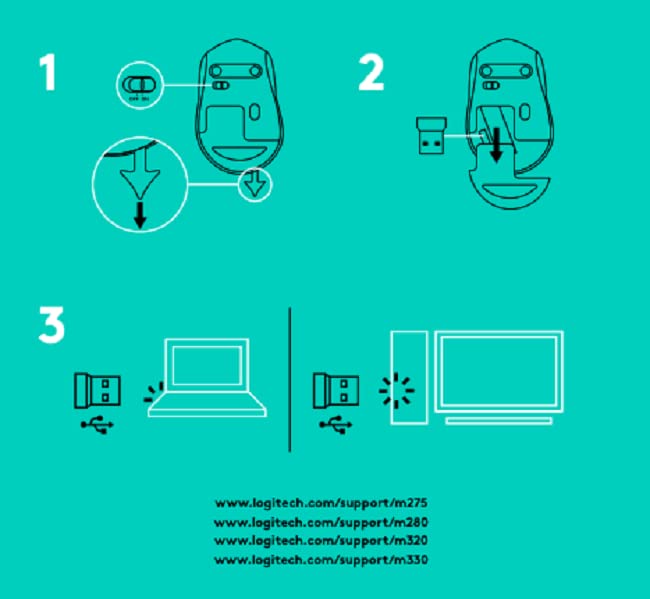
Image: A diagram showing the three steps for setting up the mouse: 1) Insert battery, 2) Insert receiver into mouse for storage, 3) Plug receiver into computer's USB port.
Parentah Operasi
The Logitech M275 Wireless USB Mouse offers intuitive control for your computer:
- Fungsi dasar:
- Klik Kénca: Tombol utama pikeun milih barang, muka tautan, jsb.
- Klik katuhu: Tombol sekundér pikeun menu kontéks sareng pilihan tambahan.
- Gulung kabayang: Roll up or down to navigate documents and web pages. The scroll wheel also functions as a clickable middle button.
- Sénsor optik canggih: The mouse utilizes a Logitech Advanced Optical Sensor for smooth and precise cursor control on various surfaces.
- Indikator Kahirupan Batré: A small LED light on the mouse indicates battery status. It typically glows green briefly when powered on if the battery is good. A red light indicates that the battery is low and needs replacement. The mouse is designed for an 18-month battery life, which may vary based on usage.

Gambar: Top view of the Logitech M275 Wireless Mouse, highlighting its ergonomic design and indicating an 18-month battery life.
Pangropéa
Pangropéa anu leres mastikeun umur panjang sareng kinerja mouse anjeun:
- Ngagantian batré: When the battery indicator light turns red, replace the AA battery. Follow the steps outlined in the 'Install the Battery' section under Setup.
- Ngabersihan Mouse:
- Pareuman beurit saméméh beberesih.
- Make kaen nu lemes, teu aya lint rada dampku cai atawa solusi beberesih hampang pikeun ngusap beungeut beurit.
- Hindarkeun ngagunakeun bahan kimia anu kasar atanapi bahan abrasive.
- Ulah ngantep cairan asup kana komponén internal beurit.
Pamérésan masalah
If you encounter issues with your Logitech M275 mouse, refer to the following common solutions:
- No Cursor Movement or Intermittent Connection:
- Pastikeun beurit dihurungkeun.
- Check the battery. Replace it if the indicator light is red or if the mouse is unresponsive.
- Ensure the USB Nano Receiver is securely plugged into a working USB port on your computer. Try a different USB port.
- Pindahkeun beurit ngadeukeutan ka panarima USB pikeun ngaluarkeun masalah jangkauan.
- Avoid using the mouse on highly reflective or transparent surfaces. A mouse pad is recommended for optimal tracking.
- Lagging or Unresponsive Cursor:
- Interference from other wireless devices can affect performance. Try moving other wireless devices away from the mouse and receiver.
- Ensure your computer's operating system is up to date.
- Mouse Not Detected by Computer:
- Balikan deui komputer anjeun.
- Try plugging the USB Nano Receiver into a different USB port.
- If you have other Logitech devices, ensure the M275 receiver is the correct one for this mouse, as it is not a Unifying receiver.
spésifikasi
| Fitur | Rincian |
|---|---|
| merek | Logitech |
| Nomer modél | M275 |
| Téhnologi konektipitas | USB Wireless |
| Téhnologi Deteksi Gerakan | Optik |
| Warna | Hideung |
| Sumber Daya | Didukung ku batré (1 batré AA) |
| Rata Kahirupan Batré | 18 Bulan |
| Platform hardware | PC |
| Kasaluyuan System Operasi | Linux, Windows 7, Windows XP |
| Item Beurat | 100 g |
| Dimensi produk | 21 x 7.6 x 15.2 cm |
| Komponén Kaasup | Wireless Mouse, Nano Receiver, 1 AA battery, User Documentation |
Garansi sareng Rojongan
- Garansi: The Logitech M275 Wireless USB Mouse comes with a 1-year warranty. Please retain your proof of purchase for warranty claims.
- Rojongan Palanggan: For technical assistance or warranty inquiries, please contact Logitech Customer Care.
- Logitech India Customer Care:
- Nomer Bebas Tol: 1800 572 4730
- Opening Time: 9:00 AM to 6:00 PM (Monday to Friday)
- Note: Weekends & National Holidays closed.


