Bubuka
This manual provides comprehensive instructions for the operation and maintenance of your ONN X5 HiFi Music Player. Please read this manual thoroughly before using the device to ensure proper functionality and to maximize your listening experience. The ONN X5 is designed to deliver high-fidelity audio playback in a compact and user-friendly format.
Produk Leuwihview
The ONN X5 is a portable HiFi music player featuring a 2.0-inch TFT screen and an aluminum alloy shell. It supports a wide range of audio formats, including lossless files, and offers expandable storage via a MicroSD card.
Fitur konci:
- Audio Kasatiaan Luhur: Supports WAV, FLAC, ALAC, APE, OGG lossless formats, and high-definition music up to 24Bit/192 KHz.
- tampilan: 2.0-inch TFT screen (176x220 pixels) for clear navigation and information display.
- Panyimpenan: 8GB internal memory, expandable up to 32GB with a MicroSD/TF card.
- Desain awét: Lightweight aluminum alloy body (60g) for enhanced durability and reduced external interference noise.
- Panganteur pamaké: Intuitive key-based operation.
- Fitur tambahan: FM Radio support.
- Batré: High-capacity rechargeable lithium polymer battery.
- Rojongan multi-basa: English, Russian, Korean, German, Japanese, Polish, Indonesian, Chinese.
Tata perenah alat:

Gambar: Hareupeun view of the ONN X5 HiFi Music Player, showing its display and control buttons. The screen displays track information, audio quality (e.g., 24BIT, 88HHZ), and playback status.

Gambar: Sisi view of the ONN X5 HiFi Music Player, illustrating the location of the MicroSD card slot on the right side of the device.

Gambar: Hareup jeung tukang view of the ONN X5 HiFi Music Player. The back panel shows the model number "X5" and branding information.
Disetél
1. Ngecas Alat:
- Connect the ONN X5 to a power source using the provided USB cable.
- Indikator batré dina layar bakal nembongkeun status ngecas.
- A full charge is recommended before first use. The device uses a high-capacity rechargeable lithium polymer battery.
2. Inserting a MicroSD/TF Card:
- Locate the MicroSD/TF card slot on the side of the player.
- Gently insert a compatible MicroSD/TF card (up to 32GB) into the slot until it clicks into place.
- Pastikeun kartu parantos dipasang kalayan leres supados henteu ruksak.

Image: Contents of the ONN X5 package, showing the player, USB charging cable, and other accessories. This illustrates the components available for setup.
3. Mindahkeun Musik Files:
- Connect the ONN X5 to your computer using the USB cable.
- Alat éta bakal némbongan salaku drive panyimpenan anu tiasa dicabut.
- Sered jeung leupaskeun audio nu dipikahayang files (MP3, WMA, APE, FLAC, WAV, ALAC, OGG) into the player's internal storage or the MicroSD card.
- Cabut alat tina komputer anjeun kalayan aman sateuacan nyabut kabel USB.
Parentah Operasi
Hurungkeun/Pareuman:
- To power on, press and hold the power button (usually marked with a universal power symbol) until the screen illuminates.
- Pikeun mareuman, pencét jeung tahan tombol daya nepi ka alat pareum.
Napigasi:
The ONN X5 uses physical buttons for navigation. Refer to the device layout for button identification.
- VOL: Nyetél polumeu.
- M (Menu): Ngaksés ménu sareng mastikeun pilihan.
- Tombol panah (< / >): Navigate through menus, select tracks, or fast forward/rewind during playback.
- Tombol Daya: Also functions as a play/pause button during music playback.
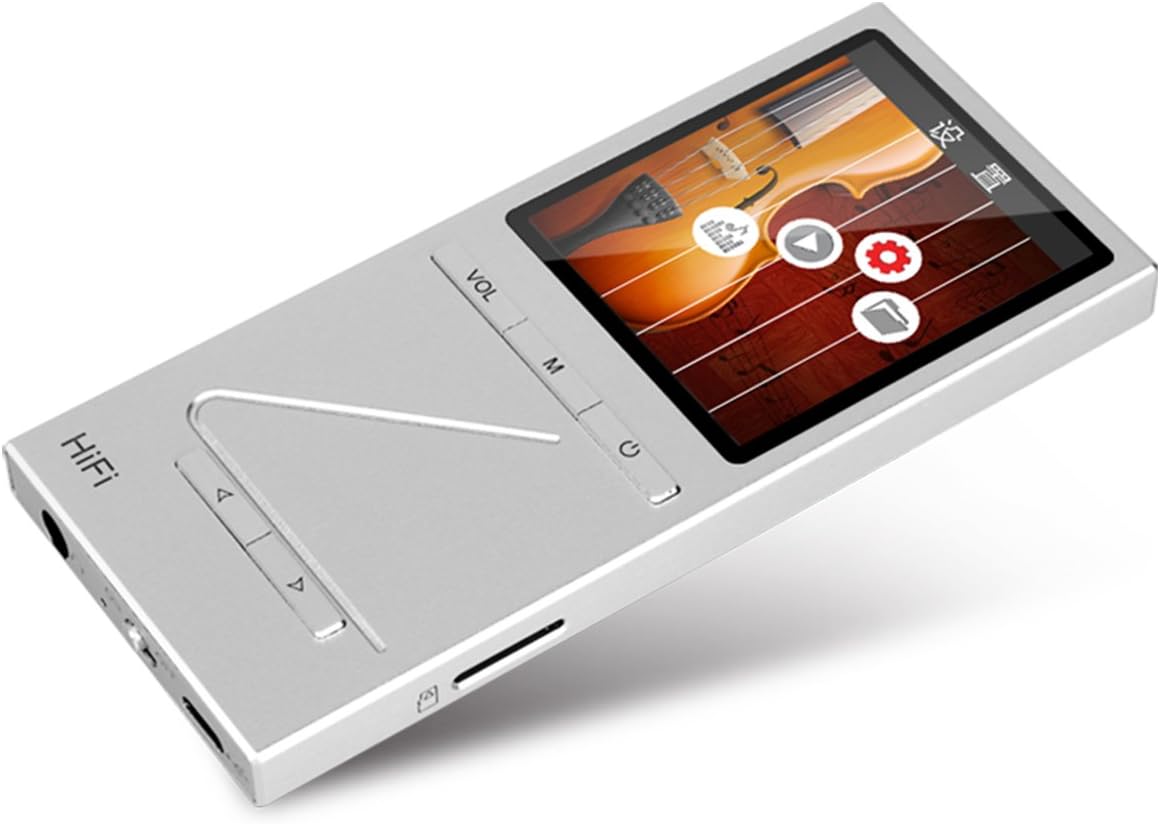
Gambar: Angled view of the ONN X5 HiFi Music Player, showing the screen with various menu icons, indicating the user interface for navigation.
Puteran musik:
- From the main menu, navigate to "Music" or "Files".
- Browse through your folders and select a track to play.
- Press the Power/Play button to start or pause playback.
- Use the arrow buttons to skip tracks or fast forward/rewind.
- Adjust volume using the VOL button.
Radio FM:
- Navigate to the "FM Radio" option from the main menu.
- Anggo tombol navigasi pikeun nyeken stasiun atanapi nyetel frékuénsi sacara manual.
- Ensure headphones are connected as they often act as the antenna for FM radio.
Setélan basa:
Alat ngadukung sababaraha basa. Pikeun ngarobah basa:
- Buka "Setélan" tina ménu utama.
- Select "Language" and choose your preferred language from the list (English, Russian, Korean, German, Japanese, Polish, Indonesian, Chinese).
Pangropéa
- beberesih: Anggo kaén anu lemes sareng garing pikeun ngabersihan alat. Hindarkeun pembersih cair atanapi bahan abrasive.
- Panyimpenan: Nyimpen pamuter dina tiis, tempat garing jauh ti sinar panonpoé langsung jeung hawa ekstrim.
- Perawatan batré: Pikeun manjangkeun umur batre, ulah miceun batre pinuh. Ngeusi batre alat sacara rutin, sanajan henteu dianggo kanggo waktos anu lami.
- Ngahindarkeun Dampak: The aluminum alloy shell provides durability, but avoid dropping the device or subjecting it to strong impacts.
- Paparan cai: Alat ieu henteu tahan cai. Hindarkeun kakeunaan cai atanapi kalembaban anu luhur.
Pamérésan masalah
Device Will Not Power On:
- Pastikeun batréna geus dieusian. Sambungkeun alat ka sumber daya tur ngidinan eta ngecas salila sahenteuna 30 menit samemeh nyoba ngahurungkeun deui.
- Try performing a hard reset (if applicable, refer to manufacturer's specific instructions for hard reset, usually involves holding power button for an extended period).
Henteu aya sora:
- Check the volume level and ensure it is not muted.
- Verify that headphones or external speakers are properly connected.
- Test with different headphones or audio output devices.
- Pastikeun audio file is not corrupted or in an unsupported format.
Teu Bisa Mindahkeun Files:
- Pastikeun kabel USB disambungkeun pageuh kana pamuter sareng komputer.
- Cobi nganggo port USB anu béda dina komputer anjeun atanapi kabel USB anu béda.
- Verify that the device is recognized by your computer as a removable drive.
- Check if the MicroSD card is properly inserted and not full.
Screen Not Responding / Frozen:
- Pencét terus tahan tombol daya salila kira-kira 10-15 detik pikeun maksa ngamimitian deui.
- Upami masalahna tetep, pastikeun batréna dieusi.
spésifikasi
| Fitur | Rincian |
|---|---|
| Nomer modél | X5 |
| merek | ONN |
| Ukuran layar | 2.0 Inches TFT (176x220 PIXEL) |
| Mémori internal | 8 GB |
| Panyimpenan Expandable | MicroSD/TF card up to 32 GB |
| Format Audio Dirojong | APE, FLAC, ALAC, WAV, WMA, OGG, MP3 (up to 24Bit/192 KHz) |
| Téhnologi konektipitas | Aux, USB |
| Fitur husus | Radio FM |
| Batré | 1 Lithium Ion battery required (High-capacity rechargeable lithium polymer) |
| Item Beurat | 7 ons (kira-kira 0.2 Kilogram) |
| Ukuran Paket | 6.21 x 4.7 x 1.2 inci |
| Produsén | SZTZWY |
Garansi sareng Rojongan
For detailed warranty information, please refer to the warranty card included with your purchase or visit the official ONN product support website. For technical assistance or further inquiries, please contact ONN customer support through their official channels.


