Bubuka
Thank you for choosing the Naztech N750 Emerge Wireless Bluetooth Headset. This manual provides detailed instructions on how to set up, operate, and maintain your headset to ensure optimal performance and longevity. The N750 Emerge is designed for clear communication and media playback, featuring advanced noise cancellation and versatile connectivity.
Eusi pakét

Image: Contents of the Naztech N750 Emerge package.
- Naztech N750 Emerge Wireless Headset
- Carjer mobil
- Ear Gels (S/M/L)
- Manual pamaké
- Flat Micro USB Cable
Produk Leuwihview
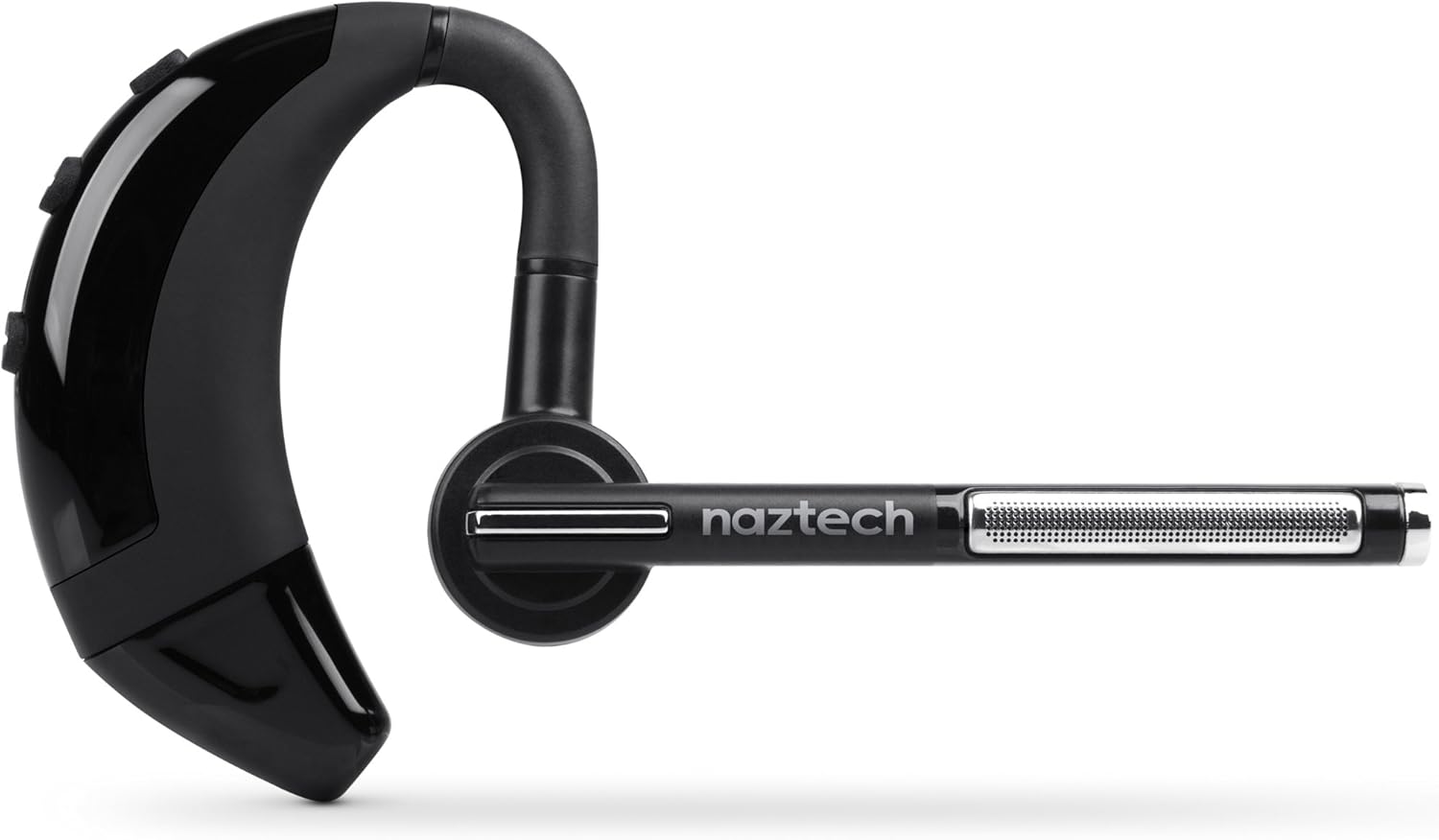
Image: The Naztech N750 Emerge Wireless Bluetooth Headset.
The Naztech N750 Emerge features an ergonomic design for comfortable wear and intuitive controls for easy operation. Key components include the ear hook, main body with control buttons, microphone boom, and ear tip.
Disetél
1. Ngecas Headsét
Before first use, fully charge the N750 Emerge headset. Connect the provided Micro USB cable to the charging port on the headset and the other end to a USB power source (e.g., the included car charger, a computer USB port, or a wall adapter). The LED indicator will show charging status and turn off or change color when fully charged.
2. Nyapasangkeun sareng Alat Bluetooth
- Pastikeun headset dipareuman.
- Press and hold the Multi-function Button (MFB) on the headset until the LED indicator flashes blue and red alternately, indicating pairing mode.
- On your smartphone or Bluetooth-enabled device, go to the Bluetooth settings and enable Bluetooth.
- Milarian pikeun available devices. Select "Naztech N750" from the list.
- Upami dipenta pikeun kodeu aksés, lebetkeun "0000" (opat nol).
- Once successfully paired, the LED indicator will flash blue slowly, and you may hear a confirmation tone.
3. Ngagem Headsét

Image: The Naztech N750 Emerge headset demonstrating its 180-degree swivel for left or right ear use.
The N750 Emerge is designed for comfortable wear on either the left or right ear. The ear hook swivels 180 degrees to accommodate your preference. Adjust the ear hook and select the appropriate ear gel size (S/M/L) for a secure and comfortable fit. The microphone boom should be positioned towards your mouth for optimal voice pickup.
Parentah Operasi
Daya Hurung/Pareuman
- Daya Hurung: Press and hold the MFB for approximately 3 seconds until the LED flashes blue.
- Pareum listrik: Press and hold the MFB for approximately 5 seconds until the LED flashes red and then turns off.
Manajemén Telepon

Image: The headset's advanced call technology automatically pauses music and routes incoming calls.
- Ngajawab Telepon: Press the MFB once when a call comes in.
- Tungtung Telepon: Pencét MFB sakali nalika nelepon.
- Nolak Telepon: Press and hold the MFB for approximately 2 seconds when a call comes in.
- Telepon deui Nomer Panungtungan: Pencét dua kali MFB nalika headset dina kaayaan nganggur.
- Nelepon Sora: Press the MFB once when the headset is idle to activate your phone's voice assistant (if supported).
Volume Control
Use the Volume Up (+) and Volume Down (-) buttons on the headset to adjust the call or media volume.
GPS & Voice Prompt / Caller ID Announcement

Image: The headset provides GPS voice prompts and announces caller ID for incoming calls.
The N750 Emerge supports voice prompts for GPS navigation and announces the caller ID for incoming calls, allowing for hands-free information and call management.
Puterkeun Musik
When connected to a device, the headset can play audio. Use your device's controls for play/pause, skip track, etc. Incoming calls will automatically pause music playback.
Téhnologi Multipoint

Image: The headset supports Multipoint Technology for connecting to two devices simultaneously.
The N750 Emerge supports multipoint technology, allowing it to be connected to two Bluetooth devices simultaneously. This enables seamless switching between calls or audio from two different paired devices.
Noise Cancelling

Image: The headset utilizes Noisehush Technology for crystal clear conversations with noise cancellation.
The integrated Noisehush® Technology provides ultimate HD clarity and noise cancellation, ensuring crystal clear conversations for both you and your callers by reducing distracting ambient sound.
Pangropéa
- Clean the headset regularly with a soft, dry cloth. Do not use harsh chemicals or abrasive cleaners.
- Avoid exposing the headset to extreme temperatures, moisture, or direct sunlight.
- Simpen headset dina tempat anu tiis sareng garing upami henteu dianggo.
- Do not attempt to disassemble or modify the headset, as this will void the warranty and may cause damage.
Pamérésan masalah
| Masalah | Mungkin Cukang lantaranana | Solusi |
|---|---|---|
| Headset teu hurung. | Batré lemah atawa béak. | Cas headset nepi ka pinuh. |
| Teu tiasa dipasangkeun sareng alat. | Headset not in pairing mode; Bluetooth off on device; device too far. | Ensure headset is in pairing mode (flashing blue/red). Turn on Bluetooth on your device. Move headset closer to device (within 10 meters). |
| Taya sora atawa volume low. | Volume too low; headset not connected; incorrect audio output selected. | Increase volume on headset and device. Reconnect headset. Ensure audio is routed to the headset on your device. |
| Poor call quality / Noise. | Weak signal; environmental interference; microphone not positioned correctly. | Move closer to the paired device. Avoid strong electromagnetic interference. Adjust microphone boom towards your mouth. |
spésifikasi
- model: N750 Emerge
- Vérsi Bluetooth: v4.1
- Téknologi Komunikasi Nirkabel: Bluetooth
- Téknologi konektipitas: Nirkabel
- Pembatalan Noise: Noisehush® Technology
- Multipoint Technology: Sumuhun
- iOS Battery Tracker: Sumuhun
- Waktu ngobrol: Nepi ka 8 jam
- Waktu sayaga: Nepi ka 140 jam
- Batré: 1 batré Litium Ion diperlukeun
- Ukuran produk: 10.16 x 10.16 x 2.54 cm
- Beurat barang: 22.7 g
- warna: Hideung
Garansi sareng Rojongan
Naztech products are designed and manufactured to the highest quality standards. For warranty information and technical support, please refer to the warranty card included with your product or visit the official Naztech websitus. Simpen resi pameseran anjeun salaku bukti pameseran pikeun klaim garansi.


