1. Bubuka
The HP USB Slim Business Keyboard is designed to provide efficient data entry and seamless connectivity for your HP Business PCs. This full-sized keyboard offers a comfortable and productive typing experience, optimized for use across multiple operating systems.
fitur konci ngawengku:
- 3 indicator lights for Caps Lock, Num Lock, and Scroll Lock.
- Integrated number pad for quick data entry.
- Spill-resistant construction for enhanced durability.
- Adjustable legs for customizable typing angles.
- Full-size 104-key layout, including Windows, Function, and Page Keys.
- Quiet key strokes to minimize typing noise.
- Plug-and-play USB connectivity for instant setup.

Gambar 1.1: Angled view of the HP USB Slim Business Keyboard, showcasing na langsing profile and full layout with the attached USB cable.
2. Setup Guide
Setting up your HP USB Slim Business Keyboard is a straightforward process due to its plug-and-play design.
2.1 Nyambungkeun kibor
- Teangan hiji port USB sadia dina komputer Anjeun.
- Selapkeun konektor USB keyboard pageuh kana port USB.
- Sistem operasi anjeun bakal otomatis ngadeteksi sareng masang panggerak anu diperyogikeun. Prosés ieu biasana butuh sababaraha detik.
- Once installed, the keyboard is ready for immediate use.
2.2 Nyaluyukeun Sudut kibor
For optimal comfort, you can adjust the typing angle of your keyboard:
- Flip the keyboard over to reveal the two adjustable legs located at the top corners of the underside.
- Gently pull out the legs to raise the back of the keyboard, providing a slight incline.
- Push the legs back in to return the keyboard to a flat position.

Gambar 2.1: Sisi view of the keyboard illustrating its slim profile and the adjustable leg extended for an inclined typing position.
3. Ngoperasikeun kibor
The HP USB Slim Business Keyboard provides a standard 104-key layout for efficient and familiar typing.
3.1 Tata perenah sareng fungsi konci
The keyboard features a full QWERTY layout, a dedicated numeric keypad, and function keys (F1-F12) that may have secondary functions depending on your operating system and installed software.
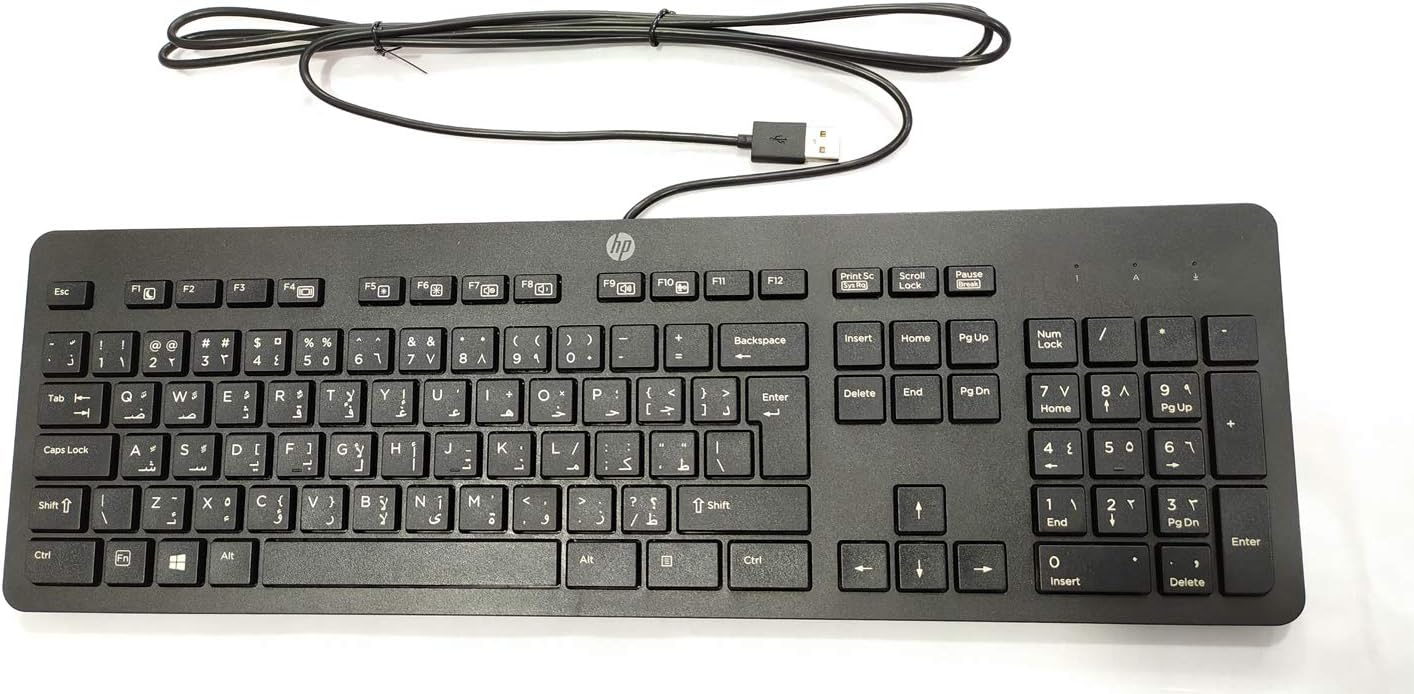
Gambar 3.1: Top-handap view of the keyboard, highlighting the full 104-key layout including the numeric keypad and function keys.
3.2 Lampu Indikator
Three LED indicator lights are located above the numeric keypad:
- Nomer Konci: Illuminates when the numeric keypad is active. Press the "Num Lock" key to toggle on/off.
- Konci hurup ageung: Illuminates when Caps Lock is active, indicating that all typed letters will be uppercase. Press the "Caps Lock" key to toggle on/off.
- Gulung konci: Illuminates when Scroll Lock is active. Its function varies by application but is rarely used in modern operating systems.
3.3 Multi-OS Compatibility
This keyboard is designed to interact seamlessly with various operating systems, including Windows 10 and other compatible systems. Standard keyboard functions will operate without additional software installation.
4. Pangropéa sarta perawatan
Proper care will extend the life and maintain the performance of your HP USB Slim Business Keyboard.
4.1 Parentah beberesih
- Pegatkeun sambungan keyboard tina komputer Anjeun sateuacan beberesih.
- Anggo kaén anu lemes sareng teu aya serat anu hampang dampdikumbah ku cai atawa leyuran beberesih hampang, non-abrasive.
- Wipe the keycaps and keyboard surface gently. Avoid excessive moisture.
- Pikeun lebu sareng lebu antara konci, paké hawa anu dikomprés.
- Pastikeun kiborna garing pisan sateuacan disambungkeun deui ka komputer anjeun.
4.2 Tahan Tumpahan
The keyboard features spill-resistant construction. While designed to withstand minor spills, it is not waterproof. In case of a liquid spill:
- Langsung pegatkeun sambungan keyboard tina komputer Anjeun.
- Invert the keyboard to allow liquid to drain.
- Ngusap permukaan garing ku lawon beresih.
- Allow the keyboard to air dry completely for several hours (or overnight) before reconnecting.
5. Cara ngungkulan
If you encounter issues with your keyboard, refer to the following common troubleshooting steps:
| Masalah | Mungkin Cukang lantaranana / Solusi |
|---|---|
| Keyboard teu ngabales. |
|
| Aya sababaraha konci anu teu tiasa dianggo. |
|
| Indicator lights (Num Lock, Caps Lock) are not working. |
|
| Keyboard input is delayed or erratic. |
|
6. Spésifikasi
| merek | HEWLETT PACKARD |
| Nomer modél | 803181 |
| Téhnologi konektipitas | USB (Kabel) |
| Tipe Alat | kibor |
| Warna | Hideung |
| Item Beurat | 7.2 ons (kira-kira 204 gram) |
| Ukuran produk (L x W x H) | 18 x 6.6 x 1.1 inci (kira-kira 45.7 x 16.8 x 2.8 cm) |
| Jumlah konci | 104 |
| Kasaluyuan System Operasi | Windows 10 (optimized for multiple operating systems) |
| Fitur husus | Ergonomic, Spill-resistant |
| Naon dina Box | HP USB Slim Business Keyboard, USB Cable (integrated) |
7. Garansi jeung Rojongan
7.1 Garansi kawates
The HP USB Slim Business Keyboard comes with a one-year limited warranty. This warranty covers defects in materials and workmanship under normal use. Please retain your proof of purchase for warranty claims.
7.2 Rojongan Palanggan
For technical assistance, warranty service, or additional product information, please visit the official HP support website or contact HP customer service. Refer to your product packaging or HP's official websitus pikeun inpormasi kontak sareng sumber pangrojong pang anyarna.
Note: Specific support contact details may vary by region.


