Bubuka
Thank you for choosing the Coby Retro LCD Alarm Clock, model CBC-52-WHT. This user manual provides essential information for setting up, operating, and maintaining your new alarm clock. Designed for clear and precise visibility, this clock features a sleek 3.5" LCD screen that displays time, date, and indoor temperature.
Fitur konci:
- Perpetual Calendar Display: Always know the current date.
- On-The-Hour Chime: Optional audible chime for every hour.
- LCD Time and Temperature Display: Clear digital readout of time and indoor temperature.
- Alarm & 10 Minute Snooze Function: Reliable alarm with a convenient snooze option.
- Batré Dioperasikeun: Portable design, requires 2 AAA batteries (not included).
Eusi pakét
Mangga parios pakét sacara saksama pikeun mastikeun yén sadaya barang aya sareng dina kaayaan anu saé.
- 1 x Coby Retro LCD Alarm Clock (CBC-52-WHT)
- 1 x Manual Pamaké (dokumén ieu)
Catetan: 2 batré AAA diperyogikeun pikeun operasi sareng henteu kalebet dina pakét.
Produk Leuwihview jeung Kontrol

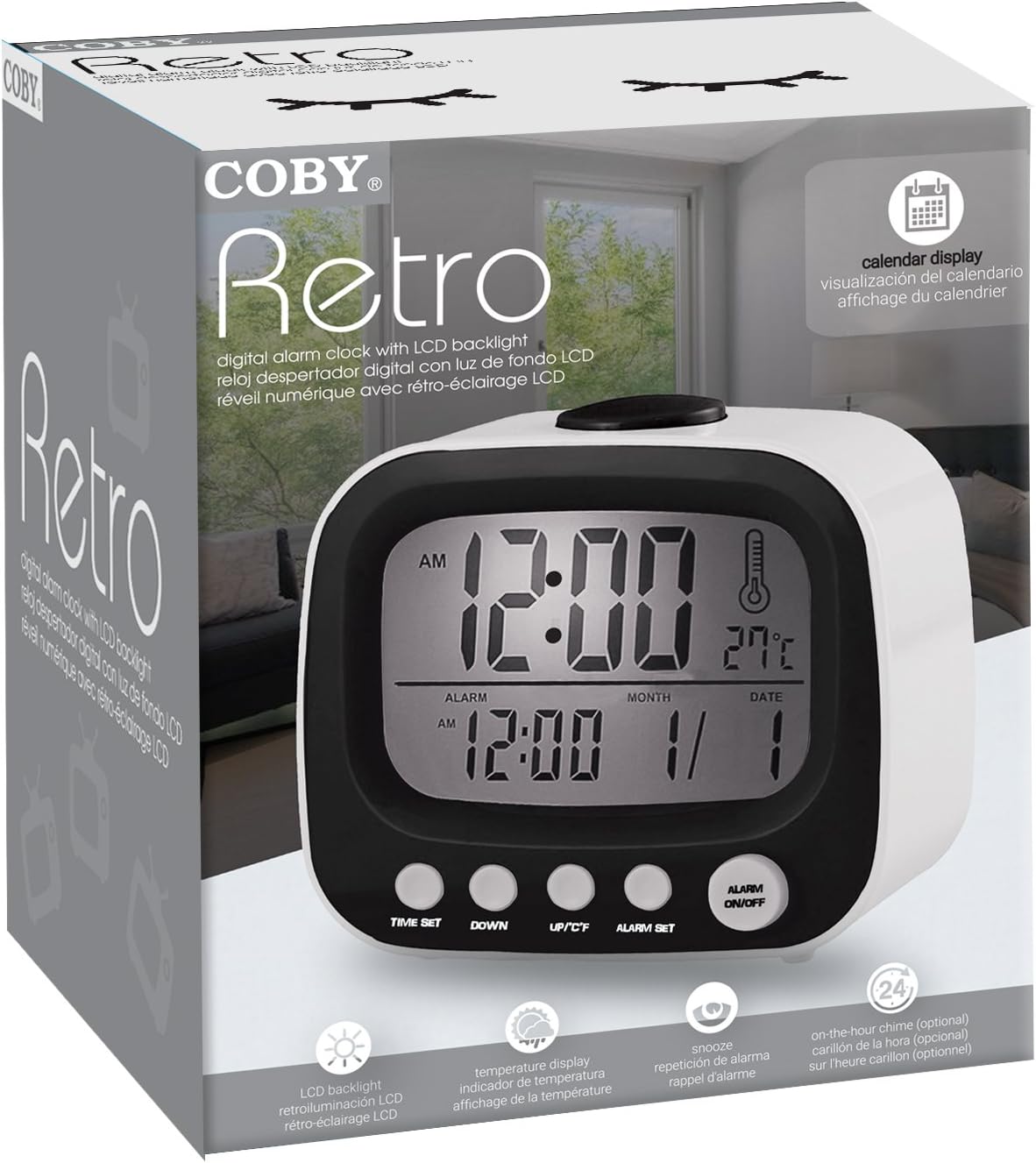
Gambar 1: Hareupeun view of the Coby Retro LCD Alarm Clock, highlighting the digital display and control buttons.
Unsur tampilan:
- Tampilan waktos: Shows current time (AM/PM indicator).
- Tampilan waktos Alarm: Shows the set alarm time.
- Month/Date Display: Némbongkeun bulan jeung poé ayeuna.
- Suhu Témbong: Némbongkeun suhu jero ruangan dina Celsius atanapi Fahrenheit.
- Ikon Alarm: Indicates when the alarm is active.
- Chime Icon: Indicates when the hourllonceng y keur aktip.
Control Buttons (Front Panel):
- SETIA WAKTU: Used to enter time/date setting mode.
- TURUN: Decreases values during setting, or navigates options.
- UP/°C/°F: Increases values during setting, navigates options, or switches temperature unit.
- SET ALARM: Dianggo pikeun asup ka modeu setelan alarm.
- ALARM Hurungkeun / Pareum: Toggles the alarm function on or off.
Tombol luhur:
- SNOOZE / CAHAYA: Activates snooze during an alarm, or temporarily illuminates the display backlight.
Disetél
1. Pamasangan batré
- Panggihan panutup kompartemen batréna di tukang jam alarm.
- Geser panutupna ka handap pikeun mukakeunana.
- Selapkeun dua (2) batré AAA anyar, mastikeun polaritasna bener (+ jeung -) sakumaha dituduhkeun di jero kompartemen.
- Pasang deui panutup kompartemen batré ku cara ngageser deui kana tempatna dugi ka ngaklik.
Note: The clock will power on automatically once batteries are inserted. The display may show default values or "12:00 AM".
Parentah Operasi
1. Nyetel Waktos sareng Kaping
- Pencét jeung tahan tombol WAKTU WAKTU button for approximately 3 seconds until the hour digits begin to flash.
- Ngagunakeun éta UP/°C/°F or TURUN tombol pikeun nyaluyukeun jam. Perhatikeun indikator AM/PM.
- Pencét WAKTU WAKTU deui pikeun pindah ka setélan menit. Anggo UP/°C/°F or TURUN pikeun nyaluyukeun menit.
- Pencét WAKTU WAKTU again to move to the year setting. Adjust with UP/°C/°F or TURUN.
- Pencét WAKTU WAKTU again to move to the month setting. Adjust with UP/°C/°F or TURUN.
- Pencét WAKTU WAKTU again to move to the date setting. Adjust with UP/°C/°F or TURUN.
- Pencét WAKTU WAKTU one last time to exit the setting mode. The display will stop flashing.
2. Nyetél Alarm
- Pencét jeung tahan tombol SET ALARM button for approximately 3 seconds until the alarm hour digits begin to flash.
- Ngagunakeun éta UP/°C/°F or TURUN buttons to adjust the alarm hour. Observe the AM/PM indicator for the alarm.
- Pencét SET ALARM deui pikeun pindah ka setélan menit alarm. Anggo UP/°C/°F or TURUN pikeun nyaluyukeun menit alarm.
- Pencét SET ALARM one last time to exit the alarm setting mode. The alarm time will stop flashing.
3. Ngaktipkeun/Nonaktipkeun Alarm
- Pikeun ngahurungkeun alarm ON: Pencét éta ALARM Hurungkeun / Pareum button once. An alarm icon (bell symbol) will appear on the display, indicating the alarm is active.
- Pikeun ngahurungkeun alarm Pareum: Pencét éta ALARM Hurungkeun / Pareum button again. The alarm icon will disappear from the display.
4. Fungsi Snooze
- Lamun alarm disada, pencét badag SNOOZE / CAHAYA button on top of the clock. The alarm will temporarily stop and sound again after approximately 10 minutes.
- To cancel the snooze and turn off the alarm completely, press any other button on the front panel (e.g., ALARM Hurungkeun / Pareum).
5. Témbongkeun Lampu tukang
Gambar 2: The Coby Retro LCD Alarm Clock with its backlight activated, providing visibility in low-light conditions.
- To temporarily illuminate the display, press the large SNOOZE / CAHAYA button on top of the clock. The backlight will stay on for a few seconds.
6. Unit Suhu Anu Robah (°C/°F)
- Dina mode tampilan waktos normal, pencét tombol UP/°C/°F button once to toggle between Celsius (°C) and Fahrenheit (°F) temperature readings.
7. On-The-Hour Chime
This model features an optional on-the-hour chime. The method to activate/deactivate this feature is typically integrated with the time setting or a dedicated button. If a chime icon is visible on the display, it indicates the chime is active. Consult the quick start guide if provided, or experiment with pressing the UP/°C/°F or TURUN buttons in normal mode to see if a chime icon appears/disappears.
Pangropéa
beberesih:
- Lap beungeut jam ku lawon anu lemes sareng garing.
- Ulah make cleaners abrasive, lilin, atawa pangleyur sabab bisa ngaruksak finish.
- Avoid exposing the clock to excessive moisture or submerging it in water.
Ngagantian batré:
- When the display becomes dim or the clock functions erratically, it's time to replace the batteries.
- Follow the "Battery Installation" steps in the Setup section to replace the two AAA batteries.
- Always use new batteries of the same type.
- Buang batré heubeul kalawan tanggung jawab nurutkeun peraturan lokal.
Pamérésan masalah
| Masalah | Mungkin Cukang lantaranana | Solusi |
|---|---|---|
| Pintonan kosong atanapi taram. | Batré paéh atanapi teu leres diselapkeun. | Ganti batré ku nu anyar, mastikeun polaritasna bener. |
| Alarm teu disada. | Alarm function is not activated, or alarm time is incorrect. | Ensure the alarm icon is visible on the display. Re-check alarm time setting. |
| Waktos/Tanggal lepat. | Time/Date was not set correctly or batteries were removed. | Follow the "Setting the Time and Date" instructions to reset. |
| Maca suhu sigana teu akurat. | Clock is placed near a heat source or vent. | Move the clock to a location with stable ambient temperature. |
spésifikasi
| merek: | Coby |
| Jumlah modél: | CBC-52-WHT |
| warna: | Bodas |
| Jenis tampilan: | LCD Digital |
| Sumber Daya: | 2 x Batré AAA (teu kalebet) |
| Ukuran produk: | 20.32 x 7.62 x 10.16 cm (8 x 3 x 4 inci) |
| Beurat barang: | 249.47 g (0.55 lbs) |
| Fitur husus: | Alarm, Calendar Display, Snooze, Temperature Display, On-The-Hour Chime |
| Pabrikan: | Summit Electronics, US |
Garansi sareng Rojongan
Coby products are designed for reliability and performance. For information regarding warranty coverage, technical support, or service inquiries, please refer to the warranty card included with your purchase or visit the official Coby websitus. Punten tahan bukti pameseran anjeun pikeun klaim garansi.
For further assistance, you may contact Coby customer support through their official channels. Always provide your product model number (CBC-52-WHT) when seeking support.


