1. Bubuka
The Datavideo HRS-30 is a versatile portable recorder and integrated 10.1-inch monitor designed for professional field recording and playback applications. This device supports both HD and SD video equipment, accepting signals via HD/SD-SDI inputs. It is compatible with various video formats including 1080i, 720p, 576i, and 480i.
The HRS-30 offers flexible recording formats, including MPEG-II Long-GOP or intra-frame (i-frame) with 4:2:2 color sampling. Recorded files are stored in the MXF/OP1A format, ensuring compatibility with a wide range of Non-Linear Editing (NLE) systems and playout solutions. Storage is facilitated by a removable caddy, compatible with standard 2.5-inch HDD and SSD drives.
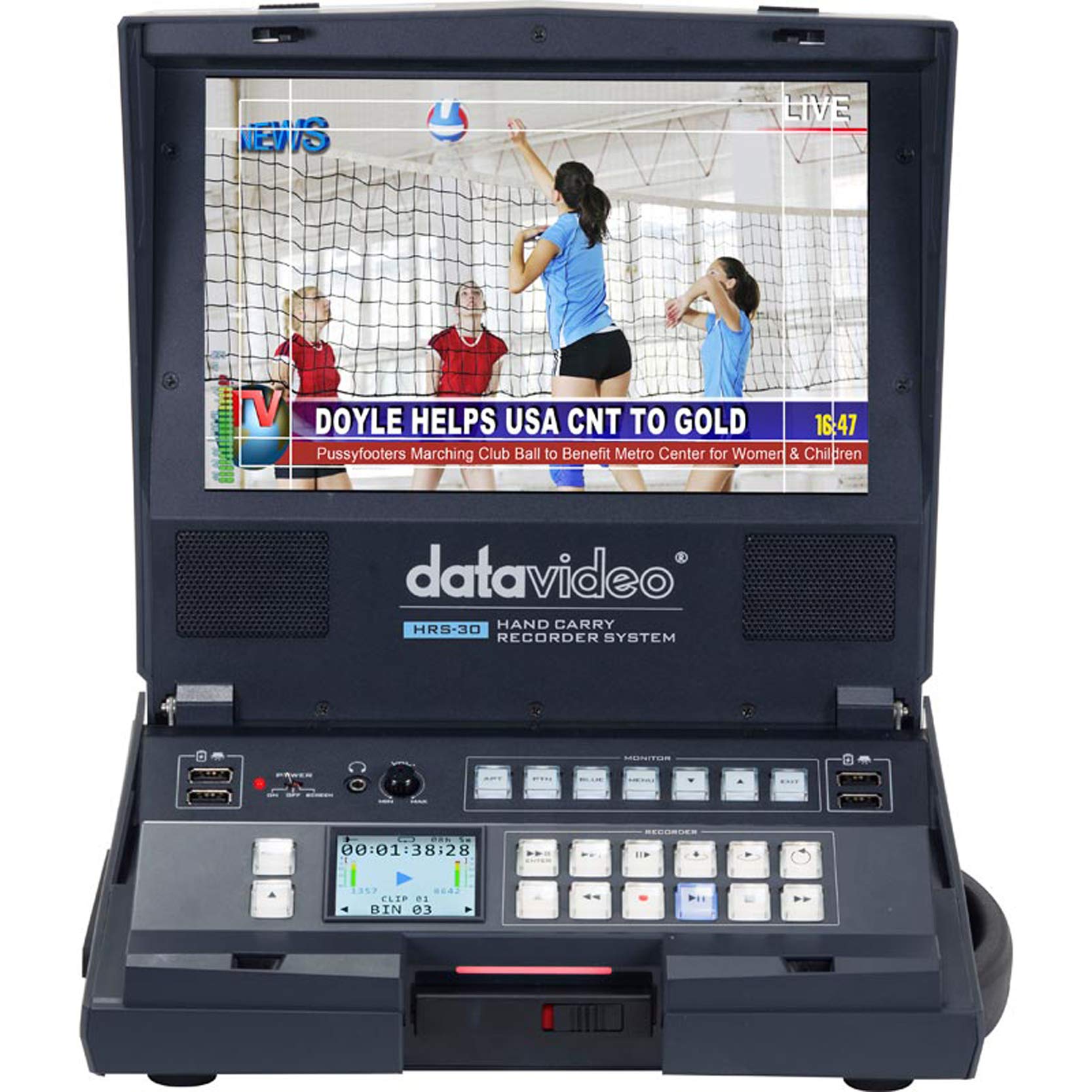
Gambar 1.1: Hareupeun view of the Datavideo HRS-30 Portable Recorder Monitor, showing the integrated screen and control interface.
2. Émbaran Kasalametan
Please read and understand all safety instructions before operating the HRS-30. Failure to follow these instructions may result in electric shock, fire, or damage to the unit.
- Sumber Daya: Use only the specified power adapter and ensure the voltage cocog sarat Unit urang.
- Ventilasi: Ulah ngahalangan liang ventilasi. Pastikeun aliran hawa anu cekap di sakitar unit pikeun nyegah panas teuing.
- Cai sareng Uap: Ulah ngantepkeun unit ieu ka hujan, kalembaban, atanapi kacemplungkeun kana cai.
- Palayanan: Entong nyobian ngalayanan produk ieu nyalira. Rujuk sadayana ngalayanan ka tanaga jasa anu mumpuni.
- panempatan: Teundeun unit dina permukaan datar anu stabil. Hindarkeun nempatkeunna dina sinar panonpoé langsung atanapi caket sumber panas.
3. Eusi Paket
Verify that all items are present in the package. If any items are missing or damaged, contact your dealer immediately.
- Datavideo HRS-30 Portable Recorder Monitor Unit
- Adaptor kakuatan
- Removable Caddy for 2.5" HDD/SSD
- Manual pangguna (dokumén ieu)
- Additional accessories as specified by your retailer
4. Setélan
Follow these steps to set up your HRS-30 unit for operation.
4.1 Installing Storage Media
- Ensure the HRS-30 is powered off.
- Locate the removable caddy slot on the unit.
- Insert a compatible 2.5-inch HDD or SSD into the removable caddy.
- Slide the caddy with the installed drive into the HRS-30's caddy slot until it clicks securely into place.
4.2 Nyambungkeun Daya
- Connect the power adapter to the DC IN 12V port on the rear of the HRS-30.
- Colokkeun adaptor kakuatan kana stop kontak listrik anu cocog.
- Press the POWER switch on the rear panel to turn on the unit.
4.3 Sambungan Video sareng Audio
The HRS-30 supports various input and output connections. Refer to the rear panel diagram for port locations.
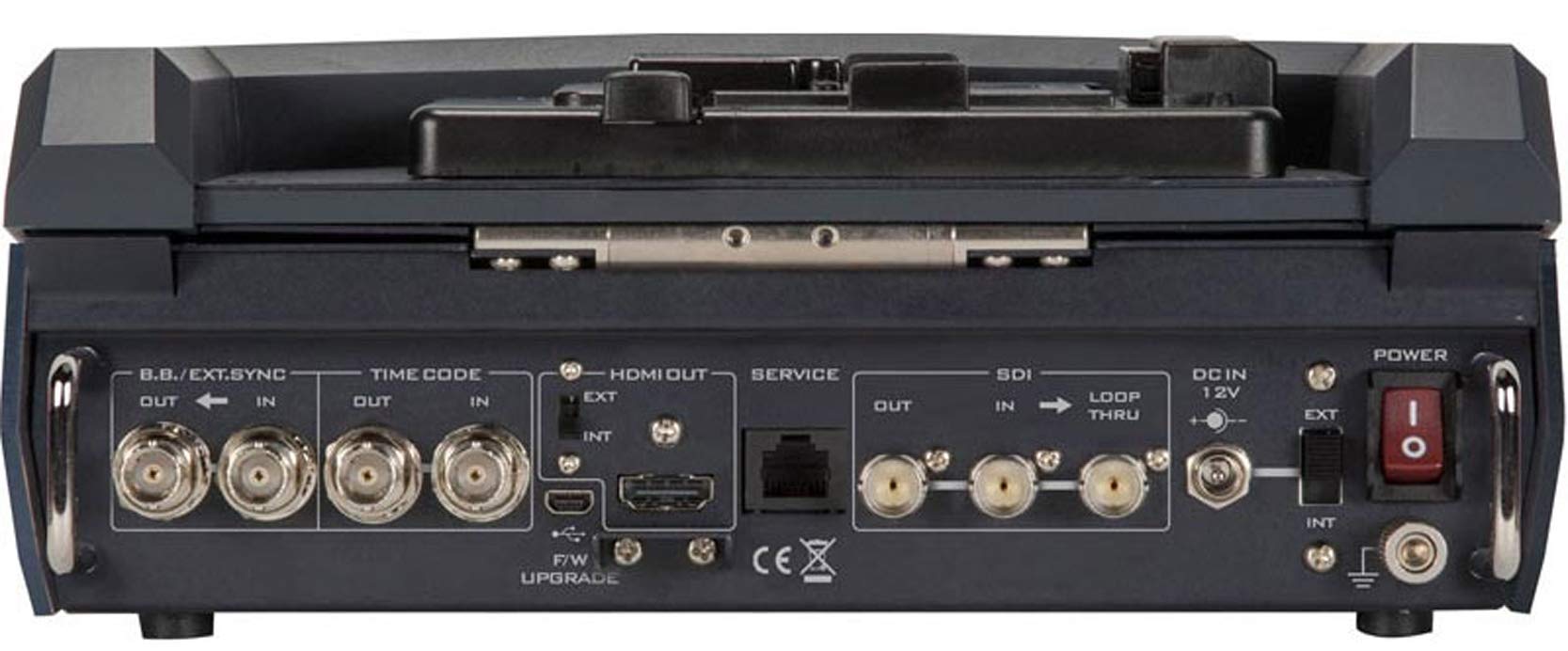
Figure 4.1: Rear panel connections of the Datavideo HRS-30, including SDI, HDMI, Timecode, and Power inputs/outputs.
- Input SDI: Connect your HD/SD-SDI video source to the SDI IN port. The unit also features an SDI LOOP THRU for connecting to another device.
- Kaluaran HDMI: Connect an external monitor or display to the HDMI OUT port for video monitoring.
- Kodeu waktos: Use the TIME CODE IN/OUT ports for external timecode synchronization.
- BB/EXT.SYNC: Connect Black Burst or external sync signals to the BB/EXT.SYNC IN/OUT ports.
- Port jasa: For firmware upgrades and maintenance.
5. Parentah Operasi
This section details the basic operation of the HRS-30 for recording and playback.
5.1 Ngahurungkeun sareng Layar Mimiti
- Ensure all necessary connections are made and the storage caddy is installed.
- Puterkeun saklar POWER dina panel tukang ka posisi 'ON'.
- The integrated 10.1-inch monitor will display the boot-up sequence, followed by the live video input or the last recorded clip.
5.2 Ngarékam Pidéo
The HRS-30 records video from HD/SD-SDI sources in various formats.
- Pilih Input: Use the control panel buttons to select the desired SDI input source.
- Input Monitor: Verify the incoming video signal on the integrated monitor.
- Mimitian Ngarékam: Pencét éta REC button on the control panel to begin recording. The recording indicator will illuminate.
- Eureun Rekaman: Pencét éta EUREUN button to end the recording. The recording indicator will turn off.
The HRS-30 supports recording in MPEG-II Long-GOP or intra-frame (i-frame) with 4:2:2 color sampling, producing MXF/OP1A files.
5.3 Playback
Pikeun ulangview recorded content:
- Access Playback Mode: Use the navigation buttons to enter playback mode.
- Select Clip: Browse through your recorded clips using the navigation controls.
- Mimitian Playback: Pencét éta ulin button to start playback of the selected clip.
- Kontrol Playback: Ngagunakeun éta Reureuh, FFW (Maju Gancang), jeung REW (Rewind) buttons to control playback.
5.4 Navigasi Menu
The HRS-30 features an on-screen menu system for configuring settings such as video format, recording quality, audio settings, and system preferences. Use the MENU button and directional arrows to navigate, and the ENTER button to confirm selections.
6. Pangropéa
Proper maintenance ensures the longevity and optimal performance of your HRS-30.
- beberesih: Use a soft, dry cloth to clean the exterior of the unit. For the screen, use a specialized screen cleaning solution and a microfiber cloth. Do not use abrasive cleaners or solvents.
- Panyimpenan: When not in use, store the HRS-30 in a cool, dry place, away from direct sunlight and extreme temperatures.
- Pembaruan firmware: Periodically check the Datavideo website for firmware updates to ensure your unit has the latest features and bug fixes. Follow the instructions provided with the firmware update carefully.
7. Cara ngungkulan
This section addresses common issues you might encounter with the HRS-30.
| Masalah | Mungkin Cukang lantaranana | Solusi |
|---|---|---|
| Unit teu hurung | No power, faulty adapter, power switch off | Check power cable connection, verify power outlet, ensure power switch is ON. |
| No video on screen | Incorrect input selected, no signal from source, faulty cable | Select correct input, check video source, replace SDI/HDMI cable. |
| Teu tiasa ngarékam | No storage media, full storage, media error | Ensure caddy with drive is installed, check available storage space, format or replace drive if necessary. |
| Playback issues | Koruptor file, incompatible format | Try playing another clip. Ensure recorded files teu ruksak. |
8. Spésifikasi
Detailed technical specifications for the Datavideo HRS-30.
- model: HRS-30
- Diagonal layar katempo: 10 inci / 26 cm
- Ukuran produk: 10.83 x 10.24 x 3.94 inci (27.5 x 26 x 10 cm)
- Beurat barang: 7.92 pon (3.6 kg)
- Input Video: HD/SD-SDI
- Kaluaran Video: HDMI, SDI Loop Thru
- Format pidéo anu dirojong: 1080i, 720p, 576i, 480i
- Format rékaman: MPEG-II Long-GOP, Intra-frame (i-frame) with 4:2:2 color sampling
- File formatna: MXF/OP1A
- Média Panyimpenan: Removable caddy for 2.5" HDD & SSD drives
- Pabrikan: Datavideo
- Titimangsa munggaran sadia: 23 Maret 2016
9. Garansi jeung Rojongan
For warranty information and technical support, please refer to the official Datavideo website or contact your authorized Datavideo dealer. Keep your purchase receipt as proof of purchase for warranty claims.


