1. Bubuka
This manual provides essential information for the safe and efficient operation of your PowerWalker VFI 3000 TG Uninterruptible Power Supply (UPS). The PowerWalker VFI TG/TGB series is a professional and versatile online UPS solution designed to provide reliable power protection for various single-phase applications, including critical security systems for kiosks, vending machines, and high-level security environments where strict software restrictions apply, such as banking institutions.
2. Parentah Kasalametan
Please read and follow these safety instructions carefully to prevent injury and damage to the unit.
- Pamakéan jero rohangan wungkul: This UPS is designed for indoor use in a controlled environment. Do not expose it to rain, snow, or direct sunlight.
- Grounding anu leres: Pastikeun UPS disambungkeun ka stop kontak AC anu di-ground kalayan leres.
- Ventilasi: Maintain adequate clearance around the UPS for proper airflow. Do not block ventilation openings.
- Hindarkeun Cairan: Do not place liquids or objects containing liquids on or near the UPS.
- Service otorisasi: Do not attempt to open or service the UPS yourself. Refer all servicing to qualified service personnel.
- Kasalametan batré: Batré tiasa nyababkeun résiko sengatan listrik sareng arus hubung singkat anu luhur. Perhatoskeun tindakan pencegahan anu leres nalika damel sareng batré.
- Pareum Darurat (EPO): Familiarize yourself with the EPO port for emergency shutdown if applicable.
3. Produk Langkungview
The PowerWalker VFI 3000 TG is a robust tower-type UPS designed for reliable power backup and protection.
3.1 Panel payun
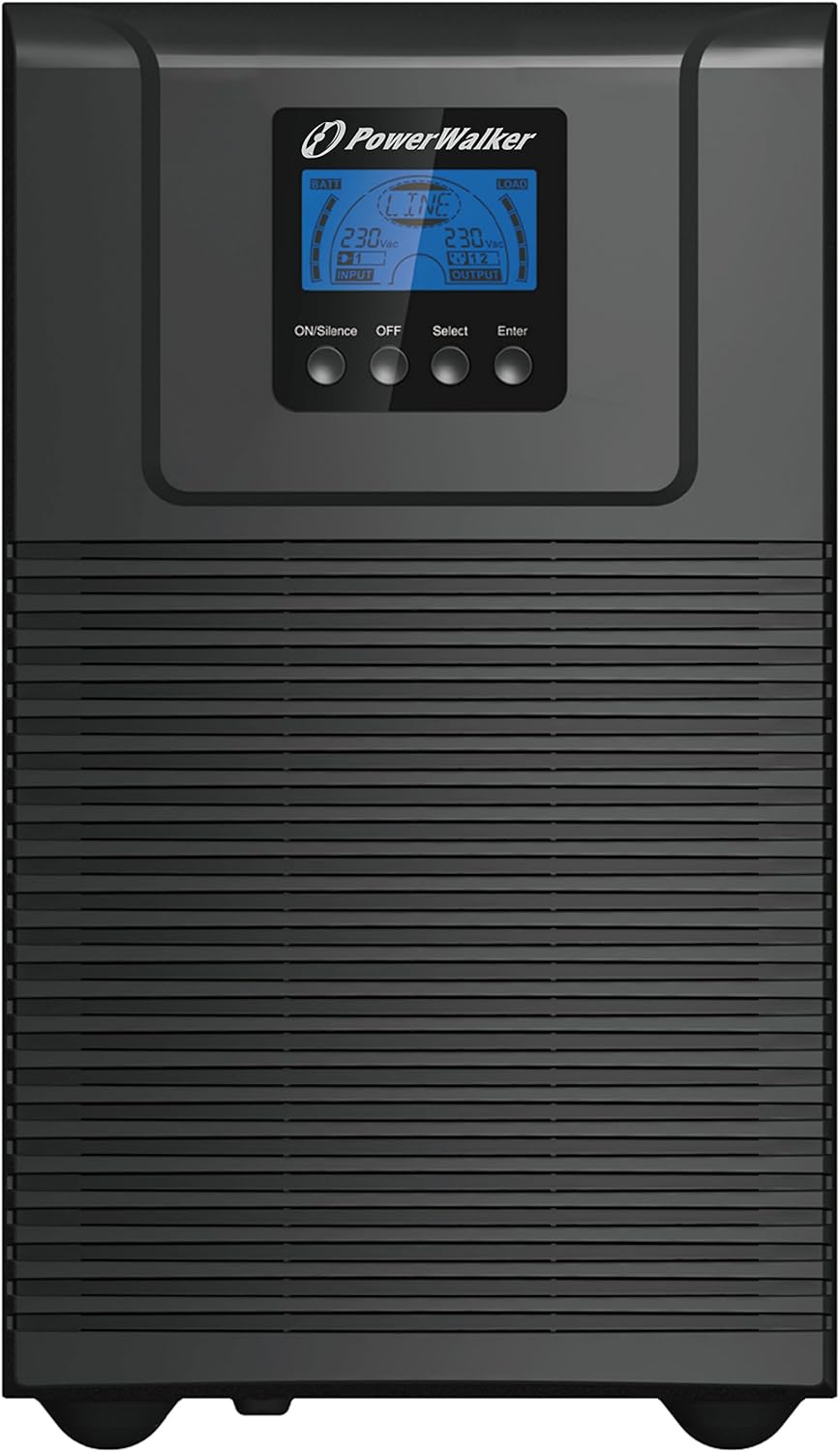
Gambar 3.1: Hareupeun view of the PowerWalker VFI 3000 TG UPS.
The front panel features an intuitive LCD display that provides real-time operational status, including input/output voltage, battery charge level, and connected load. Below the display are four control buttons: ON/Silence (to power on or silence alarms), Pareum (to power off), Pilih (to navigate menu options), and Lebetkeun (to confirm selections).
3.2 Panel tukang

Gambar 3.2: Tukangeun view of the PowerWalker VFI 3000 TG UPS.
The rear panel provides essential connectivity for the UPS. It includes an RS232 port and a USB port for communication with a computer, an EPO (Emergency Power Off) terminal for remote shutdown, multiple AC Output sockets (Imax 10A and Imax 16A) for connecting protected equipment, a resettable breaker (250VAC, 20A) for overcurrent protection, and the main AC Input for connecting to utility power.
3.3 Product Family

Figure 3.3: The PowerWalker VFI TG series, showcasing various models.
The PowerWalker VFI TG series encompasses a range of models, offering scalable power protection solutions to meet diverse requirements. The VFI 3000 TG is part of this comprehensive product line, providing robust and reliable uninterruptible power.
4. Setélan
Follow these steps to set up your PowerWalker VFI 3000 TG UPS.
- Ngabongkar bungkusan: Carefully remove the UPS from its packaging. Inspect for any shipping damage. Retain the packaging for future transport or storage.
- panempatan: Place the UPS on a flat, stable surface in a well-ventilated area. Ensure there is sufficient space around the unit for proper heat dissipation. Avoid placing it near heat sources or in direct sunlight.
- Nyambungkeun ka Daya AC: Connect the UPS to a grounded AC power outlet using the provided power cord. Ensure the outlet provides the correct voltage (230 Volt).
- Alat Nyambungkeun: Connect your critical equipment (computers, servers, network devices, etc.) to the AC Output sockets on the rear panel of the UPS. Do not overload the UPS beyond its maximum power capacity (2700 Watt).
- Ngecas awal: Allow the UPS to charge for at least 8 hours before initial use to ensure optimal battery performance. The UPS will charge automatically when connected to AC power, even if it is turned off.
5. Ngoperasikeun UPS
5.1 Powering on / Pareum
- Pikeun Ngahurungkeun: Pencét jeung tahan tombol ON/Silence button for a few seconds until the UPS powers on and the LCD display illuminates.
- Pikeun mareuman: Pencét jeung tahan tombol Pareum button for a few seconds until the UPS shuts down. Ensure all connected devices are properly shut down before powering off the UPS.
5.2 LCD Témbongkeun jeung kadali
The LCD display provides critical information about the UPS status. Use the Pilih button to cycle through different display modes (e.g., input voltage, kaluaran voltage, beban persentage, battery capacity). The Lebetkeun button is used to confirm settings or enter sub-menus if available.
5.3 Manajemén batré
The UPS features an internal lead-acid VRLA battery. The battery charges automatically when the UPS is connected to AC power. For optimal battery life, avoid frequent deep discharges and ensure the UPS is kept in a stable temperature environment. The UPS will provide an audible alarm and display a low battery warning when the battery capacity is critical during a power outage.
6. Pangropéa
Regular maintenance helps ensure the longevity and optimal performance of your UPS.
- Perawatan batré: While the battery is maintenance-free, it is recommended to perform a full discharge/recharge cycle every 3-6 months if the UPS is not frequently used, to calibrate the battery meter.
- beberesih: Periodically clean the exterior of the UPS with a soft, dry cloth. Do not use liquid or aerosol cleaners. Ensure ventilation openings are free from dust and debris.
- Cék biasa: Periodically check all cable connections to ensure they are secure. Monitor the LCD display for any error messages or warnings.
7. Cara ngungkulan
This section provides solutions to common issues you might encounter with your UPS. If the problem persists, contact customer support.
| Masalah | Mungkin Cukang lantaranana | Solusi |
|---|---|---|
| UPS does not power on | No AC input power; Battery discharged; Power button not held long enough. | Check AC power cord connection and wall outlet; Allow UPS to charge for several hours; Press and hold the ON button for 3-5 seconds. |
| UPS berbunyi bip terus | Kaleuwihan beban; Batré lemah; Kaayaan gangguan. | Reduce connected load; Allow battery to charge; Refer to LCD display for specific error codes and contact support if necessary. |
| Battery runtime is shorter than expected | Batré teu dicas pinuh; batré nearing tungtung hirup; Overload. | Ensure UPS is charged for at least 8 hours; Consider battery replacement if old; Reduce connected load. |
| No output from UPS outlets | UPS is off; Circuit breaker tripped. | Turn on the UPS; Reset the circuit breaker on the rear panel. |
8. Spésifikasi Téknis
Detailed specifications for the PowerWalker VFI 3000 TG.
| Fitur | Spésifikasi |
|---|---|
| merek | PowerWalker |
| Nomer modél | 10122043 |
| ASIN | B01JTKDC88 |
| Jenis produk | UPS munara |
| Warna | Hideung |
| Masukan Voltage | 230 volt |
| Kaluaran Voltage | 230 Volt (AC) |
| Rentang Frékuénsi | 40 Hz - 70 Hz |
| Daya Maksimum | 2700 Watt |
| Komposisi batré | Lead-acid VRLA Battery |
| Batré Rechargeable | No (refers to user-replaceable, internal battery is rechargeable) |
| Batré Voltage | 12 volt |
| Batré Ampumur | 9 Amps |
| Total palabuhan USB | 1 |
| Tipe Panyambung AC | IEC 320 |
| Item Beurat | 22.2 kg |
| Produsén | BlueWalker GmbH |
| Tanggal Kahiji Sadia | 2 Agustus 2022 |
| Kasadiaan suku cadang | Inpormasi teu sayogi |
| Software Apdet Dijamin Dugi | Inpormasi teu sayogi |
9. Garansi jeung Rojongan
For warranty information and technical support, please refer to the documentation included with your purchase or visit the official PowerWalker website. Keep your proof of purchase for warranty claims. For any issues not covered in this manual, please contact PowerWalker customer service for assistance.


