1. Bubuka
The Imperial DABMAN i400 is a versatile audio adapter designed to enhance your existing stereo system with modern radio and streaming capabilities. It provides access to thousands of internet radio stations, digital radio (DAB+), and traditional FM radio. Additionally, it supports audio streaming via Bluetooth, UPnP/DLNA, and USB, offering a comprehensive listening experience.
2. Parentah Kasalametan
- Sasayogian tanaga: Paké ngan adaptor kakuatan disadiakeun. Pastikeun voltage cocog catu daya lokal Anjeun.
- Cai sareng Uap: Ulah ngalaan alat ka hujan, beueus, atawa cairan ngeclak/mercik. Ulah nempatkeun barang-barang anu dieusian ku cairan, sapertos vas, dina alat.
- Ventilasi: Ensure adequate ventilation. Do not block ventilation openings. Avoid placing the device on soft surfaces that may obstruct airflow.
- Sumber Panas: Jauhkeun alat ieu tina sumber panas sapertos radiator, pancatat panas, kompor, atanapi alat-alat penghasil panas anu sanésna.
- beberesih: Pegatkeun sambungan listrik saméméh beberesih. Paké lawon lemes, garing. Entong nganggo pembersih cair atanapi aerosol.
- Palayanan: Entong nyobian ngalayanan produk ieu nyalira. Rujuk sadayana ngalayanan ka tanaga jasa anu mumpuni.
3. Eusi Paket
Punten parios yén sadaya barang aya dina pakét:
- Imperial DABMAN i400 Internet Digital Radio
- Adaptor kakuatan
- Telescopic Antenna with F-connector
- Wire Antenna with F-connector
- RCA Kabel
- Kabel Audio (jack 3.5mm)
- Kadali jauh
- Manual pangguna (dokumén ieu)

Image: Imperial DABMAN i400 with its power adapter, telescopic antenna, wire antenna, RCA cable, 3.5mm audio cable, and remote control.
4. Produk Langkungview
Hareupeun View

Image: The front of the Imperial DABMAN i400, showing its display and control buttons on the top edge.
The front of the DABMAN i400 features a clear 3.2-inch LCD display for navigation and information. Control buttons are located on the top edge of the device for easy access to functions like power, mode selection, volume, and station presets.
Tukangeun View jeung Sambungan
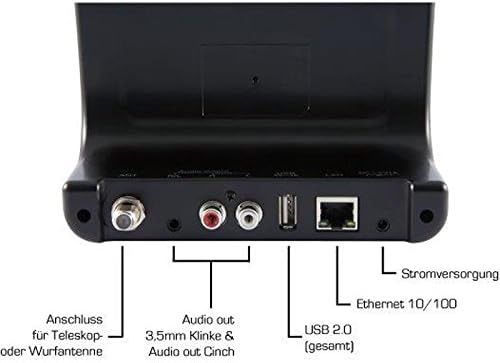
Image: The rear panel of the Imperial DABMAN i400, detailing its various connection ports. From left to right: Antenna connection (ANT), Audio output (RCA L/R and 3.5mm jack), USB 2.0 ports, Ethernet 10/100 (LAN), and Power supply (DC 5V/1A).
- SIreum: F-connector for connecting the telescopic or wire antenna for DAB+/FM reception.
- Audio Output (R/L): RCA (Cinch) stereo audio output for connecting to an amplifier atanapi sistem stereo.
- Kaluaran Audio (Jack 3.5mm): 3.5mm stereo audio output for connecting to other audio devices.
- USB 2.0: USB port for playing media from a USB storage device.
- LAN: Ethernet port (RJ45) for wired network connection.
- DC 5V/1A: Input daya pikeun adaptor daya anu kalebet.
5. Setélan
- Sambungkeun Antenna: Screw the telescopic antenna or connect the wire antenna to the SIreum F-connector on the rear panel. Extend the telescopic antenna for optimal reception.
- Nyambung ka Sistem Audio: Use the provided RCA cable to connect the Audio Output (R/L) on the DABMAN i400 to an available audio input (e.g., AUX, CD, LINE IN) on your amplifier or stereo system. Alternatively, use the 3.5mm audio cable if your system has a compatible input.
- Sambungan jaringan:
- Kabel (LAN): Connect an Ethernet cable from your router to the LAN port on the rear of the DABMAN i400.
- Wireless (WLAN): The device will prompt you to set up Wi-Fi during the initial startup wizard. Select your network and enter the password.
- Sambungkeun Kakuatan: Colokkeun adaptor kakuatan kana DC 5V / 1A input on the rear panel, then plug the adapter into a wall outlet. The device will power on automatically or enter standby mode.
- Wizard Setup Awal: Upon first power-on, the device will guide you through an initial setup process, including language selection, time/date settings, and network configuration. Follow the on-screen instructions.
6. Parentah Operasi
Napigasi Dasar
Use the control buttons on the top of the device or the remote control to navigate menus, select options, adjust volume, and change modes.
Pamilihan Mode
Press the 'Mode' button (or equivalent on remote) to switch between available modes:
- Radio Internét: Access thousands of online radio stations worldwide. Browse by genre, location, or search for specific stations.
- Radio Digital DAB+: Enjoy high-quality digital radio broadcasts. The device will scan for available stations in your area.
- Radio FM: Dengekeun kana stasiun radio FM analog tradisional.
- Bluetooth: Aliran audio sacara nirkabel tina telepon pinter, tablet, atanapi komputer anjeun anu nganggo Bluetooth.

Image: Bluetooth connectivity icon.
To pair: Select Bluetooth mode on the DABMAN i400. On your external device, search for available Bluetooth devices and select 'DABMAN i400'.
- UPnP/DLNA: Streaming musik files from compatible devices on your local network (e.g., a network-attached storage (NAS) drive or a computer running a media server).

Image: UPnP (Universal Plug & Play) icon.
- Puterkeun USB: Puterkeun audio files (e.g., MP3) from a USB flash drive connected to the USB port on the rear of the device.

Image: MP3 music file ikon.
Prasetél
Save your favorite stations as presets for quick access. Refer to the on-screen menu for instructions on how to save and recall presets.
Air Music Control App
Control your DABMAN i400 using the Air Music Control App available for smartphones and tablets. This app allows for convenient remote control and browsing of stations.

Image: Air Music Control App icon.
7. Pangropéa
- beberesih: Wipe the device with a soft, dry, lint-free cloth. Do not use abrasive cleaners, waxes, or solvents.
- Apdet parangkat lunak: Periodically check for available software updates through the device's system settings menu to ensure optimal performance and access to new features.
- Panyimpenan: Upami nyimpen alat kanggo waktos anu panjang, pegatkeun sambungan tina kakuatan teras simpen di tempat anu tiis sareng garing.
8. Cara ngungkulan
- Henteu aya kakuatan:
- Pastikeun adaptor daya disambungkeun sacara aman ka alat sareng stop kontak listrik anu tiasa dianggo.
- Coba colokan listrik anu béda.
- Henteu aya sora:
- Check the volume level on both the DABMAN i400 and your connected audio system.
- Ensure the audio cables are correctly connected to the appropriate input on your audio system.
- Pariksa yén sistem audio anjeun disetel ka sumber input anu leres.
- Teu tiasa nyambung ka Wi-Fi/Internét:
- Pastikeun router Wi-Fi anjeun hurung sareng tiasa dianggo kalayan leres.
- Pariksa deui sandi Wi-Fi.
- Try moving the device closer to your Wi-Fi router or use a wired LAN connection.
- Restart your router and the DABMAN i400.
- Panarimaan DAB+/FM anu goréng:
- Ensure the antenna is fully extended and positioned for optimal reception.
- Try repositioning the device or antenna.
- Check if you are in an area with good DAB+ or FM coverage.
- Masalah Nyapasangkeun Bluetooth:
- Ensure the DABMAN i400 is in Bluetooth pairing mode.
- Make sure your external device's Bluetooth is enabled and discoverable.
- Move your external device closer to the DABMAN i400.
- Coba cabut pasangan sareng pasangkeun deui alat.
9. Spésifikasi
| Fitur | Spésifikasi |
|---|---|
| merek | Kaisar |
| Nomer modél | 22-241-00 |
| Warna | Hideung |
| Ukuran layar | 3.2 inci |
| Téhnologi konektipitas | Bluetooth, LAN (Ethernet), WLAN (Wi-Fi), RCA (Cinch) L/R, 3.5mm Audio Jack |
| Fitur husus | Portable (as an adapter), Internet Radio, DAB+, FM, UPnP/DLNA |
| Total palabuhan USB | 1 |
| Alat nu cocog | Bluetooth devices, UPnP/DLNA compatible devices |
| Sumber Daya | AC (via power adapter) |
| Band Radio Dirojong | FM, DAB, DAB+, Internet Radio |
| Dimensi produk | 15L x 8.1W x 14H séntiméter |
| Komponén Kaasup | Power Adapter, Telescopic Antenna, Wire Antenna, RCA Cable, Audio Cable, Remote Control, User Manual |
| Basa Dirojong | German, English, French, Dutch |
10. Garansi jeung Rojongan
Garansi Produsén
The Imperial DABMAN i400 comes with a manufacturer's warranty. Please refer to the warranty card included in your package or the manufacturer's official website for specific terms and conditions. Spare parts availability is guaranteed for 1 year.
Rojongan Palanggan
For technical assistance, troubleshooting beyond this manual, or warranty claims, please contact Imperial customer support. Contact information can typically be found on the manufacturer's websitus atanapi dina bungkusan produk.


