1. Bubuka
This manual provides essential information for the proper use and maintenance of your WiMiUS Q4 4K Action Camera. Please read it thoroughly before operating the device to ensure optimal performance and longevity. Keep this manual for future reference.
Precautions Kasalametan
- Ulah ngalaan kaméra kana suhu anu ekstrim atanapi sinar panonpoé langsung salami waktos anu lami.
- Hindarkeun leupaskeun atanapi tundukkeun kaméra kana tabrakan anu kuat.
- Jauhkeun kaméra tina médan magnét anu kuat.
- Ensure the waterproof case is properly sealed before submerging the camera in water.
- Paké ngan disatujuan asesoris jeung carjer.
2. Produk Langkungview
Komponén Kaméra
Familiarize yourself with the main components of your WiMiUS Q4 Action Camera:
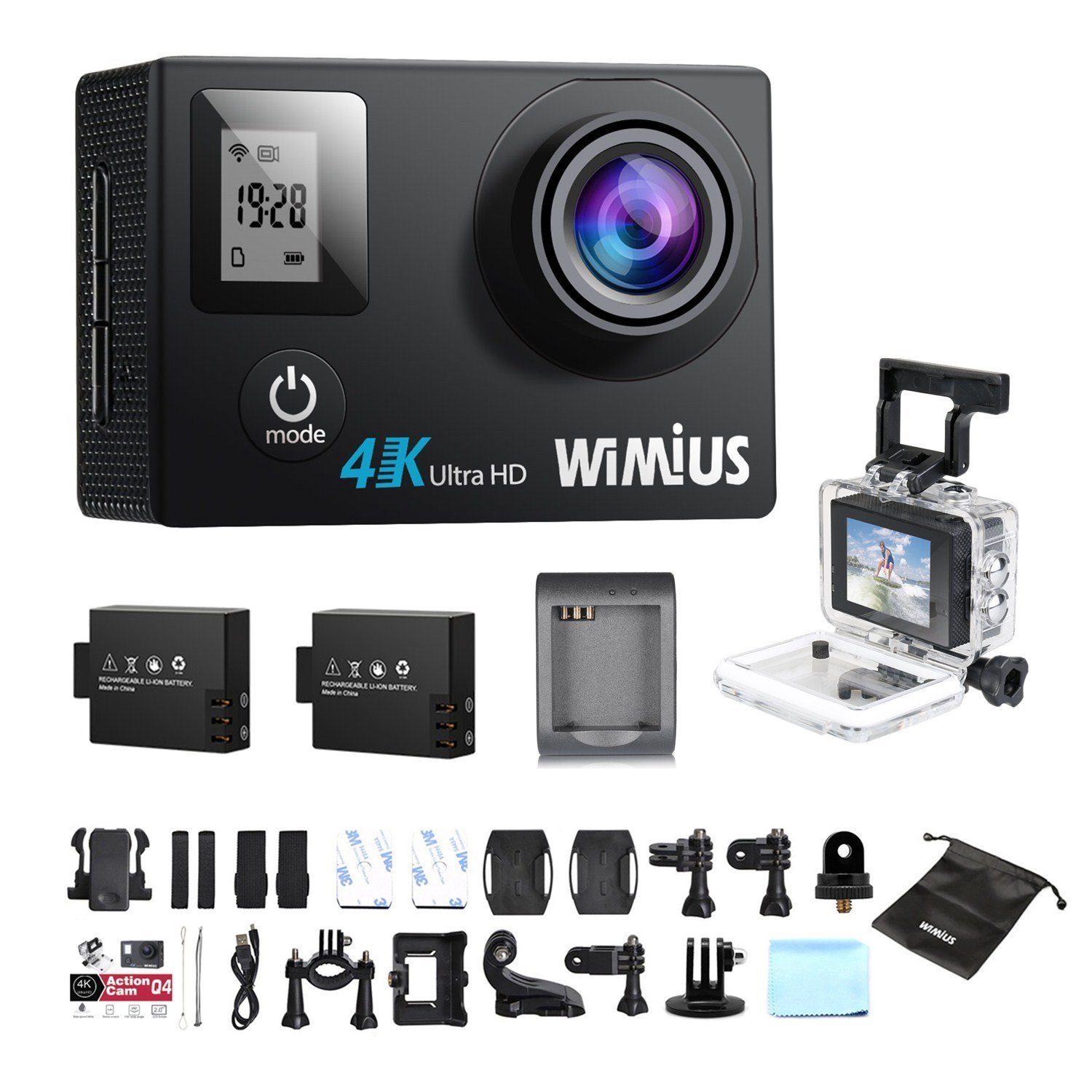
- Lensa: Nangkep video sareng poto footage.
- Tombol Kakuatan / Mode: Powers the camera on/off and switches between modes.
- Tombol Rana/OK: Starts/stops recording, takes photos, or confirms selections.
- Tombol Naék / Turun: Navigates menu options.
- Main LCD Screen (2.0 inches): Mintonkeun langsung view, playback, and menu interface.
- Status Screen (0.66 inches): Shows current mode, battery status, and recording time.
- Port USB Mikro: Pikeun ngecas sareng mindahkeun data.
- Port Mikro HDMI: Pikeun nyambungkeun kana tampilan éksternal.
- Slot Kartu MicroSD: Pikeun nyelapkeun kartu memori.
Kaasup Asesoris
Your camera comes with a comprehensive kit of accessories:

- Waterproof Case (up to 40M)
- Rechargeable Li-ion Batteries (x2)
- Kabel USB
- Various Mounts and Adapters (e.g., helmet mount, bicycle mount)
- Bantalan Perekat
- Kain beberesih
- Bands and Straps
3. Setélan
3.1 Pamasangan Batré sareng Ngecas
- Buka panutup kompartemen batré dina handapeun kaméra.
- Insert a fully charged Li-ion battery, ensuring the correct orientation.
- Tutup panutup kompartemen batré aman.
- To charge, connect the camera to a USB power source (e.g., computer, USB wall adapter) using the provided USB cable. The charging indicator light will illuminate.
- Charging typically takes 2-3 hours. The indicator light will turn off or change color when fully charged.

3.2 Pamasangan Kartu MicroSD
A MicroSD card (not included) is required for recording. The camera supports up to 64GB Class 10 or UHS-I MicroSD cards.
- Pilari slot kartu MicroSD di sisi kaméra.
- Selapkeun kartu MicroSD kalayan kontak emasna ngadep ka tukang kaméra dugi ka ngaklik kana tempatna.
- Pikeun nyabut, dorong kartu ka jero dugi ka kaluar.
- It is recommended to format the MicroSD card in the camera before first use and periodically thereafter to ensure stable recording.
3.3 Waterproof Case Usage
The waterproof case allows the camera to be used up to 40 meters underwater.
- Pastikeun kaméra garing sateuacan disimpen dina wadah tahan cai.
- Close the case firmly, ensuring the rubber seal is clean and free of debris.
- Perform a dry test by submerging the empty case in water for a few minutes to check for leaks before inserting the camera.
3.4 Pasang Asesoris
Utilize the various mounts and adapters to attach your camera to helmets, bicycles, or other surfaces. Refer to the accessory diagram for specific attachment methods.
4. Parentah Operasi
4.1 Powering on / Pareum
- Daya Hurung: Pencét terus tahan tombol Daya/Modeu salami 3-5 detik.
- Pareum listrik: Pencét terus tahan tombol Daya/Modeu salami 3-5 detik.
4.2 Pamilihan Mode
Press the Power/Mode button repeatedly to cycle through the main modes:
- Modeu Rekaman Video: Ditunjukkeun ku ikon kaméra vidéo.
- Modeu Poto: Ditunjukkeun ku ikon kaméra.
- Modeu Playback: Ditunjukkeun ku ikon maén.
- Menu Setélan: Ditunjukkeun ku ikon gir.
4.3 Rékam pidéo
- Pindah ka Modeu Rekaman Video.
- Press the Shutter/OK button to start recording. A red indicator light will flash, and the recording time will appear on the screen.
- Pencét tombol Rana/OK deui pikeun eureun ngarékam.
Video Settings (via Settings Menu)
- Resolusi: Select from 4K 30fps, 2.7K 30fps, 1080p 60/30fps, 720p 120/60/30fps.
- Ngarekam loop: Set to 2min, 3min, 5min, or Off. When enabled, the camera will continuously record, overwriting the oldest files lamun kartu memori pinuh.
- Pidéo Selang Waktu: Set intervals (0.5s, 1s, 5s, 10s, 30s, 60s) or Off. The camera will capture frames at set intervals and compile them into a video.
- Gerak Slow: Available at 1080p/60fps and 720p/120fps.
4.4 Nyokot Poto
- Pindah ka Modeu Poto.
- Pencét tombol Rana/OK pikeun nyandak poto.
Photo Settings (via Settings Menu)
- Resolusi: Up to 16 Megapixels.
- Poto Burst: Capture multiple photos in quick succession (e.g., 3P/1S, 5P/1S, 10P/1S).
4.5 Konéksi WiFi sareng Panggunaan Aplikasi
The camera features Wi-Fi connectivity for remote control via a smartphone app.
- Enable Wi-Fi on the camera via the Settings Menu. The Wi-Fi name (SSID) and password will be displayed.
- Download the compatible WiMiUS app from your smartphone's app store (e.g., App Store for iOS, Google Play for Android).
- On your smartphone, connect to the camera's Wi-Fi network using the provided password.
- Open the WiMiUS app to control the camera, view hirup footage, jeung mindahkeun files.
4.6 Menu Navigation and General Settings
Access the Settings Menu by cycling through modes. Use the Up/Down buttons to navigate and the Shutter/OK button to select.
- Basa: Select your preferred language (French is available).
- Kaping/Waktu: Atur tanggal sareng waktos anu leres. Note: The date/time setting may reset to 2016/09/01 00:00:00 when batteries are changed. This is a known behavior; reset manually after each battery change.
- Modeu Kandaraan: (OUI/NON - Yes/No) This mode typically enables automatic recording when the camera detects power, useful for dashcam functionality.
- Kartu Format: Erases all data on the MicroSD card.
- Pabrik Reset: Restores all settings to their default values.
5. Pangropéa
5.1 Ngabersihan Kaméra sareng Lensa
- Anggo lawon anu lemes sareng henteu lint pikeun ngabersihan awak kaméra.
- For the lens, use a specialized lens cleaning cloth or pen to avoid scratches. Do not use abrasive materials.
- Ensure the camera is off and dry before cleaning.
5.2 Perawatan Casing Tahan Cai
- After each use in water, rinse the waterproof case with fresh water and allow it to air dry.
- Inspect the rubber seal for any dirt, sand, or damage. Clean or replace if necessary to maintain waterproofing.
5.3 Perawatan Batré
- Simpen batré di tempat anu tiis sareng garing upami henteu dianggo.
- Do not expose batteries to high temperatures or direct flame.
- Upami disimpen kanggo waktos anu lami, eusian batréna dugi ka kapasitas sakitar 50%.
5.4 Panyimpenan
When not in use, store the camera and accessories in a protective case to prevent damage from dust and impacts.
6. Cara ngungkulan
This section addresses common issues you might encounter with your WiMiUS Q4 camera.
| Masalah | Mungkin Cukang lantaranana | Solusi |
|---|---|---|
| Kaméra teu hurung. | Batré lemah atawa béak. | Charge the battery fully. Ensure battery is correctly inserted. |
| Teu tiasa ngarékam pidéo / nyandak poto. | Taya kartu MicroSD, kartu pinuh, atawa kasalahan kartu. | Insert a MicroSD card. Delete old files or replace card. Format the card in the camera. |
| Date/Time resets after battery change. | Standard behavior for this model. | Manually reset the date and time in the settings menu after each battery change. |
| Kualitas gambar goréng dina cahaya remen. | Limitations of the camera sensor in low light conditions. | Ensure adequate lighting. Adjust exposure settings if available. |
| Sound is muffled in waterproof case. | Waterproof case seals the microphone. | This is normal. For better audio, use the camera without the waterproof case in dry conditions. |
| Masalah sambungan Wi-Fi. | Incorrect password, app issues, or signal interference. | Verify Wi-Fi password. Restart camera and smartphone. Ensure app is updated. Try resetting camera Wi-Fi settings. |
| Accessories breaking easily. | Material quality or improper use. | Handle accessories with care. Consider purchasing higher quality third-party mounts if needed for demanding activities. |
Léngkah Ngatasi Masalah Umum
- Balikan deui kaméra: Power off and then on again.
- Check MicroSD Card: Ensure it's correctly inserted and formatted. Try a different card if issues persist.
- Pabrik Reset: If problems continue, perform a factory reset via the settings menu. Note that this will erase all custom settings.
7. Spésifikasi
Key technical specifications for the WiMiUS Q4 Action Camera:
- merek: WiMiUS
- model: Q4
- Resolusi Tetep Éféktif: 16 megapiksel
- Resolusi Video: 4K (30fps), 2.7K (30fps), 1080p (60/30fps), 720p (120/60/30fps)
- Ukuran layar: 2.0 inches (main LCD), 0.66 inches (status screen)
- Téknologi konektipitas: Wifi
- jero waterproof: Up to 40 meters (with waterproof case)
- Stabilisasi Gambar: No
- Téknologi sénsor: CMOS
- Jenis lensa: Sudut lega
- warna: Gold (Note: Product title indicates 'Noir' (Black), but specifications list 'or' (Gold). This manual refers to the Q4 model generally.)
- Panyimpenan: Supports MicroSD cards up to 64GB (Class 10 or UHS-I recommended)
8. Garansi jeung Rojongan
For warranty information and customer support, please refer to the documentation provided at the time of purchase or contact your retailer. Specific details regarding warranty duration and terms are typically included with your product packaging.
Software updates and spare parts availability information are not provided in the product specifications. Please check the manufacturer's official websitus atanapi hubungi layanan palanggan kanggo inpormasi pangénggalna.


