1. Bubuka
This manual provides detailed instructions for the proper installation, maintenance, and basic troubleshooting of the Maxspect XF130 Gyre Generator Replacement Driver Door. This component is designed to restore optimal performance to your Maxspect XF130 Gyre Generator. Please read all instructions carefully before proceeding with installation.
2. Émbaran Kasalametan
- Always disconnect the Maxspect Gyre Generator from the power supply before performing any maintenance, installation, or cleaning.
- Ensure hands are dry when handling electrical components.
- Keep all tools and small parts away from children and pets.
- If any damage is observed on the replacement part or the main unit, do not proceed with installation. Contact Maxspect support.
- This replacement part is specifically for the Maxspect XF130 Gyre Generator. Do not attempt to use it with other models.
3. Produk Langkungview
The Maxspect XF130 Gyre Generator Replacement Driver Door is a critical component designed to ensure the efficient and reliable operation of your gyre pump. It houses essential parts of the motor and impeller assembly, facilitating proper water flow and preventing debris ingress.
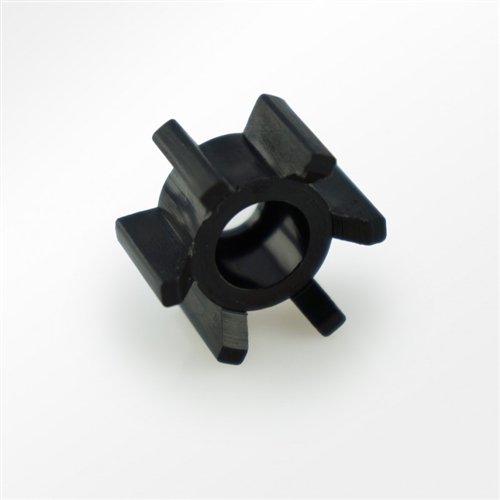
Gambar 1: A black, star-shaped component, likely an impeller or rotor, which is a key part of the Maxspect XF130 Gyre Generator's driver assembly. This component is crucial for generating water flow within the unit.
4. Instalasi (Setup)
4.1 Pakakas Diperlukeun
- Soft cloth or paper towels
- Small Phillips head screwdriver (if applicable for your specific Gyre model)
- Container for old parts (optional)
4.2 Removal of Old Driver Door
- Pegatkeun Daya: Ensure the Maxspect XF130 Gyre Generator is completely disconnected from the power outlet.
- Remove from Aquarium: Carefully remove the Gyre Generator from the aquarium.
- Disassemble Cage: Depending on your specific XF130 model, you may need to unclip or unscrew the outer protective cage to access the driver assembly.
- Locate Driver Door: Identify the existing driver door. It typically covers the impeller and motor shaft.
- Cabut Panto Lawas: Gently unclip or unscrew the old driver door. Note how it is seated to aid in the installation of the new part. Be careful not to damage any internal components.
- Pariksa sareng Bersih: While the driver door is removed, inspect the impeller and motor shaft for any debris or wear. Clean any accumulated algae or detritus.
4.3 Installation of New Driver Door
- Posisi Panto Anyar: Align the new replacement driver door with the housing of the Gyre Generator. Ensure all tabs or screw holes match perfectly.
- Panto Aman: Gently press the new driver door into place until it clicks securely, or fasten any screws if applicable. Ensure there are no gaps and the door is flush with the main unit.
- Reassemble Cage: Reattach the outer protective cage, ensuring all clips are secured or screws tightened.
- Return to Aquarium: Place the Gyre Generator back into the aquarium in its desired position.
- Sambungkeun deui Daya: Reconnect the Gyre Generator to the power supply.
5. Operation (Post-Installation Check)
After installing the replacement driver door, observe the Maxspect XF130 Gyre Generator for proper function. The water flow should be consistent and strong, and the unit should operate quietly without unusual noises or vibrations. If any issues arise, refer to the Troubleshooting section or the main Maxspect XF130 Gyre Generator user manual for detailed operational guidance.
6. Pangropéa
Regular maintenance of your Maxspect XF130 Gyre Generator, including the driver door, is essential for longevity and optimal performance.
- Ngabersihan rutin: Periodically remove the Gyre Generator from the aquarium and disassemble the driver door area. Clean any algae, detritus, or calcium buildup from the driver door, impeller, and housing using a soft brush and warm water.
- Pamariksaan: During cleaning, inspect the driver door for any signs of wear, cracks, or damage. Replace the driver door if significant wear is observed to prevent future operational issues.
- Lubrication: No lubrication is typically required for the driver door itself. Refer to the main Gyre Generator manual for any specific lubrication requirements for other components.
7. Cara ngungkulan
If you encounter issues after replacing the driver door, consider the following:
- Teu Aya Aliran Cai atanapi Aliran Lemah:
- Ensure the driver door is securely seated and properly aligned.
- Check for any obstructions around the impeller or inside the driver door area.
- Verify the impeller is correctly installed and not damaged.
- Noise atawa Geter anu teu biasa:
- Confirm the driver door is fully closed and secured.
- Inspect for any foreign objects trapped within the driver assembly.
- Ensure the Gyre Generator is properly mounted and not vibrating against the aquarium glass.
- Unit teu ngamimitian:
- Pariksa sambungan kakuatan.
- Ensure the controller is functioning correctly.
- This issue is less likely to be caused by the driver door itself, but rather by the main motor or controller.
If problems persist, refer to the complete Maxspect XF130 Gyre Generator manual or contact Maxspect customer support.
8. Spésifikasi
| Fitur | Rincian |
|---|---|
| Ngaran produk | Maxspect XF130 Gyre Generator Replacement Driver Door |
| Kasaluyuan | Maxspect XF130 Gyre Generator |
| Bahan | Durable, aquarium-safe plastic |
| Tipe Bagian | Replacement Component |
| Produsén | Maxspect |
9. Garansi jeung Rojongan
Maxspect replacement parts are typically covered by a limited warranty against manufacturing defects. Please retain your proof of purchase. For specific warranty terms and conditions, or for technical support, please visit the official Maxspect website or contact your authorized Maxspect dealer.
Maxspect Official Websitus: www.maxspect.com


