1. Bubuka
This manual provides comprehensive instructions for the installation, operation, and maintenance of your UHPPOTE 4 Channel Color Quad System Video Splitter, Model UT-XYL-440. This device is designed to process and display video feeds from up to four CCTV cameras simultaneously on a single monitor, offering various display modes and control options for effective surveillance monitoring.
2. Émbaran Kasalametan
- Pastikeun alat disimpen dina permukaan anu stabil sareng datar pikeun nyegah ragrag anu teu dihaja.
- Ngoperasikeun alat dina vol dieusiantage range (DC 12V) using the provided power adapter.
- Avoid exposing the unit to moisture, rain, or extreme temperatures. This device is intended for indoor use only.
- Ulah muka casing or attempt to repair the unit yourself. Refer all servicing to qualified personnel.
- Maintain adequate ventilation around the unit to prevent overheating.
3. Eusi Paket
Punten parios yén sadaya barang aya dina pakét anjeun:
- UHPPOTE 4 Channel Color Quad System Video Splitter (UT-XYL-440)
- Jauh Jauh Infrabeureum
- BNC Adapters (7 pieces)
- Adaptor Daya (DC 12V)

Image 3.1: UHPPOTE 4 Channel Color Quad System Video Splitter, remote control, and BNC adapters.
4. Produk Langkungview
Familiarize yourself with the components and controls of your video splitter.
4.1. Panel Hareup
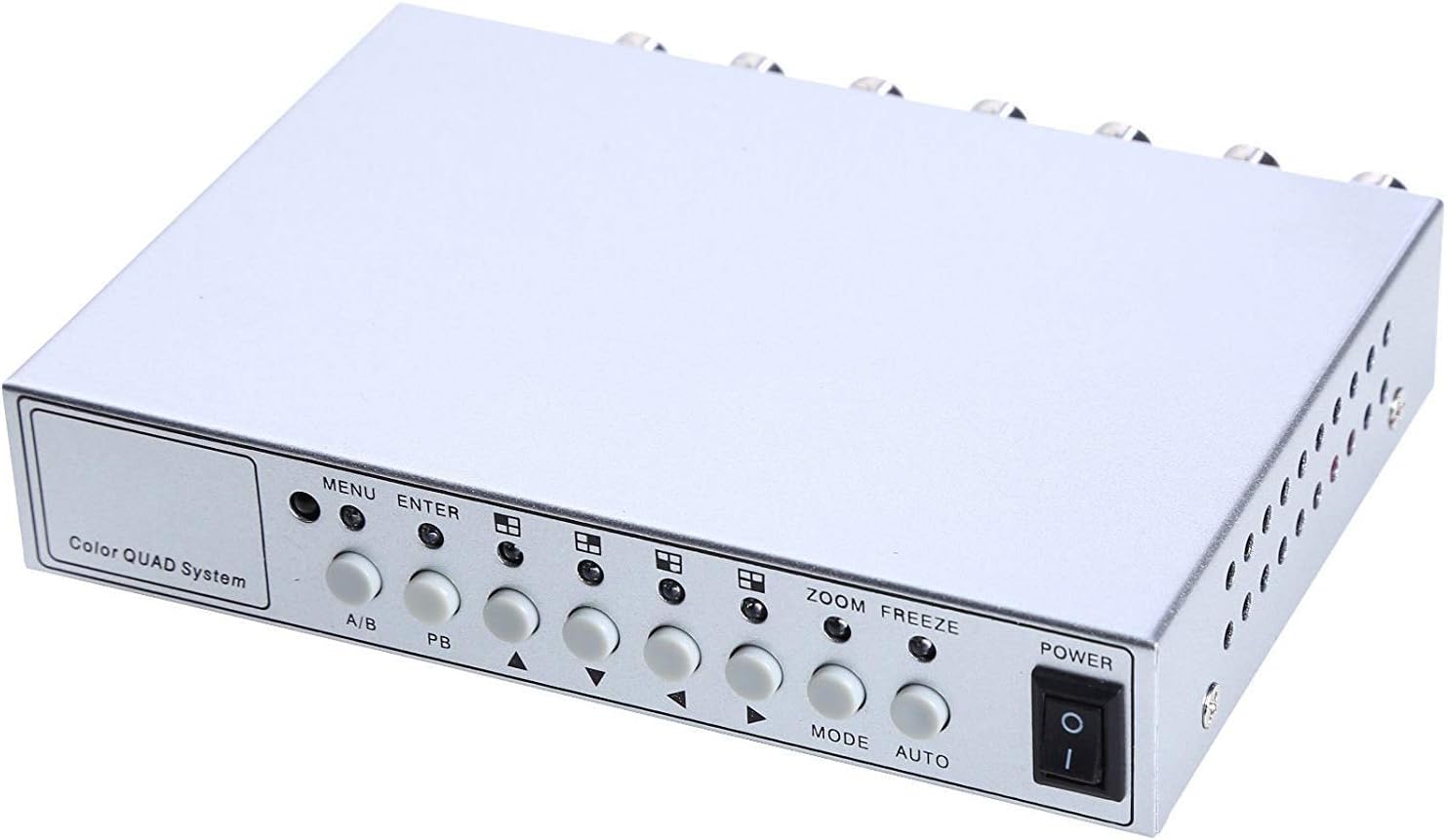
Image 4.1: Front panel controls and indicators.
- MENU: Accesses the on-screen display (OSD) menu for settings adjustment.
- Asupkeun: Confirms selections within the OSD menu.
- A/B: Switches between different display modes or channels.
- PB: Playback control (if connected to a VCR).
- Panah Arah (Luhur/Ka handap/Kénca/Katuhu): Napigasi ngaliwatan pilihan menu tur saluyukeun nilai.
- ZOOM: Activates the digital zoom function.
- BEKAS: Freezes the current video frame.
- MODÉ: Cycles through various display modes (Quad, Full Screen, PIP, Dual Split).
- Otomatis: Activates the auto-sequence display mode.
- kakuatan: Saklar hurung/pareum pikeun unitna.
4.2. Panél Pungkur

Image 4.2: Rear panel video input/output ports and power input.
- VIDEO 1-4: BNC inputs for connecting up to four CCTV cameras.
- VCR IN: BNC input for connecting a VCR or other recording device.
- VCR OUT: BNC output for connecting to a VCR or other recording device.
- MONITOR: BNC output for connecting to a display monitor.
- DC 12V: Power input jack for the DC 12V power adapter.
4.3. Kadali jauh

Image 4.3: Infrared remote control for convenient operation.
The remote control provides convenient access to all functions, mirroring the front panel controls and offering direct channel selection.
5. Setélan
Follow these steps to set up your UHPPOTE Video Splitter:
- Sambungkeun kaméra: Connect your CCTV cameras to the VIDEO 1, VIDEO 2, VIDEO 3, jeung VIDEO 4 BNC input ports on the rear panel. Ensure secure connections.
- Sambungkeun Monitor: Connect your display monitor to the MONITOR BNC output port on the rear panel.
- Connect VCR (Optional): If you wish to record video, connect the VCR IN jeung VCR OUT BNC ports to your VCR or recording device.
- Sambungkeun Kakuatan: Insert the DC 12V power adapter into the DC 12V input jack on the rear panel, then plug the adapter into a standard electrical outlet.
- Daya Hurung: Pencét éta POWER tombol dina panel hareup atawa remot kontrol pikeun ngahurungkeun unit.
6. Parentah Operasi
6.1. Daya Hurung / Pareum
Pencét éta POWER button on the front panel or the remote control to switch the unit on or off.
6.2. Modeu tampilan
The unit supports various display configurations. Use the MODÉ button on the front panel or remote to cycle through them:
- QUAD Split Mode: Displays all four camera feeds simultaneously in a four-way split screen.
- Modeu layar pinuh: Displays a single camera feed in full screen. Use the directional arrows or number buttons (1-4) on the remote to select the desired camera.
- PIP (Picture-in-Picture) Mode: Displays one main camera feed with a smaller window of another camera feed. The position of the PIP window can often be adjusted via the menu.
- Dual Split Mode: Displays two camera feeds simultaneously (e.g., side-by-side or top-bottom).
- Auto Sequence Mode: Automatically cycles through full-screen views of each connected camera. Activate using the OTOMATIS tombol dina panel hareup atawa jauh.
6.3. Napigasi Menu jeung Setélan
To access and adjust system settings:
- Pencét éta MENU button on the front panel or remote control. The On-Screen Display (OSD) menu will appear.
- Ngagunakeun éta Luhur/Turun directional arrows to navigate between menu options.
- Pencét Asupkeun to select an option or enter a sub-menu.
- Ngagunakeun éta Kénca/Katuhu directional arrows to adjust values (e.g., brightness, contrast) or change settings.
- Pencét MENU deui pikeun kaluar tina ménu.
Setélan konci:
- Penyesuaian Video: Adjust Brightness, Contrast, Saturation, Hue, and Sharpness for optimal image quality.
- Format Sistim: Select between NTSC (for North America, Japan, etc.) or PAL (for Europe, Asia, etc.) based on your region's video standard. Incorrect selection can lead to distorted or black and white images.
- Overlay Information: Configure display of Camera Title, Real Time and Date, and Alarm/Loss/Motion messages.
- Event Report: Review event logs and configure buzzer/relay output settings.
6.4. Fungsi zum
In full-screen mode, press the ZOOM button on the front panel or remote to activate digital zoom. Use the directional arrows to select the area to zoom in on.
6.5. Freeze Function
Pencét éta FREEZE (FRZ) button on the front panel or remote to pause the current video frame. Press it again to resume live video.
7. Pangropéa
- beberesih: Anggo lawon anu lemes sareng garing pikeun ngabersihkeun bagian luar unit. Entong nganggo pembersih cair atanapi aerosol.
- Ventilasi: Pastikeun liang ventilasi teu ngahalangan pikeun nyegah overheating.
- Panyimpenan: Upami nyimpen unit kanggo waktos anu lami, pegatkeun tina listrik teras simpen di tempat anu tiis sareng garing.
8. Cara ngungkulan
| Masalah | Mungkin Cukang lantaranana | Solusi |
|---|---|---|
| No video signal on monitor |
|
|
| Distorted, black & white, or rolling image |
|
|
| Kadali jauh teu jalan |
|
|
| Constant buzzing sound |
|
|
9. Spésifikasi
| Fitur | Rincian |
|---|---|
| Nomer modél | UT-XYL-440 |
| Input Video | 4 BNC (for cameras), 1 BNC (VCR In) |
| Kaluaran Video | 1 BNC (Monitor), 1 BNC (VCR Out) |
| Resolusi Video | 720x480 (NTSC 60Hz), 720x576 (PAL 50Hz) |
| Modeu tampilan | Quad Split, Full Screen, PIP, Dual Split, Auto Sequence |
| Pangaluyuan Gambar | Caang, Kontras, Saturasi, Hue, Seukeutna |
| Fungsi husus | Freeze Function, Zoom Function, Video Loss Detection, Motion Detection |
| Sasayogian tanaga | DC 12V |
| Item Beurat | 13.4 ons (kira-kira 380g) |
| Ukuran Paket | 8.54 x 6.06 x 2.4 inci (kira-kira 21.7 x 15.4 x 6.1 cm) |
| Batré Jauh | 1 x CR2 battery (required) |
10. Garansi jeung Rojongan
UHPPOTE products are designed for reliability and performance. For warranty information, technical support, or service inquiries, please refer to the contact information provided with your purchase or visit the official UHPPOTE website. Please have your model number (UT-XYL-440) available when contacting support.


