1. Bubuka
This user manual provides comprehensive instructions for the operation and maintenance of your TKSTAR TK905 GPS Tracker. Designed for real-time tracking and monitoring, this device utilizes advanced GPS and AGPS dual positioning technology to provide accurate location data for vehicles, motorcycles, trucks, and other assets. Please read this manual thoroughly before using the device to ensure proper functionality and safety.
2. Produk Langkungview
2.1 Fitur konci
- 3G GPS Tracker: Supports GSM (2G) & WCDMA (3G) networks.
- Real-time Tracking: Locate and monitor targets via SMS, APP, and Internet.
- Precise Positioning: Utilizes GPS and AGPS dual positioning.
- Multifunctionality: Includes SMS/APP/Web tracking, Electronic fence, History route playback, Over-speed alarm, Shake alarm, Loosing alarm, and Low power alarm.
- Geo-fence: Define restricted areas and receive alerts upon entry or exit.
- Super Long Standby Time: Built-in 3.7V 7800mAh rechargeable Li-ion battery, offering up to 80 days standby.
- Strong Magnetic Mount: Equipped with powerful magnets for easy installation on metallic surfaces.
2.2 Komponén Alat
The TKSTAR TK905 GPS Tracker is a compact device designed for durability and ease of use. It features a robust casing and essential ports for operation.

Figure 1: TKSTAR TK905 GPS Tracker showing its ports and dimensions. The device has an indicator light, a USB port for charging, and a SIM card slot. Dimensions are approximately 90mm (3.5 inches) length, 72mm (2.8 inches) width, and 22mm (0.8 inches) thickness.
The device includes a USB port for charging, a SIM card slot for network connectivity, and an indicator light to show operational status. Its strong magnetic base allows for secure attachment to various surfaces, particularly suitable for vehicles.
3. Setélan
3.1 Pamasangan Kartu SIM
The TKSTAR TK905 requires a local SIM card that supports both 2G (GSM) and 3G (WCDMA) networks for full functionality. In the US, T-Mobile is a recommended provider. Ensure the SIM card has an active data plan and is not PIN-locked.
- Open the rubber cover on the side of the tracker to expose the SIM card slot.
- Insert the activated SIM card into the slot with the metal contacts facing down and the notched corner oriented correctly.
- Pencét kartu SIM lalaunan nepi ka ngaklik kana tempatna.
- Close the rubber cover firmly to ensure water resistance.
3.2 Ngecas Alat
Before first use, fully charge the TK905 GPS Tracker. The device has a built-in 7800mAh rechargeable Li-ion battery.
- Sambungkeun kabel ngecas USB nu disadiakeun ka port USB tracker urang.
- Connect the other end of the cable to a standard USB power adapter (e.g., phone charger, computer USB port).
- The indicator light will illuminate during charging. It will change color or turn off once fully charged.
- A full charge can provide up to 80 days of standby time, depending on usage and network conditions.
4. Parentah Operasi
4.1 Powering on / Pareum
- To power on: Press and hold the power button (if available, otherwise, insertion of SIM card and charging may activate it). The indicator light will flash.
- To power off: Send an SMS command or use the mobile application (refer to specific app instructions).
4.2 Nyukcruk real-time
The TK905 allows for real-time tracking via a dedicated mobile application or web platform. This feature provides the current location of the device.

Figure 2: Real-time tracking interface on a smartphone, showing the current location of the GPS tracker on a map.
Download the official TKSTAR tracking application from your smartphone's app store or access the web platform using the provided URL. Log in with your device ID and password. The map will display the current position of your tracker.
4.3 Sajarah Rute Playback
Review past travel routes of your tracker through the application or web platform. This feature is useful for monitoring travel history.
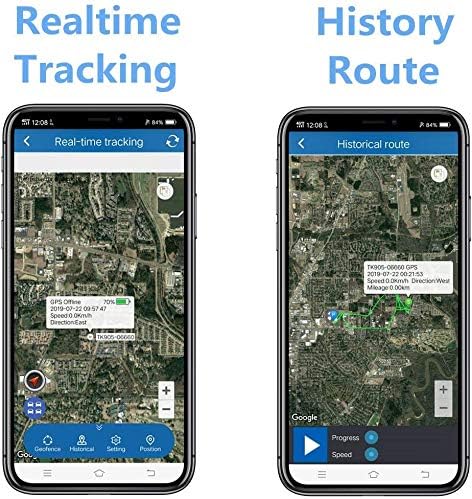
Figure 3: Comparison of Real-time Tracking and History Route features on the mobile application. The history route displays the path taken by the device over a selected period.
Navigate to the "History Route" section within the application or web interface. Select the desired date and time range to view the recorded path.
4.4 Geo-fence Function
Set up virtual boundaries (geo-fences) on the map. You will receive an alert if the tracker enters or exits these predefined areas.

Figure 4: Geo-fence feature illustration. Users can define a geographical area, and the tracker will send an alert if it crosses the boundary.
Access the "Geo-fence" setting in the application. Draw a polygon or circle on the map to define your desired area. Save the geo-fence, and configure alert notifications.
4.5 Fungsi Alarm
The TK905 supports various alarm types to enhance security and monitoring:
- Alarm leuwih-speed: Set a speed limit. If the tracker exceeds this limit, an alert will be sent.
- Alarm Goyang: Receive an alert if the device detects vibration or movement after being stationary for a set period (e.g., 5 minutes).
- Loosing Alarm: Alerts if the device is removed from its magnetic attachment point (if applicable).
- Alarm Daya Rendah: Notifies you when the battery level is critically low, prompting you to recharge the device.

Figure 5: Shake Alarm in action. The device sends an SMS alert to the user's phone when it detects unauthorized movement or vibration.
Configure these alarms within the mobile application or web platform settings. Ensure your notification settings are correctly configured to receive alerts.
5. Pangropéa
Proper maintenance ensures the longevity and optimal performance of your TKSTAR TK905 GPS Tracker.
- beberesih: Ngusap alat ku kaén anu lemes sareng garing. Hindarkeun ngagunakeun bahan kimia anu kasar atanapi pembersih abrasive.
- Tahan cai: Ensure the rubber cover for the SIM card slot and USB port is always securely closed to maintain water resistance. While the device is designed to be waterproof, avoid prolonged submersion.
- Perawatan batré: To maximize battery life, avoid fully discharging the battery frequently. Store the device in a cool, dry place when not in use for extended periods. Recharge periodically if stored for a long time.
- Panyimpenan: Store the tracker in a temperature-controlled environment, away from extreme heat or cold, and direct sunlight.
- Kartu SIM: Periodically check the SIM card's data plan and ensure it remains active to avoid service interruptions.
6. Cara ngungkulan
| Masalah | Mungkin Cukang lantaranana | Solusi |
|---|---|---|
| Alat henteu hurung. | Low battery; device not activated. | Charge the device fully. Ensure SIM card is correctly inserted and activated. |
| No real-time tracking data. | No network signal; SIM card issues (no data, expired, PIN-locked); device in an area with poor GPS signal. | Check network coverage. Verify SIM card status with your provider. Move the device to an open area with clear sky view. |
| Positioning teu akurat. | Weak GPS signal; interference; device indoors or underground. | Pastikeun alat boga jelas view of the sky. Avoid placing it near large metal objects or in enclosed spaces. |
| Alarms not working. | Alarm settings not configured; notification settings on phone/app disabled. | Verify alarm settings in the application/web platform. Check your phone's notification settings for the tracking app. |
| hirup batré pondok. | Frequent tracking updates; poor network signal (device consumes more power searching); old battery. | Adjust tracking interval to a longer period. Ensure good network coverage. If battery life significantly degrades, consider contacting support for battery replacement options. |
7. Spésifikasi
- model: TK905
- Ukuran produk: 0.9 x 2.8 x 3.5 inci (kira-kira 2.29 x 7.11 x 8.89 cm)
- Beurat barang: 10.6 ons (kira-kira 300.5 gram)
- Téknologi konektipitas: Cellular (GSM/WCDMA)
- Aplikasi anu Dirojong: Aplikasi GPS Tracking/Web Platform
- Batré: 3.7V 7800mAh Rechargeable Li-ion battery
- Waktu sayaga: Nepi ka 80 dinten
- Pabrikan: TKSTAR
- Tanggal munggaran sayogi: 25 Maret 2017
8. Garansi jeung Rojongan
For warranty information, technical support, or service inquiries regarding your TKSTAR TK905 GPS Tracker, please contact the manufacturer directly through their official websitus atawa inpo kontak disadiakeun kalawan pameseran Anjeun. Simpen resi pameseran anjeun salaku bukti pameseran pikeun klaim garansi.
For general inquiries or to visit the brand's store, you may refer to the TKSTAR Store on Amazon: TKSTAR Store.


