1. Bubuka
This manual provides detailed instructions for the Gembird MUSG-04 USB Optical Gaming Mouse. It covers product features, setup procedures, operational guidelines, maintenance tips, and troubleshooting information to ensure optimal use of your device.

Image 1.1: The Gembird MUSG-04 Gaming Mouse presented in its retail packaging, highlighting the product's design and branding.
2. Fitur Produk
The Gembird MUSG-04 is designed for gaming, offering a range of features for enhanced control and customization:
- Programmable 8-Button Design: Provides extensive customization options for various in-game actions.
- DPI adjustable: Quick DPI button allows on-the-fly sensitivity adjustments from 1200 to 3200 DPI.
- Pemrograman Makro: Dedicated software enables creation and assignment of complex macro commands to buttons.
- Illuminated Elements: Features an illuminated scroll wheel, logo, and side accents for visual feedback and aesthetic appeal.
- Ergonomic Right-Handed Design: Shaped for comfortable use during extended gaming sessions.
- Konektipitas USB: Standard USB interface for broad compatibility.
- Kabel Awét: 1.5-meter braided cable for reliable connection and longevity.
- Wide Operating System Support: Compatible with Windows 10 and other recent Windows operating systems.

Gambar 2.1: Hiji sisi view of the Gembird MUSG-04 mouse, showcasing its ergonomic contours and button placement designed for right-handed users.
3. Eusi Paket
Pariksa yén pakét anjeun ngandung barang-barang ieu:
- Gembird MUSG-04 USB Optical Gaming Mouse
- Manual pangguna (dokumén ieu)
- Macro Programming Software (typically available via download or included on a mini-CD)

Image 3.1: The side of the Gembird MUSG-04 retail box, displaying key features and specifications of the gaming mouse.
4. Parentah Setup
4.1. Konéksi Hardware
- Teangan hiji port USB sadia dina komputer Anjeun.
- Plug the USB connector of the Gembird MUSG-04 mouse into the USB port.
- Your operating system will typically detect the mouse automatically and install the necessary drivers. This process may take a few moments.
4.2. Software Installation (Optional for Macro Programming)
To utilize the programmable buttons and macro features, install the dedicated software:
- If a mini-CD is included, insert it into your computer's optical drive and follow the on-screen instructions.
- Alternatively, download the latest software from the official Gembird support websitus.
- Run the installer and follow the prompts to complete the software installation.
- Balikan deui komputer upami dipenta.
5. Ngoperasikeun Mouse
5.1. Fungsi Tombol
The Gembird MUSG-04 features 8 buttons with default functions:
- Tombol kénca: Fungsi klik primér.
- Tombol katuhu: Fungsi klik sekundér (menu konteks).
- Gulung kabayang: Scrolls content up/down. Pressing it acts as a middle click.
- Tombol DPI: Cycles through preset DPI sensitivity levels (e.g., 1200, 1600, 2400, 3200 DPI).
- Tombol Maju / Mundur: Napigasi web kaca atawa polder.
- Tombol seuneu: Often used for rapid-fire actions in games.
- Tombol Makro: Customizable via software for specific commands or macros.
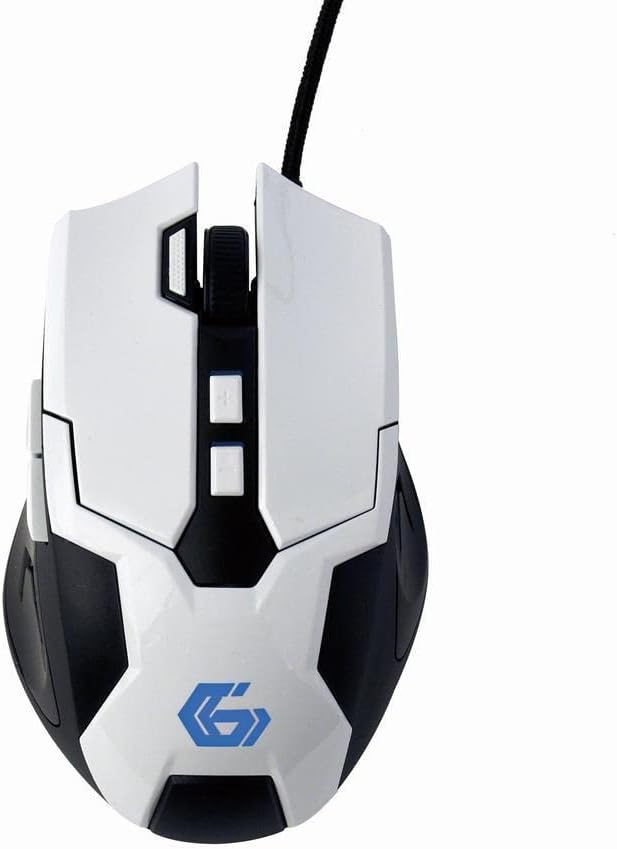
Gambar 5.1: A luhur-handap view of the Gembird MUSG-04 mouse, illustrating the placement of its various buttons, including the left, right, scroll wheel, DPI, and side buttons. The Gembird logo is illuminated in blue.
5.2. Adjusting DPI
Pencét éta Tombol DPI (usually located behind the scroll wheel) to cycle through the available sensitivity settings. Each press will switch to the next DPI level, indicated by a change in the mouse's illumination color or pattern (if supported).
5.3. Pemrograman Makro
The included macro programming software allows you to customize button functions and create complex sequences of commands. Refer to the software's built-in help or the Gembird support website for detailed instructions on macro creation and assignment.
5.4. Paneangan
The mouse features dynamic illumination on its scroll wheel, logo, and side accents. These lights may change color based on the selected DPI setting or can be customized via the macro programming software.

Image 5.2: The Gembird MUSG-04 mouse with its logo and side accents illuminated in green, demonstrating the customizable lighting feature.
6. Pangropéa
To ensure the longevity and optimal performance of your Gembird MUSG-04 mouse, follow these maintenance guidelines:
- beberesih: Paké lawon lemes, garing, lint-haratis pikeun ngusap beungeut beurit. Keur kokotor bandel, rada dampen lawon ku cai atawa solusi beberesih hampang. Hindarkeun bahan kimia anu kasar atanapi bahan abrasive.
- Sénsor optik: Periodically clean the optical sensor area on the underside of the mouse with a cotton swab to prevent tracking issues.
- Perawatan kabel: Avoid sharply bending or twisting the USB cable. Store the mouse in a way that prevents stress on the cable connection.
- Panyimpenan: Lamun teu dipaké pikeun période nambahan, nyimpen beurit dina bersih, lingkungan garing jauh ti sinar panonpoé langsung jeung suhu ekstrim.
7. Cara ngungkulan
If you encounter issues with your Gembird MUSG-04 mouse, refer to the following common problems and solutions:
- Beurit Teu Ngabales:
- Pastikeun kabel USB tos aman dicolokkeun kana port USB anu tiasa dianggo.
- Coba colokkeun beurit ka port USB anu béda dina komputer anjeun.
- Tés beurit dina komputer séjén pikeun nangtukeun naha masalahna aya dina beurit atawa komputerna.
- Balikan deui komputer anjeun.
- Gerakan Kursor Erratic:
- Ngabersihan sensor optik dina underside beurit.
- Pastikeun anjeun nganggo beurit dina permukaan anu cocog (contona, alas beurit). Hindarkeun permukaan anu mantul pisan atanapi transparan.
- Pariksa naon waé konflik parangkat lunak atanapi supir anu luntur.
- Buttons Not Working/Macros Not Activating:
- Verify that the macro programming software is correctly installed and running.
- Check the button assignments within the software.
- Ensure the software profile aktip.
- Lampuna teu jalan:
- Check software settings for illumination control.
- Pastikeun mouse nampi daya anu cekap tina port USB.
8. Spésifikasi
| Fitur | Spésifikasi |
|---|---|
| merek | Manuk permata |
| Modél | MUSG-04 |
| Téhnologi konektipitas | USB |
| Téhnologi Deteksi Gerakan | Optik |
| Sensitipitas DPI | Adjustable (1200-3200 DPI) |
| Jumlah Kancing | 8 (Bisa diprogram) |
| Panjang kabel | 1.5 méter |
| Rojongan System Operasi | Windows 10 sareng engké |
| Ukuran produk (L x W x H) | 4.96 x 3.19 x 1.61 inci (12.6 x 8.1 x 4.1 cm) |
| Item Beurat | 8.3 ons (235 gram) |
9. Garansi jeung Rojongan
For warranty information, please refer to the documentation provided with your purchase or visit the official Gembird website. Technical support and driver downloads can also be found on the Gembird support portal.
For further assistance, please contact Gembird customer service through their official channels.


