1. Bubuka jeung Leuwihview
The Ewent EW7012 USB 3.1 Gen1 Docking Station provides a convenient and efficient solution for connecting 2.5-inch and 3.5-inch SATA hard disk drives (HDDs) or solid-state drives (SSDs) to your computer via a USB port. This docking station is ideal for quick data transfers, backups, and accessing data from multiple drives without needing to install them internally. It supports SuperSpeed USB 3.1 Gen1 (USB 3.0) for high-speed data transfer and is backward compatible with USB 2.0.

Gambar 1: Hareupeun view of the Ewent EW7012 USB 3.1 Gen1 Docking Station with its blue LED indicator.
2. Naon dina Box
Mangga parios eusi pakét pikeun mastikeun yén sadaya barang aya:
- Ewent EW7012 USB 3.1 Gen1 Docking Station
- USB 3.1 Gen1 (USB 3.0) Cable
- Adaptor Daya AC
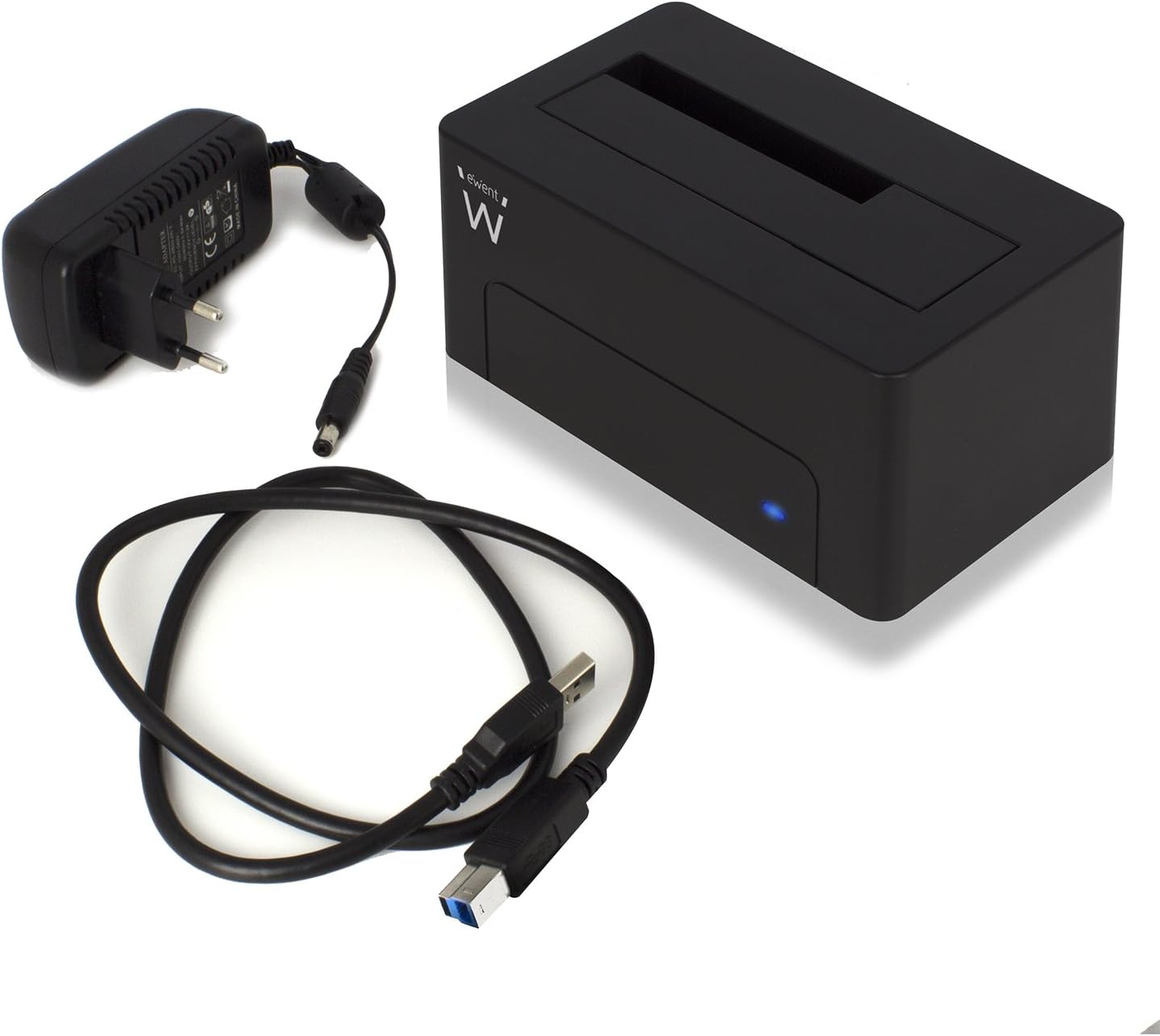
Figure 2: The Ewent EW7012 docking station, USB 3.1 Gen1 cable, and AC power adapter included in the package.
3. Fitur
- Kasaluyuan Universal: Supports both 2.5-inch and 3.5-inch SATA I/II/III HDDs and SSDs.
- Transfer Data SuperSpeed: Equipped with USB 3.1 Gen1 (USB 3.0) interface, offering data transfer rates up to 5 Gbps.
- Kasaluyuan mundur: Fully compatible with USB 2.0 ports, though at USB 2.0 speeds.
- Plug & Play: Teu aya pamasangan supir anu diperyogikeun pikeun kalolobaan sistem operasi.
- Indikator LED: A blue LED light indicates power status and data activity.
- Desain kompak: Space-saving and portable, with dimensions of approximately 4.92 x 2.91 x 2.24 inches.
- Catu daya éksternal: Includes an AC adapter for stable power delivery to the drive.
4. Setup Guide
- Sambungkeun Kakuatan: Plug the AC power adapter into the "POWER" port on the back of the docking station. Connect the other end of the adapter to a wall outlet.
- Nyambung ka Komputer: Connect one end of the supplied USB 3.1 Gen1 cable to the "USB 3.1" port on the back of the docking station. Connect the other end of the USB cable to an available USB port on your computer. For optimal performance, use a USB 3.0 or USB 3.1 port.
- Lebetkeun Hard Drive: Gently slide your 2.5-inch or 3.5-inch SATA HDD/SSD into the top slot of the docking station, ensuring the SATA connectors align properly. Apply gentle pressure until the drive is fully seated.
- Daya Hurung: Flip the "ON/OFF" switch on the back of the docking station to the "ON" position. The blue LED indicator on the front will illuminate, indicating the device is powered on.

Gambar 3: Tukangeun view of the docking station showing the USB 3.1 port, power input, and ON/OFF switch.

Figure 4: A 3.5-inch hard drive being inserted into the docking station.
5. Parentah Operasi
Once the docking station is set up and powered on, your operating system should automatically detect the connected hard drive. The blue LED on the front will blink during data transfer activity.
- Ngaksés Data: The connected drive will appear as a removable disk in your computer's file explorer (e.g., "This PC" on Windows, "Finder" on macOS). You can then access, copy, or move files sakumaha Anjeun ngalakukeunana jeung sagala alat panyimpenan séjén.
- Cadangan Data: The docking station is ideal for creating backups of your valuable photos, videos, and files. Simply drag and drop files to and from the docked drive.
- Removing a Drive: Before removing a drive, always safely eject it from your operating system to prevent data corruption. On Windows, use the "Safely Remove Hardware and Eject Media" icon in the system tray. On macOS, drag the drive icon to the Trash or use the Eject button in Finder. Once safely ejected, gently pull the drive out of the docking station.

Figure 5: A hard drive fully inserted into the docking station, ready for use. Note the QR code on the drive for additional information: http://qr.wdc.com/wdred
6. Pangropéa
To ensure the longevity and optimal performance of your Ewent EW7012 docking station, follow these simple maintenance guidelines:
- beberesih: Use a soft, dry, lint-free cloth to clean the exterior of the docking station. Do not use liquid cleaners or aerosols.
- Panyimpenan: Nalika henteu dianggo, simpen stasiun docking di tempat anu tiis sareng garing jauh tina sinar panonpoé langsung sareng suhu anu ekstrim.
- Penanganan: Nanganan alat kalayan ati-ati. Hindarkeun lungsurna atanapi nahan kana dampak anu kuat.
- Ventilasi: Ensure the docking station is placed in an area with adequate ventilation to prevent overheating, especially during prolonged use.
7. Cara ngungkulan
| Masalah | Mungkin Cukang lantaranana | Solusi |
|---|---|---|
| Drive teu kauninga ku komputer. |
|
|
| Laju mindahkeun data lambat. |
|
|
| Blue LED not illuminating. |
|
|
8. Spésifikasi
| Nomer modél | EW7012 |
| merek | Ewent |
| Tipe Drive cocog | 2.5-inch and 3.5-inch SATA I/II/III HDD/SSD |
| Kapasitas Panyimpenan Max | Up to 4 TB (as per listed specifications) |
| Panganteur | USB 3.1 Gen1 (USB 3.0) |
| Laju Mindahkeun Data | Nepi ka 5 Gbps (USB 3.1 Gen1) |
| Bahan | palastik |
| Warna | Hideung |
| Ukuran produk (L x W x H) | 4.92 x 2.91 x 2.24 inci (12.5 x 7.4 x 5.7 cm) |
| Item Beurat | 8.7 ons (248 gram) |
| Sasayogian tanaga | Adaptor AC (kaasup) |
| Kasaluyuan System Operasi | Windows, macOS, Linux (Plug & Play) |
9. Garansi jeung Rojongan
The Ewent EW7012 USB 3.1 Gen1 Docking Station comes with a garansi 5 taun, mastikeun katengtreman pikiran ngeunaan kualitas sarta durability na.
For technical support, product information, or warranty claims, please visit the official Ewent websitus:

Figure 6: Product packaging highlighting the 5-year warranty and webalamat situs.


