1. Bubuka
Thank you for choosing the PatrolEyes PE-DV5-2 Body Camera. This device is designed for professional use, offering high-definition video recording, advanced night vision capabilities, and integrated GPS for reliable evidence collection. This manual will guide you through the setup, operation, and maintenance of your new body camera to ensure optimal performance and longevity.
2. Eusi Paket
Punten parios yén sadaya barang aya dina pakét anjeun:
- PatrolEyes PE-DV5-2 Body Camera
- Battery (Included Components)
- USB Ngecas / Kabel Data
- Pangecas témbok
- Klip Pamasangan
- Manual pangguna (dokumén ieu)
3. Bagian sareng Kadali
Familiarize yourself with the various parts and controls of your PatrolEyes PE-DV5-2 body camera.

Gambar 3.1: Hareupeun view of the PatrolEyes PE-DV5-2 body camera, highlighting the central camera lens, surrounding infrared (IR) lights for night vision, and the PatrolEyes logo at the bottom. The device has a rugged, black casing.

Gambar 3.2: Front-side perspective of the PatrolEyes PE-DV5-2 body camera, providing a clearer view of the camera lens and the array of control buttons located on the side panel, including the yellow button at the top.

Gambar 3.3: Samping view of the PatrolEyes PE-DV5-2 body camera, prominently featuring the red record button and the covered USB port for charging and data transfer.
Gambar 3.4: Puncak view of the PatrolEyes PE-DV5-2 body camera, displaying the GPS indicator light and other top-mounted features.

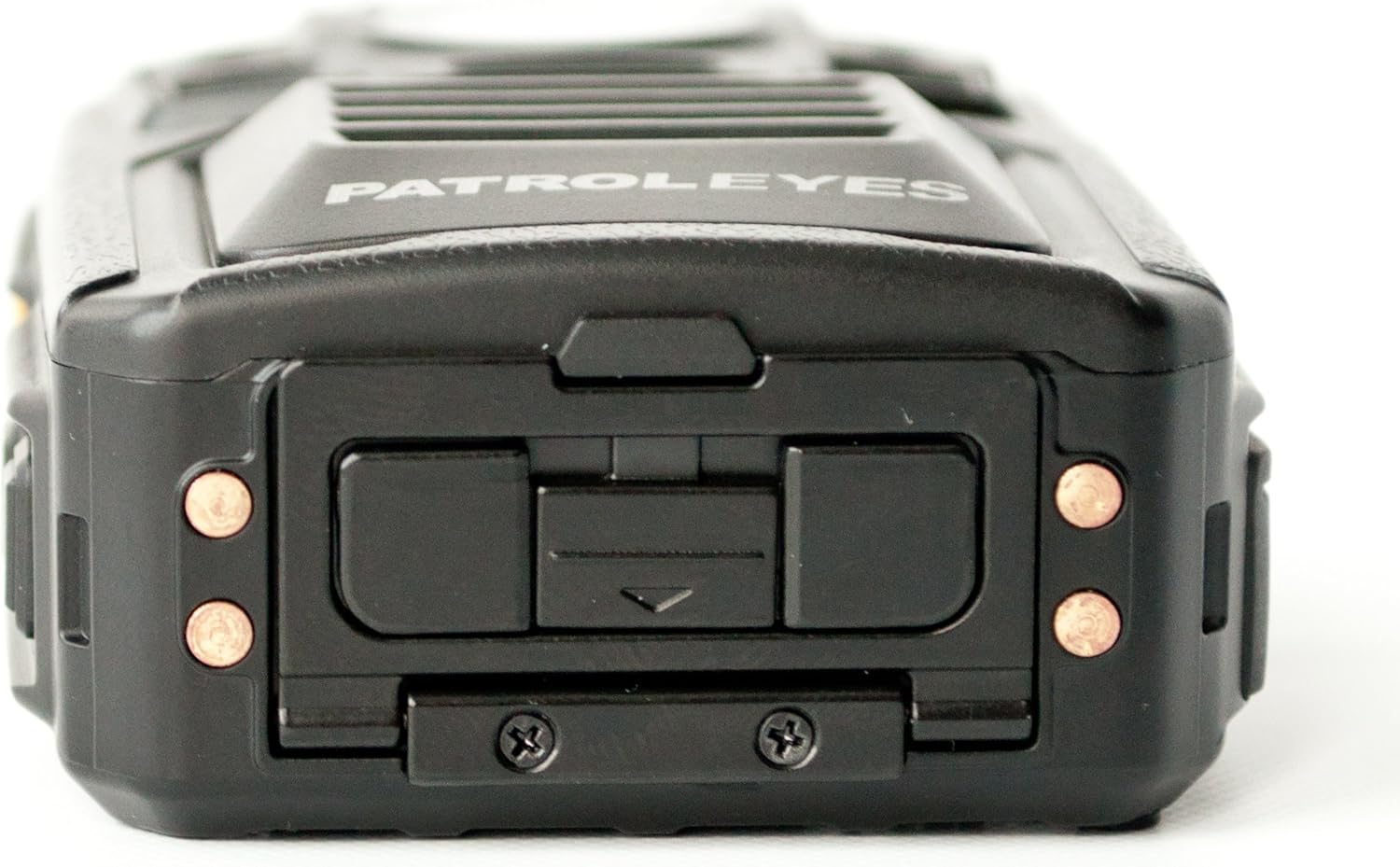
Gambar 3.5: Handapeun view of the PatrolEyes PE-DV5-2 body camera, revealing the charging contacts designed for use with a docking station.
4. Ngamimitian
4.1. Ngecas Batré
Before first use, fully charge the camera's battery. The camera comes with a rechargeable battery.
- Connect the USB charging cable to the camera's USB port.
- Plug the other end of the USB cable into the wall charger and then into a power outlet.
- The charging indicator light will illuminate. It will change color or turn off once charging is complete.
Alternatively, use a compatible docking station (sold separately) for charging.
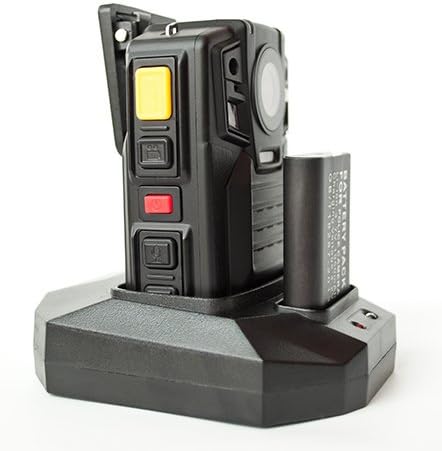
Gambar 4.1: The PatrolEyes body camera securely placed in its docking station, which also features a dedicated slot for charging an additional battery pack.

Gambar 4.2: Tukangeun view of the PatrolEyes docking station, clearly showing the power input port and the USB data port for connecting to a computer.
4.2. Powering on / Pareum
- Pikeun Ngahurungkeun: Press and hold the Power button for a few seconds until the device vibrates and the indicator lights turn on.
- Pikeun mareuman: Press and hold the Power button until the device vibrates and the indicator lights turn off.
4.3. Attaching the Mounting Clip
Attach the provided mounting clip to the back of the camera. This allows you to securely fasten the camera to your uniform or gear.
5. Ngoperasikeun kaméra
5.1. Ngarékam Pidéo
The camera supports video capture resolutions of 1080p, 480p, and 720p.
- Pastikeun kaméra diaktipkeun.
- Pencét dedicated Tombol Rékam (often red) once to start video recording. The recording indicator light will flash.
- Pencét éta Tombol Rékam again to stop recording. The indicator light will stop flashing.
5.2. Nyokot Poto
The camera has an effective still resolution of 33 MP.
- While in standby mode or during video recording, press the Tombol Poto once to capture a still image.
5.3. Night Vision (IR)
The camera features auto IR night vision with a range of 30 feet, utilizing infrared light sources.
- The camera is equipped with automatic infrared (IR) activation. In low-light conditions, the IR lights will automatically turn on to provide clear night vision footage.
5.4. Fungsi GPS
The integrated GPS module automatically records location data with your video footage. Ensure the camera has a clear view langit pikeun akuisisi sinyal GPS anu optimal.
5.5. Puterkeun deui
Anjeun tiasa deuiview recorded videos and photos directly on the camera's screen.
- Enter Playback mode via the menu or a dedicated button (refer to on-screen prompts).
- Napigasi ngaliwatan files using the directional buttons.
- Press the OK/Select button to play a video or view poto.
5.6. Nyambungkeun ka Komputer
Pikeun mindahkeun files, connect the camera to a computer using the provided USB cable.
- Hurungkeun kaméra.
- Sambungkeun kaméra kana komputer nganggo kabel USB.
- The camera will appear as a removable disk drive on your computer.
- You can now access and transfer video and photo files.
6. Pangropéa sarta perawatan
6.1. beberesih
- Usap awak kaméra ku kaén nu lemes,amp lawon. Ulah make bahan kimia kasar atawa cleaners abrasive.
- Pikeun lensa, paké lawon beberesih lensa khusus sareng solusi pikeun nyegah goresan.
6.2. Panyimpenan
- Simpen kaméra di tempat anu tiis sareng garing jauh tina sinar panonpoé langsung sareng suhu anu ekstrim.
- Ensure the battery is partially charged (around 50%) if storing for extended periods to preserve battery life.
6.3. Kaperawatan batré
- Hindarkeun sering-sering ngeusi batre.
- Use only the original or approved charging accessories.
7. Cara ngungkulan
| Masalah | Mungkin Cukang lantaranana | Solusi |
|---|---|---|
| Kaméra teu hurung. | Low atawa euweuh muatan batré. | Ngeusi batre sapinuhna. |
| Teu tiasa ngarékam pidéo / nyandak poto. | Storage full. | Mindahkeun files to a computer and delete them from the camera. |
| Kualitas pidéo/gambarna goréng. | Dirty lens; low light conditions. | Clean the lens; ensure IR is active in low light. |
| GPS teu narima sinyal. | Kahalangan view of sky; indoor use. | Pindah ka daérah luar terbuka. |
| Kaméra henteu dikenal ku komputer. | Kabel USB rusak; masalah supir. | Try a different USB port/cable; ensure camera is powered on. |
8. Spésifikasi
| Fitur | Rincian |
|---|---|
| Nomer modél | PE-DV5-2 |
| Resolusi Capture Video | 1080p, 480p, 720p |
| Resolusi Masih Éféktif | 33 MP |
| Laju pigura | 30 fps |
| Wengi Sawangan Sawangan | 30 suku |
| Téhnologi konektipitas | Nirkabel (Wi-Fi) |
| Sumber Daya | Batré Powered |
| Komponén Kaasup | Batré |
| Peunteun Protection Internasional | IP54 |
| Fitur husus | Sénsor gerak, Visi Peuting |
| Pamakéan jero rohangan / outdoor | Jero rohangan, Luar |
| Produsén | PatrolEyes |
| Tanggal Sadia munggaran | 14 Méi 2017 |
9. Émbaran jaminan
PatrolEyes products typically come with a limited manufacturer's warranty. Please refer to the warranty card included with your purchase or visit the official PatrolEyes websitus pikeun istilah jeung kaayaan jaminan lengkep. Simpen bukti pameseran anjeun pikeun klaim garansi.
10. Rojongan Palanggan
For technical assistance, troubleshooting beyond this manual, or inquiries about your PatrolEyes PE-DV5-2 body camera, please contact PatrolEyes customer support. Contact information can typically be found on the manufacturer's websitus atanapi dina bungkusan produk.
Sumberdaya Online: Visit the official PatrolEyes websitus kanggo FAQ, apdet parangkat lunak, sareng bahan dukungan tambahan.


