1. Bubuka
The BONECO U350 Ultrasonic Humidifier is designed to improve indoor air quality by adding moisture to the air. This unit features an innovative top-fill design for easy refilling, touch-sensitive controls, and an LED display. It can operate in both warm and cool mist modes and includes an AUTO mode for self-regulating humidification. The integrated demineralization cartridge helps prevent limescale residue.
This manual provides essential information for the safe and efficient operation, maintenance, and troubleshooting of your BONECO U350 humidifier. Please read all instructions carefully before use.
2. Parentah Kasalametan
Always observe the following safety precautions to reduce the risk of injury, electric shock, or damage to the appliance:
- Baca sadaya pitunjuk sateuacan ngaoperasikeun alat.
- Place the humidifier on a firm, level, water-resistant surface at least 6 inches (15 cm) away from walls and appliances.
- Ulah neuleumkeun alat dina cai atawa cairan séjén.
- Unplug the humidifier before filling, cleaning, or performing any maintenance.
- Entong nganggo kantétan anu henteu disarankeun ku produsén.
- Jauhkeun tina jangkauan barudak sareng piaraan.
- Use only clean, cool tap water or distilled water.
- Do not add essential oils directly into the water tank; use the designated fragrance tray.
3. Eusi Paket
Pastikeun yén sadaya barang aya dina bungkusan:
- BONECO U350 Humidifier Unit
- A250 AQUA PRO Water Filter
- Sikat beberesih
- Packet of EZCal Cleaning Solution
- Manual Pitunjuk (dokumén ieu)
4. Setélan
Follow these steps to set up your BONECO U350 humidifier for first use:
- Ngabongkar Unit: Sacara saksama miceun sadaya bahan bungkusan sareng tempatkeun humidifier dina permukaan datar anu stabil.
- Pasang saringan cai: The A250 AQUA PRO water filter is typically pre-installed. Ensure it is securely in place in the water tank. This filter helps demineralize water and prevent limescale.
- Eusian bak Cai:

Image: A hand pouring water from a pitcher into the open top of the BONECO U350 humidifier. A small yellow cleaning brush is visible attached to the lid.
Lift the top lid of the humidifier. Pour clean, cool tap water or distilled water directly into the water tank until it reaches the 'MAX' fill line. Close the lid securely.
- Sambungkeun Kakuatan: Colokkeun kabel listrik kana stop kontak listrik anu cocog.
5. Parentah Operasi
The BONECO U350 features a multifunctional digital display with touch-sensitive controls for easy operation.
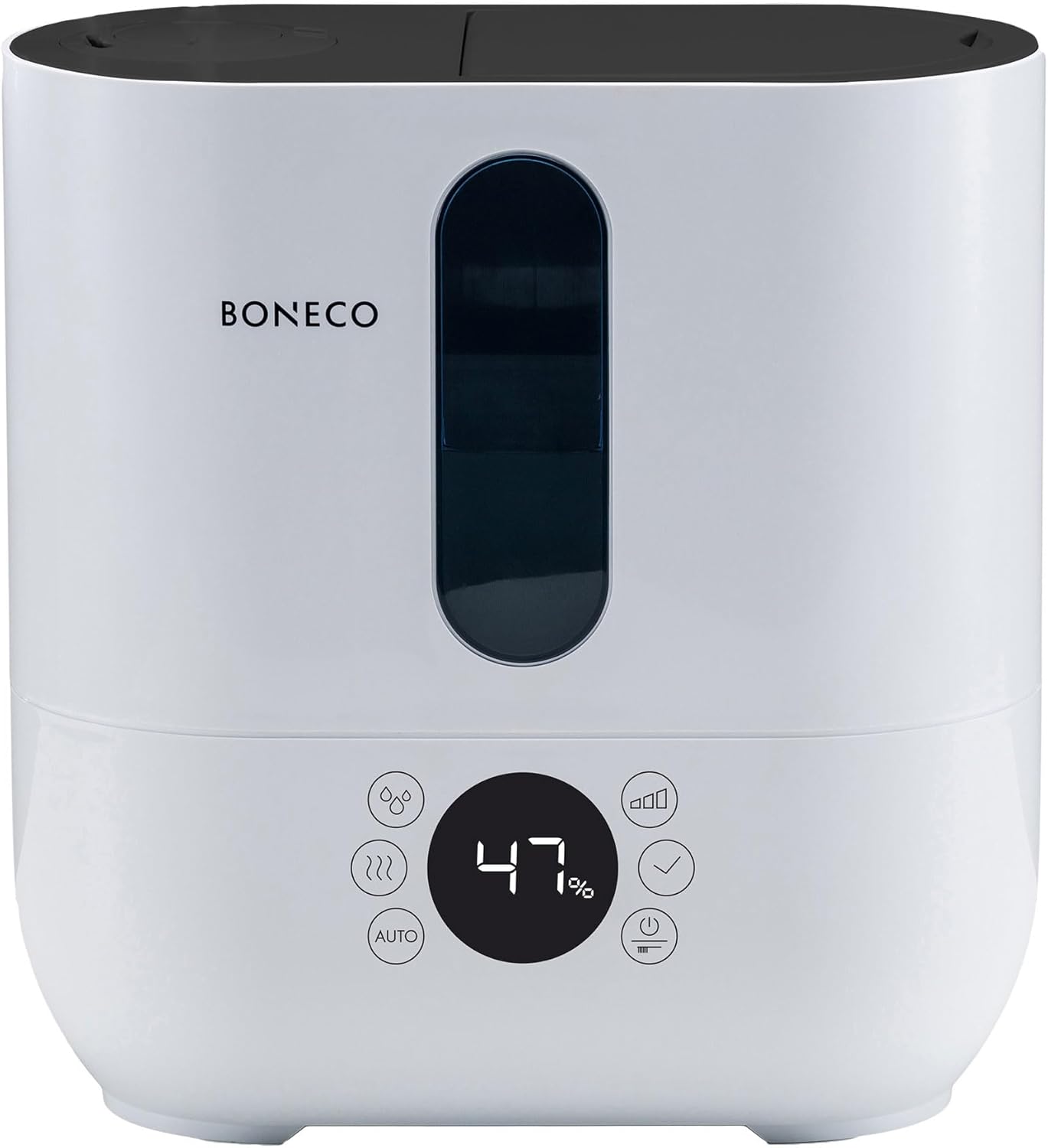
Gambar: Hareupeun view of the BONECO U350 humidifier, highlighting its digital display and touch controls. The display shows '47%' humidity.
5.1. Operasi dasar
- Hurungkeun/Pareuman: Pencét tombol daya dina panel kontrol pikeun ngaktipkeun atanapi mareuman unit.
- Saluyukeun Kaluaran Halimun: The humidifier offers 3 performance levels (Low, Medium, High). Use the mist output button to cycle through these levels.
- Warm or Cool Mist: Select between warm or cool mist output using the dedicated button. Warm mist provides faster humidification during colder months.
- Double Jet Nozzle: The mist can be directed in two directions using the double jet nozzle. Adjust the nozzles as desired to distribute mist effectively in the room.
5.2. Modeu otomatis
The AUTO mode simplifies humidification by automatically maintaining an optimal relative humidity level.
- Activate AUTO Mode: Press the 'AUTO' button on the control panel.
- Automatic Humidification: In AUTO mode, the humidifier will automatically adjust its output to achieve and maintain a relative humidity of 50%. This is measured by the built-in humidistat.
- Customizing AUTO Mode: The target humidity can be adjusted from the default 50% if desired.
5.3. Fragrance Tray
The BONECO U350 includes a fragrance tray for using essential oils to scent your room.

Image: A hand holding a small bottle, adding drops of essential oil into the pull-out fragrance tray located at the back of the BONECO U350 humidifier.
- Access Tray: Locate the small pull-out tray on the side or back of the unit.
- Tambahkeun Minyak Atsiri: Place a few drops of your preferred essential oil onto the felt pad in the tray.
- Do Not Add to Water Tank: Never add essential oils directly into the water tank, as this can damage the unit.
5.4. Digital Display Reminders
The digital display provides helpful reminders:
- Cai ngeusian: Indicates when the water tank needs refilling.
- Replace Water Filter: Reminds you when it's time to replace the A250 AQUA PRO filter.
- Indikator Kelembapan: Shows the current relative humidity level in the room.
5.5. Produk Langkungview Video
Video: An official product video from BONECO North America Corp. demonstrating the features and operation of the BONECO U350 humidifier, including its top-fill design, mist output, and overall aesthetic.
6. Pangropéa
Regular cleaning and maintenance are crucial for the optimal performance and longevity of your humidifier.
6.1. Pangropéa poean
- Cai ngeusian: Always use fresh water when refilling the tank.
- Ngusap handap: Wipe any condensation or water droplets from the exterior of the unit.
6.2. beberesih mingguan
- Cabut colokan: Salawasna cabut heula pelembab hawa sateuacan dibersihkeun.
- Cai kosong: Kosongkeun cai sésana tina tank sareng dasarna.
- Tangki cai bersih: Use the provided cleaning brush to gently scrub the inside of the water tank and remove any mineral deposits or film. Rinse thoroughly.
- Kartrid Demineralisasi: The integrated demineralization cartridge helps prevent limescale. Replace the A250 AQUA PRO filter as indicated by the display or approximately every 2-3 months, depending on water hardness and usage.
- Turun: Periodically descale the unit using the EZCal cleaning solution or a vinegar solution as per the instructions provided with the cleaning solution. This helps remove stubborn mineral buildup.
- Ngusap garing: Tegalan sakabéh bagian tuntas saméméh reassembling.
7. Cara ngungkulan
If you encounter issues with your BONECO U350, refer to the following common problems and solutions:
| Masalah | Mungkin Cukang lantaranana | Solusi |
|---|---|---|
| Taya kaluaran halimun | Tingkat cai handap Tumpukan mineral dina transduser Unitna teu dipasang kalawan bener | Eusian bak cai Clean the transducer with the cleaning brush and descale Ensure all parts are correctly seated and lid is closed |
| Bau anu teu pikaresepeun | Stagcai nant Tangki cai kotor | Empty and refill with fresh water daily Ngabersihan tank cai tuntas |
| Lebu bodas di sabudeureun unit | Cai teuas Worn demineralization cartridge | Anggo cai sulingan Replace the A250 AQUA PRO water filter |
| Unit ribut | Unit henteu dina permukaan anu rata Internal component vibration | Ensure unit is on a flat, stable surface Contact customer support if noise persists after checking water levels and placement |
If the problem persists after attempting these solutions, please contact BONECO customer support.
8. Spésifikasi
Detailed technical specifications for the BONECO U350 Humidifier:
| Fitur | Rincian |
|---|---|
| merek | BONECO |
| Ngaran modél | U350 |
| Fitur husus | Humidistat, Quiet Operation |
| Warna | Bodas |
| Disarankeun Area Room | Nepi ka 860 sq. |
| Modeu Operasi | Otomatis |
| Ukuran produk (D x W x H) | 6.5" x 12.1" x 12.7" |
| Item Beurat | 7.7 pon |
| Kaluaran asor | Up to 3 gallons/day |
| Komponén Kaasup | Aqua Pro Filter, cleaning brush, EZCal cleaning solution |
| UPC | 834546000978 |
| Produsén | BONECO Amérika Kalér Corp. |
| Tanggal Sadia munggaran | 17 Agustus 2017 |
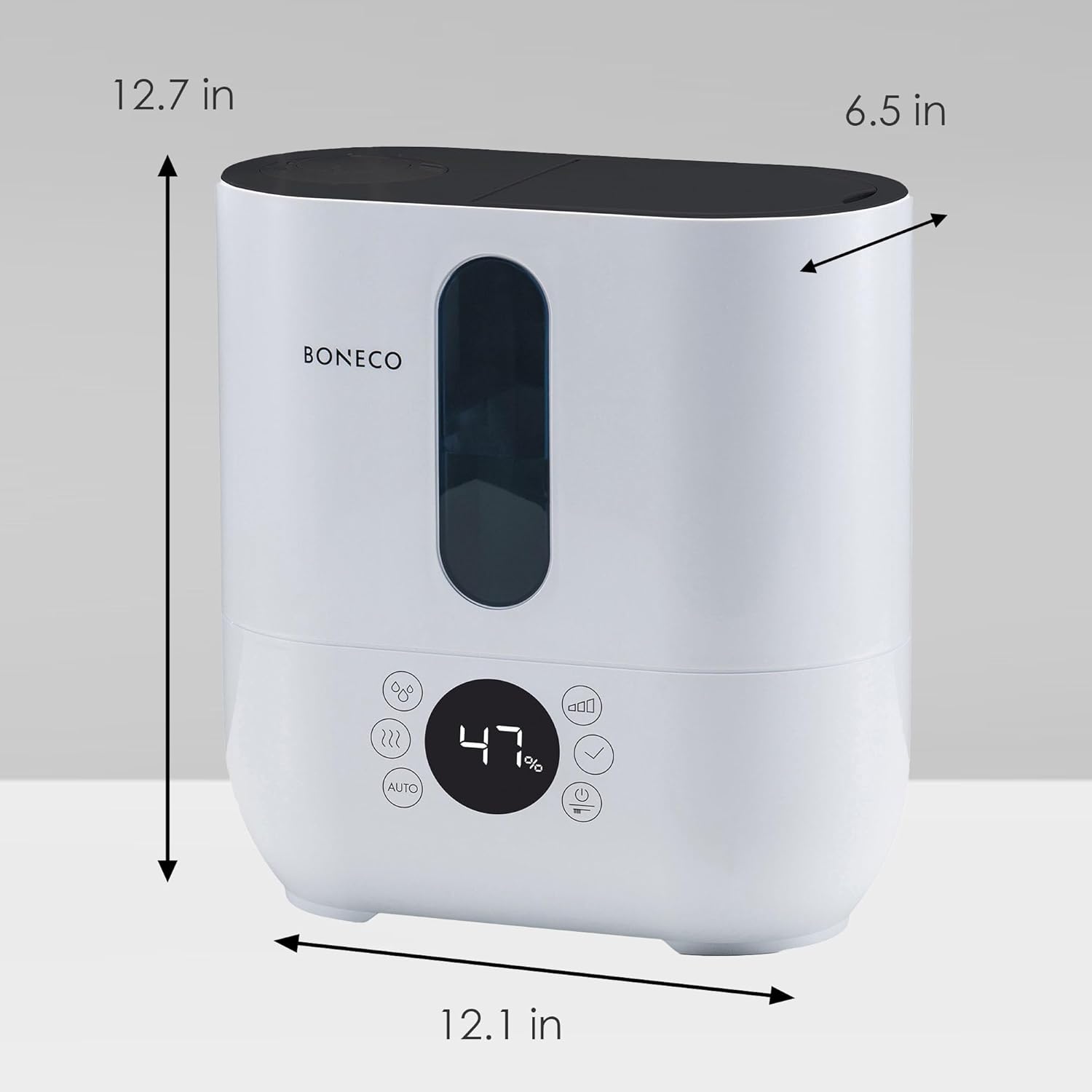
Image: A diagram showing the dimensions of the BONECO U350 humidifier: 12.7 inches high, 12.1 inches wide, and 6.5 inches deep.
9. Jaminan & Dukungan
For warranty information and customer support, please refer to the official BONECO website or contact BONECO North America Corp. directly. Keep your proof of purchase for any warranty claims.
- Dukungan Online: Visit the official BONECO websitus pikeun FAQs, pendaptaran produk, jeung sumber rojongan.
- Kontak Produsén: Refer to the contact information provided in your product packaging or on the BONECO websitus pikeun bantuan langsung.


