1. Bubuka
The Kramer VS-62HA is a high-performance 6x2 matrix switcher designed for 4K@60Hz (4:2:0) HDMI and analog audio signals. It incorporates advanced auto-switching capabilities and versatile control options, making it ideal for various professional AV environments. This device re-clocks and equalizes signals, allowing any of its six inputs to be routed to either or both of its two outputs simultaneously.
Key features include support for resolutions up to 4K@60Hz (4:2:0) and WUXGA, HDCP compliance, and comprehensive HDMI support for 3D, Deep Color, x.v.Color, Lip Sync, and various audio formats like Dolby TrueHD, Dolby Digital Plus, DTS-HD, and 7.1 PCM. The VS-62HA also features EDID capture, advanced auto AV switching (last-connected or priority), independent audio routing, and programmable Step-In over HDMI functionality.
2. Émbaran Kasalametan
Always read and follow all instructions carefully before operating this device. Keep this manual for future reference.
- Pastikeun alat disambungkeun ka stop kontak anu di-ground.
- Ulah ngalaan alat ka cai atawa kaleuleuwihan Uap.
- Hindarkeun nempatkeun alat caket sumber panas atanapi dina sinar panonpoé langsung.
- Ulah muka alat casing. Rujuk sadayana jasa ka tanaga anu mumpuni.
- Paké ngan adaptor kakuatan disadiakeun kalawan unit.
- Pegatkeun sambungan listrik sateuacan ngabersihkeun atanapi mindahkeun alat.
3. Eusi Paket
Pastikeun yén sadaya item aya dina pakét anjeun:
- Kramer VS-62HA 6x2 4K HDMI/Audio Automatic Matrix Switcher
- Adaptor kakuatan
- Rack Ears (for rack mounting)
- Manual Pamaké ieu
4. Produk Langkungview
The VS-62HA features a user-friendly front panel for direct control and comprehensive rear panel connectivity.
4.1 Panel payun

Figure 4.1: Front and Rear Panels of the Kramer VS-62HA. The top image shows the front panel with input selection buttons, EDID controls, and analog audio controls. The bottom image shows the rear panel with HDMI inputs/outputs, analog audio inputs/outputs, control ports (RS-232, Ethernet), and power input.
The front panel provides intuitive controls for input selection, EDID management, and analog audio adjustments. It includes LED indicators for power, input status, and output status.
- INPUTS Buttons (1-6): Milih sumber input HDMI.
- TO OUT 1 / TO OUT 2 Buttons: Routes the selected input to Output 1 or Output 2.
- Tombol OFF: Disconnects the current input from the output.
- EDID Controls: Buttons for EDID management (e.g., EDID Copy, EDID Default).
- ANALOG AUDIO Control: Volume up/down, mute, and swap functions for analog audio outputs.
- Tombol konci: Ngonci kontrol panel hareup pikeun nyegah parobahan anu teu dihaja.
- PATTERN Button: Activates an internal test pattern generator.
4.2 Panel tukang
The rear panel houses all the necessary ports for connecting your source devices, displays, and control systems.
- HDMI IN (1-6): HDMI input ports for connecting source devices.
- AUDIO IN (1-6): Analog audio input ports (3.5mm jacks) corresponding to HDMI inputs.
- HDMI OUT (1-2): HDMI output ports for connecting displays.
- AUDIO OUT (1-2): Balanced analog audio output ports (terminal blocks).
- REMOTE 1 / REMOTE 2 LEDs: Indicators for remote control status.
- SETUP DIP Switches: For initial configuration settings.
- REMOTE IR: IR receiver port for remote control.
- RS-232: Serial control port for integration with control systems.
- ETHERNET: RJ-45 port for network control and firmware updates.
- Tombol PROGRAM: Pikeun apdet firmware.
- Tombol RESET: Ngareset alat.
- Input kakuatan: Pikeun nyambungkeun adaptor daya éksternal.
5. Setup jeung Instalasi
Follow these steps to set up your Kramer VS-62HA matrix switcher.
5.1 Connecting the VS-62HA
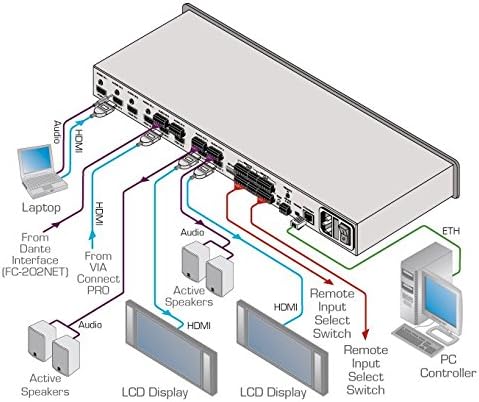
Figure 5.1: Typical Connection Diagram for the Kramer VS-62HA. This diagram illustrates how to connect various HDMI and audio sources (laptops, VIA Connect PRO, Dante Interface) to the inputs, and how to connect displays (LCD Display) and active speakers to the outputs. It also shows connections for remote input select switches and a PC controller via Ethernet.
- Pareuman Sadaya Alat: Before making any connections, ensure all devices, including the VS-62HA, are powered off.
- Sambungkeun Sumber HDMI: Connect your HDMI source devices (e.g., Blu-ray players, computers, media streamers) to the HDMI IN 1-6 ports on the rear panel using high-quality HDMI cables.
- Connect Analog Audio Sources (Optional): If using analog audio, connect your analog audio sources to the corresponding AUDIO IN 1-6 ports.
- Sambungkeun Layar HDMI: Connect your HDMI displays (e.g., TVs, projectors, monitors) to the HDMI OUT 1-2 ports on the rear panel.
- Connect Analog Audio Outputs: Connect your audio receivers or active speakers to the AUDIO OUT 1-2 terminal block connectors.
- Connect Control Systems (Optional):
- For RS-232 control, connect a serial cable from your control system to the RS-232 port.
- For network control, connect an Ethernet cable from your network switch/router to the ETHERNET port.
- Sambungkeun Kakuatan: Connect the supplied power adapter to the POWER input on the rear panel, then plug the adapter into a grounded AC outlet.
- Daya Hurung: Power on the VS-62HA, then power on your source devices and displays.
5.2 Pamasangan Rak (Opsional)
The VS-62HA can be mounted in a standard 19-inch equipment rack using the supplied rack ears. Attach the rack ears to the sides of the unit using the provided screws, then secure the unit into the rack.
6. Operating the VS-62HA
The VS-62HA can be operated via its front panel, RS-232, Ethernet, or IR remote control.
6.1 Operasi Panel hareup
- Pilihan Input: Pencét salah sahiji INPUT buttons (1-6) to select the desired source.
- Routing kaluaran: After selecting an input, press TO OUT 1 or TO OUT 2 to route the selected input to the respective output. You can route the same input to both outputs simultaneously.
- Disconnecting an Output: Pencét éta Pareum button for the desired output to disconnect the current input.
- Analog Audio Control: Ngagunakeun éta VOL+, VOL-, BISA, jeung SWAP buttons in the ANALOG AUDIO CONTROL section to adjust the analog audio output.
- Manajemén EDID: Use the EDID buttons to copy EDID from a connected display or load a default EDID. Refer to the full technical manual for advanced EDID settings.
- Kontrol ngonci: Pencét éta KUNCI button to disable front panel controls. Press again to unlock.
6.2 Otomatis Ngalihkeun
The VS-62HA supports advanced auto-switching schemes. This feature allows the switcher to automatically switch to a newly connected or active input based on predefined rules (e.g., last-connected, priority). This can be configured via the web interface or RS-232 commands.
6.3 Control via RS-232 and Ethernet
For advanced control and integration into larger AV systems, the VS-62HA can be controlled via RS-232 serial commands or over an Ethernet network using its built-in web interface or Kramer's control software. Refer to the Kramer website for detailed command lists and software downloads.
7. Pangropéa
Proper maintenance ensures the longevity and optimal performance of your VS-62HA.
- beberesih: Anggo lawon anu lemes sareng garing pikeun ngabersihkeun bagian luar unit. Entong nganggo pembersih cair atanapi aerosol.
- Ventilasi: Pastikeun ventilasi di sabudeureun unit cekap. Ulah ngahalangan liang ventilasi naon waé.
- Pembaruan firmware: Periodically check the Kramer Electronics website for firmware updates to ensure your device has the latest features and bug fixes. Firmware updates can typically be performed via the Ethernet port.
8. Cara ngungkulan
If you encounter issues with your VS-62HA, refer to the following common problems and solutions:
| Masalah | Mungkin Cukang lantaranana | Solusi |
|---|---|---|
| Taya kaluaran video |
|
|
| Taya kaluaran audio |
|
|
| Front panel unresponsive |
|
|
If the problem persists, contact Kramer technical support for further assistance.
9. Spésifikasi
Technical specifications for the Kramer VS-62HA:
| Fitur | Rincian |
|---|---|
| Nomer modél | FC-7 (VS-62HA) |
| Max. Data Data | 8.91Gbps (2.97Gbps per graphics channel) |
| Max. Resolusi | 4K@60Hz (4:2:0) and WUXGA |
| Pamatuhan HDCP | Sumuhun |
| Rojongan HDMI | 3D, Deep Color, x.v.Color, Lip Sync, Dolby TrueHD, Dolby Digital Plus, DTS-HD, 7.1 PCM |
| Manajemén EDID | EDID Capture, Non-Volatile EDID Storage |
| Routing Audio | Independent (breakaway) audio routing of embedded HDMI and analog audio |
| Pilihan kontrol | IR, RS-232, Ethernet, Contact Closure, Advanced Auto Switching |
| Dimensi produk | 48.26 x 10.16 x 18.29 cm |
| Beurat produk | 907.18 g |
| Produsén | Kramer |
| Tanggal Sadia munggaran | 22 Juni 2017 |
10. Garansi jeung Rojongan
Kramer products are backed by a standard warranty. For specific warranty terms and conditions, please refer to the warranty card included with your product or visit the official Kramer Electronics websitus.
For technical support, troubleshooting assistance, or service inquiries, please contact Kramer customer support through their official website or the contact information provided in your product documentation. When contacting support, please have your product model number (VS-62HA / FC-7) and serial number ready.
Kramer Electronics Official Websitus: www.kramerav.com


