Manual Pamaké Stasion Cuaca Nirkabel DIGOO DG-TH8868
Model: DG-TH8868
Bubuka
The DIGOO DG-TH8868 is a versatile wireless weather station designed to provide accurate indoor and outdoor temperature and humidity readings, along with a comprehensive weather forecast, moon phase, and time display. This manual provides detailed instructions for setting up, operating, maintaining, and troubleshooting your device to ensure optimal performance.
Eusi pakét
Sateuacan anjeun ngawitan, pastikeun sadaya item aya dina bungkusan:
- 1 x DIGOO DG-TH8868 Digital Weather Station (Main Unit)
- 1 x DIGOO DG-TH8868 Wireless Outdoor Sensor
- 1 x DIGOO DG-TH8868 English User Manual
- 1 x DIGOO DG-TH8868 Special USB Power Cable (5V 1A required)
- 1 x Original Color Gift Packaging

Gambar: The main DIGOO DG-TH8868 Weather Station unit and its accompanying wireless outdoor sensor.
Disetél
1. Powering Unit Utama
The main weather station unit can be powered by either batteries or the included USB power cable.
- Daya Batré: Insert 3 x AAA batteries (not included) into the battery compartment on the back of the main unit.
- USB Power: Connect the special USB power cable to the DC 5V 1A port on the back of the main unit and plug the other end into a compatible USB power adapter (not included). Using the USB power cable ensures the colorful display remains continuously bright.
2. Ngahurungkeun Sensor Luar Ruangan
Insert 2 x AA batteries (not included) into the battery compartment of the wireless outdoor sensor.
3. Panempatan sénsor
Place the wireless outdoor sensor in a shaded, dry location outdoors, protected from direct sunlight and rain, to ensure accurate temperature and humidity readings. Ensure it is within range of the main unit for optimal wireless data transmission.

Gambar: Diagram illustrating the wireless data transmission between the outdoor sensor and the main weather station unit, allowing for continuous monitoring of indoor and outdoor environmental conditions.
4. Sinkronisasi Awal
Once both units are powered, they should automatically synchronize. The main unit will display outdoor temperature and humidity readings. If synchronization does not occur, refer to the troubleshooting section.

Gambar: Pahareup-hareup view of the weather station's back, showing the USB power input and the battery compartment for AAA batteries, highlighting flexible power options.
Parentah Operasi
Paparan Liwatview
The DIGOO DG-TH8868 features a colorful HD LCD display that presents a wealth of information at a glance.

Gambar: The vibrant, high-definition display of the weather station, showcasing its colorful interface against a home backdrop, designed for enhanced readability and visual appeal.
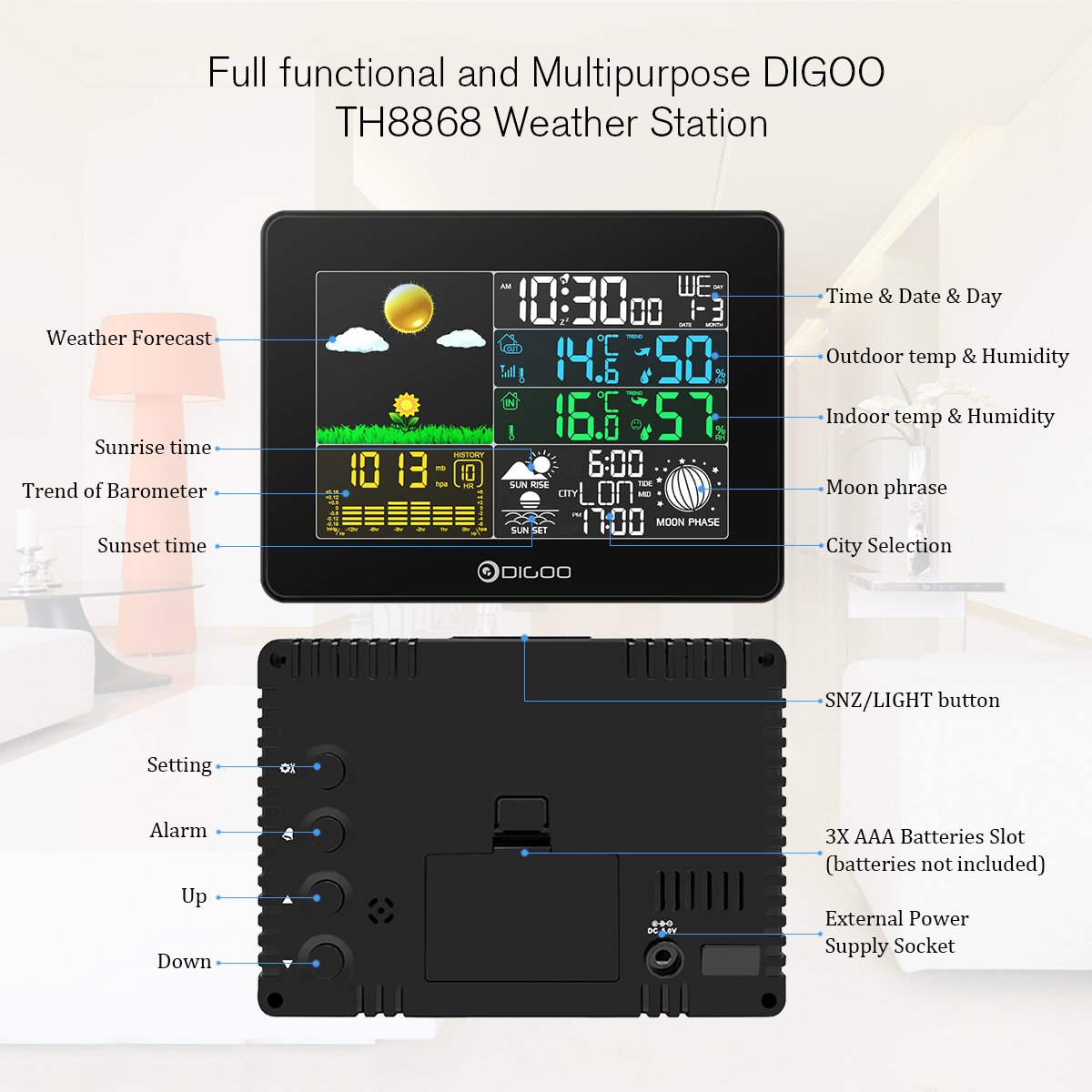
Gambar: A comprehensive diagram labeling all key features and buttons on the front and back of the DIGOO TH8868 Weather Station, including display sections, settings, and power options.
- Waktos & Tanggal: Némbongkeun waktos, tanggal, sareng dinten ayeuna dina saminggu.
- Suhu & Kalembaban di Jero/Luar Ruangan: Shows current readings, along with maximum/minimum records.
- Témbongkeun kanyamanan: Indicates indoor comfort levels (Dry, Comfort, Wet) based on temperature and humidity.
- Barometer Trends: Displays air pressure trends, updated automatically every 12 minutes.
- Ramalan Cuaca: Predicts weather for the next 12-24 hours with 6 vivid patterns: Sunny, Partly Sunny, Cloudy, Rainy, Stormy, Snowy.
- Sunrise & Sunset Time: Displays local sunrise and sunset times based on selected city.
- Fase Bulan: Shows the current moon phase.

Gambar: Visual representation of the weather station's ability to predict weather, showing various forecast icons like sunny, cloudy, rainy, and snowy conditions.

Gambar: The weather station display showing sunrise time, sunset time, and the current moon phase, providing comprehensive astronomical information.
Nyetel waktos sareng kaping
Refer to the detailed instructions in the included English User Manual for setting the precise time and date.
Fungsi Jam Alarm
Stasion cuaca ngawengku jam alarm kalayan fungsi snooze.
- To set the alarm, follow the instructions in the manual.
- When the alarm sounds for 2 minutes, press the SNZ / LAMPU button to activate the snooze function for 10 minutes.
- To stop the alarm for the day, press any button except HI / Low / Off.
Language and City Selection
The device supports eight languages: German, French, Spanish, Italian, Dutch, Danish, Russian, and English. You can also select your city to get accurate sunrise, sunset, and moon phase information.
Pangropéa
Ngagantian batré
Replace batteries in both the main unit and the outdoor sensor when the low battery indicator appears on the display or when readings become inconsistent.
beberesih
Wipe the weather station and sensor with a soft, dry cloth. Do not use abrasive cleaners or immerse the units in water.
Pamérésan masalah
- Henteu aya tampilan: Ensure batteries are correctly inserted and charged, or that the USB power cable is securely connected and receiving power.
- Sensor Luar Ruangan Teu Nyambung:
- Check if the outdoor sensor batteries are installed correctly and charged.
- Ensure the sensor is within the effective wireless range of the main unit.
- Try re-synchronizing by removing and reinserting batteries in both units.
- Bacaan teu akurat:
- Ensure the outdoor sensor is placed in a shaded area, away from direct heat sources or extreme cold.
- Verify that the main unit is not near heat-emitting appliances or direct sunlight indoors.
spésifikasi
| Fitur | Spésifikasi |
|---|---|
| Rentang Suhu Indoor | 0°C nepi ka 50°C (32°F nepi ka 122°F) |
| Rentang kalembaban jero rohangan | 1% RH - 99% RH |
| Rentang Suhu Luar | -30°C nepi ka 60°C (-22°F nepi ka 140°F) |
| Rentang kalembaban outdoor | 1% RH - 99% RH |
| Akurasi Suhu | ± 1 ° C |
| Barometer Range | 800 MB nepi ka 1100 MB |
| Daya Unit Utama | 3 x AAA batteries (not included) or 5V 1A USB power cable |
| Kakuatan Sensor Luar Ruangan | 2 x batré AA (teu kaasup) |
| Fitur husus | Alarm, Wireless, Clock, Moon Phase, Weather Forecast, Sunrise/Sunset |
| Dimensi produk | 21.01 x 13 x 5 cm; 272.16 g |
| Warna | Hideung |
Rojongan Palanggan
For any issues or inquiries regarding your DIGOO DG-TH8868 Weather Station, the manufacturer guarantees a response within 24 hours. Solutions may include a full refund without product return if problems cannot be resolved, or a partial refund as a gesture of appreciation for your patience and support.


