Bubuka
The beyerdynamic Impacto Essential is a compact high-resolution converter designed to provide a digital edge to beyerdynamic's high-end headphones. It enables impeccable digital transmission for an exceptional sound experience.

Eusi pakét
- Impacto Essential DAC/Headphone Amppangagung
- 0.4 m headphone cable with 2 x 3.5 mm jack plug (hard-wired)
- 0.8 m Micro-USB cable (On-The-Go)
- 0.8 m kabel USB-C
- 1.4 m USB-A cable
- Gancang Mimitian Guide
Disetél
Follow these steps to connect your Impacto Essential to your headphones and audio source.
Nyambungkeun ka Headphone
Connect the hard-wired 0.4m headphone cable from the Impacto Essential to your compatible beyerdynamic headphones. Ensure the 3.5mm jack plugs are fully inserted into the headphone's input ports.

Nyambungkeun ka Alat Android
Use the provided 0.8m Micro-USB (On-The-Go) or 0.8m USB-C cable to connect the Impacto Essential to your Android smartphone or tablet. The device will draw power directly from your Android device.
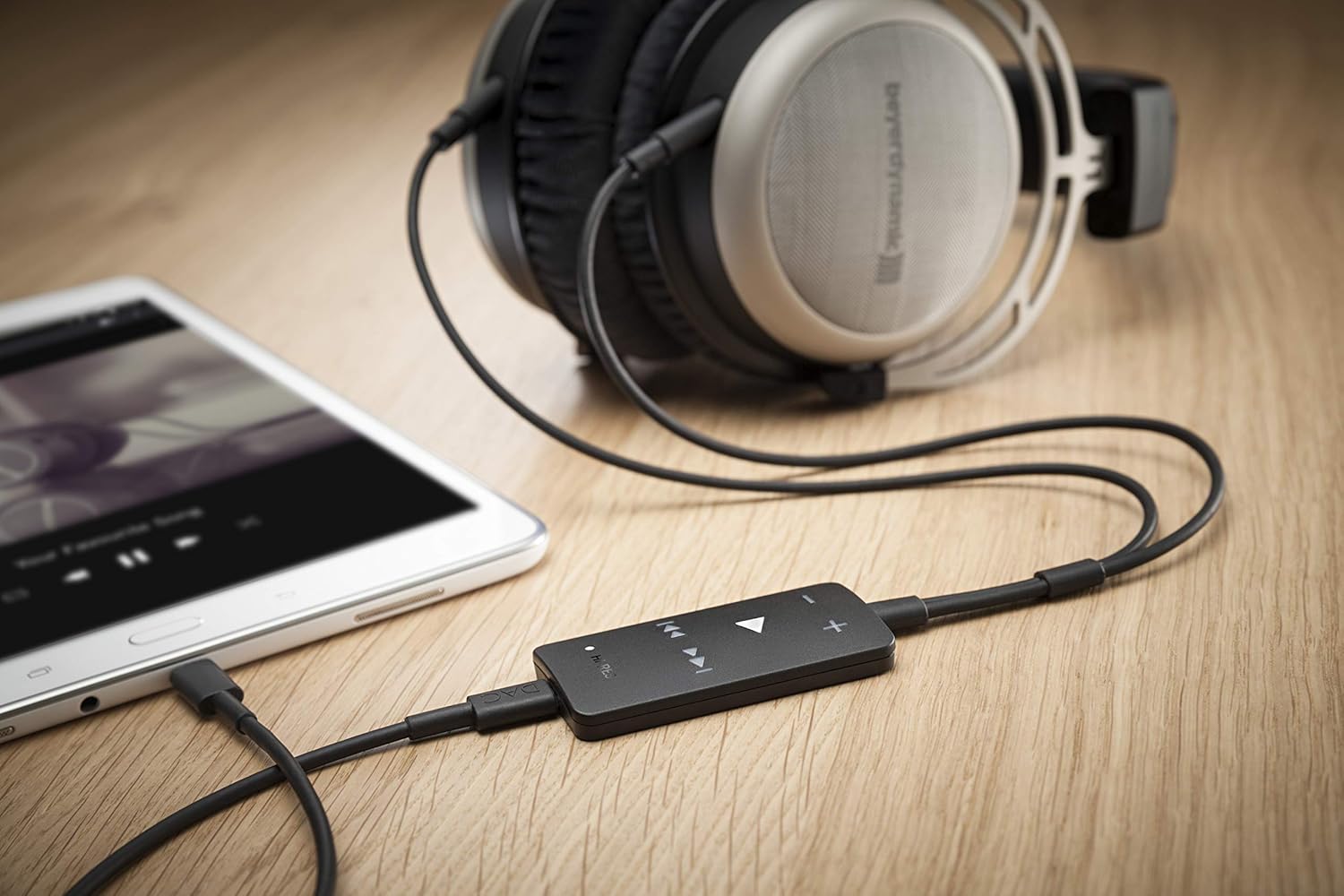
Nyambung ka PC/Laptop
For PC or laptop connection, use the 1.4m USB-A cable. Connect one end to your computer's USB port and the other to the Impacto Essential. Your computer should automatically recognize the device.

Cable Overview
The Impacto Essential comes with various cables to ensure compatibility with different devices. Always use the appropriate cable for your connection type.

Parentah Operasi
Once connected, the Impacto Essential is ready for use. The device features intuitive controls for audio playback.
Kadali Playback
The Impacto Essential features dedicated buttons for volume control and media playback:
- + / - Tombol: Saluyukeun polumeu kaluhur atanapi kahandap.
- Tombol Puter/Reureuh: Press the central triangular button to play or pause audio.
- Luncat Tombol Maju/Mundur: Use the arrow buttons to skip to the next or previous track.

Hi-Res Audio Indicator
A 'HI-RES' indicator light on the device illuminates when high-resolution audio is being processed, confirming optimal audio quality.
Pangropéa
To ensure the longevity and optimal performance of your Impacto Essential, follow these maintenance guidelines:
- beberesih: Use a soft, dry cloth to wipe the device. Avoid using abrasive cleaners or solvents.
- Panyimpenan: Simpen alat dina tempat anu tiis sareng garing jauh tina sinar panonpoé langsung sareng suhu anu ekstrim.
- Perawatan kabel: Handle cables gently. Avoid sharp bends or excessive pulling to prevent damage.
Pamérésan masalah
If you encounter issues with your Impacto Essential, refer to the following common problems and solutions:
Taya Kaluaran Sora
- Ensure all cables are securely connected to both the Impacto Essential, your headphones, and your audio source.
- Verify that the volume on both the Impacto Essential and your audio source (smartphone, PC) is turned up.
- Check if your headphones are properly connected to the Impacto Essential's 3.5mm jacks.
- Confirm that your audio source is playing media.
Device Not Recognized by Computer/Smartphone
- Try connecting the Impacto Essential to a different USB port on your computer or a different compatible smartphone.
- Ensure you are using the correct USB cable (Micro-USB OTG, USB-C, or USB-A) for your device.
- Restart your computer or smartphone.
- For PC, check your sound settings to ensure the Impacto Essential is selected as the default playback device.
Overheating or Unexpected Shutdown
- Ensure the device is used in a well-ventilated area and not covered during operation.
- If the device becomes excessively hot and shuts down, disconnect it immediately and allow it to cool down before attempting to use it again.
Masalah kasaluyuan
- The Impacto Essential is compatible with specific beyerdynamic high-end headphones: T 1 (2nd generation), T 5 p (2nd generation), Amiron home, and Aventho wired.
- It is suitable for use with Android smartphones and tablets (with USB-OTG) as well as with PC and notebook. It is not designed for iOS devices.
Spésifikasi teknis
| Fitur | Rincian |
|---|---|
| Modél | Impacto ésénsial |
| Réspon Frékuénsi | 15 Hz - 20,000 Hz |
| Impedansi | 11.5 emh |
| Téhnologi konektipitas | Dikabel |
| Headphone Jack | 3.5 mm Jack |
| Ukuran (L x W x H) | 9.1 x 2.3 x 5.6 inci |
| Item Beurat | 9.6 ons (0.6 pon) |
| Headphone cocog | beyerdynamic T 1 (2nd generation), T 5 p (2nd generation), Amiron home, Aventho wired |
| Alat nu cocog | Android smartphones/tablets (with USB-OTG), PC, Notebook |
Garansi sareng Rojongan
For warranty information and technical support, please refer to the official beyerdynamic websitus atanapi ngahubungan layanan palanggan maranéhna. Simpen bukti pameseran anjeun pikeun klaim garansi.