Radioddity Raddy RF23 AM FM Portable Pocket Radio MP3 Player User Manual
Modél: RF23
Bubuka
This manual provides detailed instructions for the Radioddity Raddy RF23, a compact and versatile portable radio and MP3 player. It features AM/FM radio reception, MP3 playback from Micro TF cards and USB disks, and an integrated flashlight. Please read this manual thoroughly before using the device to ensure proper operation and longevity.
Eusi pakét
- 1 x Radioddity Raddy RF23 AM/FM Radio
- 1 x Kabel Ngecas USB
- 1 x Rechargeable Lithium-Ion Battery (BL-5C type)
- 1 x Tali pigeulang
Produk Leuwihview
Biasakeun diri anjeun sareng rupa-rupa bagian sareng kontrol radio Raddy RF23 anjeun.

Gambar 1: Hareupeun View of Raddy RF23 - Displays the speaker grille, digital display, and numeric keypad with function buttons.

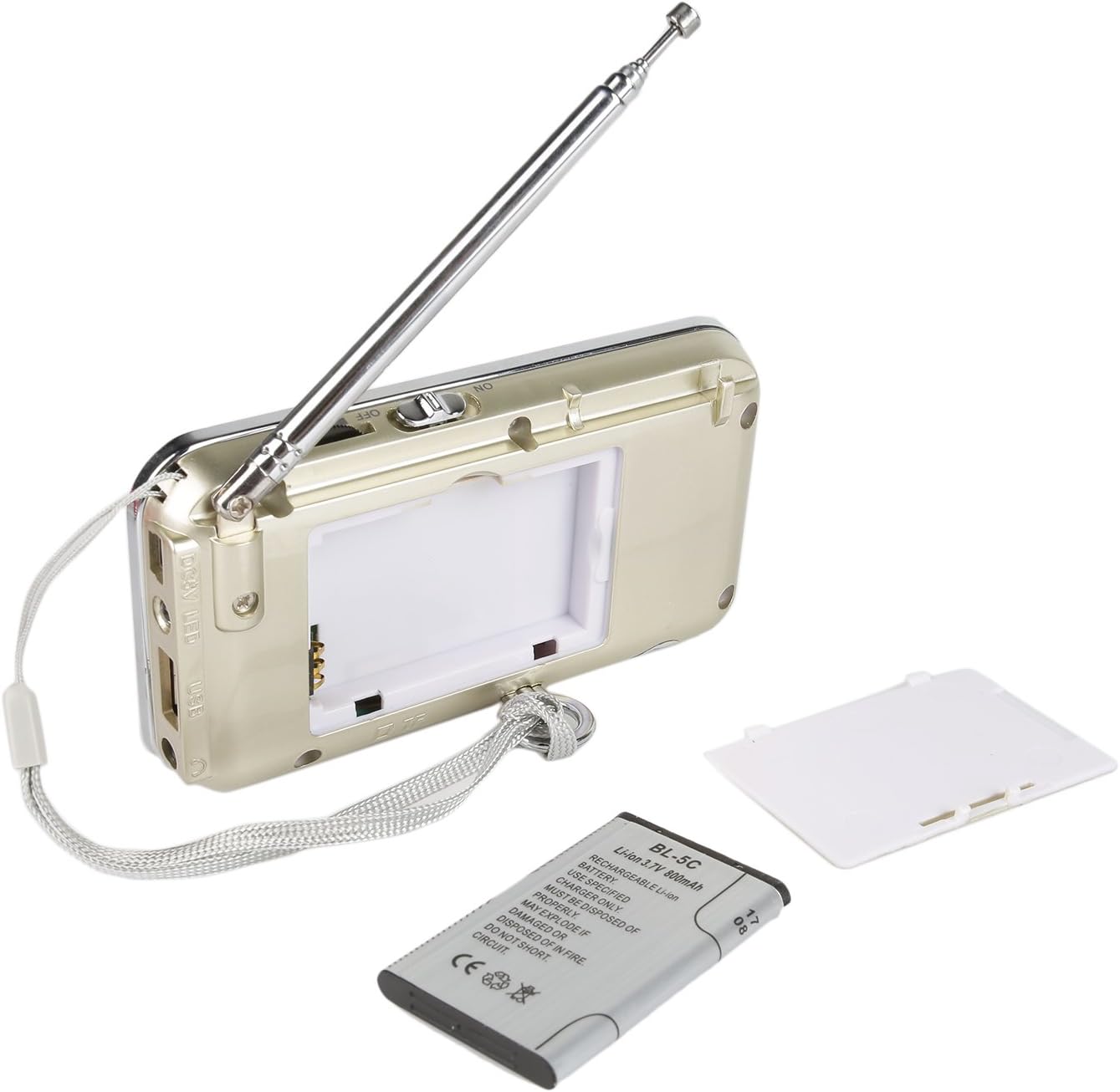
Gambar 2: Balik View of Raddy RF23 - Shows the battery cover, USB port, DC 5V charging port, and the wrist strap with its stand attachment.
Kontrol jeung palabuhan
- Saklar kakuatan: Slide switch on the side to turn the device ON or OFF.
- anteneu: Extendable telescopic antenna for improved radio reception.
- Digital tampilan: Shows frequency, mode, and track information.
- Speaker: Spiker terintegrasi pikeun kaluaran audio.
- Papan tombol angka (0-9): Used for direct frequency input or track selection.
- Tombol MODE: Switches between AM, FM, and MP3 playback modes.
- Play/Pause Button (▶⏸): Plays or pauses MP3 tracks.
- Previous/Rewind Button (◀◀): Skips to the previous track or rewinds during MP3 playback. In radio mode, short press for previous station, long press for auto-scan down.
- Next/Fast Forward Button (▶▶): Skips to the next track or fast forwards during MP3 playback. In radio mode, short press for next station, long press for auto-scan up.
- Tombol LED: Activates or deactivates the built-in flashlight.
- Input DC 5V: Port micro USB pikeun ngecas alat.
- Port USB: For connecting a USB flash drive for MP3 playback.
- Slot Kartu TF: For inserting a Micro TF (Micro SD) card for MP3 playback.
- Jack Headphone (3.5mm): Pikeun nyambungkeun headphone kanggo ngadangukeun sacara pribadi.
Disetél
1. Pamasangan batré
- Teangan tempat panutup kompartemen batré dina tonggong radio.
- Geser panutupna muka.
- Insert the provided BL-5C Lithium-Ion battery, ensuring the contacts align correctly.
- Tutup panutup kompartemen batré aman.

Gambar 3: Pamasangan batré - Open the battery compartment and insert the BL-5C battery.
2. Ngecas Batré
- Connect the small end of the included USB charging cable to the DC 5V input port on the side of the radio.
- Sambungkeun tungtung kabel USB anu langkung ageung ka adaptor kakuatan USB (teu kalebet) atanapi port USB komputer.
- The charging indicator light will illuminate. The light typically turns off or changes color when charging is complete.
- Ngeusi batre pinuh butuh kurang leuwih 2-3 jam.
Gambar 4: Ngecas USB - Connect the radio to a USB power source using the provided cable.
3. Inserting a Micro TF Card or USB Disk (for MP3 Playback)
- Pastikeun radiona pareum.
- For a Micro TF card: Gently insert the card into the TF card slot until it clicks into place.
- For a USB disk: Insert the USB disk into the USB port.
- The radio will automatically detect the storage device when powered on and switched to MP3 mode.

angka 5: TF Card sisipan - Insert a Micro TF card into the designated slot.
Parentah Operasi
1. Daya Hurung / Pareum
Slide the power switch located on the side of the radio to the "ON" position to power on. Slide it to "OFF" to power off.
2. Pilihan Modeu
Pencét éta MODÉ button repeatedly to cycle through the available modes: FM Radio, AM Radio, and MP3 Player (if a TF card or USB disk is inserted).
3. FM/AM Radio Operation
- Pilih Modeu Radio: Pencét éta MODÉ button until "FM" or "AM" appears on the display.
- Manjangkeun Antenna: For optimal reception, fully extend the telescopic antenna.
- Scan Stasion Otomatis: Pencét panjang Previous (◀◀) or Next (▶▶) button to automatically scan for and stop at the next available station.
- Tuning Manual: Use the numeric keypad to directly enter a frequency (e.g., for 106.7 FM, press 1-0-6-7).
- Penyesuaian volume: Adjust the volume using the dedicated volume controls, typically located on the side of the device or integrated with other function buttons.
4. MP3 Playback Operation
- Select MP3 Mode: Pencét éta MODÉ button until "MP3" or a track number appears on the display.
- Puter / Reureuh: Pencét éta Maénkeun/Pareuman (▶⏸) tombol pikeun ngamimitian atawa ngareureuhkeun playback.
- Lagu Salajengna / Saméméhna: Pencét éta Next (▶▶) tombol pikeun skip ka lagu salajengna. Pencét éta Previous (◀◀) tombol pikeun muka ka awal lagu ayeuna, atanapi pencét deui pikeun muka lagu sateuacana.
- Penyesuaian volume: Adjust the volume using the dedicated volume controls, typically located on the side of the device or integrated with other function buttons.
- Direct Track Selection: Use the numeric keypad to enter the track number directly.
5. Fungsi senter
Pencét éta LED button to turn the built-in flashlight ON. Press it again to turn the flashlight OFF.
Pangropéa
- beberesih: Wipe the radio with a soft, dry cloth. Do not use liquid cleaners or solvents.
- Panyimpenan: Upami henteu dianggo salami lami, simpen radio di tempat anu tiis sareng garing.
- Perawatan batré: If the radio will not be used for a long time, remove the battery to prevent leakage. Recharge the battery periodically to maintain its lifespan.
- Perawatan Antenna: Nanganan anteneu teleskopik gently pikeun nyegah bending atawa megatkeun.
Pamérésan masalah
| Masalah | Mungkin Cukang lantaranana | Solusi |
|---|---|---|
| Radio teu hurung. | Batréna paéh atanapi teu dipasang kalayan leres. | Charge the battery or ensure it is inserted with correct polarity. |
| panarimaan radio goréng. | Antena teu manjang, sinyal lemah, atanapi gangguan. | Fully extend the antenna. Try repositioning the radio. Move away from electronic devices that may cause interference. |
| No sound from MP3 player. | Volume too low, incorrect mode, or no valid media. | Increase volume. Ensure MP3 mode is selected. Verify TF card/USB disk contains MP3 files and is inserted correctly. |
| Flashlight does not work. | Battery low or flashlight not activated. | Charge the battery. Press the LED button to turn on the flashlight. |
| Alat pareum sacara teu disangka-sangka. | batré lemah. | Ngecas batré pinuh. |
spésifikasi
- merek: Radioddity
- model: RF23
- Ukuran produk: 4.61 x 0.79 x 2.5 inci
- Beurat barang: 6.7 ons
- Sumber Daya: Batré Powered (1 batré Litium Ion diperlukeun)
- Jenis Batré: BL-5C (Rechargeable)
- Téknologi konektipitas: USB
- Téknologi Tuner: AM, FM
- Band Radio Dirojong: AM, FM
- Rentang Frékuénsi: FM (87.5-108 MHz), AM (520-1710 KHz)
- Fitur husus: Built-In Flashlight, Portable
- Alat anu cocog: Earphone, Micro TF Card, USB Disk
- Pabrikan: Radioddity
Garansi sareng Rojongan
For warranty information or technical support, please refer to the documentation provided with your purchase or visit the official Radioddity websitus. Simpen resi pameseran anjeun salaku bukti pameseran pikeun klaim garansi.
Radioddity Official Websitus: www.radioddity.com


